
Registering and De-Registering Area Estimation Functions
You can use the Register and Deregister Area Estimators form to register or deregister an area estimator function, for estimating the area of the PR boundary, or that of a virtual hierarchy block.
To register an area estimator function:
-
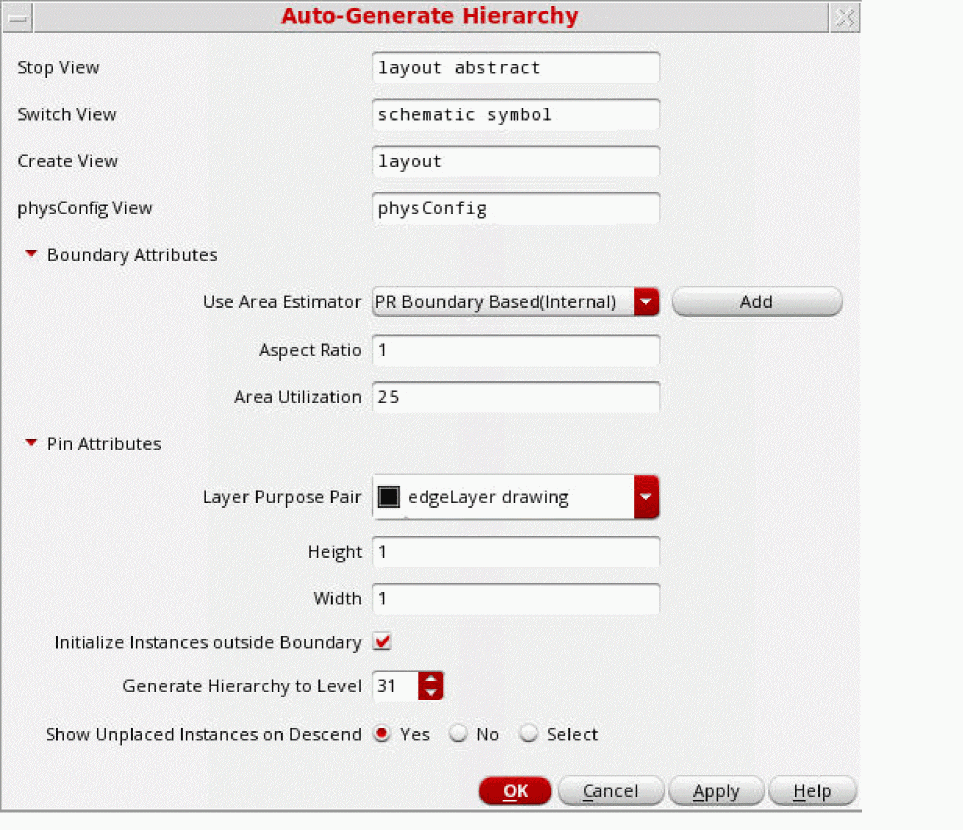
Select Floorplan – Auto Generate Hierarchy.
The Auto-Generate Hierarchy form is displayed which lets you quickly generate a physical hierarchy by applying common parameters.
-
Click Add beside the Use Area Estimator list.
The Register and Deregister Area Estimators form appears.
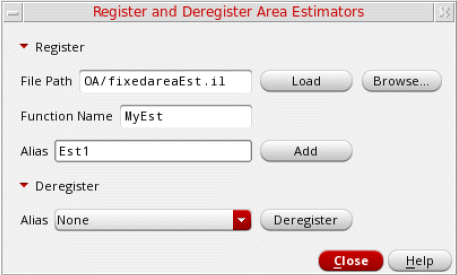
- Expand the Register section.
- Specify the File Path of the area estimator file that contains the boundary definitions. Alternatively, click Browse to select the required file and close the window.
- Click Load to load the area estimator function.
- Specify a Function Name and Alias.
- Click Add to register the area estimator function.
- Click Close.
- Select the area estimator function that you registered from the Use Area Estimator list.
- Click Apply to run the area estimator function.
To de-register an area estimator function:
- In the Register and Deregister Area Estimators form, select the area estimator function from the Deregister – Alias list.
- Click Deregister.
- Click Close.
Related Topics
Generating a Hierarchy Automatically
Return to top