
Interleave the Bits of Iterated Pins
Use the Interleave button of the Pin Placement form to interleave the bits of the selected iterated pins and automatically apply an order constraint to constrain how the individual bits will be placed.
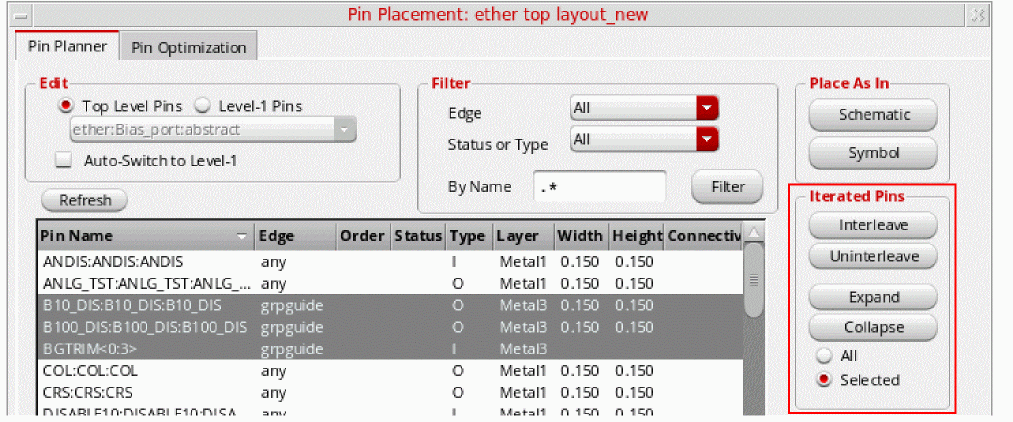
The selected set must contain at least one pin already assigned to an edge. Unplaced pins are automatically placed on the same edge and their bits are interleaved. Interleave does not work if the pins in the selected set are assigned to more than one edge or to no edge at all. In this case, the command generates an error message and does nothing.
If you select both buses and single pins, interleave processes them in two steps: first it interleaves the buses, then it gets the single pin array, splits it into two parts, and interleaves those also.
Before Interleave:A<0:2> A1 B<0:2> B1 C<0:1> C1 D1 E1 F1
After Interleave:A<0> B<0> C<0> A<1> B<1> C<1> A<2> B<2> A1 D1 B1 E1 C1 F1
The Uninterleave command works with pins assigned to any number of edges. However, it does not move pins from one edge to another, but instead deals with the pins on each edge separately. Uninterleave does nothing with unplaced pins - they are ignored.
Related Topics
Planning Placement of Top-Level and Level-1 Pins
Return to top