
Specifying the Order Constraints during Pin Optimization
Pin Optimizer enables you to specify the order in which Pin Optimizer places the pins during optimization. The priority of respecting the Order Constraints is: alignment constraint, bus constraint, followed by bus pins in layout.
Alignment Constraint
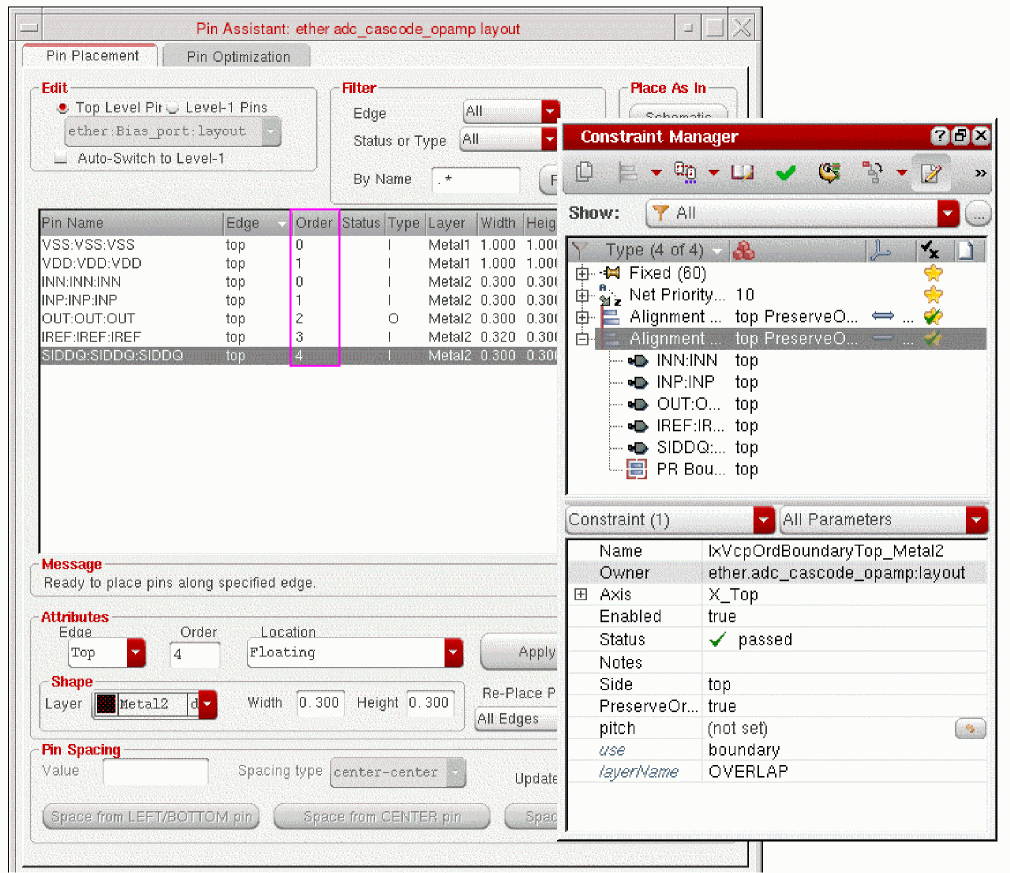
You can specify the order of the optimized pins by using Pin Planner. To specify the order of three pins using Pin Planner, perform the following steps:
- Choose either Floorplan – Pin Planner or Floorplan – Pin Optimization command to open the Pin Placement form.
- Select the pins in the Pin Placement form.
- Specify the order for the selected pin in the Order field.
- Click Apply.
Pin Optimizer respects the order of the optimized pins in the Alignment constraint. This is done by specifying the value of the PreserveOrder attribute of alignment constraint to TRUE as shown in the following figure. By default, the PreserveOrder attribute is set to false.
Also, when the pitch value is set in the alignment constraint with PreserveOrder set to TRUE, Pin Optimizer will consider it as the spacing required between the pins and will try to place those pins with this pin spacing (i.e the pitch value).
Bus Constraint
If you want the A0, A1, A2, A3, A4, A5, A6, and A7 pins to be arranged in the same order, define the Bus constraint using Constraint Manager. Pin Optimizer respects the Bus constraint and places the pins as shown in the graphic.

To define the Bus constraint in Constraint Manager, perform the following steps:
The Bus constraint is defined for the pins and Pin Optimizer respects the constraint during optimization.
Bus Pins in Layout
By default, Pin Optimizer respects the order of bus pins in the layout during optimization. Bus nets get transferred to the layout from the schematic.
Related Topics
Return to top