
14
CDBA Technology File Functions
This chapter includes the following topics:
- Technology File Overview
- Administrative (File) Functions
- Technology File Management Functions
- Control Class Functions
- Layer Functions
- Equivalent Layer Functions
- Via Layers Functions
- Derived Layers
- Layer-Purpose (LP) Pair Functions
- Layout Suite L Rule Functions
- Virtuoso Layout Suite XL Functions
- Place and Route Rule Functions
- viaDef Functions
- viaHeader Functions
- Site Definition Functions
- Site Pattern Functions
- Physical Constraint Functions
- Electrical Rule Functions
- Technology File Database Functions
- Trim Layer Functions
Technology File Overview
This section describes the technology file C functions that are administrative in nature. They do not affect the technology data of the technology file.
For more information on the technology file functions and technology file constraints, see these sections.
- Uses for Technology File Functions
- Accessing Technology Data
- Technology File Constraints
- Warnings in Functions
- Speed of Implementation in Functions
- Ordered Properties in Functions
- Pointers in Technology File Functions
Uses for Technology File Functions
Use technology file C functions to access technology data. Specifically, you can
- Open and close a technology file in virtual memory
- Manage files opened in virtual memory. This includes
- Save the technology file opened in virtual memory to disk
- Attach a technology file to a Design Framework II library, cell, or cellview
- Set and get control parameters for use in the technology data
Accessing Technology Data
When accessing technology data, keep the following in mind:
- Retrieve a technology file from the cellview, not from the library.
- Most rules are no longer stored in classes. Now, rules are defined in constraint groups. See the Technology File Constraints sections below.
- All display information is contained in packets. Each layer-purpose pair has an associated packet stored as the packet name.
Technology File Constraints
The basic structure of a constraint section in the technology file is as follows.
constraintGroups(
("constraintGroupName");constraintGroups
constraintType(
( specificConstraint )
( specificConstraint )
);constraintType
);constraintGroupName
Constraint information is defined in constraint groups. The constraintGroups section contains the following.
-
constraint group name, such as
foundry. -
constraint categories, such as
physical constraints. -
constraint types, such as
spacings. -
collection of constraints, such as
minSpacing. The constraints are used as input to compilation during loading.
constraintGroups(
("foundry"
   ; physical constraints
   spacings(
   ( minSpacing Metal1 0.3 )
   ( minSpacing Metal1 0.4 )
   );spacings
);foundry
);constraintGroups
Warnings in Functions
Some pairs or groups of functions differ only in the type and specificity of error or warning messages generated when the function returns FALSE. Functions whose names do not include NoWarn return more general error messages and are useful for simpler tasks. Functions whose names do include NoWarn are called when you are performing a more complex task, which requires a more specific and meaningful error message.
An example pair of functions differing in this respect is techList2LP and techList2LPNoWarn. In both cases, the C code prompts you to enter a layer-purpose pair. You enter a layer-purpose pair the equivalent of ("someLayer" "somePurpose"). The C code is passed this layer-purpose pair and calls the function to break the layer-purpose pair into smaller units of code for processing.
If techList2LP determines that someLayer does not exist, it gives you a general message such as "layer’someLayer’ does not exist" and returns FALSE.
If you enter a layer-purpose pair which is used for a very specific task, such as for a third-layer metal, the C code might call the techList2LPNoWarn function. If the function returns FALSE (indicating an error occurred), you have the option of printing out a more meaningful message such as “The third-layer metal specified by the layer-purpose pair does not exist. Try again.”
Speed of Implementation in Functions
Some pairs or sets of functions differ only in the speed and thoroughness in which they are implemented. The difference is indicated in the function names by the contrasting use of 2 or To in the function name. When 2 is used in a function name, the function processes information more quickly but not as thoroughly. Functions whose name includes To process information more slowly and thoroughly.
An pair of functions differing only in this respect is techList2LP and techListToLP.
Ordered Properties in Functions
A calling function passes in TRUE or FALSE to specify whether a particular property is an ordered property or not. If a property is ordered, a property between layer1 and layer 2 might have one value, whereas the a property with the same name between layer 2 and layer 1 might have another value.
If the property is not ordered, a property between layer 1 and layer 2 of a particular name has the same value regardless of whether layer 1 and layer 2 or layer 2 and layer 1 is referred to. The function returns a value of type techGroupId.
If the two-layer property is successfully created, a valid techGroupId is returned. If the return value is techcNullGroupId, an error occurred and the property was not created.
Pointers in Technology File Functions
A function updates the values indicated by the pointers. For example, the dbGenFig function updates a dbFigId pointer, techGenLP updates techLayerNum and techPurpose pointers (for a layer-purpose pair). The techGenSpacingRule updates pointers to layers, purposes, dbPropType, and dbPropValue, the latter being the spacing rule value.
See “Getting Started with CDBA” for more information on pointers in generator functions.
See “techGenSpacingRule” for an example of how these pointers are used.
Attach Functions
Use attach functions to attach, or bind, a specific technology file to a Design Framework II library. You can also delete the binding.
The technology file binding is made up of the techLibName property, which is defined as follows:
|
The name of the Design Framework II library containing the technology file. |
Administrative (File) Functions
Administrative functions do not affect the technology data of the technology file. Use administrative file functions to open, close, and manage files in virtual memory. The open functions provide three modes that control what remains on disk and what is loaded into virtual memory. The modes are
- Read—loads the contents of the binary technology file into virtual memory and does not allow any edits to the file
- Append—loads the contents of the binary technology file into virtual memory and does allow edits
-
Write—deletes the contents of the binary technology file on disk and loads the empty file into virtual memory
techCloseTechFile
Boolean
techCloseTechFile(
techFileId techfile
);
Description
Closes the technology file and decrements the opencount. The technology file is not purged from virtual memory until the system needs to use the memory and the open count is equal to zero. Internally, the system maintains a count of the number of times you open and close a specific technology file. The count increments when you open and decrements when you close. When the open count is 0 and the system needs more virtual memory, it purges the technology file from virtual memory.
Arguments
Return Values
|
If the technology file does not exist, this function returns FALSE. |
Example
Boolean status;
techFileId techFile;
status = techCloseTechFile(techfile);
techCopyTechFile
techFileId
techCopyTechFile(
techFileId   oldTechFile,
String       newLibName,
String       path,
Boolean      deleteOriginal
);
Description
Copies a technology file to a new location and optionally deletes the original. This function is especially useful for separating technology data out of libraries that contain both design data and technology data.
Arguments
|
The name of the new library that the technology file is copied to. |
|
|
The option to delete the original technology file, including binary and all device cellviews. |
Return Values
|
The database identifier of the new technology file. All technology devices are copied also. If the technology file does not exist, this function returns |
Example
techFileId newTechId;
newTechId = techCopyTechFile( oldTechId,
"newTech", "/usr/myDir/TechFiles", TRUE);
techDeleteTechFile
Boolean
techDeleteTechFile(
techFileId techFile
);
Description
Deletes a technology file. This function is useful for deleting redundant technology data from design libraries that have been updated to share one technology library.
Arguments
Return Values
|
If the technology file does not exist, this function returns FALSE (an error). |
Example
Boolean status;
techFileId techFile;
status = techDeleteTechFile(techFile);
techGetCreateTime
time_t
techGetCreateTime( techFileId    techfile
);
Returns the time at which the technology file was created.
Arguments
Return Values
Example
techFileId techFile;
techfile = techGetCreateTime();
techGetTechFileDdId
ddId
techGetTechFileDdId(
techFileId techfile
);
Description
Returns the design data identifier for the technology file attached to the specified Design Framework II library or cellview. If the technology file does not exist, this function returns techcNullTechFileId.
For more information about design data identifiers, refer to the Virtuoso Design Environment SKILL Reference.
Arguments
Return Values
|
The design data identifier of the technology file. Returns an error if the technology file does not exist. |
Example
ddId id;
techFileId techfile;
id = techGetTechFileDdId(techfile);
techGetTimeStamp
techTime
techGetTimeStamp(
techFileId techfile
);
Description
Gets the internal time stamp of the technology file to the current time. The time stamp is an integer representing the number of seconds elapsed since 00:00:00 GMT, January 1, 1970. The time stamp represents the last time the technology file was updated.
Arguments
Return Values
Example
techTime currentTime;
techFileId techfile;
currentTime = techGetTimeStamp( techfile);
techOpenDefaultTechFile;
techFileId
techOpenDefaultTechFile(
);
Description
Loads the default binary technology file in virtual memory in read mode and returns the database identifier. The default technology file resides at
your_install_dir/tools/dfII/etc/cdsDefTechLib
If the default technology file is not at the expected location, this function returns an error.
Arguments
Return Values
|
The database ( |
Example
techFileId techFile;
techfile = techOpenDefaultTechFile();
techOpenTechFile
techFileId
techOpenTechFile(
String   libName,
String   path,
String   modeString
);
Description
Loads a binary technology file in virtual memory with a specified mode and returns the database identifier of the file. If you specify r mode, the file can only be read. If you specify w mode, the contents of the disk file are deleted or truncated, and an empty technology file is loaded into virtual memory. If you specify a mode, the technology file is loaded in append mode, which means that you can edit the contents of the file.
Arguments
Return Values
|
The database ( |
Example
techFileId techFile;
String libName = "myLib";
String techfile = "techfile.cds";
String modeString = "a";
techFile = techOpenTechFile(libName,techfile.cds, modeString);
techPurgeTechFile
Boolean
techPurgeTechFile(
techFileId techfile
);
Description
Deletes the file from virtual memory, regardless of the open count.
Arguments
|
The database ( |
Return Values
|
If the technology file is invalid (does not exist), this function returns an error (a value of FALSE is returned). If the technology file is valid, a value of TRUE is returned. |
Example
Boolean status;
techFileId techFile;
status = techPurgeTechFile( techfile);
techRefreshTechFile
Boolean
techRefreshTechFile(
techFileId techfile
);
Description
Replaces the technology file loaded in virtual memory with the binary file stored on disk. The edit mode (append, read, or write) of the file remains the same. If you refresh a technology file open in append mode, any changes you made and did not save are lost. If you refresh a technology file open in write mode, the empty disk file is loaded into virtual memory. This function is sometimes referred to as DiscardEdits.
Arguments
|
The database ( |
Return Values
|
If the technology file does not exist, this function returns FALSE. |
Example
Boolean status;
techFileId techFile;
status = techRefreshTechFile( techFile);
techReopenTechFile
techFileId
techReopenTechFile(
techFileId  techfile,
String      modeString
);
Description
Changes the mode of a technology file that has been opened. Use this function to upgrade the mode from read to append.
Arguments
|
The database ( |
|
Return Values
|
If the technology file does not exist, this function returns FALSE (an error). |
Example
techFileId techFile;
techFile = techReopenTechFile( techFile, "a");
techSaveTechFile
Boolean
techSaveTechFile(
techFileId techfile
);
Description
Saves the specified technology file from virtual memory to the disk file (including all devices) from which it was opened.
Arguments
Return Values
|
If the technology file identifier is invalid, or the system is not able to write to the directory containing the disk file and devices, this function returns FALSE. |
Example
Boolean status;
techFileId techFile;
status = techSaveTechFile(techFile);
techSaveTechFilesInITDBGraph
Boolean
techSaveTechFilesInITDBGraph(
techFileId  techId,
Boolean     forceToOpen
);
Description
Saves the specified technology database and its referenced technology databases from virtual memory to disk.
Arguments
Return Values
techTruncateTechFile
Boolean
techTruncateTechFile(
techFileId techfile
);
Description
Deletes the contents of the technology file stored on disk. This has the same effect as opening the technology file in write mode.
Arguments
|
The database ( |
Return Values
|
If the technology file does not exist, this function returns FALSE |
Example
Boolean status;
techFileId techFile;
status = techTruncateTechFile( techFile);
techVerifyTechFileId
Boolean
techVerifyTechFileId(
techFileId techfile
);
Description
Indicates whether the specified database identifier is for a technology file.
Arguments
Return Values
|
If the identifier is invalid or is not for a technology file, this function returns FALSE. |
Example
Boolean status;
techId techfile;
status = techVerifyTechFileId( techfile);
Technology File Management Functions
The following functions pertain to technology file management.
*FuncConflictTriggerPtr
Boolean
( *FuncConflictTriggerPtr )
( techConflictType       conflictType,
  int                    numObj,
  techId                *conflictIDs
);
Description
Prototype for application code to follow when it is necessary to execute a function when there are conflicts in incremental technology databases. The value of the pointer (*conflictIds) is valid only if the function returns TRUE.
Arguments
|
The type of conflict type. Conflict types are:
|
|
|
The pointer to the database identifiers of the objects which have conflicts. |
Return Values
*FuncGraphTriggerPtr
Boolean
( *FuncGraphTriggerPtr )
( techFileId          techId
);
Description
Prototype for application code to follow when it is necessary to execute a function to modify the technology database graph.
Arguments
|
The identifier of the technology database for which to set up the graph modification trigger function. |
Return Values
techDeleteCellViewTechLibName
Boolean
techDeleteCellViewTechLibName(
dbCellViewId cv
);
Description
“Unattaches” a technology library name attached to a specified cellview.
Arguments
Return Values
|
Returns TRUE if the operation is successful. Returns FALSE if an error is detected. |
Example
Boolean status;
dbCellViewId cv;
status = techDeleteCellViewTechLibName(cv);
techDeleteObjTechLibName
Boolean
techDeleteObjTechLibName(
ddId obj
);
Description
“Unattaches” a technology library name from an object. The object now inherits the attached technology file from its parent object.
Arguments
|
The object attached to the technology file from which you want to delete the technology library name. |
Return Values
|
Returns TRUE if successful. Returns FALSE if an error is detected. |
Example
Boolean status;
ddId obj;
status = techDeleteObjTechLibName(obj);
techHasConflict
Boolean
techHasConflict(
techFileId    techId
);
Description
Checks whether or not a specific technology database has one or more conflicts or is incomplete.
Arguments
|
The identifier of the technology database to check for conflicts and incompleteness. |
Return Values
|
Returns TRUE if the specified technology database has a conflict or is incomplete. |
techExit
void
techExit(
);
Description
Frees up memory and prepares for the exit of the process. Do not call any technology file functions afterwards.
Arguments
Return Values
Example
void
techExit();
techGetCellViewDeviceTechFile
techFileId
techGetCellViewDeviceTechFile(
dbCellViewId cv
);
Description
Returns the database identifier of the technology file containing technology file devices.
Arguments
Return Values
Example
techFileId techFile
dbCellViewId cv;
techFile = techGetCellViewDeviceTechFile(cv);
techGetCellViewTechFile
techFileId
techGetCellViewTechFile(
dbCellViewId cv
);
Description
Returns the technology file attached to a specific cellview. If it is not explicitly attached at the cellview level, this function will work its way up the hierarchy from the cellview level to the cell level, and finally, to the library level.
Arguments
Return Values
Example
techFileId techfile;
dbCellViewIdcv;
techFile = techGetCellViewTechFile( cv);
techGetCellViewTechLibName
String
techGetCellViewTechLibName(
dbCellViewId cv
);
Description
Returns the name of the technology library attached to a specified cellview of dbCellViewId.
Arguments
Return Values
|
The name of the technology library attached to a specified cellview. |
Example
String techlib;
dbCellViewId cv;
techlib = techGetCellViewTechLibName(cv);
techGetDefTechLibName
String
techGetDefTechLibName(
String viewType
);
Description
Returns the default Cadence® defined default technology file, usually cdsDefTechLib.
Arguments
|
Can be set by view type, but this doesn’t work. Pass in |
Return Values
Example
String defTech;
defTech = techGetDefTechLibName( "dbcNullString");
techGetObjTechFile
techFileId
techGetObjTechFile(
ddId obj
);
Description
Returns the attached technology file of ddId. ddId can be that of a library, cell, or cellview.
Arguments
Return Values
Example
ddId obj;
techFileId techfile;
techfile = techGetObjTechFile(obj);
techGetObjTechLibName
String
techGetObjTechLibName(
ddId obj
);
Description
Retrieves the technology library name of the technology file attached to an object.
Arguments
Return Values
Example
ddId obj;
String name;
name = techGetObjTechLibName(obj);
techGetReadFileName
String
techGetReadFileName(
techFileId techfile
);
Description
Returns the path of the binary technology file (techfile.cds).
Arguments
Return Values
|
The name of the path to the binary technology file ( |
Example
String techFilePath;
techFileId techfile;
techFilePath = techGetReadFileName( techfile);
techGetTechFileMode
String
techGetTechFileMode(
techFileId techfile
);
Description
Returns the current open mode of the technology file, either "r" = read, "w" = write, or "a" = append.
Arguments
Return Values
Example
String openMode;
techFileId techfile;
openMode = techGetTechFileMode(techfile);
techGetTechFileName
String
techGetTechFileName(
techFileId techfile
);
Description
Returns the name (string value) of the of the binary technology file. This is currently always techfile.cds.
Arguments
Return Values
Example
String techFileName;
techFileId techfile;
techFileName = techGetTechFileName(techfile);
techGetTechLibName
String
techGetTechLibName(
techFileId techfile
);
Description
Returns the string value of the techLib name.
Arguments
Return Values
Example
String libName;
techFileId techfile;
libName = techGetTechLibName(techfile);
techGetWriteFileName
String
techGetWriteFileName(
techFileId techfile
);
Description
Returns the path of the write technology file.
Arguments
Return Values
Example
techFilePath = techGetWriteFileName(techfile);
techIdToList
list
techIdToList(
techId id
);
Description
Creates a list containing the specified identifier of the technology file or technology file object. This function is useful for passing an identifier to the SKILL level.
Arguments
|
The specified identifier of the technology file or technology file object. For example, |
Return Values
|
The list of technology files containing the specified identifier. |
Example
list techobj;
techId id;
techobj = techIdToList(id);
techInit
String
techInit(
int    *pArgc,
char   *pArgv
);
Description
Initializes all internal technology file data structures. This function must be called prior to any technology file functions, usually in main(). The arguments *pArgc and *pArgv are not used when the function is passed from main().
Arguments
Return Values
|
The current version of the technology file software (such as version 4.4.3 or 5.0.0). |
Example
String version;
int argc;
char *argv;
version = techInit( &argc, argv);
techIsLPId
Boolean techIsLPId(
techLPId lpId
);
Description
Determines whether the passed identifier is that of a layer-purpose pair.
Arguments
|
The database identifier of the passed identifier (possibly of the layer-purpose pair). |
Return Values
|
Returns TRUE if the identifier is for a layer-purpose pair, and FALSE if it is not. |
Example
Boolean status;
techLPId lpId;
status = techIsLPId(lpId);
techRegConflictTrigger
Boolean
techRegConflictTrigger(
FuncConflictTriggerPtr    triggerFunc,
unsigned int              priority,
const char                *name
);
Description
Registers an application’s function to the conflict trigger.The value of the pointer (*name) is valid only if the function returns TRUE.
Arguments
|
The name of the function to be executed if there is any conflict in the technology database. |
|
Return Values
techRegGraphModTrigger
Boolean
techRegGraphModTrigger(
FuncGraphTriggerPtr       triggerFunc,
unsigned int              priority,
const char                *name
);
Description
Registers an application’s function to the graph modification trigger.The value of the pointer (*name) is valid only if the function returns TRUE.
Arguments
|
The name of the function to be executed when a graph modification is required. |
|
Return Values
|
Returns TRUE if the operation is successful. Returns FALSE otherwise. |
techSetCellViewTechLibName
Boolean
techSetCellViewTechLibName(
dbCellViewId cv, String tfName
);
Description
Sets the technology library name to attach to a specified cellview.
Arguments
|
The name of the technology library to attach to the cellview. |
Return Values
|
Returns TRUE if the operation is successful. Returns FALSE if an error is detected. |
Example
Boolean status;
dbCellViewId cv;
String tlName;
status = techSetCellViewTechLibName(cv, tlName);
techSetObjTechLibName
Boolean
techSetObjTechLibName(
ddId obj, String tfName
);
Description
Sets the technology library name of the technology file to attach to an object.
Arguments
Return Values
|
Returns TRUE if successful. Returns FALSE if an error is detected. |
Example
Boolean status;
ddId obj;
String tfName;
status = techGetObjTechLibName(obj, tfName);
techStringToPurpose
techPurpose
techStringToPurpose(
techFileId      techfile,
String          name
)
Description
Returns techPurpose from the purpose name.
Arguments
Return Values
Example
techPurpose purpose;
techfile = techGetTechFile(ddGetObj("mylib"));
purpose = techStringToPurpose(techfile "drawing");
techUnattachTechFile
Boolean
techUnattachTechFile(
ddId obj
);
Description
“Unattaches” a specific technology file from an object. The object now inherits the attached technology file from its parent object.
Arguments
|
The design data ( |
Return Values
|
This function returns TRUE if the operation is successful. If the identifier is invalid or is not for a technology file, This function returns FALSE (an error). |
Example
Boolean status;
ddId obj;
status = techUnattachTechFile(obj);
techUnregConflictTrigger
Boolean
techUnregConflictTrigger(
FuncConflictTriggerPtr    triggerFunc
);
Description
Unregisters the specified conflict trigger function.
Arguments
Return Values
techUnregGraphModTrigger
Boolean
techUnregGraphModTrigger(
FuncGraphTriggerPtr    triggerFunc
);
Description
Unregisters the specified graph modification trigger.
Arguments
Return Values
Control Class Functions
Use the control class functions to set global parameters and permissions that affect all constraints of the technology file.
techGenAllRef
Boolean
techGenAllRef
techGenStateId     state,
string             *refLibName
);
Description
Generates the name of the next reference technology database in the graph from a technology database specified by state. The value of this pointer (*refLibName) is valid only if the function returns TRUE.
Arguments
|
The state identifier retrieved by the |
|
|
The pointer to the name of the next reference technology database in the graph. |
Return Values
|
Returns TRUE if the name of the next reference technology database in the graph is successfully generated. |
techGenAllRefLibName
Boolean
techGenAllRefLibName
techGenStateId     state,
string             *refLibName
);
Description
Generates the name of the next technology library in a graph that contains technology databases referenced, both directly and indirectly (by way of the references throughout the graph), from a technology database specified by state. The value of this pointer (*refLibName) is valid only if the function returns TRUE.
Arguments
|
The state identifier retrieved by the |
|
|
The pointer to the name of the next technology library in the graph that contains reference technology databases. |
Return Values
|
Returns TRUE if the name of the next technology library in the graph containing reference databases is successfully generated. |
techGenParam
Boolean
techGenParam(
techGenStateId   stateId,
String           *pParamName,
techPropType     *pType,
techPropValue    *pValue
);
Description
Generates the next parameter from a technology file specified by stateId. The next parameter name, the type, and the value are returned via indirection. The values of these three pointers (*pParamName, *pType, and *pValue) are valid only if the function returns TRUE.
Arguments
|
The state identifier retrieved by the |
|
Return Value
|
Returns TRUE if the parameter is successfully generated. Returns FALSE If there is an error or if there are no more parameters to generate. |
Example
stateId = techStartGenParam(techfile);
while techGenParam (stateId, &name, &type, &value){
}.....
techStopGen (stateId);
techGenRef
Boolean
techGenRef
techGenStateId     state,
techFileId         *techId
);
Description
Generates the next direct reference technology database from a technology database specified by state. The value of this pointer (*techId) is valid only if the function returns TRUE.
Arguments
|
The state identifier retrieved by the |
|
|
The pointer to the identifer of the next reference technology database. |
Return Values
|
Returns TRUE if the next reference technology database is successfully generated. |
techGenRefLibName
Boolean
techGenRefLibName
techGenStateId     state,
string             *refLibName
);
Description
Generates the name of the next technology library that contains technology databases directly referenced by a technology database specified by state. The value of this pointer (*refLibName) is valid only if the function returns TRUE.
Arguments
|
The state identifier retrieved by the |
|
|
The pointer to the name of the next reference technology library. |
Return Values
|
Returns TRUE if the reference technology libraryg name is successfully generated. |
techGetDerivedLayerLayer1Num
techLayerNum
techGetDerivedLayerLayer1Num(
techLayerId      derivedLayerId
);
Description
Gets the layer number of layer1 associated with the specified derived layer.
Arguments
Return Values
|
The layer number of |
techGetDerivedLayerLayer2Num
techLayerNum
techGetDerivedLayerLayer2Num(
techLayerId      derivedLayerId
);
Description
Gets the layer number of layer2 associated with the specified derived layer.
Arguments
Return Values
|
The layer number of |
techGetLayerMfgResolution
Boolean
techGetLayerMfgResolution(
techFileId         techfile.
techLayerNum       layerNum,
techPurpose        purpose,
techPropType       *ptype,
techPropValue      *pvalue
)
Description
Gets the manufacturing grid resolution assigned to the specified layer.
If the layer attribute is not set (is equal to 0), then the function will attempt to look up the default technology wide value and return it. If this value is not set, then it will return NULL.
Arguments
|
Pointer to the manufacturing grid resolution applied to the layer. |
Return Values
|
Returns TRUE if the manufacturing grid resolution assigned to the specified layer is successfully retrieved. |
techGetParam
Boolean
techGetParam(
techFileId      techfile,
String          paramName,
techPropType    *pType,
techPropValue   *pValue
);
Description
Returns the value of the specified control parameter. The parameter type and value are returned by indirection. The type and value are only valid if the function returns TRUE.
Arguments
Return Values
|
Returns TRUE if the function is successful. Returns FALSE if the technology file does not exist or if the specified parameter is not defined. |
Example
techFileId techfile;
String name = "lambda";
techPropType type;
techPropValue value;
Boolean status;
status = TechGetParam(techfile, name, &type, &value);
Retrieves the value of the lambda control parameter in the techfile technology file.
techIsMfgGridResolutionSet
Boolean
techIsMfgGridResolutionSet(
techFileId         techId
);
Description
Determines whether or not the manufacturing grid resolution is set in a specific technology database.
Arguments
Return Values
|
Returns TRUE if the manufacturing grid resolution is set. |
techMakeEffectiveLPsLocal
Boolean
techMakeEffectiveLPsLocal(
techFileId     techId
);
Description
Adds all layer-purpose pairs in the graph that are currently being used for the local technology database to the local technology database.
Arguments
Return Values
techPurposeDefHasDescription
Boolean
techPurposeDefHasDescription(
techPurposeDefId   purposeDefId
);
Description
Returns TRUE when the description attribute has been set on the specified purpose definition.
Arguments
Return Values
Example
Boolean hasDescription = techPurposeDefHasDescription(userPurposeDef3);
techPurposeDefHasParent
Boolean
techPurposeDefHasParent(
techPurposeDefId   purposeDefId
);
Description
Returns TRUE if the parent purpose attribute has been set on the specified purpose definition.
Arguments
Return Values
Example
Boolean hasParent = techPurposeDefHasParent(userPurposeDef3);
techPurposeDefHasSigType
Boolean
techPurposeDefHasSigType(
techPurposeDefId   purposeDefId
);
Description
Returns TRUE if the signal type attribute has been set on the specified purpose definition.
Arguments
Return Values
Example
Boolean hasSigType = techPurposeDefHasSigType(userPurposeDef3);
techPurposeDefHasVoltageRange
Boolean
techPurposeDefHasVoltageRange(
techPurposeDefId   purposeDefId
);
Description
Returns TRUE if the voltage range attribute has been set on the specified purpose definition.
Arguments
Return Values
|
Returns TRUE if the function is successful. Returns FALSE if there is an error. |
Example
Boolean hasVoltageRange = techPurposeDefHasVoltageRange(userPurposeDef3);
techSetEvaluateFlag
void
techSetEvaluateFlag(
Boolean value
);
Description
If, for some reason, you want the un-evaluated parameter expression, use techSetEvaluate (FALSE) before calling the Get function of your choice. Remember to call techSetEvaluate (TRUE) when you are finished, or the next user calling a Get function will most likely be unpleasantly surprised.
Arguments to Get functions are returned by means of indirection. You supply pointers to objects of a given type as arguments. These pointers are updated by the Get function if it is successful. The pointers are invalid if the generator or function returns FALSE.
All Get functions return any parameters through the techPropType and techPropValue pointers. The parameter returned by techPropValue is either evaluated or raw data. Unless specifically directed, all Get functions evaluate parameters before return. The ASCII dumper is the only utility or application that needs the unevaluated expression.
Arguments
Return Value
Example
_______ = techSetEvaluateFlag(value);
techStartGenAllRefLibName
techGenStateId
techStartGenAllRefLibName
techFileId         techId
);
Description
Initializes the generator function to generate the names of all of the libraries in a graph that contain technology databases referenced, both directly and indirectly (by way of the references throughout the graph), by a specific technology database.
Arguments
|
The identifier of the technology database from which you retrieve all of the names of libraries that contain reference databases in the graph. |
Return Values
|
Returns the generator state identifier which must be passed to |
techSetLayerMfgResolution
Boolean
techSetLayerMfgResolution(
techFileId         techfile.
techLayerNum       layerNum,
techPurpose        purpose,
techPropType       type,
techPropValue      value
)
Description
Sets the manufacturing grid resolution assigned to the specified layer.
Arguments
Return Values
|
Returns TRUE if the manufacturing grid resolution assigned to the specified layer is successfully set. |
techSetParam
Boolean
techSetParam(
techFileId      techfile,
String          paramName,
techPropType    type,
techPropValue   value
);
Description
Updates the value of the specified control parameter. If the parameter does not exist, the function creates it.
Arguments
Return Values
Example
techFileId techfile;
String name = "lambda";
techPropType type;
techPropValue value;
Boolean status;
type = dbcIntType;
value.aInt = 1;
status = techSetParam(techfile, name, type, value);
Updates the value of the lambda control parameter in the techfile technology file.
techSetRefs
Boolean
techSetRefs(
techFileId         techId,
int                numrefs,
techFileId         *refs
);
Description
Sets a list of technology databases to be directly referenced by a specific technology database. The value of the pointer (*refs) is valid only if the function returns TRUE.
Arguments
Return Values
|
Returns TRUE if the list of reference technology databases is successfully set. |
techStartGenAllRef
techGenStateId
techStartGenAllRef
techFileId         techId
);
Description
Initializes the generator function to generate all of the technology databases in a graph that are referenced, both directly and indirectly (by way of the references throughout the graph), by a specific technology database.
Arguments
|
The identifier of the technology database from which you retrieve all of the reference databases in the graph. |
Return Values
|
Returns the generator state identifier which must be passed to |
techStartGenParam
techGenStateId
techStartGenParam(
techFileId techfile
);
Description
Initializes the generator function to generate parameters from a specific technology file. The techParams constraints in the Controls section of the technology file contain the parameters.
Arguments
|
The identifier of the technology file from which you retrieve the parameters. |
Return Value
|
Returns the generator state identifier which must be passed to |
Example
stateId = techStartGenParam(techfile);
while (techGenParam (stateId, ¶mName, &type, &value){
}.....
techStopGen (stateId);
techStartGenRef
techGenStateId
techStartGenRef
techFileId         techId
);
Description
Initializes the generator function to generate technology databases directly referenced by a specific technology database. The refTechLibs subsection of the controls section of a technology file lists the direct reference technology databases.
Arguments
|
The identifier of the technology database from which you retrieve direct reference technology databases. |
Return Values
|
Returns the generator state identifier which must be passed to |
techStartGenRefLibName
techGenStateId
techStartGenRefLibName
techFileId         techId
);
Description
Initializes the generator function to generate the names of the libraries that contain the technology databases directly referenced by a specific technology database. The refTechLibs subsection in the controls section of a technology file lists the direct reference technology databases.
Arguments
|
The identifier of the technology database from which you retrieve the names of the libraries that contain technology databases it directly references. |
Return Values
|
Returns the generator state identifier which must be passed to |
techStopRuleGen
void
techStopRuleGen(
techRuleGenStateId stateId
);
Description
Determines whether to stop generating the technology file constraints. The techStopRuleGen function should be used for or with the following functions:
techStartGenElectricalRule
techStartGenSpacingRule
All other functions beginning with techStartGen are terminated with techStopGen.
Arguments
|
The state identifier used to determine whether to stop generating the constraint. |
Return Value
|
No return value. The technology file constraints function stops generating when no further state identifier is found. |
Example
techStopRuleGen(stateId);
techUnsetMfgGridResolution
Boolean
techUnsetMfgGridResolution(
techFileId         techId
);
Description
Unsets the manufacturing grid resolution assignment (mfgGridResolution in controls) from a specific technology database.
Arguments
Return Values
|
Returns TRUE if the manufacturing grid resolution is successfully removed. |
techUnsetRefs
Boolean
techUnsetRefs(
techFileId         techId
);
Description
Unsets all technology databases referenced by a specific technology database (refTechLibs in controls).
Arguments
Return Values
|
Returns TRUE if the list of reference technology databases is successfully unset. |
Layer Functions
The C-functions described in this chapter assign and access layer rules in the technology file. The layer rules describe layers as well as set physical and electrical limits.
Rules for Layers and Layer-Purpose Pairs
All C-level functions accept or return a techLayerNum and techPurpose argument when specifying layers.
Precedence in Retrieving the Value of a Rule
All rules that have layers as parameters can specify either a techLayer argument (only the layer name, such as "metal1") or a layer-purpose pair list (such as ("metal1" "drawing")).
You can specify rules for both a layer (indicated by the techLayer argument) and a specific layer-purpose pair which refers to that techLayer argument. When retrieving the value of a rule, the search begins at the lowest level specified, and layer-purpose pairs take precedence.
If you use C-functions that require a layer number and a purpose as arguments, and if the techPurpose argument is set to techcAllPurpose, you must use the techLayer argument, not a specific techLPId argument. You are effectively specifying only the layer for all layer-purpose pairs containing the layer number (techLayerNum).
If the optional layer specified is not available or applicable, the techLayerNum is set to techcNullLayer.
When specifying layers as rule parameters, you can use layer names or layer-purpose pairs. However, some applications only understand layer names with an implied purpose.
Layer Number and Purpose Number Arguments in Generator Functions
In generator functions that require a techLayerNum and techPurpose argument, the generator updates the values of these variables, if the function returns a value of TRUE meaning generation is successful. The values are invalid if the generator function returns a value of FALSE.
Layer Number and Purpose Number in Set and Get Functions
For Set functions, pass the techlayerNum and techPurpose arguments directly. For Get functions, including either Get or generator functions, the layer and purpose are returned by indirection, such as when you pass in a pointer to objects of type techLayerNum and techPurpose.
Equivalent Layers
In a set of equivalent layers, all layers in the set are treated in an equivalent manner. For example, in a set of three layers, the layer-purpose pair for the first, second, and third layers are equivalent.
The following sequence occurs when generating rules for a set of equivalent layers:
-
A
StartGenfunction retrieves the rule. -
The first
Genfunction generates the first rule. -
A second
Genfunction generates each layer within that particular rule. -
The first
Genfunction retrieves the next rule. - The process is repeated over again, until the generator functions have processed both all rules and layers within each rule.
Stream Layer Rules
Stream is the industry standard format for physical layout interchange–for importing and exporting geometric data. You can use this standard to export (stream out) data from Design Framework II (DFII) and then import (stream in) the data to the format of another EDA vendor, or you can do the reverse.
GDSII (Graphic Design Station II) is the official vendor and database stream from which DFII stream layer rules are derived. Every geometry in GDSII is associated with a layer number and a data type number, in the same way that every geometry in DFII is associated with a layer-purpose pair. A GDSII data type is equivalent to a DFII purpose in a layer-purpose pair.
The GDSII database consists of 64 layers (numbered 0 through 63) and 64 data types (also numbered 0-63). These layers and data types correspond very closely to the DFII techLayerNum (layer number) and techPurpose (data type) arguments in streamLayer rule functions. In DFII, however, you can have 255 layers and 255 purposes. There are more DFII layer-purpose pairs than GDSII layer-data type combinations because some DFII layer-purpose pairs, such as markers, grids, and highlights, should not be streamed out.
Because a DFII technology file can have many more layer-purpose pairs than GDSII can have layer-data type combinations, there cannot be a one-to-one correspondence between the two layout systems. To solve this problem, a DFII stream layer rule is used to specify the proper layer-purpose pair mapping to the smaller subset of GDSII layers and data types when a stream file is generated. These rules help define which layer-purpose pairs should be translated, and as what they should be translated. For example, a stream layer rule can map which layer number and stream layer number correspond, or which purpose number and stream number correspond.
Function Performance
The techLayers rules in the technology file can be identified by name or number. Many pairs of functions can be considered equivalent in the result they achieve. They differ only in the speed of processing.
For example, the function “techGetLayerNameByNumber” uses the layer number, while an equivalent function, “techGetLayerNum” uses the layer name. Functions that use the layerNumber argument deliver better performance than those that use the layerName.
Initially, you may have only the name of a layer, but need to do a lot of processing of the layer. For best performance, get the number of the layer first. Then use the get and set functions that accept the layer number.
Equivalent Layer Functions
The following functions access the equivalentLayers construct in the layerRules section of the technology file.
techStartGenEquivLayerRule
techGenStateId
techStartGenEquivLayerRule(
techFileId techfile
);
Description
Starts equivalent layer generation. First generate the rules within the equivalentLayers construct, then generate the equivalent layers. This function This function works in conjunction with the techGenEquivLayerRule function.
Arguments
Return Value
|
Returns the generator state identifier to be used in the |
Example
techGenStateId ruleStateId, stateId;
techClassId    ruleId;
techLayerNum   layerNum;
techPurpose    purpose;

stateId = techStartGenEquivLayerRule(techfile);
##Get the next set (rule) of equivalent layers##
while (techGenEquivLayerRule (stateId, &ruleId)){
   ruleStateId = techStartGenEquivLayer (ruleId);
   ###Get the next equivalent layer in the current set (rule) ###
   while (techGenEquivLayer (ruleStateId, &layerNum, &purpose)){
   ###All layer-purpose pairs within this generator are equivalent##
techGenEquivLayerRule
Boolean
techGenEquivLayerRule(
techGenStateId  stateId,
techClassId     *pRuleId
);
Description
Generates equivalent layers. First generate the rules within the equivalentLayers construct, then generate the equivalent layers. This function works in conjunction with the techStartGenEquivLayerRule function.
Arguments
|
The generator state identifier returned from |
|
Return Value
|
Returns TRUE if the function is successful and * |
techStartGenEquivLayer
techGenStateId
techStartGenEquivLayer(
techClassId, ruleId
);
Description
Starts the generator for the equivalentLayers construct in the layerRules section of the technology file. This function works in conjunction with the techGenEquivLayer function.
An ASCII representation of equivalentLayers is as follows, where ruleId identifies a particular set of layers indicated within parentheses.
equivalent Layers (
   (set of equivalent layers)
   (another set of equivalent layers)
   (...)
)
StartGenEquivLayer and GenEquivLayer are used to generate each layer in this ruleId, one at a time.
Arguments
Return Value
|
Returns the generator state identifier to be used when generating the current set of equivalent layers. |
techGenEquivLayer
Boolean
techGenEquivLayer(
techGenStateId  stateId,
techLayerNum    *pLayerNum,
techPurpose     *pPurpose
);
Description
Generates the next equivalent layer in the equivalentLayers construct in the layerRules section of the technology file. Both the pointers *pLayerNum and *pPurpose are returned via indirection.
This function works in conjunction with the techStartGenEquivLayer function.
Arguments
|
The generator state identifier returned from |
|
Return Value
|
Returns TRUE if generation is successful and * |
techSetEquivLayer
Boolean
techSetEquivLayer(
techFileId     techfile,
int            numberOfLayers,
techLayerNum   *pLayerNum,
techPurpose    *pPurpose
);
Description
Appends the specified set of equivalent layers to the equivalentLayers construct in the layerRules section of the technology file. The layers represent the same kind of material.
Arguments
|
The size of the array of (the number of) layer numbers and purposes supplied in the |
|
Return Value
Example
techFileId  techfile;
int   numberOfLayers = 5;
techLayerNum   layernum[5];
techPurpose   purpose[5];
Boolean   status;
status = techSetEquivLayer(techfile, numberOfLayers, layernum, purpose);
Via Layers Functions
The following functions access the viaDefs section of the technology file.
techStartGenViaLayer
techGenStateId
techStartGenViaLayer(
techFileId techfile
);
Description
Starts generating via layers as defined in the technology file. Via layers are included in the viaDefs section of the technology file.
Arguments
Return Value
techGenViaLayer
Boolean
techGenViaLayer(
techGenStateId  stateId,
techLayerNum    *pLayer1Num,
techPurpose     *pPurpose1,
techLayerNum    *pLayer2Num,
techPurpose     *pPurpose2,
techLayerNum    *pLayer3Num,
techPurpose     *pPurpose3
);
Description
Generates the next set of via layers. Via layers are included in the viaDefs section of the technology file.
Arguments
|
The generator state identifier returned from |
|
Return Value
|
Returns TRUE when all the arguments returned are valid. Returns FALSE if an error occurs or the generator is finished. |
techSetViaLayer
Boolean
techSetViaLayer(
techFileId      techfile,
techLayerNum    layer1Num,
techPurpose     purpose1,
techLayerNum    layer2Num,
techPurpose     purpose2,
techLayerNum    layer3Num,
techPurpose     purpose3
);
Description
Appends the specified set of via layers to the viaDefs section of the technology file. Via layers refer to layers that conduct between two other layers.
Arguments
Return Value
|
Returns FALSE if the technology file does not exist or if any of the specified layers do not exist. |
techIsViaLayer
Boolean
techIsViaLayer(
techFileId      techfile,
techLayerNum    viaLayerNum,
techPurpose     viaPurpose
);
Description
Indicates whether the specified layer is defined as a via layer or the middle layer of a via in the viaDefs section of the specified technology file. Via refer to layers that conduct between two other layers.
Arguments
|
The layer number of the layer-purpose pair that is querying if it is a via layer. |
|
|
The purpose number of the layer-purpose pair that is querying if it is a via layer. |
Return Value
|
Returns FALSE if the technology file does not exist or the specified layer is not a via layer. |
Derived Layers
A derived layer is the result of combining two layers with a special operation. In the case of IxNoOverlapLayers rule mapping, the derived layer indicates that one layer cannot overlap another layer. It takes two layers to define a derived layer for a IxNoOverlapLayers rule, so the operation is AND.
A derived layer has a name and a number. When converting IxNoOverlapLayers rules, the function automatically generates a derived layer using the following convention.
-
Derived layer name is noOverlapLayer plus a number. The number starts at 1 and increments with each new derived layer from the
techDerivedLayersconstruct in the layerDefinitions section of the technology file. The name is not reused. -
Derived layer number starts with the first unused number after 10000. This allows for user defined physical layers in the techfile. The number increments with each new derived layer from the
techDerivedLayersconstruct in the layerDefinitions section of the technology file. The number is not reused.
Layer API functions also apply to derived layers. Derived layers do have their own generator, however. The techfile layer generator generates physical layers only.
The following object type enum applies to derived layers.
enum techType {
...
techcPhysicalLayerType     = 3.
techcDerivedLayerType      = 4.
...
}
The following enum defines the value of the operation that creates a derived layer.
typedef enum techLayerOpEnum (
techcUnknownLayerOp      = 0,
techcAndLayerOp          = 1,
techcOrLayerOp           = 2,
techcNotLayerOp          = 3,
techcXorLayerOp          = 4,
techcTouchingLayerOp     = 5
} techLayerOp;
The following are corresponding strings.
static CONST String techvLayerOpString [] = {
“unknown”,
“AND”,
“OR”,
“NOT”,
“XOR”,
“touching”
};
techGetNumTechLayers
int
techGetNumTechLayers(
techFileId     techfile
);
Description
Gets the number of layers in the design.
Arguments
Return Values
techIsLayerId
Boolean
techIsLayerId(
techLayerId     layerId
);
Description
Validates that the layer is in the techfile.
Arguments
Return Values
|
Returns TRUE if the layer is in the techfile. Returns FALSE otherwise. |
techGetTechLayerIdByNumber
techLayerId
techGetTechLayerIdByNumber(
techFileId     techfile,
techLayerNum   layerNumber
);
Description
Retrieves the layer identifier based on its number.
Arguments
Return Values
|
Returns the identifier of the layer associated with the layerNumber. |
techGetTechLayerNumber
techLayerNum
techGetTechLayerNumber(
techLayerId     layerId
);
Description
Gets the layer number of the specified layerId.
Arguments
Return Values
|
Returns the number of the layer associated with the layerId. |
techGetTechLayerName
String
techGetTechLayerName(
techLayerId     layerId
);
Description
Gets the layer name of the specified layerId.
Arguments
Return Values
techIsPhysicalLayerId
Boolean
techIsPhysicalLayerId(
techLayerId     layerId
);
Description
Determines if the layerId is a physical layer.
Arguments
Return Values
techIsDerivedLayerId
Boolean
techIsDerivedLayerId(
techLayerId     layerId
);
Description
Determines if the layerId is a derived layer.
Arguments
Return Values
|
Returns TRUE if the layer is a derived layer. Returns FALSE otherwise. |
techCreateDerivedLayer
techLayerId
techCreateDerivedLayer(
techFileId         techfile,
techLayerNum       derivedLayerNum,
cppConstString     name,
techLayerNum       layer1Num,
techLayerNum       layer2Num,
techLayerOp        op
)
Description
Creates a derived layer. Both layer1Num and layer2Num must be numbers of valid layers.
Arguments
|
The enum value that defines the operation of the two layers. |
Return Values
|
Returns the techLayerId of the new derived layer. |
techStartGenDerivedLayer
techGenStateId
techStartGenDerivedLayer(
techFileId       techfile
);
Description
Starts generating derived layers in the techfile. Used exclusively for derived layers.
Arguments
Return Values
techGenDerivedLayer
Boolean
techGenDerivedLayer(
techGenStateId    stateId,
techLayerId      *derivedLayerId
);
Description
Generates derived layers in the techfile. Used exclusively for derived layers.
Arguments
|
The generator state identifier returned from |
|
Return Values
|
Returns TRUE if the derived layer is successfully generated. |
techGetDerivedTechLayer
techLayerId
techGetDerivedTechLayer(
techFileId         techfile,
techLayerNum       layer1Num,
techLayerNum       layer2Num,
techLayerOp        op
)
Description
Finds the derived layer using the relationship of the two specified layers.
Arguments
|
The enum value that defines the operation of the two layers. |
Return Values
techGetDerivedLayerNum
techLayerNum
techGetDerivedLayerNum(
techFileId         techfile,
techLayerNum       layer1Num,
techLayerNum       layer2Num,
techLayerOp        op
)
Description
Finds the derived layer using the relationship of the two specified layers.
Arguments
|
The enum value that defines the operation of the two layers. |
Return Values
techGetDerivedTechLayerSpec
Boolean
techGetDerivedTechLayerSpec(
techLayerId         derivedLayerId,
techLayerNum       *layer1Num,
techLayerNum       *layer2Num,
techLayerOp        *op
)
Description
Gets layer1, layer2, and the operation between the layers of the specified derived layer id.
Arguments
|
The enum value that defines the operation of the two layers. |
Return Values
|
Returns TRUE if the layers and operation are successfully retrieved. |
techGetDerivedLayerSpecByNumber
Boolean
techGetDerivedLayerSpecByNumber(
techFileId         techfile,
techLayerNum       number,
techLayerNum       *layer1Num,
techLayerNum       *layer2Num,
techLayerOp        *op
)
Description
Gets layer1, layer2, and the operation between the layers of the specified derived layer by number.
Arguments
|
The enum value that defines the operation of the two layers. |
Return Values
|
Returns TRUE if the layers and operation are successfully retrieved. |
techGetLayerNum
techLayerNum
techGetLayerNum(
techFileId     techfile,
constString    layerName
);
Description
Returns the layer number of the specified layer name defined in the techLayers section of the technology file.
The techLayers section is located in the layerDefinitions section of the technology file. The techLayers define the layers that can be matched with a purpose to create layer-purpose pairs.
Arguments
|
The specified layer name defined in the |
Return Values
|
Returns the layer number of the specified layer name.
Returns |
techGetLayerNameByNumber
String
techGetLayerNameByNumber(
techFileId     techfile,
techLayerNum   layerNumber
);
Description
Returns the layer name of the specified layer number defined in the techLayers section of the technology file.
The techLayers section is located in the layerDefinitions section of the technology file. The techLayers define the layers that can be matched with a purpose to create layer-purpose pairs.
Arguments
Return Values
|
Returns the name of the layer associated with the supplied number. |
techGetLayerProp
techPropId
techGetLayerProp(
techFileId      techfile,
String          layerName,
String          propName,
techPropType    *type,
techPropValue   *value
);
Description
Returns the value of the specified layer property from the techLayerProperties rules in the technology file. The function uses the layer name to determine the property.
The techLayerProperties rules are located in the layerDefinitions section of the technology file. The techLayerProperties rules contain user-defined properties for specific layer-purpose objects. User-defined properties contain company or site specific information to include on the layers in the design.
Arguments
|
The property type. This argument is returned by indirection. |
|
|
The property value. This argument is returned by indirection. |
Return Values
|
Returns the value of the layer property.
Returns |
techGetLayerPropByNumber
techPropId
techGetLayerPropByNumber(
techFileId       techfile,
techLayerNum     layerNum,
String           name,
techPropType     *type,
techPropValue    *value
);
Description
Returns the value of the specified layer property from the techLayerProperties rules in the technology file. The function uses the layer number to determine the property.
The techLayerProperties rules are located in the layerDefinitions section of the technology file. The techLayerProperties rules contain user-defined properties for specific layer-purpose objects. User-defined properties contain company or site specific information to include on the layers in the design.
Arguments
Return Values
|
Returns the value of the layer property.
Returns |
techLayerIsReserved
Boolean
techLayerIsReserved(
techLayerNum  layer
);
Description
Determines whether or not a specified layer is a Cadence® system (or Cadence reserved) layer. Reserved layers have layer numbers from 128 through 255.
Arguments
Return Values
|
Returns TRUE if the layer number is from 128 through 255.Returns FALSE if the layer number is from 0 through 127. |
techGetLayerAbbrev
String
techGetLayerAbbrev(
techFileId     techfile,
techLayerNum   layerNumber
);
Description
Gets the abbreviation of the specified layer in the techLayers section of the technology file.
The techLayers section defines the layers that can be matched with a purpose to create layer-purpose pairs. The layer to update is specified by layer name or number. The techLayers section is located in the layerDefinitions section of the technology file.
Arguments
techfile |
|
layerNumber |
|
Return Values
|
Returns the abbreviation of the layer. Returns |
techSetLayerAbbrev
Boolean
techSetLayerAbbrev(
techFileId     techfile,
techLayerNum   layerNumber,
constString    abbrev
);
Description
Updates the abbreviation of the specified layer in the techLayers section of the technology file.
Some applications truncate layer names when they display layers in lists or forms. If the layer name is not unique when truncated to seven characters, specify an acceptable abbreviation for the applications to use instead.
The techLayers section defines the layers that can be matched with a purpose to create layer-purpose pairs. The layer to update is specified by layer name or number. The techLayers section is located in the layerDefinitions section of the technology file.
Arguments
|
The number of the layer whose abbreviation you want to update. |
|
Return Values
Example
Boolean status;
techFileId techfile;
techLayerNum layerNumber;
String abbrev = "met1";
status = techSetLayerAbbrev (techfile, layerNumber, abbrev);
techSetLayerName
Boolean
techSetLayerName(
techFileId     techfile,
techLayerNum   layerNumber,
constString    layerName
);
Description
Updates the name of the specified layer in the techLayers section of the technology file.
Some applications truncate layer names when they display layers in lists or forms. If the layer name is not unique when truncated to seven characters, specify an acceptable abbreviation for the applications to use instead.
The techLayers section defines the layers that can be matched with a purpose to create layer-purpose pairs. The layer to update is specified by layer name or number. The techLayers section is located in the layerDefinitions section of the technology file.
Arguments
Return Values
|
Returns FALSE if the layer is not defined or the technology file does not exist. |
Example
Boolean status;
techFileId techfile;
techLayerNum layerNumber = 10;
String layerName = "metal1";
status = techSetLayerName (techfile, layerNumber, layerName);
techSetLayerMfgResolution
Boolean
techSetLayerMfgResolution(
techFileId         techfile.
techLayerNum       layerNum,
techPurpose        purpose,
techPropType       type,
techPropValue      value
)
Description
Sets the manufacturing grid resolution assigned to the specified layer.
Arguments
Return Values
|
Returns TRUE if the manufacturing grid resolution assigned to the specified layer is successfully set. |
techGetLayerMfgResolution
Boolean
techGetLayerMfgResolution(
techFileId         techfile.
techLayerNum       layerNum,
techPurpose        purpose,
techPropType       *ptype,
techPropValue      *pvalue
)
Description
Gets the manufacturing grid resolution assigned to the specified layer.
If the layer attribute is not set (is equal to 0), then the function will attempt to look up the default technology wide value and return it. If this value is not set, then it will return NULL.
Arguments
|
Pointer to the manufacturing grid resolution applied to the layer. |
Return Values
|
Returns TRUE if the manufacturing grid resolution assigned to the specified layer is successfully retrieved. |
techGetLayerMaskNumber
Boolean
techGetLayerMaskNumber(
techFileId         techfile,
techLayerNum       layerNum,
techPurpose        purpose,
techPropType       *pType,
techPropValue      *pValue
)
Description
Gets the mask number assigned to the specified layer.
Arguments
Return Values
|
Returns TRUE if the mask number assigned to the specified layer is successfully retrieved. |
techSetLayerMaskNumber
Boolean
techSetLayerMaskNumber(
techFileId         techfile,
techLayerNum       layerNum,
techPurpose        purpose,
techPropType       pType,
techPropValue      pValue
)
Description
Sets the mask number assigned to the specified layer.
Arguments
Return Values
|
Returns TRUE if the mask number assigned to the specified layer is successfully set. |
techStartGenLayerRoutingGrid
techGenStateId
techStartGenLayerRoutingGrid(
techFileId      techfile
)
Description
Starts a generator for examining the routing grids for a given technology database.
Arguments
Return Values
|
The generator |
techGenLayerRoutingGrid
Boolean
techGenLayerRoutingGrid(
techGenStateId      stateId,
techLayerNum        *pLayerNum,
techPurpose         *pPurpose,
techPropType        *pType
techPropValue       *pValue,
techPropType        *pType2
techPropValue       *pValue2,
techPropType        *pType3
techPropValue       *pValue3
)
Description
With each subsequent call to this function, when the returned value is TRUE, the set of pointer is set to represent the routing grid information stored in the technology database.
Arguments
Return Values
|
Returns TRUE if a layer routing grid was successfully generated. |
techGetLayerRoutingDirection
Boolean
techGetLayerRoutingDirection(
techFileId         techfile,
techLayerNum       layerNum,
techPurpose        purpose,
techPropType       *pType,
techPropValue      *pValue
    )
Description
Gets the routing direction assigned to the specified layer.
Arguments
Return Values
|
Returns TRUE if the routing direction assigned to the specified layer is successfully retrieved. |
techSetLayerRoutingDirection
Boolean
techSetLayerRoutingDirection(
    techFileId         techfile,
    techLayerNum       layerNum,
    techPurpose        purpose,
    techPropType       type,
    techPropValue      value
    )
Description
Sets the routing direction assigned to the specified layer.
Arguments
Return Values
|
Returns TRUE if the routing direction assigned to the specified layer is successfully set. |
techGetLayerRoutingPitch
Boolean
techGetLayerRoutingPitch(
    techFileId         techfile,
    techLayerNum       layerNum,
    techPurpose        purpose,
    techPropType       *pType,
    techPropValue      *pValue
    )
Description
Gets the routing pitch assigned to the specified layer.
Arguments
Return Values
|
Returns TRUE if the routing pitch assigned to the specified layer is successfully retrieved. |
techSetLayerRoutingPitch
Boolean
techSetLayerRoutingPitch(
    techFileId         techfile,
    techLayerNum       layerNum,
    techPurpose        purpose,
    techPropType       type,
    techPropValue      value
    )
Description
Sets the routing pitch assigned to the specified layer.
Arguments
Return Values
|
Returns TRUE if the routing pitch assigned to the specified layer is successfully set. |
techGetLayerRoutingOffset
Boolean
techGetLayerRoutingOffset(
    techFileId         techfile,
    techLayerNum       layerNum,
    techPurpose        purpose,
    techPropType       *pType,
    techPropValue      *pValue
    )
Description
Gets the routing offset assigned to the specified layer.
Arguments
Return Values
|
Returns TRUE if the routing offset assigned to the specified layer is successfully set. |
techSetLayerRoutingOffset
Boolean
techSetLayerRoutingOffset(
    techFileId         techfile,
    techLayerNum       layerNum,
    techPurpose        purpose,
    techPropType       type,
    techPropValue      value
    )
Description
Sets the routing offset assigned to the specified layer.
Arguments
Return Values
|
Returns TRUE if the routing offset assigned to the specified layer is successfully set. |
techStartGenLayerFunction
techGenStateId
techStartGenLayerFunction(
techFileId techfile
);
Description
Initializes a generator for the specified technology file. A generator state is returned, which is used with the function.
Arguments
Return Values
techGenLayerFunction
Boolean
techGenLayerFunction( techGenStateIdstateId, techLayerNum *pLayerNum, techPurpose *pPurpose, techPropType *pType, techPropValue *pValue)
Description
Retrieves the next technology file ID from the generator with the given .
Arguments
|
Pointer to the value of the property. Returned by the function. |
Return Value
|
|
techGenLayerFunctionAndMaskNumber
Boolean
techGenLayerFunctionAndMaskNumber( techGenStateIdstateId, techLayerNum *pLayerNum, techPurpose *pPurpose, techPropType *pType, techPropValue *pValue, techPropType *pType2, techPropValue *pValue2);
Description
Retrieves the next technology file ID and mask number from the generator.
Arguments
Return Value
|
|
Layer-Purpose (LP) Pair Functions
A layer-purpose pair is the purpose assigned to a given layer. Separately, a layer and a purpose exist as concepts, not physical entities. A layer and a purpose combined, however, make a physical entity called a “layer-purpose pair.” A layer number and a purpose number define a layer-purpose pair.
An example of a layer-purpose pair is
(metal1 drawing)
where metal is the layer and drawing is the purpose.
A two-layer layer-purpose pair property is a property that is associated with two layers. In the following example,
(minSpacing .35 (met1 drawing) (met2 drawing))
-
minSpacingis the property name -
.35is the value of the property -
(met1 drawing)is the layer-purpose pair for the first layer and(met2 drawing)is the layer-purpose pair for the second layer.
Shapes such as polygons, paths, and rectangles can only be created on a layer-purpose pair. Items listed in the LSW (layer selection window) are layer-purpose pairs. You can only select or view an object by its layer-purpose pair.
All layer-purpose pairs that reference the same layer, such as ((metal1 drawing) (metal1 pin)) have the same attributes. You create two separate layer-purpose pairs for viewing control. For example, if you only want to see the pin shapes which have been created on the (metal1 pin) layer-purpose pair, with separate layer-purpose pairs created, you can turn all of the other layer-purpose pairs off.
The following technology file functions pertain to layer-purpose pairs.
techContainsLP
Boolean
techContainsLP(
techFileId     techfile,
techLayerNum   layer,
techPurpose    purpose
);
Description
Determines whether the technology file contains a layer-purpose pair represented by a layer number and a purpose.
Arguments
|
The specified purpose number defined in the technology file. |
Return Values
|
Returns TRUE if the technology file contains the layer-purpose pair described by the layer and purpose. Returns FALSE if the layer-purpose pair does not exist in the technology file. |
techCreateDerivedPurposeDef
techPurposeDefId
techCreateDerivedPurposeDef(
techPurposeDefId    parentPurposeId,
techPurpose         purpose,
cppConstString      name,
cppConstString      abbrev
);
Description
Creates a purpose definition with the given attributes in the same technology database as the specified parent purpose. The returned purpose will have the parent purpose attribute set.
Arguments
Return Values
|
Returns the database identifier of the newly created purpose definition.
Returns |
Example
techPurposeDefId purposeDef3 =
techCreateDerivedPurposeDef(drawingPurposeDefId, 3, "userPurposeDef3", "up3");
techCreateLP
techLPId
techCreateLP(
techFileId     techfile,
techLayerNum   number,
techPurpose    purpose,
String         name
);
Description
Creates a layer-purpose pair in the specified technology file. The layer-purpose pair is defined with defaults in the techLayerPurposePriorities and techDisplays rules in the layerDefinitions section of the technology file.
The techLayerPurposePriorities rules of the technology file lists layer-purpose pairs in priority order. Layer-purpose pairs listed first are displayed first. Layer-purpose pairs listed later are displayed on top of, and may obscure, layer-purpose pairs already displayed.
The techDisplays rules of the technology file define the display attributes of a layer. Layer display attributes include the display packet used, whether the layer is visible or selectable, and if the layer is visible when dragged.
This function also creates a database object for the layer-purpose pair and returns the database identifier. You use the identifier with the techSetLP functions and techSetLPPacket functions to update the defaults and to specify how the layer-purpose pair appears in your designs. The layer and purpose you specify must be defined in the technology file before you can create a layer-purpose pair.
Default Values
The defaults set by this function are as follows:
| Technology File section | Argument | Default |
|---|---|---|
Arguments
|
The number of the layer in the layer-purpose pair specified in the technology file. |
|
|
The purpose name in the layer-purpose pair specified in the technology file. |
|
Return Values
techCreatePurposeDef
techPurposeDefId
techCreatePurposeDef(
techFileId       techfile,
techPurpose      purpose,
cppConstString   name,
cppConstString   abbrev
);
Description
This function creates a database object for the purpose definition and returns the database identifier.
You can use the identifier with other functions such as techSetPurposeDefVoltageRange to update the attributes of the purpose definition.
Arguments
Return Values
|
Returns the database identifier of the newly created purpose definition.
Returns |
Example
techPurposeDefId purposeDef11 = techCreatePurposeDef(techLib, 11, "userPurposeDef11", "p11");
techCreateTwoLayerProp
techGroupId
techCreateTwoLayerProp(
techLPId        lpId1,
techLPId        lpId2,
String          propName,
techPropType    propType,
techPropValue   propValue,
Boolean         ordered
);
Description
Creates a two-layer layer-purpose pair property. The property is associated with both layer 1 and layer 2.
Arguments
|
If the layer-purpose pairs are ordered, the value of |
Return Values
|
Returns TRUE if the property is ordered, or FALSE if it is not. Returns |
techCreateTwoLayerPropByNum
techGroupId
techCreateTwoLayerPropByNum(
techFileId       techfile,
techLayerNum     layer1,
techLayerNum     layer2,
String           propName,
techPropType     propType,
techPropValue    propValue,
Boolean          ordered
);
Description
Creates a two-layer property, based on the numbers of the layers given.
Arguments
Return Values
|
Returns |
techDeleteLP
Boolean
techDeleteLP(
techLPId lpId
);
Description
Deletes the specified layer-purpose pair from the technology file associated with the layer-purpose pair. The layer-purpose pair is defined in the layerDefinitions section of the technology file. If a database object for the layer-purpose pair does not exist, this function returns FALSE.
Arguments
|
The database identifier for the specified layer-purpose pair. |
Return Values
|
Returns TRUE if a database object for the layer-purpose pair exists and the layer-purpose pair is successfully deleted. Returns FALSE if a database object for the layer-purpose pair does not exist. |
techDeletePurposeDef
Boolean
techDeletePurposeDef(
techPurposeDefId   purposeDefId
);
Description
Deletes the specified purpose definition from the associated technology file.
Arguments
|
The database identifier for the specified purpose definition. |
Return Values
|
Returns TRUE if a database object for the purpose definition exists and the purpose definition is successfully deleted. Returns FALSE if a database object for the purpose definition does not exist. |
Example
techDeletePurposeDef(purposeDef11);
techDeleteTwoLayerProp
Boolean
techDeleteTwoLayerProp(
techLPId     lpId1,
techLPId     lpId2,
String       propName
);
Description
Deletes the specified two-layer property from the techlayerProperties rules of the specified technology file. It specifies special properties that you want to place on the layers in your design.
The techLayerProperties rules of the technology file contained user-defined properties for specific layer-purpose objects. The techLayerProperties rules are located in layerDefinitions section of the technology file.
Arguments
|
The database identifier of the property for the first layer. |
|
|
The database identifier of the property for the second layer. |
|
Return Values
|
Returns TRUE if the property is successfully deleted. Returns FALSE if an error occurs or if the technology file or property does not exist. |
techDeleteTwoLayerPropByNum
Boolean
techDeleteTwoLayerPropByNum(
techFileId     techfile,
techLayerNum   layer1,
techLayerNum   layer2,
String         propName
);
Description
Deletes the specified two-layer property.
Arguments
Return Values
|
Returns TRUE if the property is successfully deleted. Returns FALSE if an error occurs or if the property doesn’t exist. |
techGenLP
Boolean
techGenLP(
techGenStateId  pState,
techLayerNum    *pLayer,
techPurpose     *pPurpose
);
Description
Retrieves the next layer number and purpose that represent a specified layer-purpose pair. Use this function after “Virtuoso Layout Suite XL Functions”.
Arguments
Return Values
techGenLPId
Boolean
techGenLPId(
techGenStateId  pState,
techLPId        *lpId
);
Description
Generates the next layer purpose pair.
Arguments
Return Values
|
Returns TRUE if the layer purpose pair is successfully generated. |
techGenPurposeDef
Boolean
techGenPurposeDef(
techGenStateId      pState,
techPurposeDefId   *purposeDefId
);
Description
Generates the next purpose definition.
Arguments
|
The generator state identifier |
|
Return Values
|
Returns TRUE if the purpose definition is successfully generated. |
Example
techGenStateId stateId = techStartGenPurposeDef(techDB);
techPurposeDefId purposeDefId;
while techGenPurposeDef(stateId, &purposeDefId)) {
}
techGetLayerProp
techPropId
techGetLayerProp(
techFileId       techfile,
cppConstString   layerNum,
cppConstString   propName,
techPropType     *type,
techPropValue    *value
);
Description
Gets the value of the specified layer property in the techLayerProperties rules in the technology file.
The techLayerProperties rules are located in the layerDefinitions section of the technology file. The techLayerProperties rules contain user-defined properties for specific layer-purpose objects. It specifies special properties that you want to place on the layers in your design.
Arguments
|
The specified layer property, taken from the technology file or from the specified data or created by the function. |
|
Return Values
|
Returns the identifier of the layer property.
Returns |
techGetLayerPropByNumber
techPropId
techSetLayerPropByNumber(
techFileId         techfile,
techLayerNum       layerNum,
cppConstString     name,
techPropType       *type,
techPropValue      *value
);
Description
Gets the property of the layer based on the layer number.
Arguments
Return Values
|
Returns the identifier of the property, if the property exists. |
techGetLP
techLPId
techGetLP(
techFileId     techfile,
techLayerNum   layerNum,
techPurpose    purpose
);
Description
Returns the database identifier of the specified layer-purpose pair. If the layer number, purpose, or technology file does not exist, this function returns techcNullLpId.
Arguments
|
The number of the layer in question. If you have only the |
|
|
The specified purpose number defined in the technology file. |
Return Values
|
Returns the identifier of the layer-purpose pair if the layer-purpose pair exists.
Returns |
techGetLPChangeLayer
Boolean
techGetLPChangeLayer(
techLPId lpId
);
Description
Determines whether the layer-purpose pair contributes to a changed layer or not. For any editing operations, if the layer-purpose pair of an object contributes to a changed layer, this function adds the old and new value of the layer-purpose pair of an object to the changed layer.
Arguments
Return Values
techGetLPDragEnable
Boolean
techGetLPDragEnable(
techLPId lpId
);
Description
Returns the drag enable attribute that is set on the layer-purpose pair, indicating whether the layer-purpose pair will be dragged or not, during interactive editing commands.
Arguments
Return Values
techGetLPLayerName
String
techGetLPLayerName(
techLPId lpId
);
Description
Retrieves the layer name of a specified layer-purpose pair.
Arguments
|
The database identifier for the specified layer-purpose pair. |
Return Values
|
Returns the name of the layer associated with the supplied layer-purpose pair identifier ( |
techGetLPLayerProp
Boolean
techGetLPLayerProp(
techLPId        lpId,
String          name,
techPropType    *type,
techPropValue   *value
);
Description
Retrieves the specified property from the specified layer-purpose pair.
Arguments
|
The database identifier for the specified layer-purpose pair. |
|
Return Values
techGetLPName
String
techGetLPName(
techLPId lpId
);
Description
Retrieves the layer name of a specified layer-purpose pair.
Arguments
|
The database identifier for the specified layer-purpose pair. |
Return Values
|
Returns the name of the layer associated with the supplied layer-purpose pair identifier ( |
techGetLPNumById
techLayerNum
techGetLPNumById(
techLPId lpId
);
Description
Retrieves the layer number of a specified layer-purpose pair.
Arguments
|
The database identifier for the specified layer-purpose pair. |
Return Values
techGetLPPacketName
String
techGetLPPacketName (
techLPId lpId
);
Description
Returns the packet name assigned to the specified layer-purpose pair. The packet name attribute is defined in the techDisplays rules of the technology file associated with the layer-purpose pair.
The techDisplays rules of the technology file define the display attributes of a layer. Layer display attributes include the display packet, whether the layer is visible or selectable, and if the layer is visible when dragged. These rules must be contained within the layerDefinitions section of the technology file.
Arguments
Return Values
|
Returns the name of the packet defined for the layer-purpose pair. |
techGetLPPurposeDef
techPurposeDefId
techGetLPPurposeDef (
techLPId   lpId
);
Description
Retrieves the purpose definition of a specified layer-purpose pair.
Arguments
|
The database identifier for the specified layer-purpose pair. |
Return Values
|
Returns |
Example
techPurposeDefId drawingPurposeDef = techGetLPPurposeDef(lpWireDrawing);
techGetLPPriority
int
techGetLPPriority (
techLPId lpId
);
Description
Returns the drawing priority of the layer-purpose pair. The topmost layer-purpose pair (the layer-purpose pair with the highest number) is drawn on top. Each window, when drawn, references one particular technology file.
You might have five windows, for example. Each window contains a different cellview, each of which reference a different technology file. In this case, you would have five sets of “layer-purpose pair priorities” that are completely independent of each other. Each window would have priorities ranging from 0 to however many layer-purpose pairs exist in the corresponding technology file.
Arguments
Return Values
|
The drawing priority of the layer-purpose pair. The values range from zero to the number of layer-purpose pairs in the technology file. |
techGetLPPriorityInContext
long
techGetLPPriorityInContext (
techFileId     techId,
techLPId       lpId
);
Description
Returns the drawing priority of a layer-purpose pair in the effective technology database, down through the graph starting with a specified local technology database.
The topmost layer-purpose pair (the layer-purpose pair with the highest number) is drawn on top. Each window, when drawn, references one particular incremental technology database graph.
You might have five windows, for example. Each window contains a different cellview, each of which reference a different incremental technology database graph. In this case, you would have five sets of “layer-purpose pair priorities” that are completely independent of each other. Each window would have priorities ranging from 0 to however many layer-purpose pairs exist in the corresponding effective technology database.
Arguments
Return Values
|
The drawing priority of the layer-purpose pair in the specified technology database. |
techGetLPProp
techPropId
techGetLPProp(
techLPId        lpId,
String          name,
techPropType    *type,
techPropValue   *value
);
Description
Retrieves the named property from the layer-purpose pair identifier (lpId). The values are returned by indirection.
Arguments
|
The database identifier for the specified layer-purpose pair. |
|
Return Values
|
Returns the identifier of the property, if the property exists. |
techGetLPPurpose
techPurpose
techGetLPPurpose(
techLPId lpId
);
Description
Retrieves the purpose of a specified layer-purpose pair.
Arguments
|
The database identifier for the specified layer-purpose pair. |
Return Values
|
Returns the purpose of the layer-purpose pair.
Returns |
techGetLPSelectable
Boolean
techGetLPSelectable (
techLPId lpId
);
Description
Returns the selectability setting of the specified layer-purpose pair. If the attribute of the lpId (layer-purpose pair identifier) is set to TRUE, the identifier is selectable, if it is set to FALSE, the identifier is not selectable. Objects must have a selectable layer-purpose pair to be selectable themselves.
Arguments
Return Values
techGetLPTechFile
techFileId
techGetLPTechFile(
techLPId lpId
);
Description
Returns the identifier of the technology file (techFileId) containing the passed lpId (layer-purpose pair identifier).
Arguments
Return Values
|
Returns the identifier of the technology file containing the layer-purpose pair. |
Example
techGetLPTechFile();
techFileId techFile;
techLPId lpId;
techFile = techGetLPTechFile (lpId);
techGetLPValid
Boolean
techGetLPValid(
techLPId lpId
);
Description
Returns the valid setting of the layer-purpose pair that was set by the techSetLPValid function. Unless overridden, the layer-purpose pair shows up in the LSW (layer selection window).
Arguments
Return Values
|
Returns TRUE if the layer-purpose pair is valid.
Returns FALSE if the |
techGetLPVisible
Boolean
techGetLPVisible (
techLPId lpId
);
Description
Returns the visible setting for a specified layer-purpose pair (set by the techSetLPVisible function). A layer-purpose pair must be visible to be drawn or displayed.
Arguments
Return Values
techGetPurposeAbbrev
String
techGetPurposeAbbrev(
techFileId   techfile,
techPurpose  purpose
);
Description
Retrieves the abbreviation of the specified purpose.
Arguments
|
The specified purpose number defined in the technology file. |
Return Values
|
Returns the name of the abbreviation.
Returns |
techGetPurposeDef
techPurposeDefId
techGetPurposeDef(
techFileId     techfile,
techPurpose    purpose
);
Description
Returns the purpose definition in the specified techfile with the specified techPurpose number. If the purpose definition doesn't exist, techcNullPurposeDefId is returned.
Arguments
|
The specified purpose number defined in the technology file. |
Return Values
|
Returns the database identifier ( |
Example
techCreatePurposeDef(tf, 11, "userPurposeDef11", "p11");
techGetPurposeDef(tf, 11);
techGetPurposeDefAbbrev
String
techGetPurposeDefAbbrev(
techPurposeDefId   purposeDefId
);
Description
Retrieves the abbreviation name of the specified purpose definition.
Arguments
Return Values
|
Returns the name of the abbreviation.
Returns |
Example
String abbrev = techGetPurposeDefAbbrev(userPurposeDefId2);
techGetPurposeDefDescription
Boolean
techGetPurposeDefDescription(
techPurposeDefId     purposeDefId,
String               *descriptionString
);
Description
Returns the description attribute value on the specified purpose definition. if the description attribute value is not set, it returns FALSE.
techPurposeDefHasDescription() returns TRUE before calling this function. This prevents a warning message from appearing if the description attribute is not set.Arguments
Return Values
|
Returns |
Example
String description;
techGetPurposeDefDescription(techcNullPurposeDefId, &description);
techGetPurposeDefName
String
techGetPurposeDefName(
techPurposeDefId   purposeDefId
);
Description
Returns the name of the specified purpose definition defined in the techPurposes rules of the specified technology file.
The techPurposes rules are located in the layerDefinitions section of the technology file. The techPurposes rules define the purpose that can be matched with a layer to create layer-purpose pairs.)
Arguments
Return Values
|
Returns the purpose name of the specified purpose definition.
Returns |
Example
String defName = techGetPurposeDefName(userPurposeDefId2);
techGetPurposeDefNumber
techPurpose
techGetPurposeDefNumber( techPurposeDefId purposeDefId );
Description
Returns the purpose number of the specified purpose definition.
Arguments
Return Values
|
Returns the purpose number of the specified purpose definition. |
Example
techPurpose purposeNum = techGetPurposeDefNumber(userPurposeDefId2);
techGetPurposeDefParent
techPurposeDefId
techGetPurposeDefParent( techPurposeDefId purposeDefId );
Description
Returns the parent purpose definition of the specified purpose definition. If the parent purpose attribute of the purpose definition is not set, the purpose definition for the "drawing" purpose is returned.
Arguments
Return Values
|
Returns the database identifier of the parent purpose definition. |
Example
techPurposeDefId parentDefId = techGetPurposeDefParent(userPurposeDefId2);
techGetPurposeDefSigType
Boolean
techGetPurposeDefSigType( techPurposeDefId purposeDefId, String *sigTypeString );
Description
Returns the signal type attribute value of the specified purpose definition. If the signal type attribute value is not set, FALSE is returned.
techPurposeDefHasSigType() returns TRUE before calling this function. This prevents a warning message from appearing if the signal type attribute is not set.Arguments
|
The database identifier of the specified purpose definition. |
|
|
The signal type attribute value of the specified purpose definition. |
Return Values
Example
String sigTypeName;
techGetPurposeDefSigType(userPurposeDef3, &sigTypeName);
techGetPurposeDefVoltageRange
Boolean
techGetPurposeDefVoltageRange( techPurposeDefId purposeDefId, float *minVoltage, float *maxVoltage );
Description
Returns the voltage range attribute values of the specified purpose definition. If the voltage range attribute value is not set, FALSE is returned.
techPurposeDefHasVoltageRange() returns TRUE before calling this function. This prevents a warning message from appearing if the voltage range attribute is not set.Arguments
|
The database identifier of the specified purpose definition. |
|
Return Values
Example
float minVoltage;
float maxVoltage;
techGetPurposeDefVoltageRange(userPurposeDef3, &minVoltage,&maxVoltage);
techGetPurposeName
String
techGetPurposeName( techFileId techfile, techPurpose purpose );
Description
Returns the purpose name of the specified purpose number defined in the techPurposes rules of the specified technology file.
The techPurposes rules are located in the layerDefinitions section of the technology file. The techPurposes rules define the purposes that can be matched with a layer to create layer-purpose pairs.)
Some applications truncate purpose names when they display layer purpose pairs in lists or forms. If the purpose name is not unique when truncated to three characters, specify an acceptable abbreviation for the applications to use instead.
Arguments
|
The specified purpose number defined in the technology file. |
Return Values
techFindTwoLayerProp
techPropId
techFindTwoLayerProp( techLPId lpId1, techLPId lpId2, String propName, techPropType *pType, techPropValue *pValue, Boolean *pOrdered );
Description
Retrieves a two-layer property and its order, using layer-purpose pairs as arguments.
Arguments
Return Values
|
Returns the database property identifier ( |
Example
techFileId techfile;
techLPId lpId1, lpId2;
String propName = "spacing";
techPropType type;
techPropValue value;
techPropId propId;
Boolean ordered;
lpId1 = techGetLP(techfile, techGetLayerNum(techfile, "met1"), techcDrawingPurpose);
lpId2 = techGetLP(techfile, techGetLayerNum(techfile, "met2"),
techcDrawingPurpose);
propId = techFindTwoLayerProp(lpId1, lpId2, propName, &type, &value, &ordered);
/* Did we find a a prop called "spacing", associated with lp1 and lp2? */
if (propId) {
switch (type) {
case dbcIntType:
/*
value.aInt = spacing prop value and it's of type integer;
*/
break;
case dbcFloatType:
/*
value.aFloat = spacing prop value and it's of type float;
*/
break;
case ilExprType:
/*
it's an expression and we need to ilEval() it. */
break;
default:
/*
probably not something we were expecting.
*/
return;
}
if (ordered) {
/*
passed in order lp1, lp2 makes a difference. Had we passed in
lp2, lp1, would have got something else or nothing at all.
*/
}
else {
/*
order doesn't matter. passing in lp1, lp2 or lp2, lp1 returns
the same propId.
*/
}
/* do important stuff with the prop and value. */
return;
}
techFindTwoLayerPropByNum
techPropId
techFindTwoLayerPropByNum( techFileId techfile, techLayerNum layer1, techLayerNum layer2, String propName, techPropType *pType, techPropValue *pValue, Boolean *pOrdered );
Description
Retrieves a two-layer property and its order, using layer numbers as arguments.
Arguments
Return Values
|
Returns the database property identifier ( |
techIsReservedPurposeDef
Boolean
techIsReservedPurposeDef( techPurposeDefId purposeDefId );
Description
Returns TRUE when the specified purpose definition refers to a Virtuoso reserved purpose number.
The purpose number of a Virtuoso reserved purpose definition, is in the range of OpenAccess reserved purposes(from 0xffff0000 to 0xffffffff) and the Virtuoso system purposes (from techcMinPurpose to techcMaxPurpose).
Arguments
|
The database identifier of the specified purpose definition. |
Return Values
|
Returns |
Example
Boolean isSystemReserved = techIsReservedPurposeDef(techGetPurposeDef(tf, "drawing"));
techList2Layer
techLayerNum
techList2Layer( String funcName, list l, techFileId techfile );
Description
This function retrieves a layer identifier from a technology file from a list argument. (Extracts a layer from a list.)
This function is usually used in SKILL wrapper functions, in interfaces between SKILL and C-level code.
Arguments
|
The name of the calling function. If an error occurs, the function name is used in the error or warning message. |
|
|
The list containing the layer. The layer can be a number (25) or name ( |
|
Return Values
|
Returns the number of the layer supplied in the list argument. |
techListToLayer
techLayerNum
techListToLayer( String funcName, list l, techFileId techfile );
Description
This function retrieves a layer identifier from a technology file from a list argument. (Extracts a layer from a list.)
The function is usually used in SKILL wrapper functions, in interfaces between SKILL and C-level code.
This function achieves the same result as techList2Layer, but with a different implementation. (This is a slower version of the techList2Layer function.)
Arguments
|
The name of the calling function. If an error occurs, the function name appears in the error or warning message. |
|
|
The list containing the layer. The layer can be a number (25) or name ( |
|
Return Values
|
Returns the number of the layer supplied in the list argument. |
techList2LP
Boolean
techList2LP( String funcName, list l, techLayerNum *pLayer, techPurpose *pPurpose, techFileId techfile );
Description
Like techList2TechFile, this function retrieves the layer-purpose pair identifier from a technology file from a list argument. (Extracts a layer-purpose pair from a list.) The layer-purpose pair must be extracted by indirection because two items, LayerNum and Purpose, are being extracted.
This function is usually used in SKILL wrapper functions, in interfaces between SKILL and C-level code. This function is used when getting an argument from SKILL.
Arguments
Return Values
|
Returns FALSE if there is an error or if the technology file identifier is invalid. |
techListToLP
Boolean
techListToLP( String funcName, list l, techLayerNum *pLayer, techPurpose *pPurpose, techFileId techfile );
Description
This function retrieves the layer-purpose pair identifier from a technology file from a list argument. (It extracts a layer-purpose pair from a list.) The layer-purpose pair must be extracted by indirection because two items, LayerNum and Purpose, are being extracted.
This function is usually used in SKILL wrapper functions, in interfaces between SKILL and C-level code. This function is used when getting an argument from SKILL.
This function achieves the same result as techList2LP, but with a different implementation. For one, this is a slower version of the techList2LP function. Functions with 2 in the name (such as techList2LP) are faster than functions with To in the name (such as techListToLP).
Arguments
Return Values
|
Returns FALSE if there is an error or if the technology file identifier is invalid. |
techList2LPNoWarn
Boolean
techList2LPNoWarn( String funcName, list l, techLayerNum *pLayer, techPurpose *pPurpose, techFileId techfile );
Description
Like techList2TechFile and techListToTechFile, this function retrieves the layer-purpose pair identifier from a technology file from a list argument. (Extracts a layer-purpose pair from a list.) The layer-purpose pair must be extracted by indirection because two items, LayerNum and Purpose, are being extracted.
This function is usually used in SKILL wrapper functions, in interfaces between SKILL and C-level code. This function is used when getting an argument from SKILL.
This function is the same as techList2LP, but if an error occurs, no automatic error or warning message is generated. However, if FALSE is returned, you know there is a problem, so you can generate your own, more meaningful error message.
Arguments
Return Values
|
Returns FALSE if there is an error or if the technology file identifier is invalid. |
techList2TechFile
techFileId
techList2TechFile( String funcName, list l );
Description
Retrieves the database identifier from a technology file from a list argument. This function is usually used in SKILL wrapper functions, in interfaces between SKILL and C-level code. Extracts the techFileId from list. Used when getting an argument from SKILL.
Retrieves the database identifier from a technology file from a list argument. This function is usually used in SKILL wrapper functions, in interfaces between SKILL and C-level code. This function achieves the same result as techList2TechFile, but this function is implemented slightly differently. This is a slower version of the techList2TechFile function.
Arguments
|
The function name used. If an error exists, the function name is used in the error or warning message. |
|
Return Values
techListToTechFile
techFileId
techListToTechFile( String funcName, list l );
Description
Extracts the techFileId from a list argument. Used when getting an argument from SKILL. This is a slower version of the techList2TechFile function.
Arguments
|
The function name used. If an error exists, the function name is used in the error or warning message. |
|
Return Values
techMakeEffectiveLPsLocal
Boolean
techMakeEffectiveLPsLocal( techFileId techId );
Description
Adds all layer-purpose pairs in the graph that are currently being used for the local technology database to the local technology database.
Arguments
Return Values
techPurposeToString
String
techPurposeToString( techFileId techfile, techPurpose purpose );
Description
Retrieves the purpose name. This function achieves the same result as “techGetPurposeName”.
Arguments
|
The specified purpose number defined in the technology file. (This is the purpose number you want to get the name of.) |
Return Values
|
Returns the name of the purpose.
Returns |
techReplaceTwoLayerProp
techGroupId
techReplaceTwoLayerProp( techLPId lpId1, techLPId lpId2, String propName, techPropType propType, techPropValue propValue, Boolean ordered );
Description
Creates a new two-layer property or updates an existing one, using layer-purpose pairs as arguments.
Arguments
|
Returns TRUE if the property is ordered, or FALSE if it is not. |
Return Values
|
Returns the identifier of the group holding the two-layer property. |
techReplaceTwoLayerPropByNum
techGroupId
techReplaceTwoLayerPropByNum( techFileId techfile, techLayerNum layer1, techLayerNum layer2, String propName, techPropType propType, techPropValue propValue, Boolean ordered );
Description
Creates a new two-layer property, or updates an existing one.
Arguments
Return Values
|
Returns the identifier of the group holding the two-layer property. |
techSetLayerPropByNumber
techPropId
techSetLayerPropByNumber( techFileId techfile, techLayerNum layerNum, cppConstString name, techPropType type, techPropValue value );
Description
Sets the property of the layer based on the layer number.
Arguments
Return Values
|
Returns the identifier of the property, if the property exists. |
techSetLayerProp
techPropId
techSetLayerProp( techFileId techfile, cppConstString layerName, cppConstString propName, techPropType type, techPropValue value );
Description
Updates the value of the specified layer property in the techLayerProperties rules in the technology file.
The techLayerProperties rules are located in the layerDefinitions section of the technology file. The techLayerProperties rules contain user-defined properties for specific layer-purpose objects. It specifies special properties that you want to place on the layers in your design.
If the techLayerProperties rules do not exist, this function creates a rule with the specified data. If the property does not exist, the function creates a new layer property and sets the value to the specified value.
Arguments
|
The specified layer property, taken from the technology file or from the specified data or created by the function. |
|
Return Values
|
Returns the identifier of the property, if the property exists. If the technology file or layer does not exist, this function creates a new layer property and sets the specified value. |
techSetLPChangeLayer
Boolean
techSetLPChangeLayer( techLPId lpId, Boolean changeLayer );
Description
Sets the layer-purpose pair to either contribute or not to contribute to the changed layer. Sets the change-layer attribute of the lpId (layer-purpose pair identifier) to TRUE if the layer-purpose pair “contributes to the changed layer,” or to FALSE if it does not.
changeLayer attribute is set to TRUE, any shapes created on the layer-purpose pair when edited are tracked in the changeLayer attribute. For more information on DIVA, see the Diva Reference.Arguments
Return Values
|
Returns TRUE if is successful.
Returns FALSE if the |
Example
Boolean status;
techLPId lpId;
status = techSetLPChangeLayer(lpId, TRUE);
techSetLPDragEnable
Boolean
techSetLPDragEnable( techLPId lpId, Boolean dragEnable );
Description
Sets the layer-purpose pair to either be dragged or not be dragged during interactive editing commands. Sets the drag enable attribute of the lpId (layer-purpose pair identifier) to TRUE if the shapes on the layer-purpose pair are to be dragged, or to FALSE if they are not.
Arguments
lReturn Values
|
Returns FALSE if the |
Example
Boolean status;
techLPId lpId;
status = techSetLPDragEnable(lpId, TRUE);
techSetLPLayerProp
techPropId
techSetLPLayerProp( techLPId lpId, String propName, techPropType type, techPropValue value );
Description
Creates or updates the property type and value of the supplied layer-purpose pair identifier (lpId).
Arguments
Return Values
|
Returns the identifier of the property, if the property exists. |
techSetLPPacketName
Boolean
techSetLPPacketName( techLPId lpId, String packet );
Description
Updates the packet name assigned to the specified layer-purpose pair in the techDisplays rules of the technology file associated with the layer-purpose pair. The packet must be defined in the display resource file before you can assign it to an layer-purpose pair.
The techDisplays rules of the technology file define the display attributes of a layer. Layer display attributes include the display packet used, whether the layer is visible or selectable, and if the layer is visible when dragged. These rules must be contained within the layerDefinitions section of the technology file.
Arguments
|
The packet name of the packet defined in the |
Return Values
|
Returns TRUE if the packet name is successfully updated. Returns FALSE if the technology file, packet, or layer-purpose pair does not exist. |
Example
Boolean status;
techLPId lpId;
status = techSetLPPacketName(lpId, "bluezigzag");)
techSetLPPriority
Boolean
techSetLPPriority( techLPId lpId, unsigned int priority );
Description
Sets the drawing priority of the layer-purpose pair. The higher the number, the higher the priority. The highest priority is drawn on top of all other layer-purpose pairs.
Arguments
Return Values
|
Returns TRUE if is successful.
Returns FALSE if the |
techSetLPPriorityInContext
techLPId
techSetLPPriorityInContext( techFileId techId, techLPId lpId, unsigned long priority );
Description
Sets the drawing priority of a layer-purpose pair in a effective technology database. The higher the number, the higher the priority. The highest priority is drawn on top of all other layer-purpose pairs. The layer-purpose pair must exist in the graph rooted at the specified technology database and may not exist in the local technology database.
Arguments
Return Values
techSetLPProp
Boolean
techSetLPProp( techLPId lpId, String name, techPropType type, techPropValue value );
Description
Creates or updates a named property of type and value on the specified layer-purpose pair.
Arguments
|
The database identifier for the specified layer-purpose pair. |
|
Return Values
|
Returns FALSE if there is an error or if the layer-purpose pair identifier ( |
techSetLPSelectable
Boolean
techSetLPSelectable( techLPId lpId, Boolean selectability );
Description
Sets the selectable attribute of the lpId (layer-purpose pair identifier) to TRUE if the layer-purpose pair is selectable, or to FALSE if it is not.
Arguments
Return Values
|
Returns TRUE if the layer-purpose pair is selectable.
Returns FALSE if |
Example
Boolean status;
techLPId lpId;
status = techSetLPSelectable(lpId, FALSE);
techSetLPValid
Boolean
techSetLPValid( techLPId lpId, Boolean valid );
Description
Sets the valid setting of the layer-purpose pair. A layer-purpose pair must be valid to be used in creation and editing operations.
Arguments
|
If the valid setting is set to TRUE, the layer is valid. If the valid setting is set to FALSE, the layer is not valid. |
Return Values
|
Returns TRUE if the update of the valid setting is successful.
Returns FALSE if |
Example
Boolean status;
techLPId lpId;
status = techSetLPValid (lpId, FALSE);
techSetLPVisible
Boolean
techSetLPVisible( techLPId lpId, Boolean visibility );
Description
Sets a visible attribute of the layer-purpose pair.
Arguments
|
If visibility is set to TRUE, the layer-purpose pair is visible (drawn during the display). If visibility is set to FALSE, the layer-purpose pair is invisible (not drawn during display). |
Return Values
|
Returns TRUE if it is successful.
Returns FALSE if |
Example
Boolean status;
techLPId lpId;
status =techSetLPVisible(lpId, TRUE);
techSetPurposeAbbrev
Boolean
techSetPurposeAbbrev( techFileId techfile, techPurpose purpose, String abbrev );
Description
Updates the abbreviation of the specified purpose in the specified technology file.
Some applications truncate purpose names when they display layer-purpose pairs in lists or forms. If the purpose name is not unique when truncated to three characters, specify an acceptable abbreviation for the applications to use instead.
The techPurposes rules of the technology file define the purposes that can be used to define a layer-purpose pair. They refer to the purposes that can be matched with a layer to create layer-purpose pairs. You can indicate the purpose to update by specifying the layer name or number. The techPurposes rules are located in the layerDefinitions section of the technology file.
Arguments
|
The specified purpose number defined in the technology file. |
|
Return Values
|
Returns TRUE if the abbreviation is updated successfully. Returns FALSE if the technology file does not exist or the purpose is not defined. |
techSetPurposeDefAbbrev
Boolean
techSetPurposeDefAbbrev( techPurposeDefId purposeDefId, cppConstString abbrev );
Description
Updates the abbreviation of the specified purpose definition in the technology file.
Arguments
Return Values
|
Returns TRUE if the abbreviation is updated successfully. Returns FALSE if the technology file does not exist or the purpose definition is not defined. |
Example
Boolean abbrevIsSet = techSetPurposeDefAbbrev(userPurposeDef3, "up3");
techSetPurposeDefDescription
Boolean
techSetPurposeDefDescription( techPurposeDefId purposeDefId, descriptionString value );
Description
Sets the description attribute of the specified purpose definition.
descriptionString should not be an empty string. You can use techUnsetPurposeDefDescription() to remove an existing description string.Arguments
|
The value of the description attribute of the purpose definition. |
Return Values
Example
Boolean descriptionIsSet = techSetPurposeDefDescription(userPurposeDef3, "power 0.3V");
techSetPurposeDefName
Boolean
techSetPurposeDefName( techPurposeDefId purposeDefId, cppConstString name );
Description
Updates the name of the specified purpose definition.
Arguments
Return Values
|
Returns TRUE if the purpose definition name is updated successfully. |
Example
techSetPurposeDefName(userPurposeDef3, "tmp222");
techSetPurposeDefName(userPurposeDef3, "userPurposeDef3");
techSetPurposeDefParent
Boolean
techSetPurposeDefParent( techPurposeDefId purposeDefId, techPurposeDefId parentPurpDefId );
Description
Sets the parent purpose definition attribute of the specified purpose definition.
If sigType attribute has already been specified for the purpose definition, the specified parent purpose definition needs to satisfy the following criteria:
-
If
sigTypeis signal or user-definedsigType, then any purpose can be a parent purpose definition. -
If
sigTypeis an OpenAccess built-insigType, such as power or ground, other than signal, the parent purpose must be drawing purpose.
Arguments
Return Values
|
Returns TRUE if the parent purpose definition number is set successfully. |
Example
Boolean parentPurposeDefIsSet = techSetPurposeDefParent(userDefPurpose3, slotPurposeDef);
techSetPurposeDefSigType
Boolean
techSetPurposeDefSigType( techPurposeDefId purposeDefId, sigTypeString value );
Description
Sets the signal type attribute of the specified purpose definition.
Arguments
Return Values
|
Returns |
Example
Boolean parentPurposeDefIsSet = techSetPurposeDefParent(userDefPurpose3,drawingPurposeDef);
Boolean sigTypeIsSet = techSetPurposeDefSigType(userDefPurpose3, "power");
techSetPurposeDefVoltageRange
Boolean
techSetPurposeDefVoltageRange( techPurposeDefId purposeDefId, float minVoltage, float maxVoltage );
Description
Sets the maximum voltage attribute of the purpose. The value must be greater than the minimum voltage attribute value, if specified. If the minimum voltage value is not set, the maximum voltage value must be a positive value.
Arguments
Return Values
|
Returns |
Example
Boolean voltRangeIsSet = techSetPurposeDefVoltageRange(userDefPurpose3, 0.1, 0.3);
techSetPurposeName
Boolean
techSetPurposeName( techFileId techfile, techPurpose purpose, String name );
Description
Updates the name of the specified purpose number in the specified technology file. It lists the purposes that can be matched with a layer to create layer-purpose pairs.
The techPurposes rules of the technology file define the purposes that can be used to define a layer purpose object. The techPurposes rules are located in layerDefinitions section of the technology file.
Arguments
|
The specified purpose number defined in the technology file. |
|
Return Values
|
Returns TRUE if the name of the purpose number is updated successfully. Returns FALSE if the technology file does not exist or the purpose number is not defined. |
techStartGenLPId
techGenStateId
techStartGenLPId( techFileId techfile );
Description
Starts generating the layer-purpose pairs in the specified technology file.
Arguments
Return Values
techStartGenLP
techGenStateId
techStartGenLP( techFileId techfile );
Description
Starts the generator for iterating through all layer-purpose pairs in a technology file. Use this function in conjunction with “techGenLP”.
Arguments
Return Values
techStartGenPurposeDef
techGenStateId
techStartGenPurposeDef( techFileId techfileId );
Description
Starts the generator for iterating through all purpose definitions in a technology file.
Arguments
Return Values
Example
techStartGenPurposeDef(tf);
techUnsetPurposeDefDescription
void
techUnsetPurposeDefDescription( techPurposeDefId purposeDefId );
Description
Unsets the description attribute of the specified purpose definition.
Arguments
Return Values
|
Returns |
Example
techSetPurposeDefDescription(userPurposeDef3, "a user-defined purposeDef");
techUnsetPurposeDefDescription(userPurposeDef3);
techUnsetPurposeDefParent
void
techUnsetPurposeDefParent( techPurposeDefId purposeDefId );
Description
Unsets the parent attribute of the specified purpose definition.
Arguments
Return Values
|
Returns |
Example
techSetPurposeDefParent(userPurposeDef3, fillOPCPurposeDef);
techUnsetPurposeDefParent(userPurposeDef3);
techUnsetPurposeDefSigType
void
techUnsetPurposeDefSigType( techPurposeDefId purposeDefId );
Description
Unsets the signal type attribute of the specified purpose definition.
Arguments
Return Values
|
Returns |
Example
techSetPurposeDefSigType(userPurposeDef3, "power");
techUnsetPurposeDefSigType(userPurposeDef3);
techUnsetPurposeDefVoltageRange
void
techUnsetPurposeDefVoltageRange( techPurposeDefId purposeDefId );
Description
Unsets the maximum voltage attribute of the specified purpose definition.
Arguments
Return Values
|
Returns |
Example
techSetPurposeDefVoltageRange(userPurposeDef3, 0.1, 0.3);
techUnsetPurposeDefVoltageRange(userPurposeDef3);
techVerifyTechFileId
Boolean
techVerifyTechFileId( techId techfile );
Description
Verifies that the technology file is valid.
Arguments
Return Values
|
Returns TRUE if the technology file is valid. Returns FALSE if it is not. |
Layout Suite L Rule Functions
The following functions affect the Layout Editor rules.
techStartGenLeLswLayer
techGenStateId
techStartGenLeLswLayer(
techFileId techfile
);
Description
Returns the leLswLayers layers from the technology database identified by techfile, if found. If leLswLayers is not found in this technology database, the function searches any open technology database in the graph for leLswLayers and returns the first set that is found. The function does not open any technology database that is explicitly closed.
Arguments
Return Value
|
Returns the generator state identifier to be used with |
techGenLeLswLayer
techGenLeLswLayer( techGenStateId stateId, techLayerNum *pLayerNum, techPurpose *pPurpose );
Description
Generates the next Lsw layer (which is a layer-purpose pair).
Arguments
|
State identifier returned from the |
|
Return Value
techSetLeLswLayer
Boolean
techSetLeLswLayer( techFileId techfile, techLayerNum layerNum, techPurpose purpose );
Description
Appends the specified layer to the end of the leLswLayers constraints in the specified technology file if the layer does not already exist. If the layer does exist, no action is taken.
The leLswLayers constraints refer to the layer purpose pairs that display in your designs in the order in which they appear in LSW. If the leLswLayers constraint does not exist, the function creates it with the specified data.
Arguments
Return Value
|
Returns FALSE if the technology file or the layer-purpose pair does not exist. |
Virtuoso Layout Suite XL Functions
The following functions belong to the virtuosoDefaultExtractorSetup constraint group in the technology file.
techStartGenLxExtractLayer
techGenStateId
techStartGenLxExtractLayer( techFileId techfile );
Description
Starts the generator for Virtuoso XL (Lx) extract layers.
The function finds the virtuosoDefaultExtractorSetup constraint group in the techfile. If found, the function then searches the constraint group and gets the value of the validLayers constraint. The validLayers constraint is an array of layers. The function then starts the generator for Virtuoso XL (Lx) extract layers.
The generator then searches for the validVias constraint and retrieves the value. The validVias constraint is an array of viaDefs. For each viaDef in the array, the generator returns the cut layer as an lxExtractorLayer.
lxExtractorLayers is an unordered layer set. Duplicates are filtered out during generation. The layer purpose is techcAllPurpose.
For information on Virtuoso XL extract layers, see Virtuoso Layout Suite XL User Guide.
Arguments
Return Value
|
Returns the generator state identifier to be used with
Returns a NULL generator state if the |
techGenLxExtractLayer
Boolean
techGenLxExtractLayer( techGenStateId stateId, techLayerNum *layerNum, techPurpose *purpose );
Description
Generates the Virtuoso XL (Lx) extract layers.
The generator uses the array of layers in the validLayers constraint. The generator returns one layer at a time until it exhausts all layers.
Arguments
Return Value
|
Returns TRUE if it performs successfully, and the values for the layer and purpose are assigned and valid. |
techSetLxExtractLayer
Boolean
techSetLxExtractLayer( techFileId techfile, techLayerNum layerNum, techPurpose purpose );
Description
Adds the layer to the validLayers constraint layer array in the virtuosoDefaultExtractorSetup constraint group. If either the constraint group or the constraint does not exist, the function creates it and adds the layer to the layer array value of the constraint. Layer purpose is ignored.
Arguments
Return Value
techIsLxExtractLayer
Boolean
techIsLxExtractLayer( techFileId techfile, techLayerNum layerNum, techPurpose purpose );
Description
Indicates whether the specified layer is in the validLayers constraint layer array or is a cut layer in the validVias constraint group.
Arguments
Return Value
|
Returns TRUE if the specified layer is in the |
techStartGenLxNoOverlapLayer
techGenStateId
techStartGenLxNoOverlapLayer( techFileId techfile );
Description
Starts the generator for the LxNoOverlapLayer function.
The function searches for the virtuosoDefaultExtractorSetup constraint group in the techfile. The function then searches the constraint group for errorLayer constraints. If the errorLayer constraint value is TRUE, the layer is retrieved. The function then determines whether the layer is a derived layer. If the layer is not a derived layer, the constraint is ignored.
If the layer is a derived layer, one of the following occurs.
-
Layer1 and layer2 are returned from the derived layer. The purpose for both layers is
techcAllPurpose. -
If the derived layer has an operation other than AND, the
errorLayerconstraint is ignored.
Arguments
Return Value
|
Returns the generator state identifier to be used with the
Returns a NULL generator state id, if the |
techGenLxNoOverlapLayer
Boolean
techGenLxNoOverlapLayer( techGenStateId stateId, techLayerNum *layer1Num, techPurpose *purpose1, techLayerNum *layer2Num, techPurpose *purpose2 );
Description
Generates the next set of two layer-purpose pairs.
Arguments
Return Value
|
Returns TRUE if the values for the four pointer arguments are assigned and valid. Returns FALSE if the generator state identifier is invalid or if the generator is finished. |
techSetLxNoOverlapLayer
Boolean
techSetLxNoOverlapLayer( techFileId techfile, techLayerNum *layer1Num, techPurpose *purpose1, techLayerNum *layer2Num, techPurpose *purpose2 );
Description
This function does the following.
- Creates a derived layer from the two specified layers.
- creates an errorLayer constraint with a value of TRUE on the derived layer.
-
Adds the constraint to the
virtuosoDefaultExtractorSetupconstraint group.
If the constraint group does not exist, the function creates it.
If a derived layer with these two layers already exists, but the operation is different, the function creates a new derived layer.
If a derived layer with these two layers and the same operation already exists, but the value is FALSE, the value updates to TRUE.
Arguments
Return Value
|
Returns FALSE if the technology file does not exist or if either or both layer-purpose pairs do not exist. |
techIsLxNoOverlapLayer
Place and Route Rule Functions
Placement and routing rules are defined in constraint groups. The LEFDefaultRouteSpec constraint group in the technology file contains the constraints (the rules) for a design.
prRoutingLayers
techStartGenPrRoutingLayer
techGenStateId
techStartGenPrRoutingLayer( techFileId techfile );
Description
Starts generating all the routing layers in the validLayers constraint in the LEFDefaultRouteSpec constraint group. A routing layer has a valid mask number and material set.
The generator obtains the preferred routing direction of each layer. If a layer does not have a preferred routing direction, the generator returns none and issues a warning.
Arguments
Return Value
|
Returns the generator state identifier to be used in the |
techGenPrRoutingLayer
Boolean
techGenPrRoutingLayer( techGenStateId stateId, techLayerNum *pLayerNum, techPurpose *pPurpose, techPropType *pType, techPropValue *pValue );
Description
Generates all the routing layers in the validLayers constraint in the LEFDefaultRouteSpec constraint group. A routing layer has a valid mask number and material set.
The generator obtains the preferred routing direction of each layer. If a layer does not have a preferred routing direction, the generator returns none and issues a warning.
Arguments
Return Value
|
Returns FALSE if the arguments are invalid or if the generator is finished. |
techSetPrRoutingLayer
Boolean
techSetPrRoutingLayer( techFileId techfile, techLayerNum layerNum, techPurpose purpose, techPropType type, techPropValue value );
Description
Adds the oaPhysicalLayer of the layerNum to the validLayers constraint in the LEFDefaultRouteSpec constraint group. If a layer associated with the layerNum already exists, the function compares the preferred routing direction with the specified direction. If the direction is the same, the function returns a TRUE. If the direction is not the same, the function updates the direction and issues a warning.
If the LEFDefaultRouteSpec constraint group does not exist, the function creates it. A validLayers constraint containing this single layer is created and added to the constraint group.
If the LEFDefaultRouteSpec constraint group does exist, but the validLayers constraint does not exist within it, the function creates the validLayers constraint with this single layer.
In both cases, the function compares the preferred direction with the existing value either returning TRUE or updating the direction and issuing a warning.
Arguments
|
Type and value together specify the preferred routing direction. |
|
|
Type and value together specify the preferred routing direction. |
Return Value
techGetPrRoutingDirection
Boolean
techGetPrRoutingDirection( techFileId techfile, techLayerNum layerNum, techPurpose purpose, techPropType *pType, techPropValue *pValue );
Description
Gets the routing direction of the given layer.
The function does the following.
- Verifies the layer is a valid oaPhysicalLayer number.
-
Finds the layer in the
validLayersconstraint in theLEFDefaultRouteSpecconstraint group. -
Returns the preferred routing direction of the layer. If the layer has no preferred routing direction, returns
noneand issues a warning.
Arguments
|
pType and pValue together specify the preferred routing direction. Returned by the function. |
|
|
pType and pValue together specify the preferred routing direction. Returned by the function. |
Return Value
|
Returns FALSE if the layer is not included in the |
techIsPrRoutingLayer
Boolean
techIsPrRoutingLayer( techFileId techfile, techLayerNum layerNum, techPurpose purpose );
Description
Verifies whether the oaPhysicalLayer of the layerNum is in the validLayers constraint in the LEFDefaultRouteSpec constraint group.
Arguments
Return Value
|
Returns FALSE if the layer is not included in the |
techGetPrRoutingPitch
Boolean
techGetPrRoutingPitch( techFileId techfile, techLayerNum layerNum, techPurpose purpose, techPropType *pType, techPropValue *pValue );
Description
Gets the routing pitch of the specified layer. Routing pitch is the minimum spacing between two regular geometries on different nets.
The function does the following.
- Verifies the layer is a valid routing layer.
- Gets the preferred direction.
-
Searches for the
oacHorizontalRoutingGridPitchconstraint or theoacVerticalRoutingGridPitchconstraint depending on the preferred routing direction. - If found, the function returns the routing pitch in the property. If no pitch is found, the function returns a 0.
You may add diagonal routing directions and the corresponding constraints.
Arguments
|
pType and pValue together specify the routing pitch. Returned by the function. |
|
|
pType and pValue together specify the routing pitch. Returned by the function. |
Return Value
|
Returns FALSE if the routing pitch does not exist or if the technology file does not exist. |
techSetPrRoutingPitch
Boolean
techSetPrRoutingPitch( techFileId techfile, techLayerNum layerNum, techPurpose purpose, techPropType type, techPropValue value );
Description
Sets the routing pitch for the specified layer. The function does the following.
- Verifies the layer as a valid routing layer.
- Get the preferred routing direction of the layer.
-
Depending on the preferred routing direction, creates either the
oacHorizontalRoutingGridPitchconstraint or theoacVerticalRoutingGridPitchconstraint with the specified value.
Arguments
|
type and value together specify the preferred routing pitch. |
|
|
type and value together specify the preferred routing pitch. |
Return Value
techGetPrRoutingOffset
Boolean
techGetPrRoutingOffset( techFileId techfile, techLayerNum layerNum, techPurpose purpose, techPropType *pType, techPropValue *pValue );
Description
Returns the routing offset for the specified layer. Routing offset is the distance between the placement grid and the routing grid when there is a routing grid between two placement grids.
The function does the following.
- Verifies the layer is a valid routing layer.
- Gets the preferred direction.
-
Searches for the
oacHorizontalRoutingGridOffsetconstraint or theoacVerticalRoutingGridOffsetconstraint depending on the preferred routing direction. - If found, the function returns the offset value in the property. If no offset is found, the function returns a 0.
Arguments
|
pType and pValue together specify the routing offset. Returned by the function. |
|
|
pType and pValue together specify the routing offset. Returned by the function. |
Return Value
|
Returns FALSE if the routing offset does not exist or if the technology file does not exist. |
techSetPrRoutingOffset
Boolean
techSetPrRoutingOffset( techFileId techfile, techLayerNum layerNum, techPurpose purpose, techPropType type, techPropValue value );
Description
Updates the routing offset for the specified layer. Routing offset is the distance between the placement grid and the routing grid when there is a routing grid between two placement grids.
The function does the following.
- Verifies the layer as a valid routing layer.
- Get the preferred direction of the layer.
-
Depending on the preferred routing direction, creates either the
oacHorizontalRoutingGridOffsetconstraint or theoacVerticalRoutingGridOffsetconstraint with the specified value.
Arguments
Return Value
prViaTypes
techStartGenPrViaType
techGenStateId
techStartGenPrViaType( techFileId techfile );
Description
Starts generating all the viaDefs in the validVias constraint of all constraint groups.
Arguments
Return Value
|
Returns the generator state identifier to be used in the |
techGenPrViaType
Boolean
techGenPrViaType( techGenStateId stateId, String *pDeviceName, String *pDeviceView, techPropType *pType, techPropValue *pValue );
Description
Generates all the viaDefs in the validVias constraint in all constraint groups.
Arguments
Return Value
|
Returns FALSE if the arguments are invalid or if the generator is finished. |
techSetPrViaType
Boolean
techSetPrViaType( techFileId techfile, String deviceName, String deviceView, techPropType type, techPropValue value );
Description
Adds the viaDef named deviceName_via to the validVias constraint in the specified constraint group if the following criteria are met.
-
deviceName_
viaexists in the technology file. -
deviceName_
viais a custom viaDef. - deviceView is a fixed, meaning a non-p-cell, cellview.
If deviceName_via does not exist in the technology file, this viaDef is created and added to the validVias constraint.
If the constraint group and/or the validVias constraint does not exist, it is created and the viaDef is added.
Arguments
|
type and value together specify the name of the constraint group. |
|
|
type and value together specify the name of the constraint group. |
Return Value
|
Returns FALSE and issues a warning if the viaDef is not custom or if the cellview is not a fixed cellview. |
techGetPrViaType
Boolean
techGetPrViaType( techFileId techfile, String deviceName, String deviceView, techPropType *pType, techPropValue *pValue );
Description
Gets the constraint group name of the specified viaDef.
The function finds the viaDef named deviceName_via in the technology file. It then searches for the viaDef in the validVias constraint in all constraint groups in the technology file.
- If the viaDef is found, the function returns the constraint group name.
-
If the constraint group is LEFDefaultRouteSpec, the functions returns
defaultinstead of the constraint group name.
If more than one constraint group has a validVias constraint containing the viaDef, the function returns the first occurrence.
Arguments
|
pType and pValue together specify the name of the constraint group. Returned by the function. |
|
|
pType and pValue together specify the name of the constraint group. Returned by the function. |
Return Value
|
Returns FALSE if the viaDef is not found in the technology file or is not a custom viaDef. |
techIsPrViaDevice
Boolean
techIsPrViaDevice( techFileId techfile, String deviceName, String deviceView );
Description
Determines whether the specified device is a valid prVia. A valid prVia is a custom viaDef defined in the validVias constraint in the LEFDefaultRouteSpec constraint group.
Arguments
Return Value
|
Returns FALSE if the device is not a custom via or if the technology file does not exist. |
prOverlapLayers
The overlap layer supports older LEFIN/LEFOUT translators. For consistency with the lef2oa translator, a technology database hierarchical property named LEF legacy contains the name of the overlap layer as a string property. The property stores only one overlap layer. A layer set would replace the existing property with the specified name of the set.
techStartGenPrOverlapLayer
techGenStateId
techStartGenPrOverlapLayer( techFileId techfile );
Description
Starts generating only the overlap layer stored as a string property on the LEF legacy property. LEF legacy is a technology database hierarchical property.
Arguments
Return Value
|
Returns the generator state identifier to be used in the |
techGenPrOverlapLayer
Boolean
techGenPrOverlapLayer(
techGenStateI stateId,
techLayerNum *pLayerNum,
techPurpose *pPurpose
);
Description
Generates only the overlap layer stored as a string property on the LEF legacy property. LEF legacy is a technology database hierarchical property.
Arguments
|
The generator state identifier returned by the |
|
Return Value
|
Returns FALSE if the generator state identifier is invalid or if the generator is finished. |
techIsPrOverlapLayer
Boolean
techIsPrOverlapLayer( techFileId techfile, techLayerNum layerNum, techPurpose purpose );
Description
Verifies whether the layer associated with the layerNum has the same name as the stored property.
Arguments
Return Value
|
Returns FALSE if the layer does not have the same name as the stored property. |
techSetPrOverlapLayer
Boolean
techSetPrOverlapLayer( techFileId techfile, techLayerNum layerNum, techPurpose purpose );
Description
Creates or replaces the property value with the given layer.
Arguments
Return Value
prViaStacks
prViaStacks indicate whether two layers can be stacked. The boolean value of the oacViaStackAllowed layer pair constraint in the LEFDefaultRouteSpec designates whether stacking is allowed. Stackable layers must be material cut or li, which is contactlessMetal on OpenAccess, and the layers must be different.
techStartGenPrStackVia
techGenStateId
techStartGenPrStackVia( techFileId techfile );
Description
Starts generating all the oacViaStackAllowed layer pair constraints having a value of TRUE in the LEFDefaultRouteSpec constraint group.
Arguments
Return Value
|
Returns the generator state identifier to be used in the |
techGenPrStackVia
Boolean
techGenPrStackVia( techGenStateI stateId, techLayerNum *pLayer1Num, techPurpose *pPurpose1, techLayerNum *pLayer2Num, techPurpose *pPurpose2 );
Description
Generates all the oacViaStackAllowed layer pair constraints having a value of TRUE in the LEFDefaultRouteSpec constraint group.
Arguments
|
The generator state identifier returned by the |
|
Return Value
|
Returns FALSE if the generator state identifier is invalid or if the generator is finished. |
techSetPrStackVia
Boolean
techSetPrStackVia( techFileId techfile, techLayerNum layer1Num, techPurpose purpose1, techLayerNum layer2Num, techPurpose purpose2 );
Description
Creates an oacViaStackAllowed layer pair constraint with a value of TRUE for the two specified layers.
-
If no
stackableconstraint in thespacingssection of the techfile exists, this function creates it with the specified data. - If the constraint already exists for the two layers, the constraint value updates to TRUE.
Arguments
Return Value
|
Returns FALSE if both layers are not of material |
techIsPrStackVia
Boolean
techIsPrStackVia( techFileId techfile, techLayerNum layer1Num, techPurpose purpose1, techLayerNum layer2Num, techPurpose purpose2 );
Description
Determines whether the two layers have an oacViaStackAllowed layer pair constraint with a value of TRUE in the LEFDefaultRouteSpec constraint group.
Arguments
Return Value
|
Returns FALSE if the layers do not have an |
prViaMaxStackVias
prViaMaxStackVias indicates the maximum stack between two layers. The integer value of the viaStackingLimit constraint in the constraint group is the maximum stack allowed. Specifying layers is optional. Specifying layers allows more than one viaStackingLimit constraint in the same constraint group. Otherwise, one viaStackingLimit applies to all layer pairs in the constraint group.
techStartGenPrMaxStackVia
techGenStateId
techStartGenPrMaxStackVia( techFileId techfile );
Description
Starts generating all the viaStackingLimit constraints in the LEFDefaultRouteSpec constraint group. The integer value is the limit between the two layers.
Arguments
Return Value
|
Returns the generator state identifier to be used in the |
techGenPrMaxStackVia
Boolean
techGenPrMaxStackVia( techGenStateId stateId, techPropType *pType, techPropValue *pValue, techLayerNum *pLayer1Num, techPurpose *pPurpose1, techLayerNum *pLayer2Num, techPurpose *pPurpose2 );
Description
Generates all the viaStackingLimit constraints in the LEFDefaultRouteSpec constraint group. The integer value is the limit between the two layers.
Arguments
Return Value
|
Returns FALSE if the generator state identifier is invalid or if the generator is finished. |
techSetPrMaxStackVia
Boolean
techSetPrMaxStackVia( techPropType type, techPropValue value, techFileId techfile, techLayerNum layer1Num, techPurpose purpose1, techLayerNum layer2Num, techPurpose purpose2 );
Description
Sets the viaStackingLimit between the two layers. The function searches for the viaStackingLimit constraint on the two specified layers in the LEFDefaultRouteSpec constraint group. If found, the function updates the value. If the viaStackingLimit constraint does not exist, the function creates the constraint and adds it to the LEFDefaultRouteSpec constraint group.
Arguments
|
type and value together specify the maximum stacking limit between the layers. |
|
|
value and type together specify the maximum stacking limit between the layers. |
|
Return Value
prMastersliceLayers
techStartGenPrMastersliceLayer
techGenStateId
techStartGenPrMastersliceLayer( techFileId techfile );
Description
Starts generating all the masterslice layers in the technology file.
Arguments
Return Value
|
Returns the generator state identifier to be used with the |
techGenPrMastersliceLayer
Boolean
techGenPrMastersliceLayer ( techGenStateId stateId, techLayerNum *pLayerNum, techPurpose *pPurpose );
Description
Generates all the masterslice layers in the technology file.
Arguments
Return Value
|
Returns FALSE if the generator state identifier is invalid or if the generator is finished. |
techSetPrMastersliceLayer
Boolean
techSetPrMastersliceLayer( techFileId techfile, techLayerNum layerNum, techPurpose purpose );
Description
Determines whether the layer associated with the layerNum is a masterslice layer.
Arguments
Return Value
techIsPrMastersliceLayer
Boolean
techIsPrMastersliceLayer( techFileId techfile, techLayerNum layerNum, techPurpose purpose );
Description
Determines if the layer associated with the layerNum is a masterslice layer in the specified technology file.
Arguments
Return Value
prViaRules
techStartGenPrViaRule
techGenPrViaRule
techSetPrViaRule
Boolean
techSetPrViaRule( techFileId techfile, String ruleName, techParamStruct *pViaTypes, int numberOfVias, techLayerNum layer1Num, techPurpose purpose1, techPropType dir1Type, techPropValue dir1Value, techParamStruct *pParams1, techLayerNum layer2Num, techPurpose purpose2, techPropType dir2Type, techPropValue dir2Value, techParamStruct *pParams2 );
Description
Sets the prViaRule in the technology file.
If a viaSpec already exists, the function ensures the layers match.
If the layers do not match, the function aborts and issues a warning.
If the layers do match, the function updates the direction of the layers and issues a warning if the value specified differs from the existing value.
The function gets the viaDef2DTbl from the viaSpec.
If no table exists, a table is created as follows.
If the table exists, the function searches the table header for the layer width values.- if the layer width values are found, the function updates the indexes of the viaDefArray entry to include the viaDefs specified, if the viaDefs are not already in the array.
- if the layer width values are not found, the function inserts the width value into the table and adds the corresponding viaDefArray entry value.
If a viaSpec does not already exist, the function creates a new viaSpec with the specified layers. It also creates a viaDef2DTbl with the values specified in the headers.
Arguments
Return Value
prGenViaRules
techStartGenPrGenViaRule
techSetPrGenViaRule
techGen
techStartGenPrTurnViaRule
techGenStateId
techStartGenPrTurnViaRule( techFileId techfile );
Description
Starts the generator to generate the turn via rule in the Place and Route rules class in the technology file.
Arguments
Return Value
|
Returns the generator state identifier to be used with the |
techGenPrTurnViaRule
Boolean
techGenPrTurnViaRule( techGenStateId stateId, String *pRuleName, techLayerNum *pLayerNum, techPurpose *pPurpose, techPropType *pDir1Type, techPropValue *pDir1Value, techPropType *pDir2Type, techPropValue *pDir2Value );
Description
Generates the parameters for the specified turn via rule in the prTurnViaRules rules of the specified technology file.
Arguments
Return Value
|
Returns FALSE if the generator state identifier is not valid, if the technology file does not exist, or if the generator is finished. |
prNonDefaultRules
techStartGenPrNonDefaultRule
techGenPrNonDefaultRule
techSetPrNonDefaultRule
techStartGenPrNonDefaultParam
techRuleGenStateId
techStartGenPrNonDefaultParam techClassId ruleId );
Description
Starts generating the parameters of the non-default rule.
Arguments
|
The identifier of the rule to be used in the |
Return Value
|
Returns the generator state identifier to be used in the |
techGenPrNonDefaultParam
Boolean
techGenPrNonDefaultParam( techRuleGenStateId ruleStateId, techLayerNum *pLayerNum, techPurpose *pPurpose, techParamStruct *pParams, String *pViaName, techLayerNum *pViaLayer1Num, techPurpose *pViaPurpose1, techLayerNum *pViaLayer2Num, techPurpose *pViaPurpose2, techParamStruct *pStackViaParams );
Description
Generates the parameters of the non-default rule. The class id is the constraint group id. The function generates layers and viaDefs if the constraint group has validLayers and validVias constraints.
The stackVia comes from the stacking constraints in the constraint group. The function fills constraint values in the stackViaParams if it finds stacking constraints. If the constraints do not exist, the function uses NULL.
Arguments
Return Value
|
Returns FALSE if the |
viaDef Functions
This section describes functions affecting viaDef objects.
About viaDefs
A viaDef object defines a via cellview in a technology database. A via in a route must point to a viaDef object in the technology database associated with the cellview where the route resides. There are two types of viaDefs, custom viaDef and standard viaDef.
techList2ViaDef
techViaDefId
techList2ViaDef( String funcName, list l );
Description
Gets the corresponding viaDef according to the list passed in.
Arguments
Return Values
techIsViaDefId
Boolean
techIsViaDefId( techViaDefId viaDef );
Description
Checks that the given viaDef refers to a viaDef object.
Arguments
Return Values
|
Returns TRUE if the viaDef refers to a viaDef object. Returns FALSE if it is not a viaDef object. |
techIsCustomViaDefId
Boolean
techIsCustomViaDefId( techViaDefId viaDef );
Description
Checks that the given viaDef refers to a customViaDef object.
Arguments
Return Values
|
Returns TRUE if the viaDef refers to a customViaDef object. Returns FALSE if it is not a customViaDef object. |
techIsStandardViaDefId
Boolean
techIsStandardViaDefId( techViaDefId viaDef );
Description
Checks that the given viaDef refers to a standardViaDef object.
Arguments
Return Values
|
Returns TRUE if the viaDef refers to a standardViaDef object. Returns FALSE if it is not a standardViaDef object. |
techFindViaDefByName
techViaDefId
techFindViaDefByName( techFileId techId, String name );
Description
Searches the technology file specified in techId for a viaDef object with the specified name.
Arguments
Return Values
techDeleteViaDef
Boolean
techDeleteViaDef( techViaDefId viaDefId );
Description
Deletes the viaDef object from the specified technology file.
Arguments
Return Values
|
Returns TRUE if the viaDef object was successfully deleted. Returns FALSE otherwise. |
techGetViaDefName
String
techGetViaDefName( techViaDefId viaDefId );
Description
Gets the name of the specified viaDef object.
Arguments
Return Values
techCreateCustomViaDef
techViaDefId
techCreateCustomViaDef( techFileId techId, String name, dbCellViewId masterId, techLayerId layer1, techLayerId layer2 );
Description
Creates a custom viaDef with the specified attributes in the viaDef section of the specified technology file.
Arguments
Return Values
techCreateCustomViaDefByName
techViaDefId
techCreateCustomViaDefByName( techFileId techId, String viaDefName, String libName, String cellName, String viewName, techLayerId layer1, techLayerId layer2 );
Description
Creates a viaDef with the specified attributes in the viaDef section of the specified technology file. The master cellview is specified by its library, cell, and view names.
Arguments
Return Values
techGetCustomViaDefLibName
String
techGetCustomViaDefLibName( techViaDefId viaDefId );
Description
Gets the library name of the master cellview that is associated with the specified customViaDef object.
Arguments
Return Values
|
The library name of the master cellview that is associated with the specified customViaDef object. |
techGetCustomViaDefCellName
String
techGetCustomViaDefCellName( techViaDefId viaDefId );
Description
Gets the cell name of the master cellview that is associated with the specified customViaDef object.
Arguments
Return Values
|
The cell name of the master cellview that is associated with the specified customViaDef object. |
techGetCustomViaDefViewName
String
techGetCustomViaDefViewName( techViaDefId viaDefId );
Description
Gets the view name of the master cellview that is associated with the specified customViaDef object.
Arguments
Return Values
|
The view name of the master cellview that is associated with the specified customViaDef object. |
techGetViaDefLayers
Boolean
techGetViaDefLayers( techViaDefId viaDefId, techLayerId *layer1, techLayerId *layer2 );
Description
Gets the layers associated with the specified viaDef object.
Arguments
Return Values
|
Returns TRUE if the viaDef object layers were successfully retrieved. Returns FALSE otherwise. |
techGetViaDefLayer1
techLayerId
techGetViaDefLayer1( techViaDefId viaDefId );
Description
Gets physical layer1 (bottom) associated with the specified viaDef object.
Arguments
Return Values
|
The database id of physical layer1 (bottom) associated with the viaDef object. |
techGetViaDefLayer1Num
techLayerNum
techGetViaDefLayer1Num( techViaDefId viaDefId );
Description
Gets the layer number of physical layer1 (bottom) associated with the specified viaDef object.
Arguments
Return Values
|
The layer number of physical layer1 (bottom) associated with the |
techGetViaDefLayer2Num
techLayerNum
techGetViaDefLayer1Num( techViaDefId viaDefId );
Description
Gets the layer number of physical layer2 (top) associated with the specified viaDef object.
Arguments
Return Values
|
The layer number of physical layer2 (top) associated with the viaDef object. |
techGetViaDefLayer2
techLayerId
techGetViaDefLayer2( techViaDefId viaDefId );
Description
Gets physical layer2 (top) associated with the specified viaDef object.
Arguments
Return Values
|
The database id of physical layer2 (top) associated with the viaDef object. |
techViaDefHasLayer
Boolean
techViaDefHasLayer( techViaDefId viaDefId, techLayerNum layerNum );
Description
Check whether a viaDef object is associated with the layer with the specified layer number.
Arguments
Return Values
|
Returns TRUE if the viaDef object is associated with the layer with the specified layer number. Returns FALSE otherwise. |
techGetViaDefResistancePerCut
float
techGetViaDefResistancePerCut( techViaDefId viaDefId );
Description
Gets the resistancePerCut parameter value from the viaDef.
Arguments
Return Values
techSetViaDefResistancePerCut
Boolean
techSetViaDefResistancePerCut( techViaDefId viaDefId, float resPerCut );
Description
Sets the resistancePerCut attribute on this viaDef.
Arguments
|
The resistance per cut shape value to be set for the viaDef. |
Return Values
|
Returns TRUE if the resistance per cut shape value is successfully set for the viaDef. Returns FALSE otherwise. |
techGetNumViaDefs
int
techGetNumViaDefs( techFileId techId );
Description
Gets the number of viaDefs in the specified techfile.
Arguments
Return Values
techStartGenViaDef
techGenStateId
techStartGenViaDef( techFileId techId );
Description
Starts generating all the viaDefs in the given techfile.
Arguments
Return Values
|
Returns the generator |
techGetStdViaDefImplant2Num
techLayerNum
techGetStdViaDefImplant2Num( techViaDefId viaDefId );
Description
Gets the layer number of the implant2 layer associated with the specified standardViaDef object.
Arguments
Return Values
|
The layer number of the |
techGenViaDef
Boolean
techGenViaDef( techGenStateId pState, techViaDefId *viaDefId );
Description
Generates the next viaDef in the techfile.
Arguments
|
The generator |
|
|
The |
Return Values
|
Returns TRUE if a viaDef is generated. Returns FALSE otherwise. |
techCreateStdViaDef
techViaDefId
techCreateStdViaDef( techFileId techId, String viaDefName, techLayerId layer1, techLayerId layer2, dbViaParam *param, techLayerId implant1, techLayerId implant2 );
Description
Creates a standard viaDef with the specified attributes in the viaDef section of the specified technology file.
Arguments
Return Values
|
The database id of the techViaDef created. Otherwise techcNullViaDefId is returned. An exception is thrown if a viaDef with the specified name already exist. |
techStdViaDefHasImplant1
Boolean
techStdViaDefHasImplant1( techViaDefId viaDefId );
Description
Checks whether or not a standardViaDef object has an implant1 layer.
Arguments
Return Values
|
Returns TRUE if the |
techStdViaDefHasImplant2
Boolean
techStdViaDefHasImplant2( techViaDefId viaDefId );
Description
Checks whether or not astandard viaDef object has an implant2 layer.
Arguments
Return Values
|
Returns TRUE if the |
techGetStdViaDefImplant1
techLayerId
techGetStdViaDefImplant1( techViaDefId viaDefId );
Description
Gets the implant1 layer (bottom layer implant) associated with the stdViaDef object.
Arguments
Return Values
|
The database id of the implant1 layer associated with the stdViaDef object. If the stdViaDef object does not have an associated implant1 layer, NULL is returned. |
techGetStdViaDefImplant2
techLayerId
techGetStdViaDefImplant2( techViaDefId viaDefId );
Description
Gets the implant2 layer (top layer implant) associated with the stdViaDef object.
Arguments
Return Values
|
The database id of the implant2 layer associated with the stdViaDef object. If the stdViaDef object does not have an associated implant1 layer, NULL is returned |
techGetStdViaDefParams
dbViaParam*
techGetStdViaDefParams( techViaDefId viaDefId );
Description
Gets the standard via parameters associated with the stdViaDef object.
Arguments
Return Values
|
A pointer pointing to the standard via parameter structure associated with the stdViaDef object. |
techSetStdViaDefParams
Boolean
techSetStdViaDefParams( techViaDefId viaDefId, dbViaPram *params );
Description
Sets the standard via parameters associated with the stdViaDef object.
Arguments
|
A pointer pointing to the standard via parameter structure associated with the stdViaDef object. |
Return Values
|
Returns TRUE if the via parameters were successfully set for the stdViaDef object. Returns FALSE otherwise. |
viaSpec Functions
This section describes functions affecting viaSpec objects.
About Via Specifications
Via specification objects define arrays of via definitions.
techGetViaSpecDefaultViaDefNames
Boolean
techGetViaSpecDefaultViaDefNames( techViaSpecId viaSpecId, unsigned int *numViaDefs, string **viaDefNames );
Description
Gets the names of the viaDefs of the default value in a specific viaSpec. The value of the pointers is valid only if the function returns TRUE.
Arguments
|
The pointer to the number of via definitions in the |
|
|
The pointer to the list of names of the via definitions in the |
Return Values
|
Returns TRUE if the function successfully gets the |
viaHeader Functions
This section describes functions affecting viaHeader objects.
About viaHeaders
Via Header objects hold information that is common to all vias referring to a specific viaHeader.
dbIsViaHeaderId
Boolean
dbIsViaHeaderId( dbId objId );
Description
Checks that the given objId is a valid a viaHeader object.
Arguments
Return Values
|
Returns TRUE if the objId is a valid viaHeader object. Returns FALSE if it is not a viaHeader object. |
dbFindViaHeaderByName
Boolean
dbFindViaHeaderByName( dbCellViewId cvId, String viaDefName, dbViaHeaderId* viaHeaderId );
Description
Searches the cellview specified by cvId for a super viaHeader object associated with a viaDef with the specified name.
Arguments
Return Values
|
Returns TRUE if the viaHeader object was successfully found. Returns FALSE otherwise. |
dbFindViaHeader
Boolean
dbFindViaHeaderByName( dbCellViewId cvId, techViaDefId viaDefId, dbViaHeaderId* viaHeaderId );
Description
Searches the cellview specified by cvId for a viaHeader object associated with a viaDef with the specified viaDefId.
Arguments
Return Values
|
Returns TRUE if the viaHeader object was successfully found. Returns FALSE otherwise. |
dbIsViaHeaderBound
Boolean
dbIsViaHeaderBound( dbViaHeaderId viaHeaderId );
Description
Checks whether specified the viaHeader is bound.
Arguments
Return Values
|
Returns TRUE if the viaHeader object is bound. Returns FALSE otherwise. |
dbGetViaHeaderViaDef
Boolean
dbGetViaHeaderViaDef( dbViaHeaderId viaHeaderId, techViaDefId* viaDefId );
Description
Gets the technology database viaDef associated with the specified viaHeader object in the viaDefId parameter.
Arguments
Return Values
|
Returns TRUE if the viaHeader object was successfully retrieved. Returns FALSE otherwise. |
dbGetViaHeaderViaDefName
Boolean
dbGetViaHeaderViaDefName( dbViaHeaderId viaHeaderId, String* viaDefName );
Description
Gets the name of the technology database viaDef associated with the specified viaHeader object in the viaDefName parameter. The viaHeader may or may not be bound.
Arguments
Return Values
|
Returns TRUE if the viaDefName was successfully populated. Returns FALSE otherwise. |
dbStartGenViaHeader
dbGenStateId
dbStartGenViaHeader( dbCellViewId cvId )
Description
Starts generating all the viaHeaders in the given cellview.
Arguments
Return Values
|
The generator |
dbGenViaHeader
Boolean
dbGenViaHeader( dbGenStateId pState, dbViaHeaderId* viaHeaderId )
Description
Generates the next viaHeader in the cellview.
Arguments
|
The generator |
|
Return Values
|
Returns TRUE if the viaHeader is generated. Returns FALSE otherwise. |
dbGetViaHeaderMaster
Boolean
dbGetViaHeaderMaster( dbViaHeaderId viaHeaderId, dbCellViewId* cellViewId );
Description
Gets the cellviewId of the specified viaHeader’s master cellview in the cellviewId parameter. The viaHeader must be bound.
Arguments
|
A pointer to the cellview id of the viaDef object to be populated. |
Return Values
|
Returns TRUE if the cellview id of the viaHeader master cellview was successfully retrieved. Returns FALSE otherwise. |
dbGetViaHeaderMasterBBox
Boolean
dbGetViaHeaderMasterBBox( dbViaHeaderId viaHeaderId, dbBBox* bBox );
Description
Populates the bBox parameter with the specified viaHeader’s master cellview bBox.
Arguments
Return Values
|
Returns TRUE if the bBox of the viaHeader master cellview was successfully populated into the bBox parameter. Returns FALSE otherwise. |
dbIsViaSuperHeader
Boolean
dbIsViaSuperHeader( dbViaHeaderId viaHeaderId );
Description
Checks if the viaHeader object specified by viaHeaderId is a via superHeader
Arguments
Return Values
|
Returns TRUE if the viaHeader object specified by viaHeaderId is a super viaHeader. Returns FALSE otherwise. |
dbIsViaSubHeader
Boolean
dbIsViaSubHeader( dbViaHeaderId viaHeaderId );
Description
Checks if the viaHeader object specified by viaHeaderId is a via subHeader
Arguments
Return Values
|
Returns TRUE if the viaHeader object specified by viaHeaderId is a via subHeader. Returns FALSE otherwise. |
dbStartGenViaSuperHeaderToSubHeader
dbGenStateId
dbStartGenViaSuperHeaderToSubHeader( dbViaHeaderId viaSuperHeaderId );
Description
Starts generating the via subHeaders for the via superHeader.
Arguments
Return Values
|
The generator |
dbGenViaSuperHeaderToSubHeader
Boolean
dbGenViaSuperHeaderToSubHeader( dbGenStateId pState, dbViaHeaderId* viaSubHeaderId );
Description
Generates the via subHeaders for a viaSuperHeader.
Arguments
|
The generator |
|
Return Values
|
Returns TRUE if the via subHeaders are generated successfully. |
dbGetStdViaHeaderParams
Boolean
dbGetStdViaHeaderParams( dbViaHeaderId stdViaHeaderId, dbViaParam** viaParams );
Description
Gets the standard via parameters associated with the specified viaHeader identified by stdViaHeaderId. These parameters are common to all standard vias for a specific standard via definition.
dbFreeViaParam when it is no longer needed. Arguments
|
A pointer to the allocated via parameters available using the |
Return Values
|
Returns TRUE if standard via parameters associated with the specified viaHeader were successfully retrieved. Returns FALSE otherwise. |
dbGetCustomViaHeaderParams
Boolean
dbGetCustomViaHeaderParams( dbViaHeaderId customViaHeaderId, unsigned int* numParams, dbParamRec** params );
Description
Gets the custom via overridden parameters associated with the specified viaHeader identified by customViaHeaderId. The number of custom via parameters are returned with numParams while the parameter array is returned with params. These parameters are common to all custom vias for a specific custom via definition.
Arguments
Return Values
|
Returns TRUE if custom via parameters associated with the specified viaHeader were successfully retrieved. Returns FALSE otherwise. |
dbGetCustomViaHeaderAllParams
Boolean
dbGetCustomViaHeaderAllParams( dbViaHeaderId customViaHeaderId, unsigned int* numParams, dbParamRec** params );
Description
Gets all the custom via parameters (overrides and default) associated with the specified viaHeader identified by customViaHeaderId. The number of custom via parameters are returned with numParams while the parameter array is returned with params. These parameters are common to all custom vias for a specific custom via definition.
Arguments
Return Values
|
Returns TRUE if custom via parameters (overrides and default) associated with the specified viaHeader were successfully retrieved. Returns FALSE otherwise. |
dbGetCustomViaHeaderLibName
Boolean
dbGetCustomViaHeaderLibName( dbViaHeaderId viaHeaderId, String* libName );
Description
Gets the name of the master cellview library (based upon its custom via definition) associated with the specified viaHeader object in the libName parameter.
Arguments
Return Values
dbGetCustomViaHeaderCellName
Boolean
dbGetCustomViaHeaderCellName( dbViaHeaderId viaHeaderId, String* cellName );
Description
Gets the name of the master cellview cell (based upon its custom via definition) associated with the specified viaHeader object in the cellName parameter.
Arguments
Return Values
dbGetCustomViaHeaderViewName
Boolean
dbGetCustomViaHeaderViewName( dbViaHeaderId viaHeaderId, String* viewName );
Description
Gets the name of the master cellview view (based upon its custom via definition) associated with the specified viaHeader object in the viewName parameter.
Arguments
Site Definition Functions
This section describes functions that affect site definition objects.
About siteDefs
A site definition (siteDef) is a technology object. A siteDef defines a building element, a site for rows. A row is a repetition of a site or an array of sites. The siteDef associated with the row defines at which sites instances can be placed in the row.
There are two predefined types for a site, pad and core. Pad sites create rows to place the chip IO pads. Core sites create rows for standard cell placement.
A siteDef can be scalar or array. An array siteDef defines an array of sites. Each site in the array is bound to a unique scalar siteDef. An array of siteDefs is also called a sitePattern.
A cellview has one sitePattern defined. The sitePattern contains a one dimensional array of sites. The sitePattern indicates the sites in the row to which the cell can snap.
In the figure below, the following rules apply.
- An instance of INV is associated with siteDef A can snap to any A site in the row.
- An instance of AND is associated with sitePattern AB can snap to any AB pattern in the row.
-
An instance of DFF is associated with sitePattern ABCA can snap to any ABCA pattern in the row.
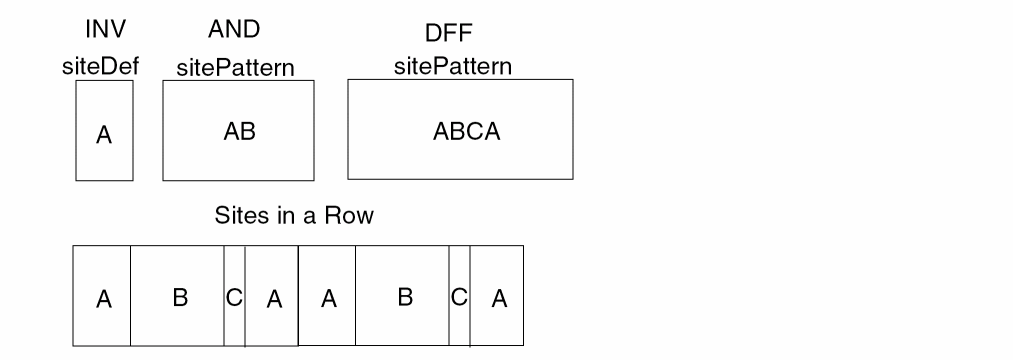
If the sitePattern has a size of one, then it has only one site defined. The instance can snap to any site in the row that is associated with the scalar siteDef having the site name, for example, INV.
If the sitePattern has a size greater than one, then the instance snaps to a pattern in a row that is specified by the sitePattern, for example, AND, DFF, etc.
Two definitions support the functions.
typedef techId techScalarSiteDefId;
typedef techId techArraySiteDefId;
The follow structure supports siteRef.
typedef struct techSiteRef techSiteRef;
struct techSiteRef {
String siteName;
dbPoint offset;
dbOrient orient;
};
techIsSiteDefId
Boolean
techIsSiteDefId( techSiteDefId siteDef );
Description
Verifies that the given siteDef refers to a siteDef object.
Arguments
Return Values
|
Returns TRUE if the siteDef refers to a siteDef object. Returns FALSE if it is not a siteDef object. |
techDeleteSiteDef
Boolean
techDeleteSiteDef( techSiteDefId siteDefId );
Description
Deletes the siteDef object from the specified technology file.
Arguments
Return Values
|
Returns TRUE if the siteDef object was successfully deleted. Returns FALSE otherwise. |
techFindSiteDefByName
techSiteDefId
techFindSiteDefByName( techFileId techId, String name );
Description
Searches the technology file specified by techId for a siteDef object with the specified name.
Arguments
Return Values
techGetSiteDefName
String
techGetSiteDefName( techSiteDefId siteDefId );
Description
Gets the name of the specified siteDef object.
Arguments
Return Values
techGetSiteDefType
techSiteDefType
techGetSiteDefType( techSiteDefId siteDefId );
Description
Gets the type of the specified siteDef object.
Arguments
Return Values
techGetSiteDefWidth
unsigned int
techGetSiteDefWidth( techSiteDefId siteDefId );
Description
Gets the width of the specified siteDef object.
Arguments
Return Values
techGetSiteDefHeight
unsigned int
techGetSiteDefHeight( techSiteDefId siteDefId );
Description
Gets the height of the specified siteDef object.
Arguments
Return Values
techIsSiteDefSymmetricInX
Boolean
techIsSiteDefSymmetricInX( techSiteDefId siteDefId );
Description
Determines whether the siteDef object has the symmetric flag for the X direction set. A symmetricX flag TRUE allows the instance to be placed as R0 or MX.
Arguments
|
Returns TRUE if the siteDef has the symmetric flag for the X direction set. |
techIsSiteDefSymmetricInY
Boolean
techIsSiteDefSymmetricInY( techSiteDefId siteDefId );
Description
Determines whether the siteDef object has the symmetric flag for the Y direction set. A symmetricY flag TRUE allows the instance to be placed as R0 or MY.
Arguments
|
Returns TRUE if the siteDef has the symmetric flag for the Y direction set. |
techIsSiteDefSymmetricInR90
Boolean
techIsSiteDefSymmetricInR90( techSiteDefId siteDefId );
Description
Determines whether the specified siteDef object has the symmetric flag for 90 degree rotation set. A symmetricR90 flag TRUE allows the instance to be placed at a 90 degrees.
Arguments
|
Returns TRUE if the siteDef has the symmetric flag for 90 degree rotation set. |
techSetSiteDefSymmetricInX
Boolean
techSetSiteDefSymmetricInX( techSiteDefId siteDefId, Boolean symmetricInX );
Description
Sets the symmetric flag for the X direction for the specified siteDef object. Setting a symmetricX flag TRUE allows the instance to be placed as R0 or MX.
Arguments
|
Returns TRUE if the symmetric flag for the X direction is set successfully. |
techSetSiteDefSymmetricInY
Boolean
techSetSiteDefSymmetricInY( techSiteDefId siteDefId );
Description
Sets the symmetric flag for the Y direction for the specified siteDef object. Setting a symmetricY flag TRUE allows the instance to be placed as R0 or MY.
Arguments
|
Returns TRUE if the symmetric flag for the Y direction is set successfully. |
techSetSiteDefSymmetricInR90
Boolean
techSetSiteDefSymmetricInR90( techSiteDefId siteDefId );
Description
Sets the symmetric flag for 90 degree rotation for the specified siteDef object. Setting a symmetricR90 flag to TRUE allows the instance to be placed at a 90 degrees.
Arguments
|
Returns TRUE if the symmetric flag for 90 degree rotation is set successfully. |
techSetSiteDefType
Boolean
techSetSiteDefType( techSiteDefId siteDefId, techSiteDefType sType );
Description
Sets the type associated with the specified siteDef.
Arguments
|
The type to set the siteDef object to. The choices are: |
Return Values
|
Returns TRUE if the type for the specified siteDef |
techStartGenSiteDef
techGenStateId
techStartGenSiteDef( techFileId techId );
Description
Starts generating all the siteDefs in the given techfile.
Arguments
Return Values
|
Returns the generator |
techGenSiteDef
Boolean
techGenSiteDef( techGenStateId pState, techSiteDefId *pSiteDefId );
Description
Generates the next siteDef in the subject techfile.
Arguments
|
The generator |
|
|
The |
Return Values
|
Returns TRUE if a siteDef is generated. Returns FALSE otherwise. |
techGenSiteDefToRowHeader
Boolean
techGenSiteDefToRowHeader( techGenStateId pState, dbRowHeaderId *rowHeaderId );
Description
Generates the next rowHeader in the open cellviews.
Arguments
|
The generator |
|
|
The |
Return Values
|
Returns TRUE if a rowHeader is generated. Returns FALSE otherwise. |
techStartGenCellViewSiteDefs
techGenStateId
techStartGenCellViewSiteDefs( dbCellViewfId cvfId );
Description
Starts generating all the siteDefs in the cellview.
Arguments
Return Values
|
Returns the generator |
techGenCellViewSiteDefs
Boolean
techGenCellViewSiteDefs( dbCellViewfId pState, techSiteDefId *pSiteDefId );
Description
Generates the next siteDef in the subject cellviews.
Arguments
|
The generator used to track the state of siteDef generation. |
|
|
The |
Return Values
|
Returns TRUE if a siteDef is generated. Returns FALSE otherwise. |
techStringToSiteDefType
techSiteDefType
techStringToSiteDefType( String s );
Description
Gets the corresponding siteDefType according to the string passed in.
Arguments
Return Values
|
The siteDef type. The choices are: |
techSiteDefTypeToString
String
techSiteDefTypeToString( techSiteDefType enumVal );
Description
Gets a string which represents the type of the siteDef.
Arguments
Return Values
|
The string representing the siteDef type. The choices are: |
techListToSiteDefType
techSiteDefType
techListToSiteDefType( String funcName, list l );
Description
Gets the corresponding siteDef type according to the list passed in.
Arguments
Return Values
|
The siteDef type. The choices are: |
techList2SiteDef
techSiteDefId
techList2SiteDef( String funcName, list l );
Description
Gets the corresponding siteDef type according to the list passed in.
Arguments
Return Values
techIsScalarSiteDefId
Boolean
techIsScalarSiteDefId( techId objId );
Description
Verifies that the objId refers to a valid oaScalarSiteDef object.
Arguments
Return Values
|
Returns TRUE if the objId refers to an oaScalarSiteDef object. Returns FALSE otherwise. |
techCreateScalarSiteDef
techScalarSiteDefId
techCreateScalarSiteDef( techFileId techId, const char *siteDefName, techSiteDefType type, unsigned int width, unsigned int height, Boolean isSymmetricInX, Boolean isSymmetricInY, Boolean isSymmetricInR90 );
Description
Creates a scalar siteDef object using the specified attributes.
Arguments
Return Values
|
Returns the techId of the oaScalarSiteDef if it is created. |
techSetScalarSiteDefWidth
Boolean
techSetScalarSiteDefWidth( techScalarSiteDefId siteDefId, unsigned int width );
Description
Sets the width of the scalar siteDef object.
Arguments
Return Values
|
Returns TRUE if the |
techSetScalarSiteDefHeight
Boolean
techSetScalarSiteDefHeight( techScalarSiteDefId siteDefId, unsigned int height );
Description
Sets the height of the scalar siteDef object.
Arguments
Return Values
|
Returns TRUE if the |
techIsArraySiteDefId
Boolean
techIsArraySiteDefId, techId objId );
Description
Verifies that the objId refers to a valid oaArraySiteDef object.
Arguments
Return Values
|
Returns TRUE if the objId refers to an oaArraySiteDef object. Returns FALSE otherwise. |
techCreateArraySiteDef
techArraySiteDefId
techCreateArraySiteDef( techFileId techId, const char *siteDefName, techSiteDefType type, unsigned int patternSize, const techSiteRef *sitePattern, Boolean isSymmetricInX, Boolean isSymmetricInY, Boolean isSymmetricInR90 );
Description
Creates an array siteDef object using the specified attributes. A pre-defined array of techSiteRefs defines the sitePattern of the array siteDef. The siteRef number must match the array size. The siteRef array is not checked for correctness.
The function creates the array siteDef as follows.
- creates an oaSiteRef for each techSiteRef structure.
- creates an oaSitePattern using these oaSiteRefs.
- creates an arraySiteDef using the oaSitePattern and other attributes.
Arguments
Return Values
|
Returns the techId of the oaArraySiteDef if it is created. |
Site Pattern Functions
This section describes functions that affect site patterns.
techGetArraySiteDefSitePattern
Boolean
techGetArraySiteDefSitePattern( techArraySiteDefId siteDefId, unsigned int *patternSize, techSiteRef **sitePattern );
Description
Gets the sitePattern, which is the array of techSiteRefs, of the array siteDef object.
The returned sitePattern references a static variable maintained by the system. You do not need to free its memory. If you want to cache the returned sitePattern, do the following.
- use the techCopySitePattern function to copy the sitePattern.
- use the techFreeSitePattern function to free the copied sitePattern.
Arguments
|
The siteDef object for which the function gets the sitePattern. |
|
|
Pointer to the static system variable that holds the techSiteRef array. |
Return Values
|
Returns TRUE if the function gets the sitePattern successfully. |
techSetArraySiteDefSitePattern
Boolean
techSetArraySiteDefSitePattern( techArraySiteDefId siteDefId, unsigned int patternSize, const techSiteRef *sitePattern );
Description
Sets the sitePattern, which is the array of techSiteRefs, of the array siteDef object.
Arguments
|
The siteDef object for which the function gets the sitePattern. |
|
|
Pointer to the static system variable that holds the techSiteRef array. |
Return Values
|
Returns TRUE if the sitePattern is set successfully. |
techCopySitePattern
techSiteRef *
techCopySitePattern( unsigned int patternSize, techSiteRef *sitePattern );
Description
Copies the sitePattern into dynamically allocated memory. Once the copy completes, be sure to free the memory using the techFreeSitePattern function.
Arguments
|
Pointer to the static system variable that holds the techSiteRef array. |
Return Values
techFreeSitePattern
void
techFreeSitePattern( techSiteRef *sitePattern );
Description
Frees the memory allocated for the sitePattern. Use after executing the techCopySitePattern function.
The function also checks whether the sitePattern is the system managed copy. The memory is freed only if the sitePattern is not the system managed copy.
Arguments
Return Values
dbGetCellViewSitePattern
Boolean
dbGetCellViewSitePattern( dbCellViewId cvId, unsigned int *patternSize, techSiteRef **sitePattern );
Description
Gets the sitePattern, which is the array of techSiteRefs, in the cellview.
Arguments
|
Pointer to the system variable that holds the siteRef array. |
Return Values
dbSetCellViewSitePattern
Boolean
dbSetCellViewSitePattern( dbCellViewId cvId, unsigned int *patternSize, const techSiteRef **sitePattern );
Description
Sets the sitePattern in the cellview.
Arguments
Return Values
|
Returns TRUE if the sitePattern is set successfully. Returns FALSE otherwise. |
Physical Constraint Functions
The Physical Rules constraint functions in this section pertain to spacing constraints.
You can view layer-purpose pairs selectively. When you create separate layer-purpose pairs for the same layer and then specify that only the layer in a layer-purpose pair to be seen, you see the virtual layer, indicated by the techLayer argument.
The spacing constraint functions are designed to avoid problems between spacing constraints and this selective viewing of layers. When you apply a constraint to a layer, you are implying that the constraint applies to all layer-purpose pairs referencing that layer, unless the constraint is specifically overridden for a particular layer-purpose pair.
Layer-purpose pairs are supported in DFII only. OpenAccess does not support them.
techStartGenSpacingRule
techRuleGenStateId
techStartGenSpacingRule( techFileId techfile );
Description
Starts the generator for generating all defined spacing constraints in the technology file. Spacing constraints can be for one or two layers.
Arguments
Return Value
|
Returns the generator state identifier to use when generating spacing constraints. |
techGenSpacingRule
Boolean
techGenSpacingRule( techRuleGenStateId stateId, String *ruleName, techLayerNum *pLayer1Num, techPurpose *pPurpose1, techLayerNum *pLayer2Num, techPurpose *pPurpose2, techPropType *pType, techPropValue *pValue );
Description
Generates the next spacing constraint.
Arguments
|
The layer number of the second layer-purpose pair, if a two-layer constraint is being generated. |
|
|
The purpose number of the second layer-purpose pair, if a two-layer constraint is being generated. |
|
Return Value
|
Returns FALSE if the generator is finished or the generator state identifier is invalid. |
Example
techFileId techfile;
techRuleGenStateId stateId;
String ruleName, layerName;
techLayerNum layer1Num, layer2Num;
techPurpose purpose1, purpose2;
techPropType type;
techPropValue value;
stateId = techStartGenSpacingRule (techfile);
while (techGenSpacingRule (stateId, &ruleName, &layer1Num, &purpose1, &layer2Num, &purpose2, &type, &value)) {
switch (type) {
case dbcIntType:
the spacing rule value can be found value.aInt;
break;
case dbcFloatType:
the spacing rule value can be found value.aFloat;
break;
default:
not a numeric so not a legal spacing rule value.
}
}
techStopRuleGen (stateId);
techGetSpacingRule
Boolean
techGetSpacingRule( techFileId techfile, String ruleName, techLayerNum layer1Num, techPurpose purpose1, techLayerNum layer2Num, techPurpose purpose2, techPropType *pType, techPropValue *pValue );
Description
Returns the value of the specified spacing constraint defined in the technology file.
The spacing constraints are located in a spacings construct in the technology file. They define the spacing requirements of your design environment.
Arguments
Return Value
|
Returns FALSE if the technology file does not exist or there is no spacing constraint defined for the specified layer or layers. |
Example
The example for techGetSpacingRule is based on the values returned for the following example for “techSetSpacingRule”:
techSetSpacingRule (techFile "minWidth" 0.6 "metal1")
techSetSpacingRule (techFile "minWidth" 2.0 ("metal1" "power"))
The value of 0.6 set in the techSetSpacingRule example is returned for any query in which the layer is "metal1" or for a query in which the layer in a layer-purpose pair is equal to "metal1" and purpose is not equal to "power".
The value of 2.0 set in the techSetSpacingRule example is returned if the ("metal1" "power") is queried (an exact match).
techGetSpacingRule (techfile "minWidth" "metal1")
techGetSpacingRule (techfile "minWidth" ("metal1" "power"))
techSetSpacingRule
Boolean
techSetSpacingRule( techFileId techfile, String ruleName, techLayerNum layer1Num, techPurpose purpose1, techLayerNum layer2Num, techPurpose purpose2, techPropType type, techPropValue value );
Description
Updates the value of the spacing constraint for the specified layer(s) in the technology file.
The spacing constraints are located in a spacings construct. They define the spacing requirements of your design environment. If you do not specify a second layer, the spacing constraint applies only to the first layer.
If a spacing constraint does not exist for the specified layer(s), the function creates one.
Arguments
Return Value
|
Returns FALSE if the technology file or layers do not exist. |
Example
techSetSpacingRule(techFile "minWidth" 0.6 "metal1")
techSetSpacingRule(techFile "minWidth" 2.0 ’("metal1" "power"))
This example creates two separate spacing constraints "minWidth" relating to techLayer "metal1". See the example for “techGetSpacingRule” for retrieving the values set in this example.
techStartGenOrderedSpacingRule
techGenStateId
techStartGenOrderedSpacingRule( techFileId techfile );
Description
Starts the generator for generating all defined spacing constraints in the technology file. This function is the same as techStartGenSpacingRule, except that this function is for spacing constraints for two layers only. The order of the layers is significant.
The following is an example of an unordered spacing constraint in which the order inside the left parentheses is equivalent to the order inside the right parentheses.
(minSpacing .25 layer1 layer2) == (minSpacing .25 layer2 layer1).
The following is an example of an ordered spacing constraint in which the order inside the left parentheses is not equivalent to the order inside the right parentheses:
(minEnclosure .35 layer1 layer2) != (minEnclosure .35 layer2 layer1)
Arguments
Return Value
|
Returns the generator state identifier to be used when generating spacing constraints. |
techGenOrderedSpacingRule
Boolean
techGenOrderedSpacingRule( techGenStateId stateId, String *ruleName, techLayerNum *pLayer1Num, techPurpose *pPurpose1, techLayerNum *pLayer2Num, techPurpose *pPurpose2, techPropType *pType, techPropValue *pValue );
Description
Generates all defined spacing constraints in the technology file. The order of the layers is significant.
Arguments
|
The generator state identifier to be used in generating defined spacing constraints. |
|
Return Value
|
Returns TRUE if all *p values returned are valid and can be used. |
techGetOrderedSpacingRule
Boolean
techGetOrderedSpacingRule( techFileId techfile, String ruleName, techLayerNum layer1Num, techPurpose purpose1, techLayerNum layer2Num, techPurpose purpose2, techPropType *pType, techPropValue *pValue );
Description
Returns a list of all the ordered spacing constraints defined in the orderedSpacings constraints of the technology file.
The orderedSpacings constraints define the spacing requirements for which the order of the layers is important.
Arguments
Return Value
|
Returns FALSE if the technology file does not exist or there are no spacing constraints defined. |
techSetOrderedSpacingRule
Boolean
techSetOrderedSpacingRule( techFileId techfile, String ruleName, techLayerNum layer1Num, techPurpose purpose1, techLayerNum layer2Num, techPurpose purpose2, techPropType type, techPropValue value );
Description
Updates the value of the spacing constraint for the specified layers in the orderedSpacings constraints of the technology file.
The orderedSpacings constraints define the spacing requirements for which the order of the layers is important. If an ordered spacing constraint does not exist for the specified layers, the function creates one. If an orderedSpacings constraints does not exist, this function creates one with the specified data.
Arguments
Return Value
|
Returns FALSE if the technology file or layers do not exist. |
Electrical Rule Functions
Electrical rules, are stored as layer properties in the LayerDefinitions section of the technology file. Electrical constraints are visible in ASCII as layer properties.
User defined electrical constraints, or rules, map to the electricalCharacterizations section within a constraint group.
techStartGenElectricalRule
techRuleGenStateId
techStartGenElectricalRule( techFileId techfile );
Description
Starts generating all electrical rules defined in the technology file. The electrical rules generated can be for one or two layers.
Arguments
|
The database identifier of the technology file where the rules are defined. |
Return Value
|
Returns the generator state identifier to be used when generating electrical rules. |
techGenElectricalRule
Boolean
techGenElectricalRule( techRuleGenStateId stateId, String *ruleName, techLayerNum *pLayer1Num, techPurpose *pPurpose1, techLayerNum *pLayer2Num, techPurpose *pPurpose2, techPropType *pType, techPropValue *pValue );
Description
Generates all defined electrical rules in the technology file. The electrical rules generated can be for one or two layers.
Arguments
|
The generator state identifier to be used when generating electrical rules. |
|
Return Value
|
Returns TRUE if all *p values returned via indirection are valid. |
techGetElectricalRule
Boolean
techGetElectricalRule( techFileId techfile, String ruleName, techLayerNum layer1Num, techPurpose purpose1, techLayerNum layer2Num, techPurpose purpose2, techPropType *pType, techPropValue *pValue );
Description
Returns a list of all the electrical constraints defined as one of the following.
-
techLayerPropertiesconstraints in thelayerRulessection of the technology file. -
electricalCharacterizationsconstraints within a constraint group.
These constraints specify the electrical properties of the layers in your design.
Arguments
Return Value
|
Returns FALSE if the technology file does not exist or there are no characterization rules defined. |
techSetElectricalRule
Boolean
techSetElectricalRule( techFileId techfile, String ruleName, techLayerNum layer1Num, techPurpose purpose1, techLayerNum layer2Num, techPurpose purpose2, techPropType type, techPropValue value );
Description
Updates the value of the electrical constraint for the specified layer or layers. The value is updated in the electricalCharacterizations constraints of the technology file.
The electricalCharacterizations constraints specify the electrical properties of the layers in your designs. If you do not specify a second layer, the constraint applies only to the first layer. If a characterization constraint does not exist for the specified layer or layers, the function creates one with the data you specify.
Arguments
Return Value
|
Returns FALSE if the technology file or layers do not exist. |
techStartGenOrderedElectricalRule
techGenStateId
techStartGenOrderedElectricalRule( techFileId techfile );
Description
Starts generating the electrical constraints defined in the technology file. The order of the layers is significant.
Arguments
Return Value
|
Returns the generator state identifier used when generating the defined electrical rules. |
techGenOrderedElectricalRule
Boolean
techGenOrderedElectricalRule( techGenStateId stateId, String *ruleName, techLayerNum *pLayer1Num, techPurpose *pPurpose1, techLayerNum *pLayer2Num, techPurpose *pPurpose2, techPropType *pType, techPropValue *pValue );
Description
Generates the electrical constraints defined in the technology file. The order of the layers is significant.
Arguments
|
The generator state identifier used when generating the defined electrical rules. |
|
Return Value
|
Returns TRUE if all *p values returned via indirection are valid. |
techGetOrderedElectricalRule
Boolean
techGetOrderedElectricalRule( techFileId techfile, String ruleName, techLayerNum layer1Num, techPurpose purpose1, techLayerNum layer2Num, techPurpose purpose2, techPropType pType, techPropValue pValue );
Description
Returns the value of the specified ordered characterization constraint defined in the orderedElectricalCharacterizations constraints in the technology file. The order of the layers is significant.
The orderedElectricalCharacterizations constraints specify electrical properties in which the order of layers is important.
Arguments
Return Value
|
Returns FALSE if the technology file does not exist or there is no characterization constraint defined for the specified layers. |
techSetOrderedElectricalRule
Boolean
techSetOrderedElectricalRule( techFileId techfile, String ruleName, techLayerNum layer1Num, techPurpose purpose1, techLayerNum layer2Num, techPurpose purpose2, techPropType type, techPropValue value );
Description
Updates the value of the electrical rule for the specified layers in the orderedElectricalCharacterizations constraints of the technology file. The order of the layers is significant.
The orderedElectricalCharacterizations constraints specify the electrical characteristics in which the order of layers is important. If a constraint does not exist for the specified layer or layers, the function creates one with the specified data.
Arguments
Return Value
|
Returns FALSE if the technology file or layers do not exist. |
Technology File Database Functions
techGetDBUPerUU
double
techGetDBUPerUU( techFileId techId, dbCellViewType cvType );
Description
Gets the number of database units per each user unit for the specified cellview type in the specified technology file.
Arguments
Return Values
techGetUserUnit
dbUserUnitType
techGetUserUnit( techFileId techId, dbCellViewType cvType );
Description
Gets the user unit that is set for the specified cellview type in the specified technology file.
Arguments
Return Values
|
The user unit that is set for the specified cellview type in the specified technology file. |
techIsDBUPerUUSet
Boolean
techIsDBUPerUUSet( techFileId techId, dbCellViewType cvType )
Description
Checks whether or not the database units per user unit (DBUPerUU) value is set for the specified cellview type in the specified technology database.
Arguments
Return Values
|
Returns TRUE if the database units per user unit value is set for the specified cellview type in the specified technology database. |
techIsUserUnitSet
Boolean
techIsUserUnitSet( techFileId techId, dbCellViewType cvType )
Description
Checks whether or not the user unit is set for the specified cellview type in the specified technology database.
Arguments
Return Values
|
Returns TRUE if the user unit is set for the specified cellview type in the specified technology database. |
techSetDBUPerUU
Boolean
techSetDBUPerUU( techFileId techId, dbCellViewType cvType, double dbuPerUU );
Description
Set the number of database units per each user unit for the specified cellview type in the specified technology file.
Arguments
Return Values
|
Returns TRUE if the number of database units per each user unit for the specified cellview type in the specified technology file is successfully set. Returns FALSE otherwise. |
techSetUserUnit
Boolean
techSetUserUnit( techFileId techId, dbCellViewType cvType, dbUserUnitType userUnit );
Description
Sets the user unit for the specified cellview type in the specified technology database.
Arguments
|
The enum value of the user unit. |
|
Returns TRUE if the user unit for the specified cellview type in the specified technology database is successfully set. Returns FALSE otherwise. |
techUnsetDBUPerUU
Boolean
techUnsetDBUPerUU( techFileId techId, dbCellViewType cvType );
Description
Unsets the number of database units per each user unit for the specified cellview type in the specified technology database. Issues a warning if the number of database units per user unit is not set for the cellview type in the technology database.
Arguments
Return Values
|
Returns TRUE if the number of database units per each user unit for the specified cellview type in the specified technology database is successfully unset. |
techUnsetUserUnit
Boolean
techUnsetUserUnit( techFileId techId, dbCellViewType cvType );
Description
Unsets the user unit for the specified cellview type in the specified technology database. Issues a warning if the user unit is not set for the cellview type in the technology database.
|
Returns TRUE if the user unit for the specified cellview type in the specified technology database is successfully unset. Returns FALSE otherwise. |
Trim Layer Functions
The trim layer C functions retrieve information about the trim layers and the metal and poly layers trimmed by these trim layers.
This chapter describes the following C functions:
- techGetTrimLayer
- techGetTrimmedLayers
- techFreeColoredLayerArray
- dbGetShapeTrimFillType
- dbStartGenCellViewTrimFillShapes
- dbGenCellViewTrimFillShapes
The trim layer C functions use the following enums and structure:
Enumerated constants in type techLayerParamMaskColorType
typedef enum techLayerParamMaskColorType {
techcLayerParamMaskAnyColor = -1,
techcLayerParamMaskGrayColor = 0,
techcLayerParamMask1Color = 1,
techcLayerParamMask2Color = 2,
techcLayerParamMask3Color = 3
} techLayerParamMaskColorType;
Enumerated constants in type techLayerParamColorLockedType
typedef enum techLayerParamColorLockedType {
techcLayerParamAnyColorLocked = 0,
techcLayerParamColorLocked = 1,
techcLayerParamColorUnlocked = 2
} techLayerParamColorLockedType;
struct techColoredLayer {
techLayerId layerId;
techLayerParamMaskColorType color;
techLayerParamColorLockedType colorState;
} techColoredLayer;
Here, layerId is the tech layer ID, color is the mask color, and colorState depicts the state of the color.
techGetTrimLayer
Boolean
techGetTrimLayer( techLayerIdlayerId, techLayerParamMaskColorType color, techLayerParamColorLockedTypelock, techColoredLayer *trimLayer);
Description
Returns the trim layer that trims the specified metal or poly layer with the given color and color state combination.
Arguments
|
|
|
|
Output argument. Pointer to the trim layer that trims the given metal or poly layer. |
Return Value
Examples
techLayerNum layerNum = techGetLayerNum(techfile, "Metal1");
techLayerId metalLayer = techGetTechLayerIdByNumber(techfile, layerNum);
techLayerParamMaskColorType color = techcLayerParamMask1Color;
techLayerParamColorLockedType colorState = techcLayerParamColorLocked;
techColoredLayer trimLayer;
techGetTrimLayer(metalLayer, color, colorState, &trimLayer);
On success, returns trim layer along with its color attributes (color mask and color state), trimming metal layer Metal1 with color mask1 and color state locked.
Metal1 with color mask1 and color state locked, trimLayer.layerId is set to techcNullLayerId.techGetTrimmedLayers
Boolean
techGetTrimmedLayers( techLayerIdlayerId, techLayerParamMaskColorTypecolor, techLayerParamColorLockedTypelock, unsigned int *nTrimmedLayers, techColoredLayer **trimmedLayers);
Description
Returns an array of metal or poly layers trimmed by the specified layer with the given color and color state combination.
Arguments
Return Value
Examples
techLayerNum layerNum = techGetLayerNum(techfile, "Trim1");
techLayerId trimLayer = techGetTechLayerIdByNumber(techfile, layerNum);
techLayerParamMaskColorType color = techcLayerParamMask2Color;
techLayerParamColorLockedType colorState = techcLayerParamColorUnlocked;
unsigned int *nTrimmedLayers;
techColoredLayer *trimmedLayers;
techGetTrimmedLayers(trimLayer, color, colorState, &nTrimmedLayers, &trimmedLayers);
Returns an array of metal or poly layers along with their color attributes (color mask and color state), trimmed by trim layer Trim1 with color mask2, and color state unlocked.
Trim1 with color mask2 and color state unlocked, nTrimmedLayers is set to 0.// Free the allocated memory
techFreeColoredLayerArray(nTrimmedLayers, trimmedLayers)
techFreeColoredLayerArray
void
techFreeColoredLayerArray( unsigned intnColoredLayers, techColoredLayer *coloredLayers);
Description
Deallocates the memory allocated to the techColoredLayer array by .
Arguments
|
Pointer to the techColoredLayer array, for which memory is to be deallocated. |
Return Value
Example
techFreeColoredLayerArray(nTrimmedLayers, trimmedLayers)
Frees memory allocated for the techColoredLayer array.
dbGetShapeTrimFillType
const char* trimFillType
dbGetShapeTrimFillType(dbShapeIdshapeId);
Description
Returns the type of trimFillShape for the specified trim shape.
Arguments
Value Returned
dbStartGenCellViewTrimFillShapes
dbGenStateId
dbStartGenCellViewTrimFillShapes(
dbCellViewId cvId
)
Description
Initializes a generator for all trimFillShape objects in the specified cellview. A generator state is returned, which is used with the function.
Arguments
|
ID of the cellview containing the trimFillShape to be generated. |
Return Value
dbGenCellViewTrimFillShapes
Boolean dbGenCellViewTrimFillShapes( dbGenStateIdpState, dbShapeId *trimFillShape);
Description
Retrieves the next trimFillShape ID from the generator with the given dbGenStateId. The trimFillShape ID is returned in the dbShapeId argument.
Arguments
|
ID of the next trimFillShape produced by the generator. This value is undefined if |
Return Value
|
|
Return to top