
The license server configuration utility allows you to start the license server, update the licenses on the server, and install the license manager as a service.
To start the License Server Configuration Utility:
- Run Start > Cadence > License Manager >License Server Configuration Utility.
- Specify the location of the license file that you had received from Cadence.
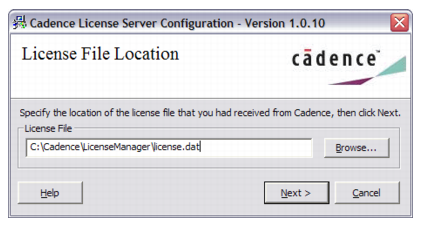
- Specify the license server information.
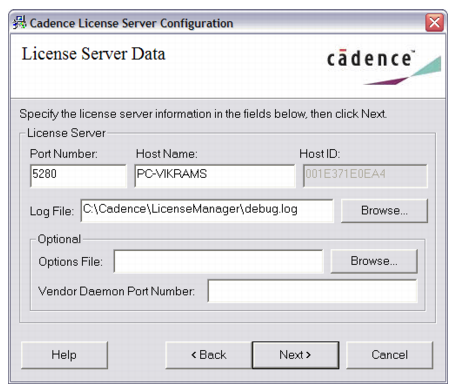
Port Number:
The TCP/IP port number that the license server uses to serve license requests. The default port number is 5280. Cadence applications will use this port number to access the license server.
Host Name:
Name of the computer that hosts the license server.
Log File:
Specify the location of the debug.log file. All license server activity, including status and error messages useful for debugging the license server will be recorded in this log file.
Optional Information:
You can provide optional information, which includes the following fields:
Options File:
You can use the options file to manage licensing beyond the limits provided by the license file. You can use an options file to:- Return idle licenses to the license pool.
- Define groups to avoid listing individual users or hosts.
- Reserve copies of a feature for specific workstations or specific users.
- Allow or prevent specific users from using certain products.
- For more information on options file, see FlexNet End User Guide.
Vendor Daemon Port Number:
The TCP/IP port number for the Cadence vendor daemon cdslmd to communicate with lmgrd. This can be left blank. By default, the port is chosen during runtime (recommended). However, for some sites with Internet firewalls, you may need to specify the TCP/IP port number for the vendor daemon and allow the port in your firewall for the vendor daemon and lmgrd to communicate.- Click Next to complete the configuration process.
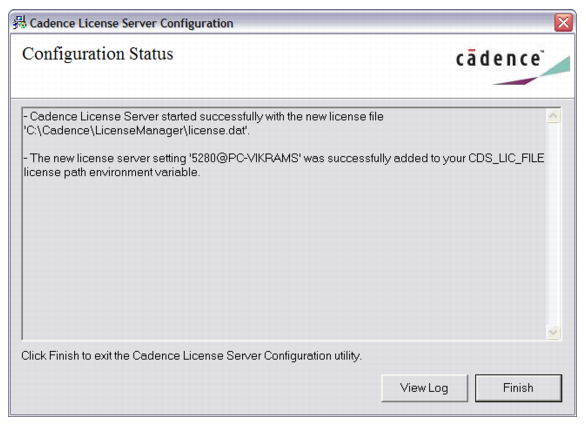
View Log will allow you to view the license server log file. - Click Finish to complete the license server setup.