
This appendix contains some frequently asked questions about troubleshooting licensing.
Q. How should my network topology be?
Ans: You should not have an overly congested network or one with too much delay. Both of these can cause "heartbeat" and other failures.
Q. Should my license server be a dedicated machine?
Ans: For maximum performance, and on sites with a large number of users, the license server should be a DEDICATED machine.
Q. Can license files be combined?
Ans: While it is technically possible to combine FlexNet-based license files, there are a few disadvantages to this approach:
- There is a performance degradation associated with large license files.
- It makes debugging difficult as it is difficult to trace the origin of the problem.
Therefore, it is suggested that you maintain separate license files for each daemon and run multiple lmgrd daemons (one for each vendor daemon).
Q. Why are some FEATURES in the license file rejected when the server is started?
Ans: The license server accepts only valid FEATURE lines. A FEATURE line is considered valid when:
- the start_date is less than the date the server is started or re-read
- date has not expired
- the 20-character encryption code is valid
Q. Are duplicated FEATURE lines allowed?
Ans: Except for temporary keys, Cadence does not allow multiple lines for a FEATURE.
Q: What does the UNSUPPORTED line in the log file mean?
Ans: It is very important that the FEATURE lines be consistent in both the application client and the license server versions of the license file (which may be different for a variety of reasons). The UNSUPPORTED line in the log file is most likely due to a mis-match in these two license files. Usually, a license if available is granted.
Note: It is possible that an UNSUPPORTED line in the log file is immediately followed by an OUT line.
Q. The server is fine. What else could be causing the problem?
Ans: It is possible that the license server is fine, but the application is causing the problem. You can access the internal testability code of the application. This code appends information representing version, search path, actions, run times, results, and other diagnostics to a specified file.
To access this testability code, execute the following at the command prompt (in Linux):
setenv CDS_LIC_QA_TesT /tmp/client_debug_log.out
Q. How can I reclaim a license if it has been lying idle for some time?
Ans: You can use the TIMEOUT option in the options file to reclaim the license when the product has been idle for sometime.
Q: What configurations are supported with the fault-tolerant server setup?
Ans: Only homogeneous platforms of the same OS release are supported. All three servers in a fault-tolerant configuration must be of the same OS version and platform, and the systems should belong to the same subnet block.
Q. What do I do to make a standalone machine work as a license server? (Applicable for Linux and Windows)
Ans: The first thing to check is whether you can ping the machine that is supposed to be the server. If not, then that is the first thing to correct. Even in a single machine configuration, licenses require a working TCP/IP infrastructure, implying working hardware, name mapping, IP addresses, and so on.
First, ensure that the hardware is enabled. The hardware solution is to make a simple loop back plug (one that routes the transmit to the receive). The Ethernet will interpret this as being connected.
Ethernet twisted pair loopback plug
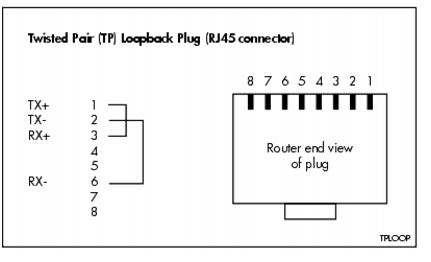
From looking at a diagram of a crossover cable, you can see which pin is which:
Straight-through and Crossover Cable Pinouts
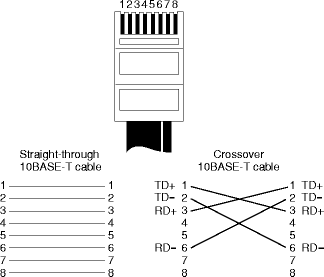
If you do not fix this, you will see the lmhostid command returning a null value or "FFFFFFFFFFFF" for the host ID of the machine. See the example below where the lmhostid was run with attaching the loopback plug.
The FlexNet host ID of this machine is ""
After the loopback plug was attached, lmhostid returned the following:
The FlexNet host ID of this machine is "0010a48977a0"
There is a software alternative as well. On Windows, there is a registry hack. You can find the information in the Microsoft knowledge base. However, it is recomended that you use the hardware solution.
On Linux, open the /etc/modules.conf file and find out which module (or driver) is aliased to the eth0 interface. It might be something like an eepro100. Edit your /etc/init.d/network script and insert the equivalent of the following line just after the "start)" line:
sbin/insmod eepro100
This will load the module for your ethernet device regardless of whether you are connected to a working network.
Once the connectivity between the hardware and the OS is established, you have to make sure that the name resolution happens correctly. Since by default, there should be a host file that maps the IP addresses to the names, and localhost is a default name that should always be mapped, you can use that as the hostname for the license file (and the setting of the ENV variables to find the server).
If you do not want to use localhost, then make sure that the /etc/hosts file on Linux (and the C:\Windows\System32\drivers\etc\hosts file on Windows) has the information required to add the name of your machine to the loopback (127.0.0.1) address mapping.
Finally, set the CDS_LIC_FILE environment variable to 5280@127.0.0.1 or 5280@localhost.
More information on troubleshooting is available at:
-
Troubleshooting - Detailed Appendix
- The Licensing and Installation FAQ in the Cadence Support portal
Q. Can I use lmremove to remove the licenses?
Ans: Cadence advises customers not to use lmremove to remove licenses from active or idle applications. See advisory note on page 124.
Q. Can I use lmreread to restart my server?
Ans: Cadence does not recommend using lmreread and advises customers to restart the license server for any license updates. Lmreread has issues with certain keywords in the license and options files. Flexera has no plans to fixing lmreread for all cases. But Cadence has asked Flexera to provide us the situations where lmreread will work. Until then Cadence's recommendation is to restart the license server. Cadence applications can handle a license server restart without any issues.
Q. How to use fixed ports for the license server?
Ans: The following two ways can be used to fix the license server ports:
- When you open the license file, the first two lines are as follows:
SERVER lx-linux C858C0E96C7B 5280
DAEMON cdslmd ./cdslmd5280is the port that is used by thelmgrddaemon. Thecdslmdprocess looks for any free port available on the system. To ensure thatcdslmduses a fixed port, add the port number as shown below:SERVER lx-linux C858C0E96C7B 5280
DAEMON cdslmd ./cdslmd PORT=5281When you restart the license server,
cdslmdlistens at the fixed port5281. Both5280and5281are TCP ports that are helpful for adding the rules to the firewall policy. - In case you do not want to add the port number in the license file, start the license server in the command prompt as shown below:
lmgrd –c <license_file> -l debug.log –reuseaddrThe
–reuseaddrargument ensures thatlmgrdandcdslmduse the same ports on the next restart of the license server.It is not recommended to use the
lmrereadbinary to re-read the license file. Instead, restart the license server to read the license file again.
Q. How to force lmgrd and cdslmd to use the old TCP port after restarting the license server?
Ans. With effect from FLEXnet version 10.8.5.0, lmgrd supports the -reuseaddr switch. It is designed to reuse the ports for both lmgrd and cdslmd.
- Start the license server in the command prompt as shown below:
lmgrd -c license_file –l log_file -reuseaddr
- If your license file uses a fixed port for
cdslmdas shown below:
DAEMON cdslmd /installs/LCU/tools/bin/cdslmd port=5281
Flexnet reuses this port, 5281, for cdslmd in addition to reusing the designated port for lmgrd.