
Product Documentation
Virtuoso ADE SKILL Reference
Product Version IC23.1, November 2023

relxAddSetupRelxOption

relxAddSetupRelxOption (
[ ?name s_name ]
[ ?type s_type ]
[ ?prompt t_prompt ]
[ ?choices l_choices ]
[ ?value g_value ]
[ ?display g_display ]
[ ?enabled g_enabled ]
[ ?onFields l_onFields ]
[ ?buttonLocation s_buttonLocation ]
[ ?callback t_callback ]
[ ?defValue g_defValue ]
[ ?itemsPerRow x_itemsPerRow ]
[ ?items l_items ]
[ ?frame g_frame ]
[ ?formApplyCB s_formApplyCB ]
[ ?scrollable g_scrollable ]
[ ?tooltip t_tooltip ]
[ ?spacing x_spacing ]
[ ?discLayout s_discLayout ]
[ ?buttonIcon g_buttonIcon ]
)
=> r_fieldHandle

Description

Adds new fields to the Reliability Options form.

This function can be used as a unit function to customize the Custom tab.

Arguments

?name s_name

The symbol name of the field to be added.

?type s_type

Type of the field.

Default value: string.

Possible values: radio, Boolean, separator, label, cyclic, string, toggle, and button.

?prompt t_prompt

Prompt for the field.

?choices l_choices

List of choices.

?value g_value

Value of the field.

?display g_display

Controls the display of fields on the form. If this argument is set to nil, the field is not displayed in the form.

?enabled g_enabled

Enables or disables the field. When set to t, the field is enabled, When set to nil, the field is disabled and becomes inactive in the form.

?onFields l_onFields

It is applicable only for the disclosureTriangle type of fields.

?buttonLocation s_buttonLocation

Location of the button.

It is applicable only for the Boolean type of fields.

?callback t_callback

Specifies the SKILL functions (callbacks) that execute after you select Apply, OK, or Cancel in the form.

?defValue g_defValue

Default value of the field.

?itemsPerRow x_itemsPerRow

Number of items in a single row.

It is applicable only for the radio and toggle type of fields.

?items l_items

Defines the items in the layout.

It is applicable only for gridLayout, horizontalBoxLayout, and verticalBoxLayout fields.

?frame g_frame

Any of the following values:

  • nil: (Default) For an unframed layout.
  • t: For an untitled frame.
  • t_title: For a framed layout with a title.

It is applicable only for gridLayout, horizontalBoxLayout, and verticalBoxLayout fields.

?formApplyCB s_formApplyCB

Calls the formApplyCB function set when a button, such as OK, Apply, and so on, is clicked.

?scrollable g_scrollable

If set to t, adds a scroll bar in the layout if the content is large and cannot be accommodated. The default value is nil.

It is applicable only for gridLayout, horizontalBoxLayout, and verticalBoxLayout fields.

?tooltip t_tooltip

Tooltip for the field.

?spacing x_spacing

Specifies the integer value to apply for horizontal spacing.

?discLayout s_discLayout

Defines the layout of the disclosure triangle.

?buttonIcon g_buttonIcon

Defines the button icon.

Value Returned

r_fieldHandle

Handle to the field.

Examples

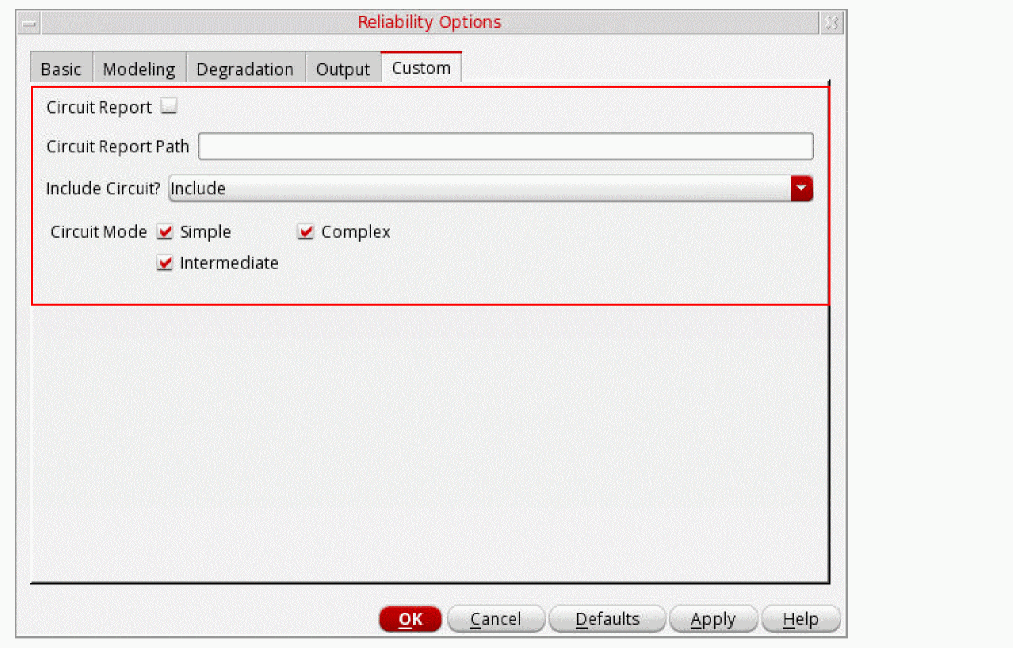
Add the following SKILL code in the .cdsinit file to add these fields to the Custom tab:

(defun relxCreateCustomizedTab (formSymbol)
 let((cusTagVertLayout circuitReport circuitReportPath circuitType circuitMode
circuitInclude)
  circuitReport = relxAddSetupRelxOption(  ?name 'circuitReport
             ?type 'Boolean
             ?prompt "Circuit Report"
             ?defValue nil
                       )
  circuitReportPath = relxAddSetupRelxOption(?name 'circuitReportPath
                     ?type 'string
                    ?prompt "Circuit Report Path"
                     )
  circuitType = relxAddSetupRelxOption(  ?name 'circuitType
                     ?type 'radio
                     ?choices list("Static" "Dynamic")
                     ?value "Static"
                     ?prompt " Circuit Type"
                       )
  circuitMode = relxAddSetupRelxOption(?name 'circuitMode
                      ?type 'toggle
             ?choices list( list( 't1 "Simple")
                                                  list('t2 "Complex")
                         list( 't3 "Intermediate")
                           )
                    ?value list( t t t)
                    ?itemsPerRow 2
                    ?prompt " Circuit Mode"
                    )
  circuitType = relxAddSetupRelxOption(?name 'circuitInclude
                     ?type 'cyclic
             ?choices list("Include" "Exclude")
                     ?value "Include"
                     ?prompt "Include Circuit?"
                    )
  cusTagVertLayout = relxAddSetupRelxOption( ?name 'cusTagVertLayout
           ?type 'verticalBoxLayout
           ?items list(
             list(circuitReport)
            list(circuitReportPath)
            list(circuitType)
            list(circuitMode)
            list(circuitInclude)
            list('spacer_item 5)
            list('stretch_item 5)
            )
             )
  cusTagVertLayout
               )
  )

The new fields are added to the Custom tab in the Reliability Options form.

Return to top
 ⠀
X