
calcVal
calcVal(t_outputName[t_testName] [?cornerNamet_cornerName] [?historyNamet_historyName] [?libt_libName] [?cellt_cellName] [?viewt_viewName] [?runt_runName] [?resultt_resultName] [?getFirstSweepPointt_getFirstSweepPoint] [?ignoreParamsg_ignoreParams] [?matchParamsg_matchParams] [?defaultValt_defaultVal] [ ?relxNamet_relxName] [?ageValuet_ageValue] [?ageUnitt_ageUnit] [?sheg_she] ) =>g_output/nil
Description
Returns the value of an output from the same or another test. You can use the value returned by this function in another output expression.
Arguments
|
Name of the output or expression. The output can return a scalar value or waveform. To retrieve the value of an output of type signal, the simulation waveform results must be saved. calcVal supports waveform outputs in expressions, but it does not support waveforms outputs used in subexpressions. For example, the following calcVal expression returns a good result : a=calcVal("b" "test1") |
|
|
Name of test name to which the given output belongs. When not specified, the name of the current test is used.
You do not need to provide this argument when using the For calcVal expressions that use the result of an output from another test, it is recommended to use outputs that return scalar values for better performance. |
|
|
Name of the corner. When specified, the value of the given output for this corner is used. Name of a |
|
|
Name of the history from which the results are to be retrieved. When specified, the scalar or waveform result of the output from the given history is used. Otherwise, the value of the output from the current simulation run is used. You can use the following wildcards to find a history saved for the given cellview:
You can combine two or more wildcards, for example, |
|
|
The library associated with the maestro cellview from where the results are to be retrieved.
This argument can be used only when the |
|
|
The cell associated with the maestro cellview from where the results are to be retrieved.
This argument can be used only when the |
|
|
The view associated the maestro cellview from where the results are to be retrieved.
This argument can be used only when the |
|
|
Name of the run plan from which the value of the given output is to be returned. This argument is useful only when the setup has a run plan.
Use this argument to get the value of an output from the results of one run (in the run plan) and use it in a variable, expression, or run condition for another run in the same run plan or history. It cannot be used to refer to the results of any other history. When both
Also see: |
|
|
Name of an analysis from which the
The specified analysis must exist in the test along with the simulation waveform results in order for |
|
|
Specifies that when sweep values are used, the result of only the first swept point is to be used for calculation.
If |
|
|
Specifies the requirements to look for points that have matched variables and parameters in the current run and the source run. The source run can be of any other test in the current history, or the same or another test in another history specified by
|
|
|
Ignores the specified parameters. For example, a local parameter value that is different in the source and the target test or a parameter whose value is a
If a list of name-value pairs are specified for
If the model files in the setup of the source and target tests are different and you want to ignore those while comparing setups, add
If |
|
|
The default value to be returned if
This is helpful when |
|
|
Specifies one of the following values: "age_number" specifies the age points at which the device degradation is calculated. |
|
|
Specifies the unit for the age points.
Valid Values: |
|
|
Boolean value to specify whether the self-heating effect is enabled. |
|
Value Returned
Examples
In the following example, avg_vt represents the expression average(VT("/out")) and myTest is the test name:
calcVal("avg_vt" "myTest")
You can compute the value of an expression with reference to another expression from a different test, as shown below.
calcVal("output1" "test1")/calcVal("output2" "test3")
You can also use the output value for a corner, as shown below.
calcVal("Gain" "AC" ?cornerName "C2")
You can also use the output value from a history that has the highest numerical value suffixed with the history name Interactive, as shown below.
calcVal("Gain" "AC" ?historyName "Interactive.<highest>")
You can use the waveform from the result, as shown below.
calcVal("/OUT" "AC" ?result "ac")
=> srrWave:0x40421090
If you want to retrieve the value from only the first sweep point, you can use the ?getFirstSweepPoint argument. The following example will always return the first sweep point value of myCalib in the test calib_tb. This is useful if you run a sweep on the test where the calcVal expression is used but the source of the value myCalib is not swept.
calcVal("myCalib" "calib_tb" ?getFirstSweepPoint t)
You can specify a default value that can be used when the result for the specified output is not found.
calcVal("Gain" "AC" ?cornerName "C2" ?defaultVal "1000")
The default value can also be used to show an error message when the result for the corner is not available.
calcVal("Gain" "AC" ?cornerName "C2" ?defaultVal "ERROR: Gain for C2 is not available")
You can retrieve the results from a nominal run. The following example would give an output, which is the ratio of the measured frequency of the specified corner to the frequency in the nominal run:
calcVal("Freq")/calcVal("Freq" ?cornerName "Nominal")
This example shows how ?matchParams works when multiple matching points are found and they belong to different corners.
The setup contains two tests, AC and TRAN, with multiple points and corners. The corners setup appears as shown below.
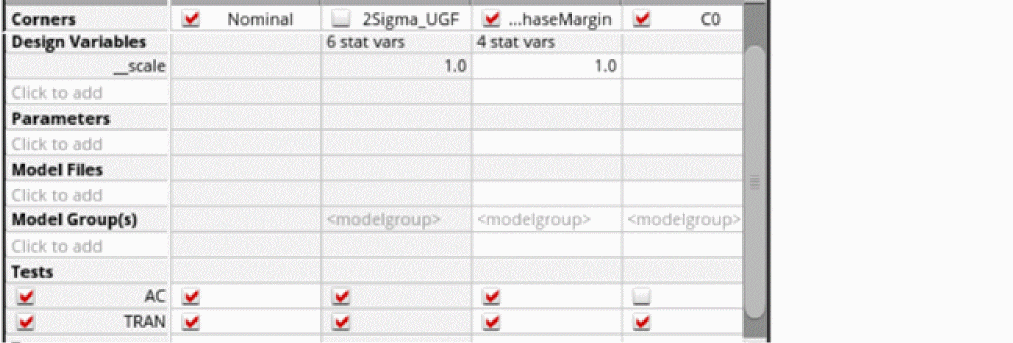
The test TRAN has an output GainVal with the calcVal expression shown below.
calcVal("Gain" "AC" ?matchParams "all")
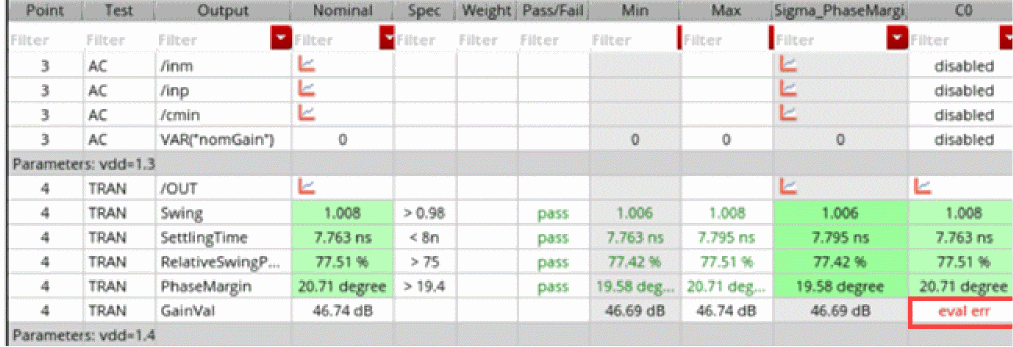
The corners Nominal and C0 are identical, so calcVal evaluation for each point finds two corners in which all variables and parameters match. However, the calcVal expression is successfully evaluated only for Nominal.
For C0, it returns eval err because when ?matchParams is used, even though calcVal finds the matching point in multiple corners, it can use the value from a corner that has the same name as that of the corner for which the expression is being evaluated, which is C0 in this case. C0 is disabled for AC, so no value is returned for Gain. Therefore, the output returns an error. To return a value result for GainVal, you must enable C0 for AC.
More Examples Using ?matchParams
The following examples show how you can use the ?matchParams argument of calcVal. The base setup used in these examples is shown below.
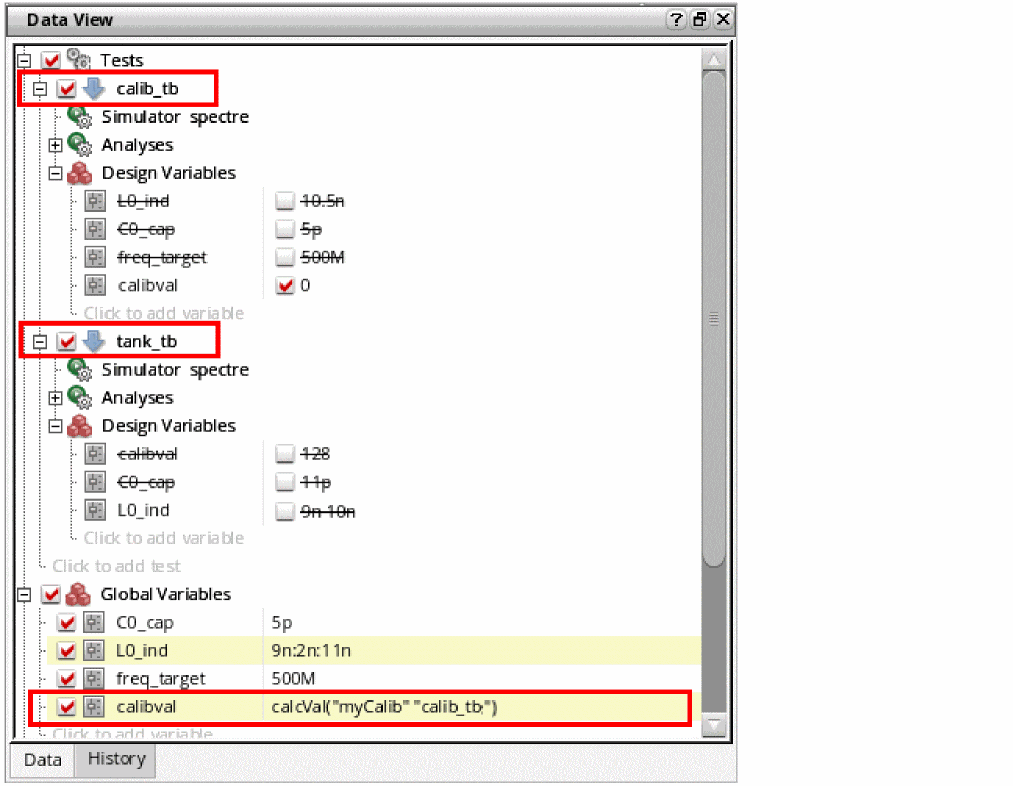
This setup contains two tests, calib_tb and tank_tb.
If not overriding, these tests use four global variables: C0_cap, L0_ind, freq_target, and calibval. calibval contains an expression that uses the value of the myCalib output defined for the test calib_tb.
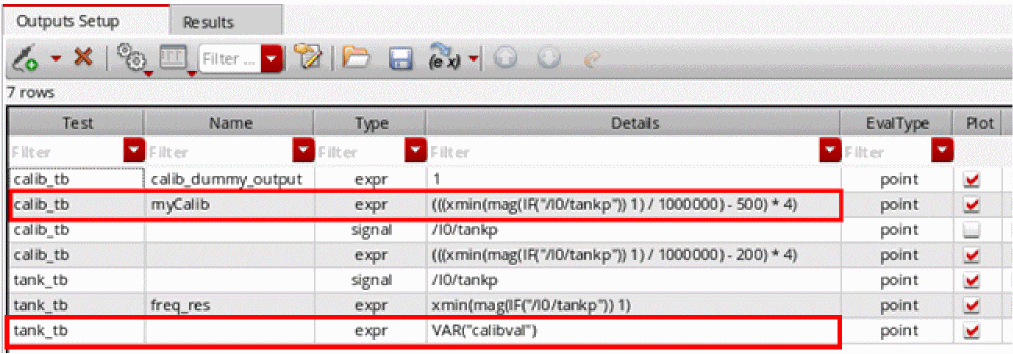
The VAR("calibval")output of test tank_tb returns the value of the calibval global variable, which saves the result of the calcVal function.
In the following example cases, you can observe the difference in the value of VAR("calibval")for different values of ?matachParam, and varying variables and parameters:
Case I: ?matchParams is set to the default value ("none"), the number of data points in the calibrated and target tests is same, and the swept variables and corners are identical
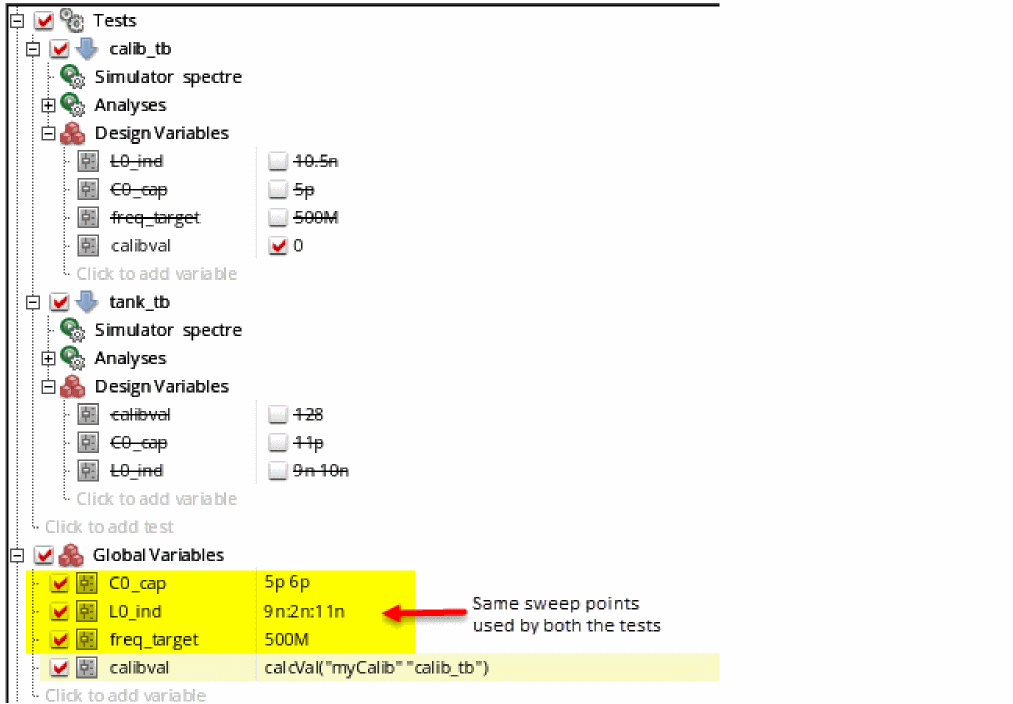
For each data point of tank_tb, there will be a valid value of the calibval global variable. Thus, calcVal returns a valid, non-nil value.
?matchParams is set to "all" because the count and values of all variables and parameters match.Case II: ?matchParams is set to the default value ("none"), the number of data points in the calibrated and target tests is same, but the values are different
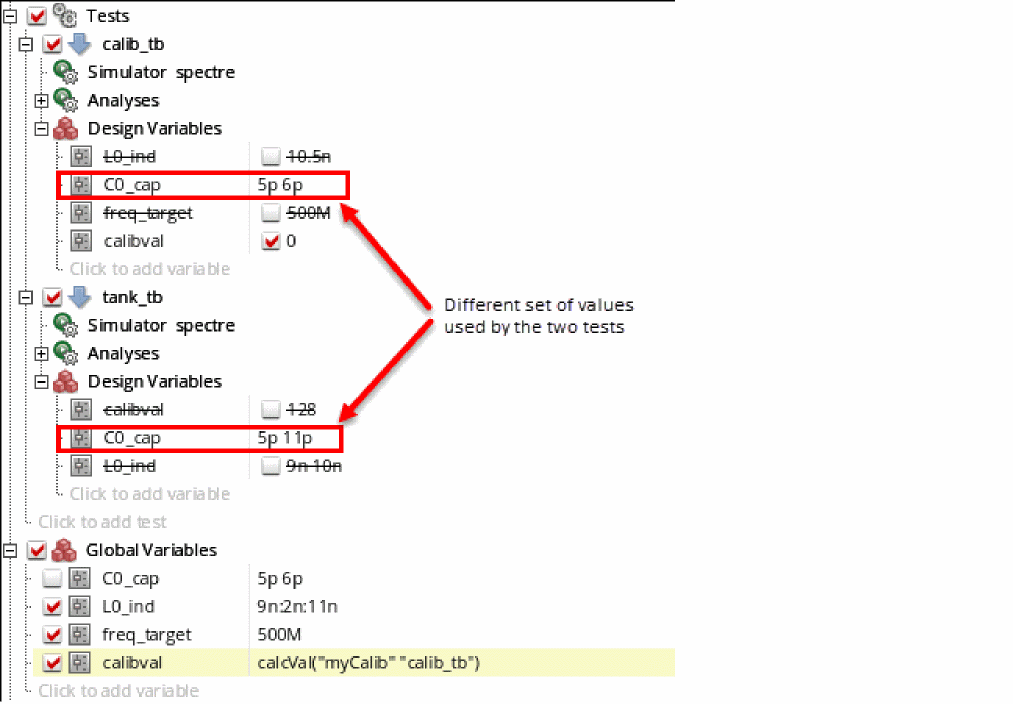
In this example, ?matchParams is set to "none", but calcVal does not look for any matching variable because the setup contains local sweeps. As a result, for each point of tank_tb, calcVal returns nil.
calcVal does not return valid results. Therefore, it is recommended to use ?matchParams set to "none" only when the tests do not have local sweeps, the count of the enabled sweep points and corners in the source and target test is same and they are identical.
In case II described above, if ?matchParams is set to "all" instead of "none", calcVal looks for matching variables and parameters in other points, and the results are different, as shown below.
Case III: ?matchParams is set to "all" and the target test has more data points than the calibrated test
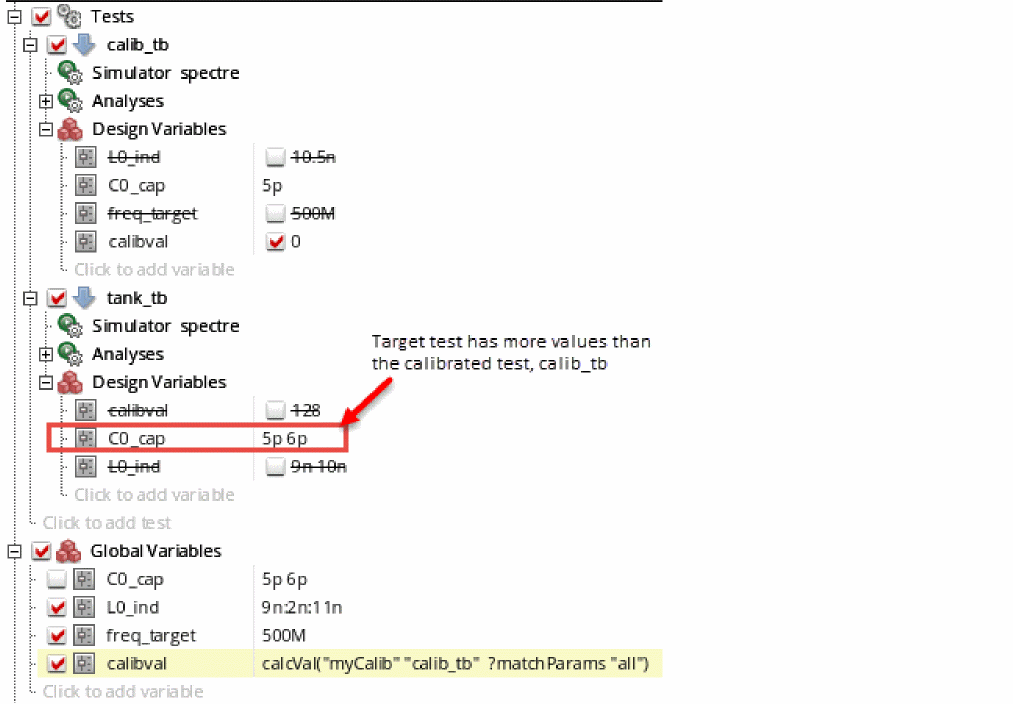
calcVal does not find matching data points for some parameters. For those points, it returns nil, as shown below.
Case IV: ?matchParams is set to list(list("L0_ind" "11n") list("C0_cap" "8p"))
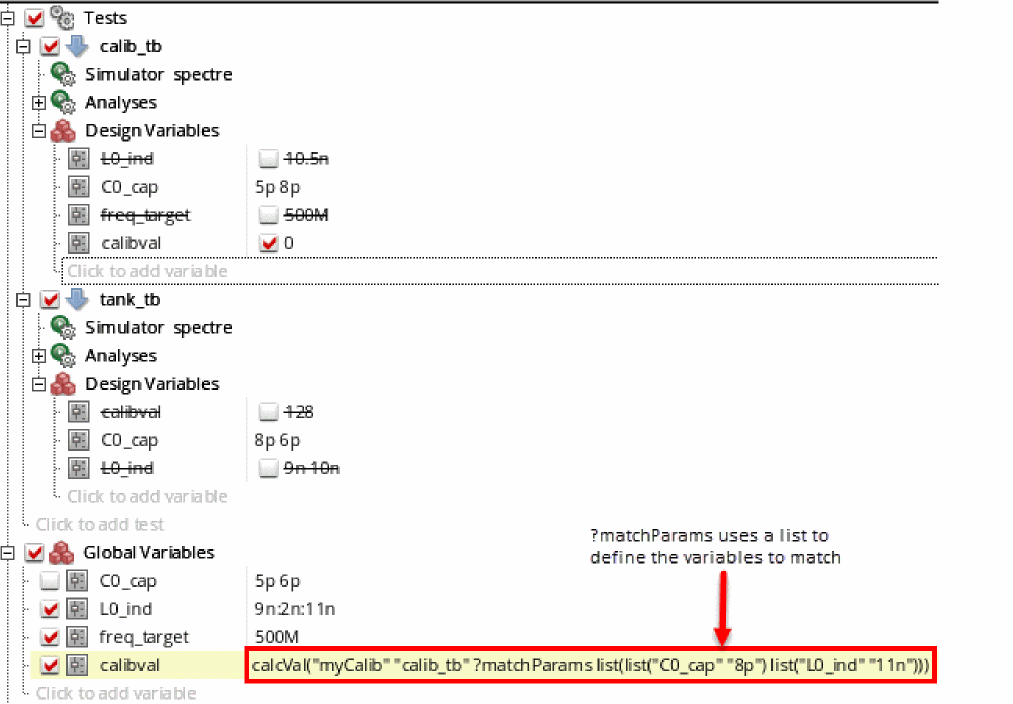
In this case, calcVal looks for data points in the calibrated test that have parameters L0_ind=11n and C0_cap=8p. If found, the target test uses the value of the myCalib expression to get the value for calibval for all the points in the target test, as shown below.
Case V: ?matchParams is used with ?ignoreParams where ?matchParams is set to "all" and ?ignoreParams is set to list ("calibVal")
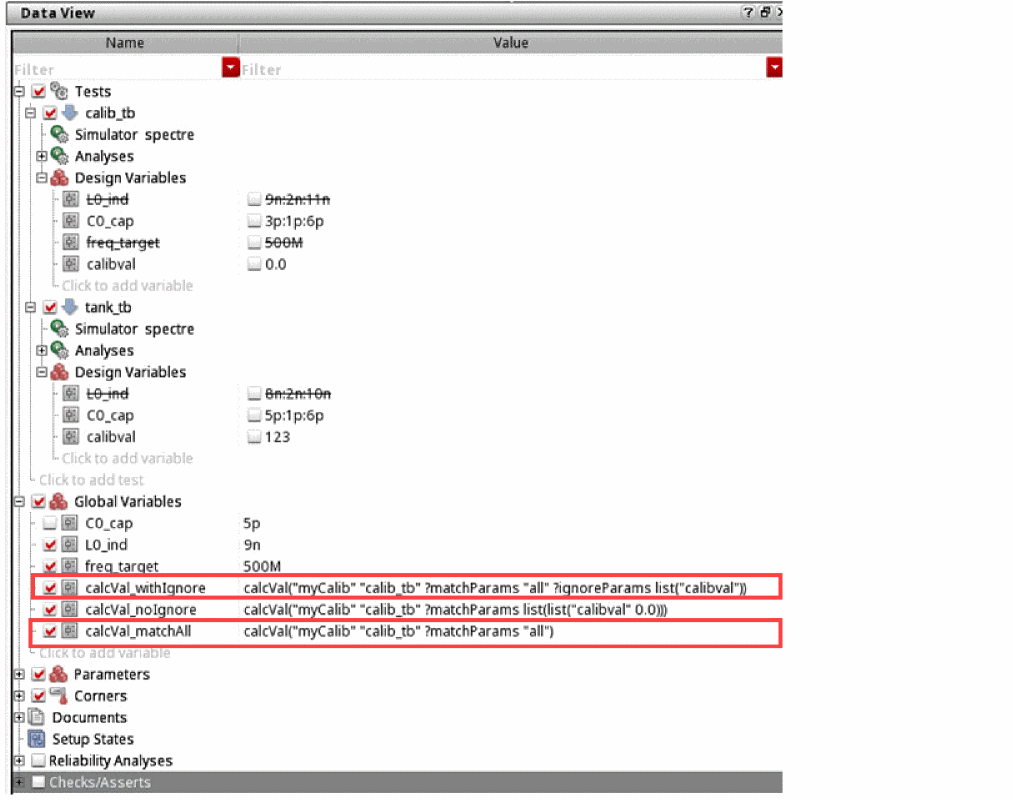
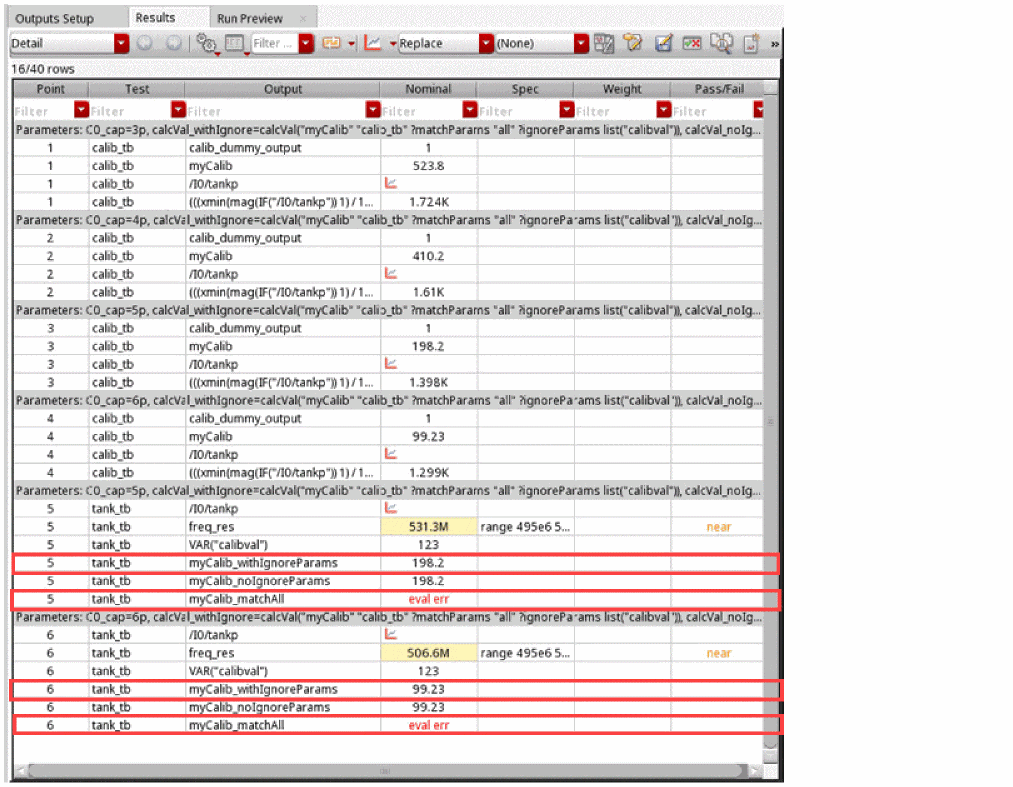
On using ?matchParams with ?ignoreParams, calcVal looks for matching data points but ignores the local sweep variable calibval that has different values in both the tests. The target test then uses the value of the myCalib expression to get the value for calcVal_withIgnore for all the points in the target test.
However, on setting ?matchParams to "all" without using ?ignoreParams, you get an evaluation error, as calcVal tries to match all data points and encounters calibval that has a different value in both the tests.
Recommendations for ?output in calcVal
Consider the following recommendations while using calcVal expressions in outputs:
-
To optimize
calcValperformance, it is recommended to pointcalcValto scalar output expressions. ThoughcalcValcan also be used on signals and expression resulting into waveforms, it is costly to evaluate those.
For example, to getymaxof signal\OUTfromtest1intest2, you can use two options:-
Use
calcValto get the signal\OUTintotest2and then calculateymaxintest2 -
Calculate
ymaxof\OUTintest1itself and fetch that scalar value bycalcVal
The second option is more efficient. However, there can certainly be cases when it cannot be avoided to usecalcValon waveform expression and signals. -
Use
-
You can use
calcValinside complex expressions, however, it is more efficient to use a separate output expression for eachcalcVal. This helps in debugging because you can see which part of the expression might cause an issue.
For example, the expressionmyValue = max(calcVal(…) calcVal(…)), can be represented as shown below.value1 = calcVal(…) value2=calcVal(…) myValue=max(value1 value2)
Recommendations for Using ?matchParams in calcVal
Depending on the variable and corner settings in the target and source (calibrated) test, you can specify an appropriate value for the ?matchParams argument of calcVal to obtain correct results. You may find the following recommendations useful:
-
Use the default value,
"none", when the following conditions are met:- The source and target tests do not use local sweep variables
- The count of sweep values of variables and corners in the source and target tests is same
- The values of all enabled corners and swept variables are identical
In this case,calcValconsiders only the count, and setup of variables and corners. It does not look for matching parameters. -
Set
?matchParamsto"all"when the tests have local sweeps or corners with varying values. In this case,calcValfinds points with matching sweeps and corners in the current or given history or run of the source test. -
Set
?matchParamsto<a-list-of-specific-design-points>or a user-defined function that returns a list containing name-value pairs of variables when the tests have local sweeps or corners with varying values, and you wantcalcValto explicitly look for the given matching design points in the source and target tests. See the example in case IV above. You can also use the?ignoreParamsargument in addition to the?matchParamsargument to ignore specific parameters in case you have local parameters with varying values or a parameter that has acalcValexpression as a a value. -
To use the results of a non-identical corner from the source test, use the default value of
?matchParamsand specify the corner name of the source test by using the?cornerNameargument. -
To use the results from another history or run by using the
?historyor?runarguments ofcalcVal, ensure that the design points are identical. These arguments can be used with any value of?matchParams. -
Do not specify
?matchParamswhen?getFirstSweepPointis set tot, which indicates that the result of the first sweep point in the source test is to be used for all design points in the target test.?getFirstSweepPointworks with the default value of?matchParamsand ignores any other value set for it.
Troubleshooting calcVal
Before running a simulation, ADE Explorer or ADE Assembler check the calcVal expressions in outputs or variables for any syntax issues and report errors that you can fix before running the simulation. If you proceed without fixing the syntax issues or if the values assigned to the arguments during runtime are invalid, the expressions return eval err. You can set the debug environment variable to specify the level of details to be reported in the log file to help you resolve issues.
The examples cases described in this section show how you can resolve issues for calcVal expressions.
Case 1: calcVal with Local Sweeps
With local sweep values, the Results tab displays independent sweep points for each test. In such cases, on using calcVal with just the arguments t_outputName and t_testName, the function returns an evaluation error or nil. This is because when calcVal tries to fetch the target value from the specified test, it looks for the same sweep point as that of the test where the function is specified.
For example, let us consider the following setup.
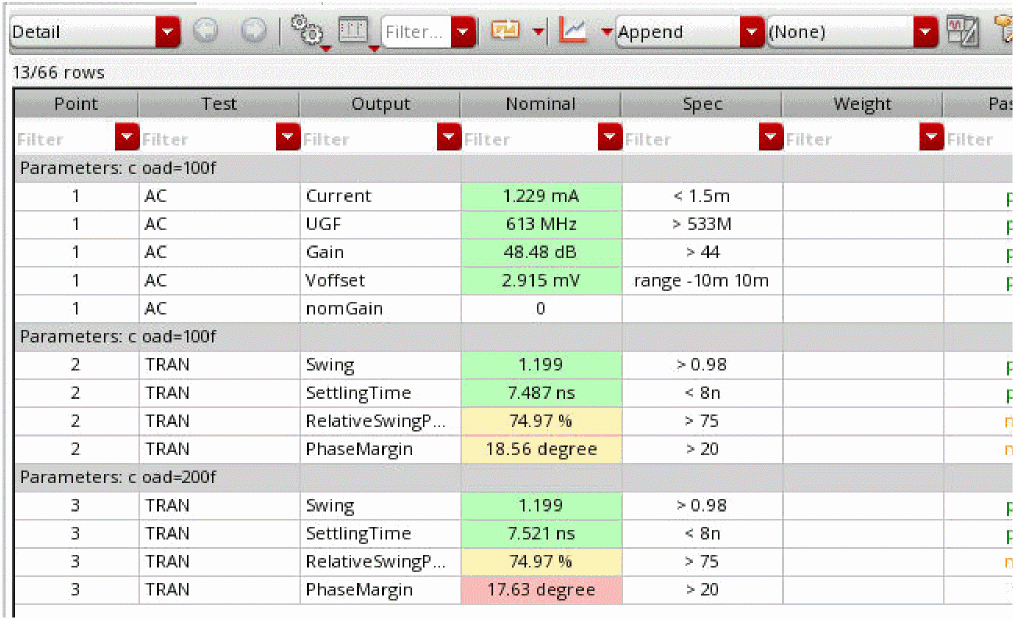
Here, on using the function calcVal("UGF" "AC")for the second sweep point of the test TRAN, calcVal will try to find the value of UGF from the second sweep point for the test AC, which does not exist. This will result in an evaluation error.
You can fix this by using additional arguments like ?getFirstSweepPoint, ?matchParams, and ?ignoreParam.
To avoid such errors, you can also use the calcVal lint check button in the in the Run Preview tab to run pre-simulation checks on calcVal expressions. You can then view the resulting output messages in the CIW.
Case 2: Using ?matchParams with multiple matching points in the target test
On using the arguments ?ignoreParams and ?matchParams, calcVal looks for matching points in the target test. But on encountering multiple matching points, it would not know which value to pick and will return nil.
For example, on setting ?matchParams and ?ignoreParams to list(list("a" 1) list("b" 3)) and list("c")) respectively, with a local sweep c=5 6 7 in the target test, calcVal would find three matching values and would not know which one to use.
Case 3: Syntax errors
The most common issues with calcVal expressions are syntax errors, such as missing double quotation marks or a missing parenthesis.
When the calcVal expressions have syntax errors, the tool displays warning messages. It is recommended to fix the reported warnings before continuing with simulation. However, if you still continue, the incorrect expressions either result in a nil value in the netlist or an evaluation error in the results of output expressions.
To avoid such errors, you can use the calcVal lint check button in the Run Preview tab to run pre-simulation checks on calcVal expressions. You can then view the resulting output messages in the CIW.
Case 4: Using the argument ?getFirstSweepPoint
In general, the ?getFirstSweepPoint argument is useful to tell calcVal to fetch the value from the first sweep point only, especially while working with local sweeps. But in specific cases, you might get an evaluation error.
In case, you have a local sweep in the target test and you run only one point in the source test, calcVal would not know which value to pick even though there is just one point.
To avoid such issues, you can specify the option ?getFirstSweepPoint t in the expression to tell calcVal to fetch the value from the first sweep point, irrespective of the number of sweeps in the source test.
Case 5: calcVal accuracy
The calcVal return value is a copy of the target value this function is pointing to, but a comparison with the original value shows some extremely small differences.
calcVal needs to do some processing of the values and expressions. Usually, a 64-bit double floating point value can be precisely processed upto fifteen digits. Differences in the thirteen, fourteen, and, fifteen digits range indicate a difference in the numerical noise level. The simulator can accurately process values in the range of five to six digits. Therefore, comparing values from the numerical noise level should be avoided. Comparison should always be done with a certain range to avoid any false alarm.
Case 6: The usage of ?matchParams and ?ignoreParams
The ?matchParams and ?ignoreParams arguments let you specify which value to fetch in case of local sweeps. But in some cases, problems may arise.
For example, consider two tests, test1 and test2 containing local sweep points vdd=1 2 3 4 and vdd=2 4 respectively. Here, if a calcVal expression in the second point of test2, vdd=4 tries to get a value from test1, it would not know which point of test1 to fetch the value from.
In such scenarios, using ?matchParams "all" would solve the issue because calcVal will then look at all the points in the test1 to find a point with vdd=4 and will get the value from point four of test1.
But if you sweep vdd=2 4 in test1 and vdd=1 2 3 4 in test2, the above argument would not solve the problem since calcVal will try to match all values and will not find a match for vdd=1 and vdd=3. In this case, you can specify which value to match by using the argument ?matchParams list(list("vdd" 4))
Let us add another variable rload to this setup with rload=2 for test1 and rload=3 for test2. Now considering the local sweep point vdd=1 2 3 4, the above mentioned solution will not work since all the variables need to match and the value for rload is different for both the tests. In this case, you can use any of the following arguments as a solution.
-
?matchParamslist(list("vdd"4)list("rload"2)) -
?matchParamslist(list("vdd"4))?ignoreParamslist("rload")
Case 7: Circular dependencies
An error message is displayed in case you have a circular dependency in calcVal expressions.
For example, consider a circular dependency between the calcVal expressions in four tests, test1, test2, test3, and test4. The calcVal expression in test2 is dependent on test1. Accordingly, test3 is dependent on test2 and test3 on test4. If test1 has an additional dependency on test4, the setup contains a circular dependency. This would mean that test1 is dependent on test2, test3, test4 and finally on itself. This indicates that there is an issue with your setup and the dependency loop needs to be broken at one point.
calcVal might report only the dependency between test2 and test3. However, it could be that the wrong dependency is actually between test3 and test1.Return to top