
axlSetDefaultVariables
axlSetDefaultVariables(l_variables[t_libName] ) => t / nil
Description
Creates a set of default variables in the Global Variables tree on the Data View pane and in the Parameters and Variables assistant of ADE Assembler.
By using this function, you can define a distinct set of default variables for each library. You can also define a general set of default variables to be associated with all the libraries.
If you have set the default variables, when you open a new setup, the program loads the set of default variables associated with the same library as the setup, if any exists. After that, it loads the generic set of default variables, if they exist.
Arguments
|
When you do not specify any library name, the variables are added to the list of default variables. |
Value Returned
Examples
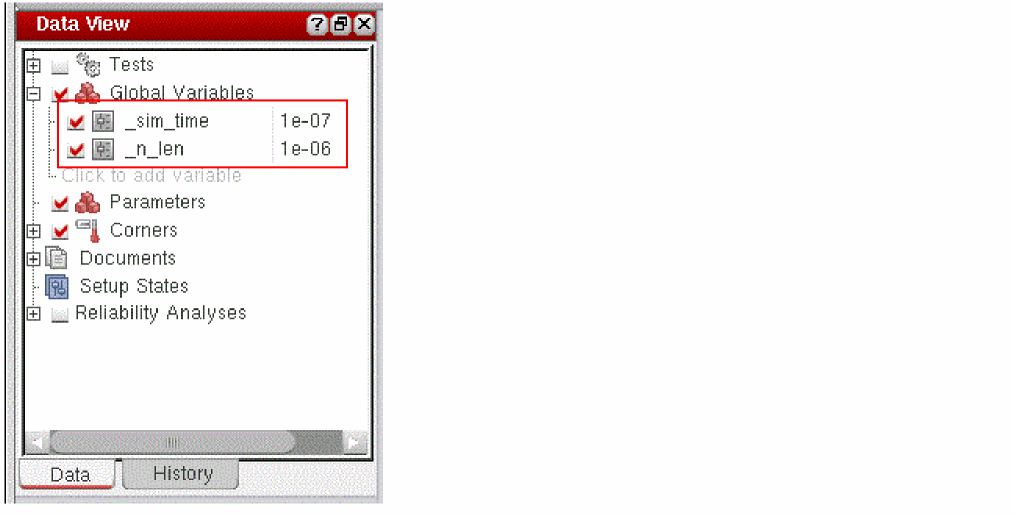
If you add the following statement in the .cdsinit file, it adds two variables, _n_len and _sim_time, with their default values to the myDemoLib library.
axlSetDefaultVariables( '(_n_len 1u _sim_time 100n) "myDemoLib" )
=>t
When you launch Virtuoso and create a new adexl view, the default list of variables is added to the Global Variables list in the Data View and the Variables and Parameters view, as shown in the figure below.
Return to top