
Modgen Transparent Editing Mode
A Modgen is an important structure in custom layouts. There are multiple ways to create and edit Modgens.
In Layout MXL, instead of invoking any GUI, you can use Modgen Transparent Editing mode to modify a Modgen directly from the top level. To invoke Modgen Transparent Editing mode, click the  icon in the Options toolbar.
In this mode, double-clicking a Modgen does not invoke Modgen Editing mode. Modgen Transparent Editing mode allows all the functionalities of Modgen Editing mode, but with the top-level canvas object in context. The Virtuoso workspace menus and toolbars are also available in this mode.
You can use the Array Assistant in combination with Modgen Transparent Editing mode. In Modgen Transparent Editing mode, the tool supports cross-selection of instances between the layout canvas and the Array Assistant. Modifications done to array instances in the Array Assistant are immediately reflected in layout canvas. For example, if you apply a base pattern in the Array Assistant, the instances in the layout canvas are automatically re-arranged as per the specified base pattern.
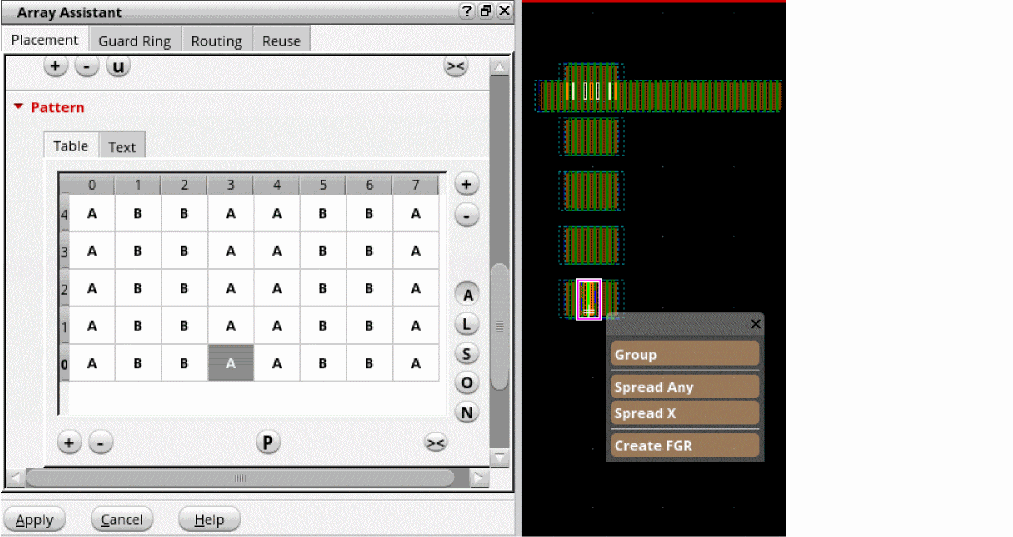
In Modgen Transparent Editing mode, when the leHiMove enter function is used to move the selected array grid members outside the current array area, the array is regenerated and these grid members are removed from the Modgen array. Similarly, when the function is used to move non-array grid members inside an array area and the array is regenerated, these members are added to the array. You can also move an instances directly from one Modgen array into another.
At any point, you can click the  icon in the Options toolbar to turn off Modgen Transparent Editing mode.
Alternatively, use the transparentModgenArray environment variable to control the mode.
Related Topics
Modgen Placement Settings in the Array Assistant
Open Modgens in the Modgen Editor
Return to top