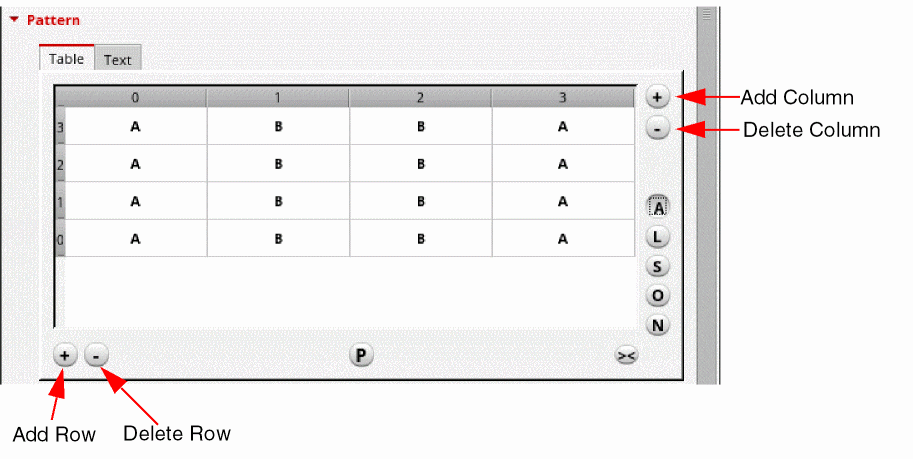
Methods to Add and Delete Rows and Columns in the Array Assistant
Use one of the following methods to add new rows or columns to Modgen arrays in the Array Assistant:
-
Using the Add buttons in the Array Assistant.
-
To add a new column at the bottom of the grid, click the Add button at the top-right corner of the Array Assistant.
-
To add a new row at the right of the grid, click the Add button at the bottom-left corner of the Array Assistant.
-
Using the shortcut menu.
-
Select the required row or column.
-
Right-click to display the shortcut menu.
-
Choose Insert Row(s) or Insert Column(s).
You can delete rows or columns using one of the following methods:
-
Using the Delete button in the Array Assistant.
-
To delete the bottom most column, click the Delete button at the top-right corner of the Array Assistant.
-
To delete the right most column, click the Delete button at the bottom-left corner of the Array Assistant.
-
Using the shortcut menu.
-
Select the required row or column.
-
Right-click to display the shortcut menu.
-
Choose Delete Row(s) or Delete Column(s).
If you alter the size of any column in the Patten or Pattern Mapping sections, click  to auto-fit the columns.
Related Topics
Creating Rows
Array Assistant
Modgen Placement Settings in the Array Assistant
Editing the Grid Pattern
Specifying the Spacing Between Modgens
Display Names in Array Assistant
Return to top