
Display Names in Array Assistant
By default, the cells in the Pattern section of Array Assistant display the symbols that are mapped to instances in the Pattern Symbol Mapping section.
Use the following buttons to toggle between symbol names, layout names, schematic names, device orientations, and net names.
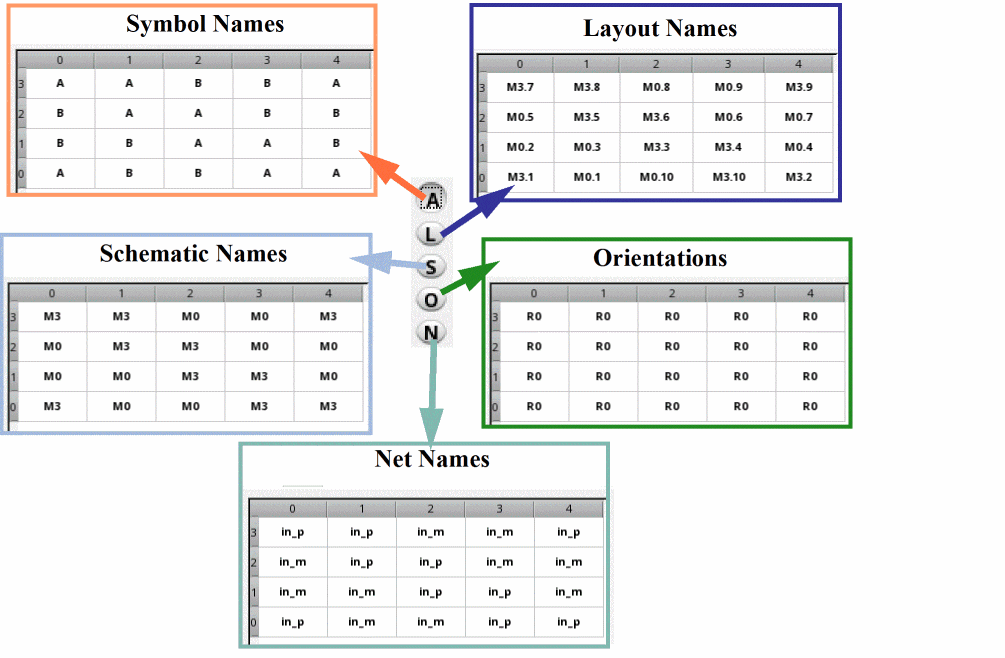
The above buttons are available on the Table tab of Pattern section. The A, L, and S settings are also applied to the Text tab.
Click  to bring all power and ground-connected terminals to their nearest row edges. The orientations of the related instances are updated based on their locations and the pattern preset is set to Custom. This command does not run on dummies added to the grid.
Related Topics
Modgen Placement Settings in the Array Assistant
The Move Command in the Array Assistant
Methods to Add and Delete Rows and Columns in the Array Assistant
Return to top