
Customizing Snapshot Output Field
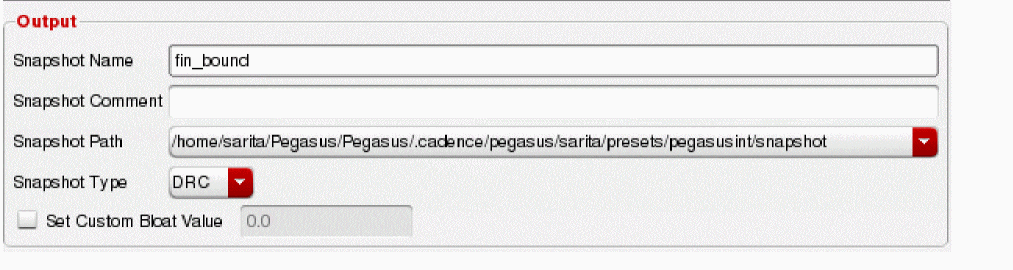
The Output field contains final snapshot name declaration, snapshot comment, the snapshot directory path, snapshot Type and check box for defining custom bloat value.
In the Snapshot Name field, you can enter the snapshot name. The naming syntax should not include any special characters, SPACE or TAB. If any special character is detected in the snapshot name input, following pop-up message box appears and requests you to modify the input.

If the snapshot name you have defined already exists, then a warning message that snapshot already exits is displayed.
The Snapshot Comment field specifies a description comment for the snapshot.
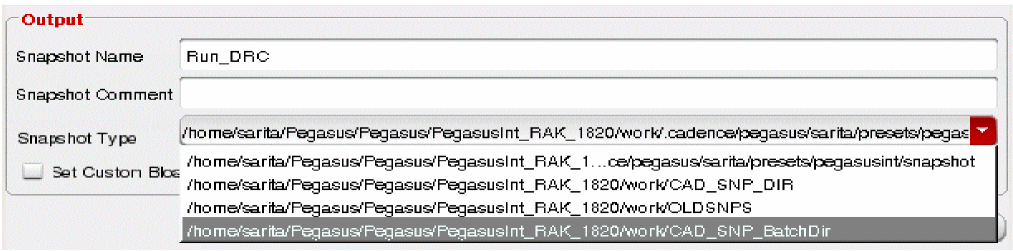
The Snapshot Path drop-down list allows you to set the directory path that snapshot is going to save to. The Snapshot Path field is set to the local snapshot directory by default. However, its drop-down items can be replaced through PegasusInt_SnapshotsDirs. If PegasusInt_SnapshotsDirs is specified, paths in this shell variable is parsed and stored as a list for the Snapshot Path combo field. The order of the snapshot directory path in this list is based on the order of declaration in PegasusInt_SnapshotsDirs. Thus, the active snapshot directory path is the first item in the list. Also, path declared in PegasusInt_SnapshotsDirs is expanded and displayed in its absolute path format.
Following example shows all four paths declared in PegasusInt_SnapshotsDirs and how they are displayed under the Snapshot Path drop-down list.
The Snapshot Type drop-down list allows you to select the snapshot type you want to create: DRC or Fill.
The Set Custom Bloat Value check box allows you to specify the custom bloat value. By default the option is disabled. In this case bloat value is defined by the Pegasus engine based on selected checks and this information is outputted as part of snapshot header after the snapshot is created. When you select the check box and specify the custom bloat value, this value is stored as part of the snapshot header.

You can enter any positive float value including “0”. However, If you enter “0” bloat value, it would mean that you want to check area “as-it-is”. When this option is off, bloat value is determined by Pegasus engine based on selected checks and output this information as part of the snapshot header. Otherwise, custom bloat value declared through this option is stored as part of snapshot header.
Return to top