
Buttons at the Bottom of the Form
- OK - Closes the Preferences form, saving any changes you have made.
- Cancel - Closes the Preferences form without saving any changes.
- Defaults - Loads the default form setting.
- Apply - Applies any preference changes that you have made. This does not close the form.
-
Save to - Saves the changes you have made to a preset file. You can use that preset whenever you want to use the settings set in the file. Clicking the button opens the Save Pegasus Interactive Preferences form:
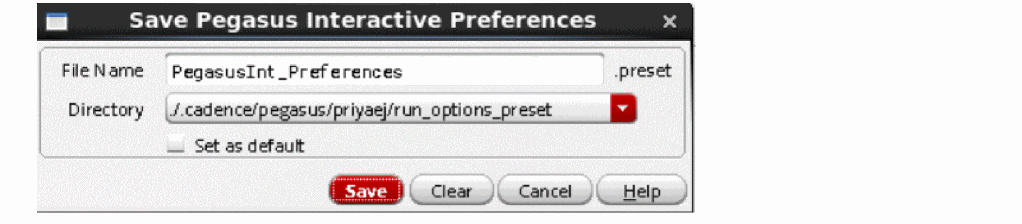
- File Name: Enter the file name for the Pegasus Interactive Run Options form settings you have made.
-
Directory: Select the location where you want to save the file. The Directory drop-down list allows you to set the directory path that preset is going to save to. By default the Directory field allows you to select two locations: the local
.cadence/pegasus/$USERdirectory and.cadence/pegasus/$USERat the$HOMEdirectory. However, its drop-down items can be expanded usingCDS_WORKAREAenvironment variable. - Set as default: Select this check box to save the settings as default.
- Click Save to save the settings.
-
Load From - Loads the form settings from an already saved preset file. Clicking Load Form opens the Load Pegasus Interactive Preferences form:
The form lists presets saved by user in different locations. These locations and search order are defined by setup.loc file, which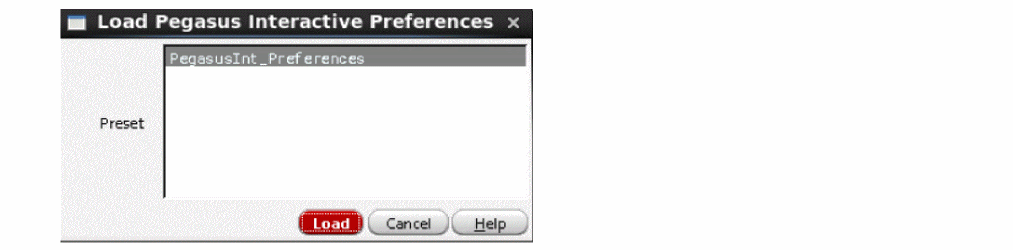
Cadence provides in $PEGASUS_INSTAL_DIR/share/cdssetup/setup.loc. Default setup.loc file defines search order as follows:
. : cwd should always be searched first.
$CDS_WORKAREA: User workarea if defined.
$CDS_SEARCHDIR: This is set by various tools during tool startup.
$HOME
$CDS_PROJECT: Project storage area, ignored if not defined.
$CDS_SITE : Site Setup Info - default is $CDS_INST_DIR/share/local.
$(compute:THIS_TOOL_INST_ROOT)/share: Cadence Default Setup Info. - Help - Brings up context-sensitive help.
Return to top