
Automatic Twig Mesh Routing
Automatic twig mesh routing lets you automatically connect a new wire to a parallel or orthogonal pre-routed wire segment. The pre-routed wire segment can either be an over-the-device route or it can be within the channel route that already connects the device pins. The number of twigs generated in mesh routing depends on the aspect ratio of the device and the electrical data of the targeted object.
In comparison to mesh routing, standard automatic twig routing only allows connections to the device pins or to an already existing pre-route on the same net with no flexibility to spread and distribute the current over existing wires. This leads to the stacking requirements.
The following example shows mesh routing with two rows of horizontal pre-routes on net39 on a large device. When a new horizontal wire is created on the selected net, multiple twigs (the vertical red segments) are created to connect both rows of pre-routes. With standard automatic twig routing, only one connection would be created on the whole device.
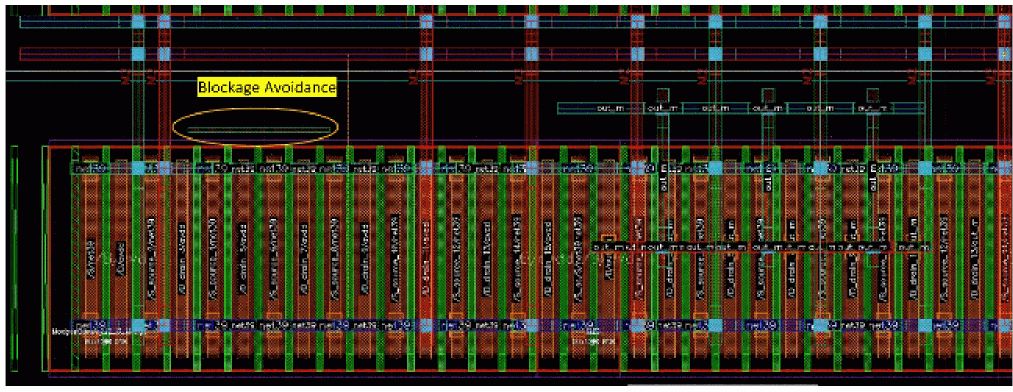
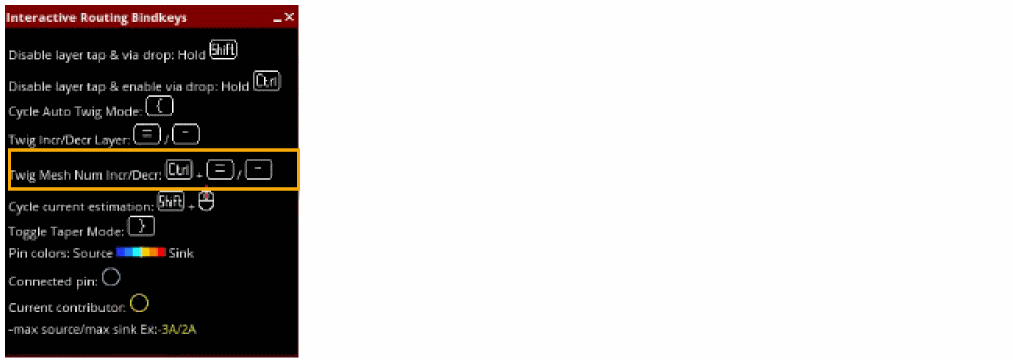
The number of twig connections can be modified by using the bindkeys. Use:
Mesh routing also supports the standard automatic twig bindkeys to increase and decrease the twig layer.
For twig mesh routing, an option is also available in the bindkeys info balloon. This option is only available when the weAutoTwigMeshRoutingEnabled environment variable is set in create wire.
Related Topics
Connecting Twigs Automatically
Return to top