dbGetNeighborList
dbGetNeighborList(
d_cellView
l_area
t_direction
[ ( t_layer [ t_purpose ] ) ]
[ lx_depth ]
)
=> l_closestNeighbor
Description
Lists neighboring shapes in the specified direction of the given layer-purpose pair. Shapes that overlap the searching box are ignored.
Arguments
|
d_cellView
|
Cellview.
|
|
l_area
|
Specifies a bounding box that defines the search area.
|
|
t_direction
|
Direction in which to search for neighboring shapes. The following strings identify the directions that can be specified:
T, t, or top Above the searching box.
B, b, or bottom Below the searching box.
L, l, or left To the left of the searching box.
R, r, or right To the right of the searching box.
|
|
t_layer
|
Specifies layer with the drawing purpose. Only the bounding boxes of the shapes on this layer-drawing pair are checked against the searching box.
|
|
t_purpose
|
Specifies layer-purpose pair. Only the bounding boxes of the shapes on this layer-purpose pair are checked against the searching box.
|
|
lx_depth
|
Search level, that is, the depth hierarchy up to which the search needs to be performed. If lx_depth is 0, only the top-level shapes are returned.
|
-
If
t_purpose is not specified, the (t_layer, drawing) layer purpose pair is used. -
If both
t_layer and t_purpose are not specified, all layer purpose pairs are used. -
If
lx_depth is not specified, 0 depth is used.
Value Returned
|
l_closestNeighbor
|
A list of ld_closestNeighbor (in the search direction). The list is in no specific order, but you can put the list into order of increasing distance with a sorting function.
|
Examples
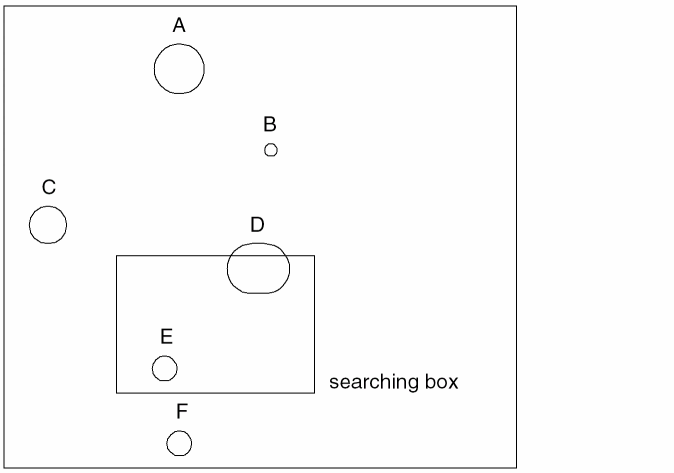
Searches for the closest neighboring shapes that are above the searching box.
closestIDs = dbGetNeighborList(cell3 ((10 5)(20 12)) "T")
Returns the information about shapes A and B because both shapes are above the specified searching box. Shapes C and F are ignored because they do not satisfy the search constraints and shapes D and E are ignored because they overlap the searching box.
Related Topics
dbGetNeighbor
Figure Creation and Retrieval Functions
Return to top