dbGetNeighbor
dbGetNeighbor(
d_cellViewId
l_bBox
t_direction
[ ( t_layer [ t_purpose ] ) ]
[ x_depth ]
)
=> ld_closestNeighbor / nil
Description
Returns a list containing information about the closest neighboring shape in the specified direction of the given layer-purpose pair. Shapes that overlap the searching box are ignored.
Arguments
|
d_cellViewId
|
Cellview ID.
|
|
l_bBox
|
Specifies a bounding box that defines the search area.
|
|
t_direction
|
Direction to search for the neighboring shape. The following strings identify the directions that can be specified:
-
T, t, or top Above the searching box. -
B, b, or bottom Below the searching box. -
L, l, or left To the left of the searching box. -
R, r, or right To the right of the searching box.
|
|
t_layer
|
Layer specification with drawing purpose. Only the bounding boxes of the shapes on this layer-drawing pair are checked against the searching box.
|
|
t_purpose
|
Layer-purpose pair specification. Only the bounding boxes of the shapes on this layer-purpose pair are checked against the searching box.
|
|
x_depth
|
The depth hierarchy up to which the search needs to be performed. If x_depth is 0, only the top-level shapes are returned.
|
-
If
t_purpose is not specified, the (t_layer, drawing) layer purpose pair is used. -
If both
t_layer and t_purpose are not specified, all layer purpose pairs are used. -
If
x_depth is not specified, 0 depth is used.
Value Returned
|
ld_closestNeighbor
|
|
|
A list containing the following information about the closest neighboring shape:
The distance to the closest shape in the specified direction.
The closest object ID identified by its hierarchical path.
The co-ordinate pair representing the position of the closest shape.
|
|
nil
|
The closest neighboring shape in the specified direction has not been found.
|
Examples
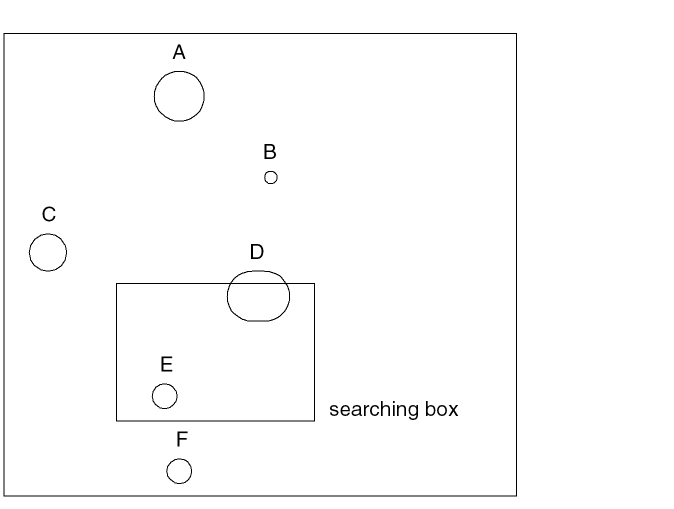
Searches for the closest neighboring shape above the searching box and returns the information about B because B is the closest shape above the specified searching box.
closestID = dbGetNeighbor(cell3 ((10 5)(25 12)) "T")
Shapes D and E are ignored because they are fully or partially within the searching box. Shapes C and F are ignored because they do not satisfy the search constraints. Although shape A is above the box, it is ignored because it is not the closest shape in that direction.
Related Topics
Figure Creation and Retrieval Functions
Return to top