
13
About SKILL++ and SKILL
Cadence® SKILL++ is the second generation extension language for Cadence software. SKILL++ combines the ease-of-use of the SKILL environment with the power of the Scheme programming language. The major power brought in from Scheme is its use of lexical scoping and functions with lexically-closed environments called closures:
- Lexical scoping makes reliable and modular programming more easily achievable, because you have total control over the use and reference of variables for any code without worrying about accidental corruptions caused by the use of the same variable name in a remote place.
- Closures are powerful entities that only exist in the more advanced programming languages. They encapsulate the code and related data into a single unit, with total control on the exported interface. Many modern programming idioms and paradigms, such as message-passing and objects with inheritance, can be implemented elegantly using closures.
Other advantages of SKILL++ include the following:
- SKILL++ provides environments as first-class objects. With closures and first-class environments, you can create your own module or package systems. You are no longer restricted to SKILL’s single flat name space model. Instead, you can organize the code into a hierarchy of name spaces.
- In addition to Scheme semantics, SKILL++ includes an object layer that makes explicit object-oriented style programming possible. The object layer supports classes, generic functions, methods, and multiple inheritance.
- Because SKILL++ and SKILL can coexist harmoniously in the same environment, backward compatibility and interoperability are not an issue. All existing SKILL code can still run without any changes, and all or part of any SKILL package can be migrated to SKILL++. Code developed in SKILL++ and SKILL can call each other and share the same data structures transparently.
Background Information about SKILL and Scheme
SKILL was originally based on a flavor of Lisp called “Franz Lisp.” Franz Lisp and all other flavors of Lisp were eventually superceded by an ANSI standard for Lisp called “Common Lisp.” The semantics and nature of SKILL make it ideal for scripting and fast prototyping. But the lack of modularity and good data abstraction, or its general openness, make it harder to apply modern software engineering principles especially for large endeavors. Since its inception, SKILL has been used for writing very large systems within the Cadence tools environments. To this end Cadence chose to offer Scheme within the SKILL environment.
Scheme is a Lisp-like language developed originally for teaching computer science at the Massachusetts Institute of Technology and is now a popular language in computer science and sometimes EE curriculums. Scheme is a modern language whose semantics empower engineers to develop sound software systems. There is an IEEE standard for Scheme. Scheme was also the choice of the CAD Framework Initiative (CFI) for an extension language base. Cadence supplies major Scheme functionality as part of the SKILL environment. Benefits include the following:
- New programs written in Scheme can coexist and call procedures in existing programs written in SKILL without paying penalties in performance or functionality.
- Scheme and SKILL will share the run-time environment so structures allocated in Scheme programs can be passed without modification to SKILL programs and visa-versa.
- Suppliers and consumers can choose to migrate to Scheme independently of each other. For example, a Cadence-supplied layer can choose to remain written in SKILL while users of that layer can switch to using Scheme. The converse is also true.
SKILL++ Relation to IEEE and CFI Standard Scheme
CFI has chosen IEEE standard Scheme as the base of their proposed CAD Framework extension language. Because the intended use was as a CAD tool extension language, which must be embeddable within large applications in a mixed language environment, CFI relaxed the requirement for the support of full “call-with-current-continuation” and the full numeric tower (only numbers equivalent to C's long and double are required).
For the same reason, CFI added a few extensions such as exception handling and functions for evaluating Scheme code, as well as a specification on the foreign function interface APIs, to their proposal.
SKILL++ is designed with IEEE Scheme and CFI Scheme compliance in mind, but due to its SKILL heritage and compatibility, it is not fully compliant with either standard.
The following sections describe the differences between SKILL++ and the standard Scheme language.
Syntax Differences
SKILL++ uses the same familiar SKILL syntax with the following restrictions and extensions.
Restrictions
-
Because most of the special characters are used as infix symbols in SKILL++ and SKILL, they cannot be used as regular name constituents. However, many standard Scheme functions and syntax forms have been systematically renamed for ease of use under SKILL++'s syntax, for example
pair?            ==> pairp
list->vector     ==> listToVector
make-vector      ==> makeVector
set!             ==> setq
let*             ==> letseq (for “sequential let”)
-
Except for vector literals (such as
#(1 2 3)), the#…syntax is not supported, so usetfor#t,nilfor#f, and use single character symbols for character literals and so forth.
Extensions
- Like SKILL, but unlike standard Scheme, SKILL++ symbols are case- sensitive.
-
SKILL++ inherited all the SKILL syntactic features, such as infix notation, optional/keyword arguments with default values, and many powerful looping special forms (such as
for,foreach,setof). -
SKILL++ code can define macros using the
mprocedure/defmacroas well as use existing macros defined in SKILL.
Semantic Differences
SKILL++ adopts the standard Scheme semantics with the following restrictions and extensions.
Restrictions
-
The atom
nilis the same as the empty list '(), as well as thefalsevalue. Standard Scheme uses #f for the only false value and treats the empty list as a true value. -
The
conscells in SKILL++ are like SKILL's, that is, theircdrslot can only be eithernilor anotherconscell. In standard Scheme, thecdrslot of a cons cell can hold any value. -
The SKILL++
mapfunction and the SKILLmapfunction share the same name and implementation, but behave differently from standard Scheme’smapfunction. To get the behavior of Scheme’smap, usemapcarin SKILL++. -
Strings in SKILL++ and SKILL are immutable, so there is no support for functions like Scheme's
string-set!. -
The
charactertype is not supported yet. As in SKILL, symbols of one character can be used as characters. -
No “eof” object. The
linereadfunction returnsnilon end-of-file.
Extensions
-
Environments are treated as first class objects. The
theEnvironmentform can be used to get the enclosing lexical environment, and bindings in an environment can be easily accessed. This provides a powerful encapsulation tool. -
SKILL++ inherits the SKILL set of powerful data structures, such as
defstructand association tables, as well as all the functions and many special forms of SKILL. - Support for transparent cross-language (SKILL <-> SKILL++) mixed programming.
Syntax Options
SKILL++ adopts the same SKILL syntax, which means SKILL++ programs can be written in the familiar infix syntax and the general Lisp syntax.
If syntax is not an issue for you and you are comfortable with the infix notation, continue to use that.
If you are concerned that the knowledge of SKILL++ you build by programming in the infix syntax will not be useful if you were to program in a Scheme environment (without SKILL), then use the Lisp syntax for programming in SKILL++. The syntactic differences between SKILL++ using Lisp syntax and standard Scheme are:
-
In SKILL++, you may not use any special characters (such as
+,-,/,*,%,!,$,&, and so forth) in identifiers because most of these characters are used as infix operators. -
As a general convention, Scheme functions ending with an exclamation point (
!) are provided either without the exclamation point or as the equivalent SKILL function. For example, Schemeset!is SKILL++setq. Scheme functions using->are provided usingToas part of the function name. For example,list->vectorbecomeslistToVector. See “Scheme/SKILL++ Equivalents” in the Cadence SKILL Language Reference for a complete list of name mappings. - Scheme's dotted pairs are not available in SKILL++. Use simple lists instead.
-
You can use
=>and…as identifiers.
Compliance Disclaimer
Cadence-supplied Scheme is not fully IEEE compliant for the following reason:
-
Scheme was not originally designed as an extension language. Features in Scheme that cannot be used safely in conjunction with a system written in C/C++ are omitted, such as “
call/cc” and non-null terminated strings. -
Cadence puts a high value on making the system fully backward compatible for SKILL programs and procedural interfaces. As a result, the empty list
nilis a Booleantruein the Scheme standard while Cadence's SKILL and SKILL++ treatnilas a Booleanfalse. Without this treatment ofnil, the migration of existing SKILL programs to Scheme would require many existing procedural interfaces written in SKILL to change.
In general, SKILL++ is implemented to support both the Lisp syntax and the more familiar SKILL infix syntax for writing Scheme programs, as well as to provide a smooth path for migrating SKILL code to Scheme.
References
You can read the following for more information about Scheme:
Structure and Interpretation of Computer Programs, Harold Abelson, Gerald Sussman, Julie Sussman, McGraw Hill, 1985.
Scheme and the Art of Programming, G. Springer & D. Friedman, McGraw Hill, 1989.
An Introduction to Scheme, J. Smith, Prentice Hall, 1988.
“Draft Standard for the Scheme Programming Language,” P1178/D5, October 1, 1990. IEEE working paper.
Extension Language Environment
Cadence’s extension language environment supports two integrated extension languages, SKILL and SKILL++. Your application can consist of source code written in either language. Programs in either language can call each other’s functions and share data.
- You can maintain existing SKILL applications with no change whatsoever.
- Using SKILL++, you can hide private functions and private data so that you can design and implement your application with reusable components.
You should consider developing new applications using the SKILL++ language, in conjunction with SKILL procedural interfaces as necessary.
For source code files, the file extension indicates the language:.il for SKILL, .ils for SKILL++.
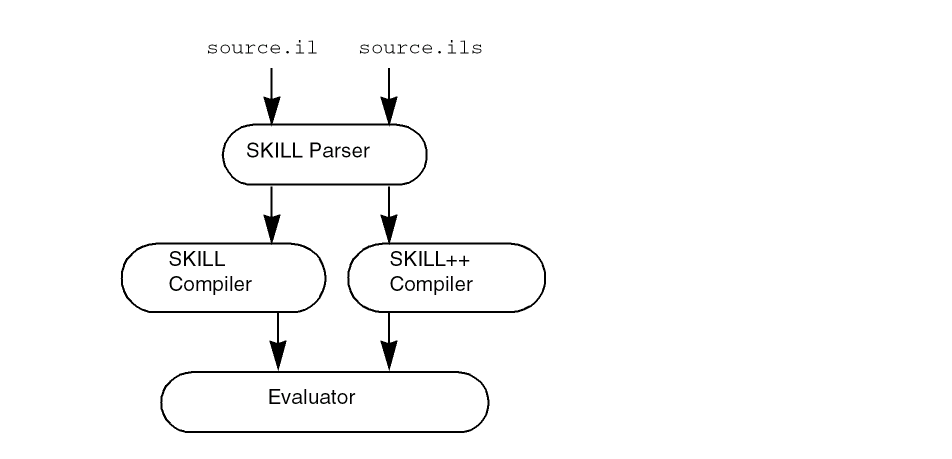
By default, the session accepts SKILL expressions. Interactively, you can invoke a top level for either SKILL or SKILL++ as follows:
| Language | Command |
|---|---|
Advanced programmers can use the eval function to evaluate an expression using either SKILL semantics or SKILL++ semantics.
Contrast Variable Scoping
Variables associate an identifier with a memory location. A referencing environment is the collection of identifiers and their associated memory locations. The scope of a variable refers to the part of your program within which the variable refers to the same location.
During your program’s execution, the referencing environment changes according to certain scoping rules. Even though the syntax of both languages is identical, SKILL and SKILL++ use different scoping rules and partition a program into pieces differently.
SKILL++ Uses Lexical Scoping
SKILL++ uses lexical scoping. Because lexical scoping relies solely on the static layout of the source code, the programmer can confidently determine how reusing a program affects the scope of variables.
The lexical scoping rule is only concerned with the source code of your program. The phrase ‘a part of your program’ means a block of text associated with a SKILL++ expression, such as let, letrec, letseq, and lambda expressions. You can nest blocks of text in the source code.
SKILL Uses Dynamic Scoping
SKILL uses dynamic scoping. Modifying a SKILL program can sometimes unintentionally disrupt the scope of a variable. The probability of introducing subtle bugs is higher.
The dynamic scoping rule is only concerned with the flow of control of your program. In SKILL, the phrase ‘a part of your program’ means a period of time during execution of an expression. Usually, the dynamic scoping and lexical scoping rules agree. In these cases, identical expressions in both SKILL and SKILL++ return the same value.
Lexical versus Dynamic Scoping
It is important that the scope of variables not be unintentionally disrupted when a programmer modifies or otherwise reuses a program. Subtle bugs can result when modification or reuse in another setting changes the scope of a variable.
Lexical scoping makes it possible for you to inspect the source code to determine the effect on the scope of variables. Dynamic scoping—which relies on the execution history of your program—can make it difficult to write reusable, modular code by preventing confident reuse of existing code.
Example 1: Sometimes the Scoping Rules Agree
The following example has line numbers added for reference only.
1:let((x)
2:     x = 3
3:     x
4:   )
In both SKILL and SKILL++, the let expression establishes a scope for x and the expression returns 3.
-
In SKILL++, the scope of
xis the block of text comprising line 2 and line 3. Thexin line 2 and the x in line 3 refer to the same memory location. -
In SKILL, the scope of
xbegins when the flow of control enters theletexpression and ends when the flow of control exits theletexpression.
Example 2: When Dynamic and Lexical Scoping Disagree
In example 1, the two scoping rules agree and the let expression returns the same value in both SKILL and SKILL++. Example 2 illustrates a case in which dynamic and lexical scoping disagree. Notice that the following extends the first example by merely inserting a function call to the A function between two references to x. However, the A function assigns a value to x.
1: procedure( A() x = 5 )
2: let( ( x )
3:      x = 3
4:      A()
5:      x
6:      )
-
In SKILL++, the
xin line 1 and thexin line 5 refer to different locations because thexin line 1 is outside the block of text determined by theletexpression. Theletexpression returns 3. -
In SKILL, because line 1 executes during the execution of the
letexpression, thexin line 1 and thexin line 5 refer to the same location. Theletexpression returns 5.
Example 3: Calling Sequence Effects on Memory Location
In SKILL, dynamic scoping dictates that the memory location affected depends on the function calling sequence. In the code below, function B updates the global variable x. Yet, when called from the function A, function B alters function A’s local variable x instead. Function B updates the x that is local to the let expression in A.
procedure( A()
    let( ( x )
        x = 5        ;;; set the value of A’s local variable x
        B()
        x            ;;; return the value of A’s local variable x
        ) ;let
    ) ; procedure
procedure( B()
    let( ( y z )
        x = 6
        z
        )
    ) ; procedure
See “Dynamic Scoping” for guidelines concerning the use of dynamic scoping.
Differencein Symbol Usage
SKILL and SKILL++ share the same symbol table. Each symbol in the symbol table is visible to both languages.
How SKILL Uses Symbols
SKILL has a data structure called a symbol. A symbol has a name which uniquely identifies it and three associated memory locations. For more information, see “Symbols”.
The Value Slot
SKILL uses symbols for variables. A variable is bound to the value slot of the symbol with the same name. For example, x = 5 stores the value 5 in the value slot of the symbol x. The symeval function returns the contents of the value slot. For example, symeval( 'x ) returns the value 5.
The Function Slot
SKILL uses the function slot of a symbol to store function objects. SKILL evaluates a function call, such as
fun( 1 2 3 )
by fetching the function object stored in the function slot of the symbol fun. Dynamic scoping does not affect the function slot at all.
The Property List
Dynamic scoping does not affect the property list at all. See “Important Symbol Property List Considerations”.
Summary
You can call the set, symeval, getd, putd, get, and putprop SKILL functions to access the three slots of a symbol. The following table summarizes the SKILL operations that affect the three slots of a symbol.
| SKILL Construct | Value Slot | Function Slot | Property List |
|---|---|---|---|
How SKILL++ Uses Symbols
Normally, each SKILL++ global variable is bound to the function slot of the symbol with the same name. In this way, SKILL and SKILL++ can share functions transparently.
Sometimes your SKILL++ program needs to access a SKILL global variable. You can use the importSkillVar function to change the binding of the SKILL++ global from the function slot of a symbol to the value slot of the symbol.
Difference in the Use of Functions as Data
In SKILL++ it is much easier to treat functions as data than it is in SKILL.
Assigning a Function Object to a Variable
In SKILL++, function objects are stored in variables just like other data values. You can use the familiar SKILL algebraic or conventional function call syntax to invoke a function object indirectly. For example, in SKILL++:
addFun = lambda( ( x y ) x+y ) => funobj:0x1e65c8
addFun( 5 6 ) => 11
In SKILL, the same example can be done two different ways, both of them less convenient.
addFun = lambda( ( x y ) x+y )
apply( addFun list( 5 6 )) => 11
putd( 'addFun lambda( ( x y ) x+y ))
addFun( 5 6 ) => 11
Passing a Function as an Argument
To pass a function as an argument in SKILL++ does not require special syntax. In SKILL the caller must quote the function name and the callee must use the apply function to invoke the passed function.
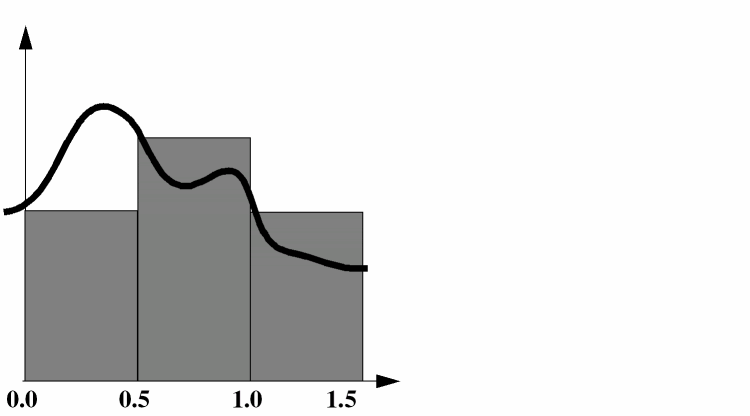
The areaApproximation function in the following example computes an approximation to the area under the curve defined by the fun function over the interval ( 0 1 ). The approximation consists of adding the areas of three rectangles, each with a width of 0.5 and with heights of fun(0.0), fun(0.5), and fun(1.0).
In SKILL++
procedure( areaApproximation( fun )
    0.5*( fun( 0.0 ) + fun( 0.5 ) + fun( 1.0 ) )
    ) => areaApproximation
areaApproximation( sin ) => 0.6604483
areaApproximation( cos ) => 1.208942
In SKILL
procedure( areaApproximation( fun )
    0.5*(
      apply( fun '( 0.0 )) +
      apply( fun '( 0.5 )) +
      apply( fun '( 1.0 ))
      )
    ) => areaApproximation
areaApproximation( 'sin ) => 0.6604483
areaApproximation( 'cos ) => 1.208942
SKILL++ Closures
A SKILL++ closure is a function object containing one or more free variables (defined below) bound to data. Lexical scoping makes closures possible. In SKILL, dynamic scoping prevents effective use of closures, but a SKILL++ application can use closures as software building blocks.
Relationship to Free Variables
Within a segment of source code, a free variable is a variable whose binding you cannot determine by examining the source code. For example, consider the following source code fragment.
procedure( Sample( x y )
    x+y+z
    )
By examination, x and y are not free variables because they are arguments. z is a free variable. In SKILL++ lexical scoping implies that the bindings of all of a function’s free variables is determined at the time the function object (closure) is created. In SKILL, dynamic scoping implies that all references to free variables are determined at run time.
For example, you can embed the above definition in a let expression that binds z to 1. Only code in the same lexical scope of z can affect z’s value.
let( (( z 1 ))
    procedure( Sample( x y )
        x+y+z
        )
    ;;; code that invokes Sample goes here.
    )
How SKILL++ Closures Behave
A SKILL++ application can use closures as software building blocks. The following examples increase in complexity to illustrate how SKILL++ closures behave.
Example 1
let( (( z 1 ))
    procedure( Sample( x y )
        x+y+z
        )
    ;;; code that invokes Sample goes here.
    Sample( 1 2 )
    )
=> 4
Example 2
let( (( z 1 ))
    procedure( Sample( x y )
        x+y+z
        )
    ;;; code that invokes Sample goes here.
    z = 100
    Sample( 1 2 )
    )
=> 103
This example assigns 100 to the binding of z. Consequently, the Sample function returns 103. In this case, dynamic scoping and lexical scoping agree.
Example 3
let( (( z 1 ))
    procedure( Sample( x y )
        x+y+z
        ) ; procedure
    ;;; code that invokes Sample goes here.
    let( (( z 100 ))
        Sample( 1 2 )
        ) ; let
    ) ; let
=> 4
This example invokes Sample from within a nested let expression. Although dynamic scoping would dictate that z be bound to 100, lexically it is bound to 1.
Example 4
procedure( CallThisFunction( fun )
    let( (( z 100 ))
          fun( 1 2 )
        )
    )
let( (( z 1 ))
    procedure( Sample( x y )
        x+y+z
        ) ; procedure
    CallThisFunction( Sample )
    )
=> 4
In this SKILL++ example, the let expression binds z to 1, creates the Sample function and then passes it to the CallThisFunction function. Whenever the Sample function runs, z is bound to 1. In particular, when the CallThisFunction function invokes Sample, z is bound to 1 even though CallThisFunction binds z to a different value prior to calling Sample.
Therefore, Sample has encapsulated a value for its free variable z. To do this in SKILL is impossible, because dynamic scoping dictates that Sample would see the binding of z to 100.
Therefore, SKILL++ allows you to build a function object that you can pass an argument, certain that its behavior will be independent of specifics of how it is ultimately called.
Example 5
W = let( (( z 1 ))
    lambda( ( x y )
        x+y+z
        )
    )
=> funobj:0x1bc828
W( 1 2 ) => 4
In this example, the name Sample is insignificant because the let expression itself does not contain a call to Sample. Instead, the let expression returns the function object. This function object is a closure. The code returns a distinct closure each time the code is executed. In SKILL++, there is no way to affect the binding of z. The function object has effectively encapsulated the binding of z.
Example 6
The makeAdder function below creates a function object which adds its argument x to the variable delta. Each call to makeAdder returns a distinct closure.
procedure( makeAdder( delta )
    lambda( ( x ) x + delta )
    )
=> makeAdder
In SKILL++, you can pass 5 to makeAdder and assign the result to the variable add5. No matter how you invoke the add5 function, its local variable delta is bound to 5.
add5 = makeAdder( 5 )=> funobj:0x1e3628
add5( 3 ) => 8
let( ( ( delta 1 ) )
    add5( 3 )
    ) => 8
let( ( ( delta 6 ) )
    add5( 3 )
    ) => 8
SKILL++ Environments
This section introduces the run-time data structures called environments that SKILL++ uses to support lexical scoping. This section covers how SKILL++ manages environments during run time. Understanding this material is important if your application use closures.
For more information, Using SKILL and SKILL++ Together covers how inspecting environments can help you debug SKILL++ programs.
The Active Environment
During the execution of your SKILL++ program, the set of all the variable bindings is called an environment. To accommodate the sequence of nested lexical scopes which contain the current SKILL++ statement being executed, an environment is a list of environment frames such that
- SKILL++ stores all the variables with the same lexical scope in a single environment frame
- The sequence of nested lexical scopes correspond to a list of environment frames
Consequently, each environment frame is equivalent to a two column table. The first column contains the variable names and the second column contains the current values.
The Top-Level Environment
When a SKILL++ session starts, the active environment contains only one environment frame. There are no other environment frames. All the built-in functions and global variables are in this environment. This environment is called the top-level environment. The toplevel( 'ils ) function call uses the SKILL++ top-level environment by default. However, it is possible to call the toplevel( 'ils ) function and pass a non-top-level environment. Consider an expression such as
let( (( x 3 )) x ) => 3
in which we insert a call to toplevel( 'ils ). During the interaction we attempt to retrieve the value of x and then set it. References to x affect the SKILL++ top-level.
ILS-<2> let( (( x 3 )) toplevel( 'ils ) x )
ILS-<3> x
*Error* eval: unbound variable - x
ILS-<3> x = 5
5
ILS-<3> resume()
3
ILS-<2>
Compare it with the following in which we call toplevel passing in the lexically enclosing (active) environment. Thus the toplevel function can be made to access a non-top-level environment!
ILS-<2> let( (( x 3 )) toplevel( 'ils theEnvironment() ) x )
ILS-<3> theEnvironment()->??
(((x 3)))
ILS-<3> x
3
ILS-<3> x = 5
5
ILS-<3> resume()
5
ILS-<2> x
*Error* eval: unbound variable - x
ILS-<2>
Creating Environments
During the execution of your program, when SKILL++ evaluates certain expressions that affect lexical scoping, SKILL++ allocates a new environment frame and adds it to the front of the active environment. When the construct exits, the environment frame is removed from the active environment.
Example 1
let( (( x 2 ) ( y 3 ))
    x+y
    )
When SKILL++ encounters a let expression, it allocates an environment frame and adds it to the front of the active environment.
| Variable | Value |
|---|---|
To evaluate the expression x+y, SKILL++ looks up x and y in the list of environment frames, starting at the front of the list. When the expression terminates, SKILL++ removes it from the active environment. The environment frame remains in memory as long as there are references to the environment frame.
In this simple case, there are none, so the frame is discarded, which means it’s garbage and therefore liable to be garbage collected.
Example 2
let( (( x 2 ) ( y 3 ))
    let( (( u 4 ) ( v 5 )( x 6 ))
        u*v+x*y
        )
    )
At the time SKILL++ is ready to evaluate the expression u*v+x*y, there are two environment frames at the front of the active environment.
| Variable | Value |
|---|---|
| Variable | Value |
|---|---|
To determine a variable’s location is a straight-forward look up through the list of environment frames. Notice that x occurs in both environment frames. The value 6 is the first found at the time the expression u*v+x*y is evaluated.
Functions and Environments
When you create a function, SKILL++ allocates a function object with a link to the environment that was active at the time the function object was created.
When you call a function, SKILL++ makes the function object’s environment active (again) and allocates a new environment frame to hold the arguments. For example,
procedure( example( u v )
    let( (( x 2 ) ( y 3 ))
        x*y + u*v
        )
    )
example( 4 5 )
| Variable | Value |
|---|---|
and adds to the front of the active environment, which is the environment saved when the example function was first created.
When the function returns, SKILL++ removes the environment frame holding the arguments from the active environment and, in this case, the environment frame becomes garbage. It then restores the environment that was active before the function call.
Persistent Environments
The makeAdder example below shows a function which allocates a function object and then returns it. The returned function object contains a reference to the environment that was active at the time the function object was created. This environment contains an environment frame that holds the argument to the original function call.
Therefore, whenever you subsequently call the returned function object, it can refer the local variables and arguments of the original function even though the original function has returned.
This capability gives SKILL++ the power to build robust software components that can be reused. Full understanding of this capability is the basis for advanced SKILL++ programming.
procedure( makeAdder( delta)
    lambda( ( x ) x + delta )
    )
=> makeAdder
add2 = makeAdder(2) => funobj:0x1e6628
add2( 1 ) => 3
The function object that makeAdder returns is within the lexical scope of the delta argument.
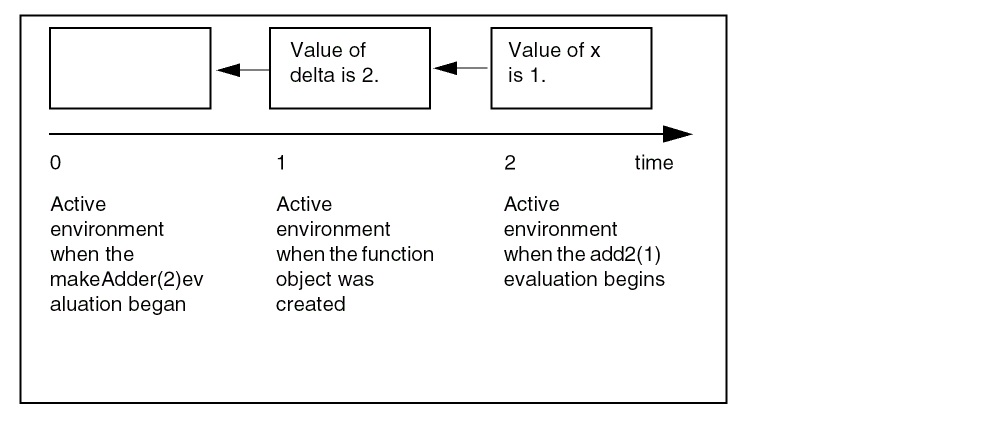
Calling makeAdder again returns another function object.
add3 = makeAdder(3) => funobj:0x1e6638
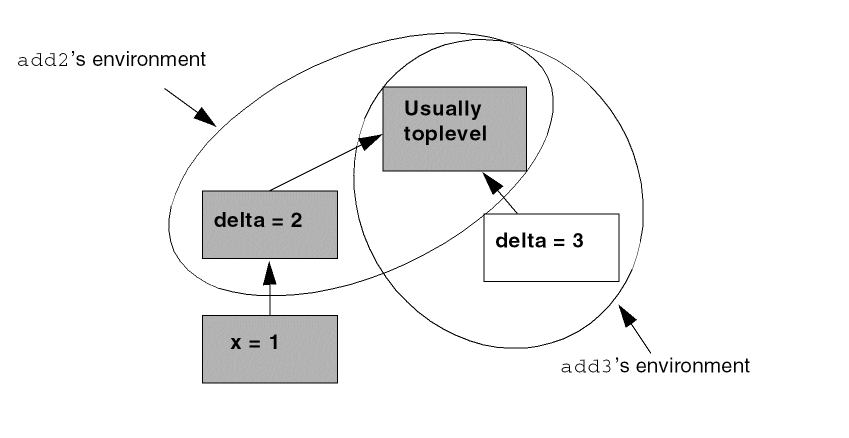
The figure below shows several environments. The encircled environments belong to the add2 and add3 functions. The gray environment is the active environment at the time add2(1) at its entry point. The other environment belongs to the add3 function, which becomes active only if add3 is called.
Return to top