
9
Advanced Topics
You can find information about advanced topics in the following sections:
- Cadence SKILL Language Architecture and Implementation
- SKILL Namespace
- Evaluation
- Function Objects
- Macros
- Variables
- Error Handling
- Top Levels
- Memory Management (Garbage Collection)
- Exiting SKILL
Cadence SKILL Language Architecture and Implementation
When you first encounter the Cadence® SKILL language in an application and begin typing expressions to evaluate, you are encountering what is known as the read-eval-print loop.
The expression you type in is first “read” and converted into a format that can be evaluated. The evaluator then does an “eval” on the output from the “read.” The result of the “eval” is a SKILL data value, which is then printed. The same sequence is repeated when other expressions are entered.
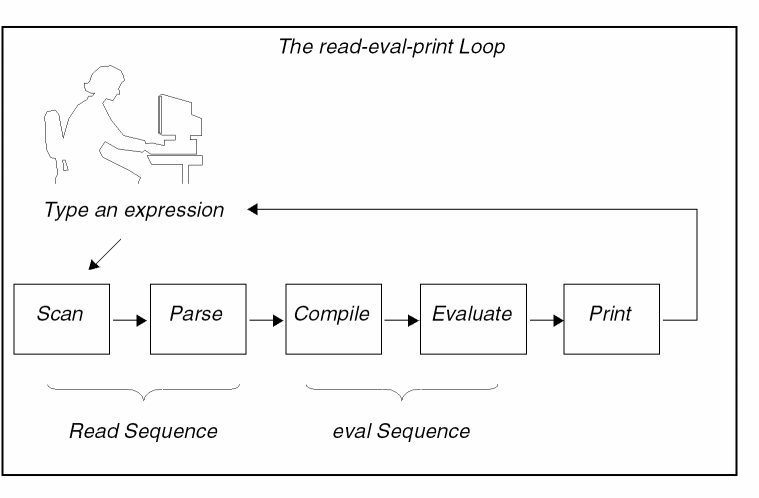
The “read” in this case performs the following tasks.
- The expression is parsed, resulting in the generation of a parse tree.
- The parse tree is then compiled into a body of code, known as a function object, made of a set of instructions that, when executed, results in the desired effect from the expression.
The instructions generated are not those of a particular machine architecture. They are the instructions of an abstract machine. Usually, this set of instructions might be referred to as byte-code or p-code. (p-code was the target instruction set of some of the early Pascal compilers and lent the name to this technique.)
The evaluator executes the byte-code generated by the compiler. In a sense, the evaluator emulates in software the operations of a hardware CPU. This technique of using an abstract instruction set to be executed by an engine written in software has several advantages for the implementation of an extension language.
- This technique lends itself well to an interpreter-based implementation.
- This technique offers faster performance than direct source interpretation.
- Once SKILL code is compiled into contexts (refer to Delivering Products) the context files are faster to load than original source code and are portable from one machine to another.
That is, if the context file is generated on a machine with architecture A from vendor X, it can be copied onto a machine with architecture B from vendor Y and SKILL will load the file without the need for recompilation or translation.
SKILL Namespace
Need for a SKILL Namespace
A SKILL programmer often uses the same name for different purposes when working on a large project with different programmers. Usually this problem is solved by using naming conventions or adding prefixes to function names, such as leCreateRect, dbCreateRect, rodCreateRect, and geCreateRect. SKILL provides a language mechanism called namespace to separate these symbols, so that a symbol with the same name can exist in several namespaces.
SKILL provides several namespace functions that you can use. For example, you can use namespace functions to create a new namespace, associate symbols with the new or an existing namespace, add or remove symbols to and from a namespace, and also use shadow functions to resolve any name conflicts between symbols within a namespace.
Default Namespace
In SKILL, the default namespace is the namespace that is opened at the start of the SKILL interpreter. The symbols from the default namespace can be referenced with their full names, such as IL:::<symbol_name> or just by their names such as <symbol_name> since there is no way to change the current namespace.
Working with a Namespace
Creating a Namespace
You start working with a namespace when you first create a new namespace using the makeNamespace function. For example, the following code helps you create an empty namespace, myNS:
makeNamespace("myNs")
You can use the findNamespace function to check if a given namespace already exists.
Associating Symbols to a Namespace
Next, you associate new symbols to the namespace (or an existing namespace) by using any of the following methods:
Some examples are given below:
myNs:::x = 0
;Creates a new symbolxin the namespacemyNsand associates a numerical value 0 to it
defun( myNs:::y (a) list(a a))
;Creates a new symbol y in the namespace myNs and associates a function value to it
(addToNamespace "A" '("a" "b" "c"))
;Adds symbols a, b, and c to the namespace A
Using Export and Import Lists of a Namespace
Finally, to be able to use the symbols associated with your own or other namespaces, you must add them to an export list. An export list is a list of symbols to be imported into the default ("IL") namespace when the useNamespace() function is called. When a new namespace is created, its export list is empty. You use the addToExportList and the removeFromExportList functions to add or remove symbols from the export list of a namespace.
You can use the symbols that have been added to the export list by using the "::" and ":::" operators, such as <NAMESPACE>::<SYMBOL>. Consider the following example:
makeNamespace("A")
addToExportList('(A:::abcd))
defun(A::abcd ()
;;defun a function "abcd" in the namespace:"A"
. . .
. . .
printf("calling A::abcd\n")
)
useNamespace("A") ;; now symbol A::abcd is imported into the default namespace
abcd()
=> "calling A::abcd\n"
getSymbolNamespace('abcd)
=> ns@A ;; this symbol belongs to the namespace:"A"
To use symbols that are not available in the export list, you can use only the ":::" operator.
Consider the following examples.
myNs:::y(myNs:::x)
;Uses a private functionyfrom the namespacemyNs, use the following code
makeNamespace("A")
A::a1
A:::a1
;A::a1 returns an error because a1 is not in the export list of namespace A, whereas, A:::a1 enables you to access the symbol a1
addToExportList('(A:::a1))
A::a1
;Allows you to access a1 from namespace A
addToNamespace function can also be used to add symbols to the export list of a namespace. Therefore, this function is suitable for converting the existing code into one that adopts a namespace without the need to modify all the occurrences of that symbol in the code.Symbols from other namespaces can be imported to the default (or current) namespace by using any of the following methods:
-
Implicitly–from the export list by using the
useNamespacefunction
In the following example, functionycan be accessed by its name after themyNsnamespace is used.useNamespace("myNs" )
=>t
y(6)
=>(6 6)
-
Explicitly–by using the
importSymbolorshadowImportfunctions
In the following example, the explicit import feature is used to gain access to the symbolximportSymbol('(myNs:::x))
=>t
x = y(x)
=>(0 0)
(eq 'x 'myNs:::x)
=>t
To be able to access the imported symbols, you can use the symbol name (without using the "::" or ":::" operator).
The unuseNamespace function is used to remove imported symbols from a namespace.
Resolving Symbol Name Conflicts
Importing operations (that is, using the importSymbol or useNamespace functions) on a namespace can cause symbol name conflicts. For example, a name conflict can occur if a namespace contains a symbol with the same name as a symbol in the default namespace. Such conflicts can be resolved or avoided. Unhandled name conflicts cause an error and do not allow importing of any symbols.
To resolve a name conflict, you can use the shadow or shadowImport functions. Using these functions you can determine the symbols that should be used in case of a name conflict.
The shadow function is used to protect symbols in the given namespace. This means that the symbols that were shadowed cannot be overridden by the import operation. On the other hand, the shadowImport function shadows the symbol from the importing namespace and disregards any name conflict. This means that if a symbol of the same name is present then it is removed. See the following example:
makeNamespace("ns1")
=>t
ns1:::x = 9; the symbol x is assigned a value
=>9
importSymbol('(ns1:::x))
*error* the symbol 'x' is already exists
shadowImport('(ns1:::x)) ;; it takes a list of symbols
=>t
(eq 'ns1:::x 'x)
=>t
Nesting Namespaces
Currently, nested namespaces are not permitted.
For more information about SKILL namespace functions, see Chapter 15, “
Evaluation
SKILL provides functions that invoke the evaluator to execute a SKILL expression. You can therefore store programs as data to be subsequently executed. You can dynamically create, modify, or selectively evaluate function definitions and expressions.
Evaluating an Expression (eval)
eval accepts any SKILL expression as an argument. eval evaluates an argument and returns its value.
eval( '( plus 2 3 ) )=> 5
Evaluates the expression plus(2 3).
x = 5
eval( 'x )=> 5
Evaluates the symbol x and returns the value of symbol x.
eval( list( 'max 2 1 ) ) => 2
Evaluates the expression max(2 1).
Getting the Value of a Symbol (symeval)
symeval returns the value of a symbol. symeval is slightly more efficient than eval and can be used in place of eval when you are sure that the argument being evaluated is indeed a symbol.
x = 5
symeval( 'x )=> 5
y = 'unbound
symeval( 'y )=> unbound
Returns unbound if the symbol is unbound.
Use the symeval function to evaluate symbols you encounter in lists. For example, the following foreach loop returns aList with the symbols replaced by their values.
a = 1
b = 2
aList = '( a b 3 4 )
anotherList = foreach( mapcar element aList
      if( symbolp( element )
            then symeval( element )
            else element
            ) ; if
      )
=> ( 1 2 3 4 )
Applying a Function to an Argument List (apply)
apply is a function that takes two or more arguments. The first argument must be either a symbol signifying the name of a function or a function object. (Refer to “Declaring a Function Object (lambda)”.) The rest of the arguments to apply are passed as arguments to the function.
apply calls the function given as the first argument, passing it the rest of the arguments. apply is flexible as to how it takes the arguments to pass to the function. For example, all the calls below have the same effect, that of applying plus to the numbers 1, 2, 3, 4, and 5:
apply('plus '(1 2 3 4 5) )
=> 15
apply('plus 1 2 3 '(4 5) )
apply('plus 1 2 3 4 5 nil)
=> 15
The last argument to apply must always be a list.
If the function is a macro, apply evaluates it only once, that is, apply expands the macro and returns the expanded form, but does not evaluate the expanded form again (as eval does).
apply('plus (list 1 2) )         ; Apply plus to its arguments.
=> 3
defmacro( sum (@rest nums) `(plus ,@nums)) ; Define a macro.
=> sum
apply('sum '(sum 1 2))
=> (1 + 2)                       ; Returns expanded macro.
eval('(sum 1 2))
=> 3
Read-time Evaluation
SKILL provides the read-time eval operator #. for evaluating expressions at read-time. When this operator is encountered, the expression following the dot is evaluated and the result of this evaluation replaces the #. For example, in the code below get_filename(piport) is evaluated at read-time and the results are inserted when the entire expression is compiled:
procedure(printFileThisWasFrom()
printf( "The file is:%s\n" #.get_filename(piport) )
)
If this function was defined within a file "code.il" then after the read-time evaluation, the expression would expand to the following, before being passed to the SKILL evaluator:
procedure(printFileThisWasFrom()
printf( "The file is:%s\n" "code.il" )
)
Function Objects
When you use the procedure function to define a function in SKILL, the byte-code compiler generates a block of code known as a function object and places that object on the function property of a symbol.
Subsequently, when SKILL encounters the symbol in a function call, the function object is retrieved and the evaluator executes the instructions.
Function objects can be used in assignment statements and passed as arguments to functions such as sort and mapcar.
SKILL provides several functions for manipulating function objects.
Retrieving the Function Object for a Symbol (getd)
You can use the getd function to retrieve the function object that the procedure function associates with a symbol.
procedure( trAdd( x y )
      printf( "Adding %d and %d … %d \n" x y x+y )
      x+y
      )
=> trAdd
getd( 'trAdd ) => funobj:0x1814bc0
If there is no associated function object, getd returns nil. The following table shows several other possible return values.
| Function | Return Value | Explanation |
|---|---|---|
|
Read-protected SKILL function. |
||
Assigning a New Function Binding (putd)
The putd function binds a function object to a symbol. You can undefine a function by setting its function binding to nil. You cannot change the function binding of a write-protected function using putd.
For example, you can copy a function definition into another symbol as follows:
putd( 'mySqrt getd( 'sqrt ))=> lambda:0x108b8
Assigns the function mySqrt the same definition as sqrt.
putd( 'newFun
      lambda( ( x y ) x + y )
      )
=> funobj:0x17e0b3c

newFun( 5 6 )
=> 11
Assigns the symbol newFun a function definition that adds its two arguments.
Declaring a Function Object (lambda)
The word lambda in SKILL is inherited from Lisp, which in turn inherits it from lambda calculus, a mathematical compute engine on which Lisp is based.
The lambda function builds a function object. The arguments to the lambda function are
- The formal arguments
-
The SKILL expressions that make up the function body (these expressions are evaluated when the function object is passed to the
applyfunction or thefuncallfunction)
Unlike the procedure function, the lambda function does not associate the function object with any particular symbol. For example:
(lambda (x y) (sqrt (x*x + y*y)))
defines an unnamed function capable of computing the length of the diagonal side of a right-angled triangle.
Evaluating a Function Object
Unnamed or anonymous functions are useful in various situations. For example, mapping functions such as mapcar require a function as the first argument. You can pass either a symbol or the function object itself.
mapcar( 'get_pname '( sin cos tan ))
=> ("sin" "cos" "tan")
mapcar( lambda(( x ) strlen( get_pname(x)) )
      '( sin cos tan ))
=> ( 3 3 3 )
A quote before a lambda construct is not needed. In fact, a quote before a lambda construct used as a function is slower than one without a quote because the construct is compiled every time before it is called. That is, the quote prevents the lambda construct from being compiled into a function object when the code is loaded. You can save function objects in data structures. For example:
var = (lambda (x y) x + y)
=> funobj:0x1eb038
The result is a function object stored in the variable var. Function objects are first class objects. That is, you can use function objects just like an instance of any other type to pass as an argument to other functions or to assign as a value to variables. You can also use function objects with apply or funcall. For example:
apply(var '(2 8))
=> 10
funcall(var 2 8)
=> 10
Efficiently Storing Programs as Data
Whenever possible, store SKILL programs as function objects instead of text strings. Function objects are more efficient because calls to eval, errset, evalstring, or errsetstring require the compiler and generate garbage parsing the text strings. On the other hand, unquoted lambda expressions are compiled once. Use apply or funcall to do the evaluation.
Converting Strings to Function Objects (stringToFunction)
To convert an expression represented as a string into a function object with zero arguments, use stringToFunction. For example:
f = stringToFunction("1+2") => funobj:0x220038
apply(f nil) => 3
To convert an expression represented as a list, you can construct a list with lambda and eval it. Make sure you account for any parameters:
expr = '(x + y)
f = eval( ‘( lambda ( x y ) ,expr )) => funobj:0x33ab00
apply( f '( 5 6 ) ) => 11
You can always construct the expression as a lambda construct at the outset to avoid an unnecessary call to eval.
Macros
Macros in SKILL are different from macros in C.
- In C, macros are essentially syntactic substitutions of the body of the macro for the call to the macro.
- A macro function allows you to adapt the normal SKILL function call syntax to the needs of your application.
Benefits of Macros
SKILL macros can be used in various situations:
- To gain speed by replacing function calls with in-line code
- To expand constant expressions for readability
-
As convenience wrappers on top of existing functions
Macro Expansion
When SKILL encounters a macro function call, it evaluates the function call immediately and the last expression computed is compiled in the current function object. This process is called macro expansion. Macro expansion is inherently recursive: the body of a macro function can refer to other macros including itself.
Macros should be defined before they are referenced. This is the most efficient way to process macros. If a macro is referenced before it is defined, the call is compiled as “unknown” and the evaluator expands it at run-time, incurring a serious penalty in performance for macros.
Redefining Macros
If you are in development mode and you redefine a macro, make sure all code that uses that macro is reloaded or redefined. Otherwise, wherever the macro was expanded, the previous definition continues to be used.
defmacro
To define a macro in SKILL, use defmacro.
For example, if you want to check the value of a variable to be a string before calling printf and you don’t want to write the code to perform the check at every place where printf is called, you might consider writing a macro:
(defmacro myPrintf (arg) `when((stringp ,arg)
 printf( "%s" ,arg)))
As you can see, the macro myPrintf returns an expression constructed using backquote, which is substituted for the call to myPrintf at the time a function calling myPrintf is defined.
mprocedure
The mprocedure function is a more primitive facility on which defmacro is based. Avoid using mprocedure in new code that you are developing. Use defmacro instead. While compiling source code, when SKILL encounters an mprocedure call, the entire list representing the function call is passed to the mprocedure immediately, bound to the single formal argument. The result of the last expression computed within the mprocedure is compiled.
Using the Backquote (`) Operator with defmacro
Here is a sample macro that highlights the effect of compile time macro expansion in SKILL. It assumes isMorning and isEvening are defined.
(defmacro myGreeting (_arg)
      let((_res)
            cond( (isMorning()
                              _res= sprintf(nil "Good morning %s" _arg))
                         (isEvening()
                              _res= sprintf(nil "Good evening %s" _arg)))
            `println(,_res))
)
Use the utility function expandMacro to test the expansion, for example,
expandMacro('myGreeting("Sue")) ; using the above definition
=> println("Good morning Sue")  ; if isMorning returns t
When called, myGreeting returns a println statement with the desired greeting to be in-line substituted for the call to myGreeting. Because the call to sprintf inside myGreeting is performed outside of the expression returned, the greeting message reflects the time when the code was compiled, and not when it was run.
This is how myGreeting should be rewritten to have the greeting message reflect the time the code was run:
(defmacro myGreeting (_arg)
     `let((_res)
        cond( (isMorning()
                     _res= sprintf(nil "Good morning %s" ,_arg))
                  (isEvening()
                     _res= sprintf(nil "Good evening %s" ,_arg)))
        println(_res))
)
The above, when compiled, substitutes the entire let expression in-line for the macro call.
Using an @rest Argument with defmacro
The next macro example shows how a functionality can be implemented efficiently by exploiting in-line expansion. The macro implements letOrdered. It differs from regular let in that it performs the bindings for the declared local variables in sequence, so an earlier declared variable can be used in expressions evaluated to bind subsequent variable declarations, which is not safe to do in a let. For example:
(letOrdered ((x 1) (y x+1) …)
guarantees that x is first bound to 1 when the binding for y is done.
defmacro(letOrdered (decl @rest body)
                  cond(( zerop(length(decl))
                                     cons(‘progn body))
                         ( t ‘let((,car(decl))
                                          letOrdered(,cdr(decl),@body)))
                  )
)
is defined recursively. For each variable declaration, it nests let statements, thereby guaranteeing that all bindings are performed sequentially. For example:
procedure( foo()
      letOrdered(((x 1) (y x+1))
                        y+x))
procedure(foo()
      let(((x 1))
            let(((y x+1))
                        progn( y+x ))))
Using @key Arguments with defmacro
The following example illustrates a custom syntax for a special way to build a list from an original list by applying a filter and a transformation. To build a list of the squares of the odd integers in the list
( 0 1 2 3 4 5 6 7 8 9 )
trForeach(
      ?element         x
      ?list            '( 0 1 2 3 4 5 6 7 8 9 )
      ?suchThat        oddp(x)
      ?collect         x*x
      ) => ( 1 9 25 49 81 )
instead of the more complicated
foreach( mapcar x
      setof(x '(0 1 2 3 4 5 6 7 8 9) oddp(x))
      x * x
      ) => ( 1 9 25 49 81 )
Implementing an easy-to-maintain macro requires knowledge of how to build SKILL expressions dynamically using the backquote (‘),
comma (,), and comma-at (,@) operators.
The definition for trForeach follows.
defmacro( trForeach ( @key element list suchThat collect )
      `foreach( mapcar ,element
            setof( ,element ,list ,suchThat )
                  ,collect
            ) ; foreach
) ; defmacro
Variables
SKILL uses symbols for both global and local variables. In SKILL, global and local variables are handled differently from C and Pascal.
Lexical Scoping
In C and Pascal, a program can refer to a local variable only within certain textually defined regions of the program. This region is called the lexical scope of the variable. For example, the lexical scope of a local variable is the body of the function. In particular
- Outside of a function, local variables are inaccessible
- If a function refers to non-local variables, they must be global variables
Dynamic Scoping
SKILL does not rely on lexical scoping rules at all. Instead:
- A symbol’s current value is accessible at any time from anywhere within your application
- SKILL transparently manages a symbol’s value slot as if it were a stack
- The current value of a symbol is the top of the stack
- Assigning a value to a symbol changes only the top of the stack
-
Whenever the flow of control enters a
letorprogexpression, the system pushes a temporary value onto the value stack of each symbol in the local variable list (he local variables are normally initialized tonil) -
Whenever the flow exits the
letorprogexpression, the prior values of the local variables are restored
Dynamic Globals
During the execution of your program, the SKILL programming language does not distinguish between global and local variables.
The term dynamically scoped variable refers to a variable used as a local variable in one procedure and as a global in another procedure. Such variables are of concern because any function called from within a let or prog expression can alter the value of the local variables of that let or prog expression. For example:
procedure( trOne()
      let( ( aGlobal )
            aGlobal = 5 ;;; set the value of trOne’s local variable
            trTwo()
            aGlobal     ;;; return the value of trOne’s local variable
            ) ;let
      ) ; procedure

procedure( trTwo()
      printf("\naGlobal: %L" aGlobal )
      aGlobal = 6
      printf("\naGlobal: %L\n" aGlobal )
      aGlobal
      ) ; procedure
The trOne function uses the let function to define aGlobal to be a local variable. However, aGlobal’s temporary value is accessible to any function trOne calls. In particular, the trTwo function changes aGlobal.
This change is not intuitively expected and can lead to problems that are difficult to isolate. SKILL Lint reports this type of variable as an “Error Global.” It is usually recommended that users should not rely on the dynamic behavior of variable bindings.
Error Handling
SKILL has a robust error handling environment that allows functions to abort their execution and recover from user errors safely. When an error is discovered, you can send an error signal up the calling hierarchy. The error is then caught by the first error catcher that is active. The default error catcher is the SKILL top level, which catches all errors that were not caught by your own error catchers. In addition, starting from the IC6.1.6 release, SKILL can handle unusual situations or exceptions, which may occur during the execution of your programs by using the throw and catch functions.
The errset Function
The errset function catches any errors signalled during the execution of its body. The errset function returns a value based on how the error was signalled. If no error is signalled, the value of the last expression computed in the errset body is returned in a list.
errset( 1+2 )(3)
In the following example, without the errset wrapper, the expression
1+"text"
signals an error and display the messages
*Error* plus: can’t handle (1 + "text")
To trap the error, wrap the expression in an errset. Trapping the error causes the errset to return nil.
errset( 1+"text" ) => nil
If you pass t as the second argument, any error message is displayed.
errset( 1+"text" t ) => nil
*Error* plus: can’t handle (1 + "text")
Information about the error is placed in the errset property of the errset symbol. Programs can therefore access this information with the errset.errset construct after determining that errset returned nil.
errset( 1+"text" ) => nil
errset.errset =>
("plus" 0 t nil
      ("*Error* plus: can’t handle (1 + \"text\")"))
When working in the CIW, to ensure that the errset.errset variable is not modified internally in the Virtuoso Studio design environment, do not separate errset and errset.errset. For example, use this construct:
errset(sqrt('x)), errset.errset
=> ("sqrt" 0 t nil    ("*Error* sqrt: cannot handle sqrt(x)"))
Using err and errset Together
Use the err function to pass control from the point at which an error is detected to the closest errset on the stack. You can control the return value of the errset by your argument to the err function.
If this error is caught by an errset, nil is returned by that errset. However, if an optional argument is given, that value is returned from the errset in a list and can be used to identify which err signaled the error. The err function never returns.
procedure( trDivide( x )
      cond(
            ( !numberp( x ) err() )
            ( zerop( x ) err( 'trDivideByZero ) )
            ( t 1.0/x )
            )
      ) ; procedure
errset( trDivide( 5 ) )      => ( 0.2 )
errset( trDivide( 0 ) )      => (trDivideByZero)
errset( trDivide( "text" ) ) => nil
errset( err( 'ErrorType) )   => (ErrorType)
errset.errset                                          => nil
The error Function
error prints any error messages and then calls err flagging the error. The first argument can be a format string that causes the rest of the arguments to print using that format. Here are some examples:
The warn Function
warn queues a warning message string. After a function returns to the top level, all queued warning messages are printed in the Command Interpreter Window and the system flushes the warning queue. Arguments to warn use the same format specification as sprintf, printf, and fprintf.
This function is useful for printing SKILL warning messages in a consistent format. You can also suppress a message with a subsequent call to getWarn.
arg1 = 'fail
warn( "setSkillPath: first argument must be a string or list of strings - %s\n" arg1)
=> nil

*WARNING* setSkillPath: first argument must be a string or list of strings - fail
The getWarn Function
getWarn dequeues the most recently queued warning from a previous warn function call and returns that warning as its return result.
procedure( testWarn( @key ( dequeueWarn nil ) )
      warn("This is warning %d\n" 1 ) ;;; queue a warning
      warn("This is warning %d\n" 2 ) ;;; queue a warning
      warn("This is warning %d\n" 3 ) ;;; queue a warning
      when( dequeueWarn
            getWarn() ;;; return the most recently queued warning
            )
      ) ; procedure
The testWarn function prints the warning if t is passed in and gets the warning if nil is given as an argument.
testWarn( ?dequeueWarn nil)
=> nil
*WARNING* This is warning 1
*WARNING* This is warning 2
*WARNING* This is warning 3
Returns nil and the system prints all the queued warnings.
testWarn( ?dequeueWarn t)
=> "This is warning 3\n"
*WARNING* This is warning 1
*WARNING* This is warning 2
Returns the dequeued (most recent) warning and the system prints the remaining queued warnings.
The muffleWarnings and getMuffleWarnings Functions
The muffleWarnings function can be used when it is not desirable to show warning messages from functions included in a piece of code. In such cases, where the number of messages is dynamic, the getWarn function is not feasible.
Wrapping code in muffleWarnings dequeues all SKILL warning messages within the enclosed code. You can include the getMuffleWarnings function within it to retrieve the muffled warnings, which can then be used to build a new message, if required.
The following example illustrates the use of muffleWarnings with function calls that will result in a dynamic number of warning messages.
procedure( myTask( task @optional object )
    let((code)
        if( typep( task ) == 'string then
            code = case( task
                ("Open"
                    unless( object
                        warn( "Object not defined\n" )
                    )
                    1
                )
                ("Close"
                    2
                )
                (t
                    warn( "Unknown task specified\n" )
                    0
                )
            )
        else
            warn( "Task is expected to a string\n" )
        )
        unless( code
            warn( "Unexpected task result\n" )
        )
        code
    )
)
myTask( "Open" "Door" )
=> 1
myTask( "Open" )
*WARNING* Object not defined
=> 1
myTask( "Look" )
*WARNING* Unknown task specified
*WARNING* Unexpected task result
=> nil
muffleWarnings(
    myTask( "Open" "Door" )
)
=> 1
getMuffleWarnings() => nil
muffleWarnings(
myTask( "Open" )
)
=> 1
getMuffleWarnings() => ("Object not defined\n")
muffleWarnings(
myTask( "Look" )
)
=> nil
getMuffleWarnings() => ("Unknown task specified\n" "Unexpected task result\n")
The results for getMuffleWarnings pertain to the preceding muffleWarnings command.
The throw and catch Functions
The throw and catch functions implement the exception mechanism in SKILL. These functions can be used to throw exceptions of various types with the help of tags and provide handlers for each tag. When a throw occurs and a particular tag or exception is caught, the SKILL stack is unwound to the initial point of block execution and catch block returns the value produced by evaluating throw form(s).
The throw function should always be defined inside a block. There can also be nested blocks.
The syntax for using the catch and throw functions is as follows:
(s_tag g_form) => g_result
throw(s_tag g_value)
You can specify an s_tag to be t, in which case the function will any condition thrown by the corresponding throw.
The steps of execution of the catch and throw functions is as follows:
-
Evaluate
s_tagand establish it as a return point. -
Evaluate the forms and return the results of the last form unless a
throwoccurs. -
If a
throwoccurs, transfer the control to the block for which s_tag corresponds with the s_tag argument of thethrowfunction. No more forms are evaluated any further.
Top Levels
When you run SKILL or non-graphical applications built on top of SKILL, you are talking to the SKILL top level, which reads your input from the terminal, evaluates the expressions, and prints the results. If an error is encountered during the evaluation of expressions, control is usually passed back to the top level.
When you are talking to the top level, any complete expression that you type (followed by typing the Return key to signal the end of your input) is evaluated immediately. Following the evaluation, the value of the expression is pretty printed.
If only the name of a symbol is typed at the top level, SKILL checks if the variable is bound. If so, the value of the variable is printed. Otherwise, the symbol is taken to be the name of a function to call (with no arguments). The following examples show how the outer pair of parentheses can be omitted at the top-level.
if (ga > 1) 0 1
if( (a > 1) 0 1 )
loadi "file.ext"
loadi("file.ext")
exit                 ; Assuming exit has no variable binding
exit()
The default top level uses lineread, so it quietly waits for you to complete an expression if there are any open parentheses or any binary infix operators that have not yet been assigned a right operand. If SKILL seems to do nothing after you press Return, chances are you have mistyped something and SKILL is waiting for you to complete your expression.
Sometimes typing a super right bracket (]) is all you need to properly terminate your input expression. If you mistype something when entering a form that spans multiple lines, you can cancel your input by pressing Control-c. You can also press Control-c to interrupt function execution.
Memory Management (Garbage Collection)
In SKILL all memory allocation and deallocation is managed automatically. That is, the developer using SKILL does not have to remember to deallocate unused structures. For example, when you create an array or an instance of a defstruct and assign it as a value to a variable declared locally to a procedure, if the structure is no longer in use after the procedure exits, the memory manager reclaims that structure automatically. In fact, reclaimed structures are subsequently recycled. For users programming in SKILL, garbage collection simplifies bookkeeping to the point that most users do not have to worry about storage management at all.
The allocator keeps a pool of memory for each data type and, on demand, it allocates from the various pools and reclaimed structures are returned to the pool. The process of reclaiming unused memory - garbage collection (GC) - is triggered when a memory pool is exhausted.
Garbage collection replenishes the pool by tracking all unused or unreferenced memory and making that memory available for allocation. If garbage collection cannot reclaim sufficient memory, the allocator applies heuristics to expand the memory pools by a factor determined at run time.
Garbage collection is transparent to SKILL users and to users of applications built on top of SKILL. The system might slow down for a brief moment when garbage collection is triggered, but in most cases it should not be noticeable. However, unrestrained use of memory in SKILL applications can result in more time spent in garbage collection than intended.
How to Work with Garbage Collection
The garbage collector uses a heuristic procedure that dynamically determines when and if additional working memory should be allocated from the operating system. The procedure works well in most cases, but because optimal time/space trade-offs can vary from application to application, you might sometimes want to override the default system parameters.
When an application is known to use certain SKILL data types more than others, you can measure the amount of memory pools needed for the session and preallocate that pool. This allocation helps reduce the number of garbage collection cycles triggered in a session. However, because the overhead caused by garbage collection is typically only several percent of total run time, such fine-tuning might not be worthwhile for many applications.
First you need to analyze your memory usage by using gcsummary. This function prints a breakdown of memory allocation in a session. See the next section for a sample output. Once you have determined how many instances of a data type you need for the session, you can preallocate memory for that data type by using needNCells (described at the end of this section).
For the most part, you do not need to fine tune memory usage. You should first use memory profiling (refer to the chapter about SKILL Profiler in Cadence SKILL IDE User Guide) to see if you can track down where the memory is generated and deal with that first. Use the memory tuning technique described in this section as a last resort. Remember, because all memory tuning is global, you can’t just tune the memory for your application. All other applications running in the same currently running binary are affected by your tuning.
Printing Summary Statistics
The gcsummary function prints a summary of memory allocation and garbage collection statistics in the current SKILL run.
************* SUMMARY OF MEMORY ALLOCATION *************
Maximum Process Size (i.e., voMemoryUsed) = 3589448
Total Number of Bytes Allocated by IL = 2366720
Total Number of Static Bytes          = 1605632
-----------------------------------------------------------
Type       Size   Allocated     Free      Static   GC count
-----------------------------------------------------------
list         12      339968    42744     1191936          9
fixnum        8       36864    36104       12288          0
flonum       16        4096     2800       20480          0
string        8       90112    75008       32768          0
symbol       28           0        0      303104          0
binary       16           0        0        8192          0
port         60        8192     7680           0          0
array        16       20480     8288        8192          0
TOTALS       --      516096   188848     1576960          9
-----------------------------------------------------------
User Type (ID)             Allocated     Free    GC count
-----------------------------------------------------------
hiField              (20)       8192     7504           0
hiToggleItem         (21)       8192     7900           0
hiMenu               (22)       8192     7524           0
hiMenuItem           (23)       8192     5600           0
TOTALS                --       32768    28528           0
-----------------------------------------------------------
Bytes allocated for :
      arrays       = 38176
      strings      = 43912
      strings(perm)= 68708
      IL stack     = 49140
      (Internal)   = 12288
TOTAL GC COUNT 9
----- Summary of Symbol Table Statistics -----
Total Number of Symbols = 11201
Hash Buckets Occupied = 4116 out of 4499
Average chain length = 2.721331
Allocating Space Manually
The needNCells function takes a cell count and allocates the appropriate number of pages to accommodate the cell count. The name of the user type can be passed in as a string or a symbol. However, internal types, like list or fixnum, must be passed in as symbols. For example:
needNCells( 'list 1000 )
guarantees there will always be 1000 list cells available in the system.
Exiting SKILL
Normally you exit SKILL indirectly by selecting the Quit menu command from the CIW while running the Cadence software in graphic mode, or by typing Control-d at the prompt while running in non-graphic mode. However, you can also call the exit function to exit a running SKILL application with or without an explicit status code. Both the Quit menu command in the CIW and Control-d in standalone SKILL trigger a call to exit.
Sometimes you might like to do certain cleanup actions before exiting SKILL. You can do this by registering exit-before and/or exit-after functions, using the regExitBefore and regExitAfter functions. An exit-before function is called before exit does anything, and an exit-after function is called after exit has performed its bookkeeping tasks and just before it returns control to the operating system. The user-defined exit functions do not take any arguments.
To give you even more control, an exit-before function can return the atom ignoreExit to abort the exit call totally. When exit is called, first all the registered exit-before functions are called in the reverse order of registration. If any of them returns the special atom ignoreExit, the exit request is aborted and it returns nil to the caller. After calling the exit-before functions, it does some bookkeeping tasks, calls all the registered exit-after functions in the reverse order of their registration, and finally exits to the operating system.
For compatibility with earlier versions of SKILL, you can still define the functions named exitbefore and exitafter as one of the exit functions. They are treated as the first registered exit functions (the last being called). To avoid confusing the system setup, do not use these names for other purposes.
Return to top