
abeLayerGrow
abeLayerGrow(o_abeInputLayer o_abeOutputLayer[ ?northg_sizeNorth] [ ?southg_sizeSouth] [ ?eastg_sizeEast] [ ?westg_sizeWest] [ ?queueg_queue] ) => t / nil
Description
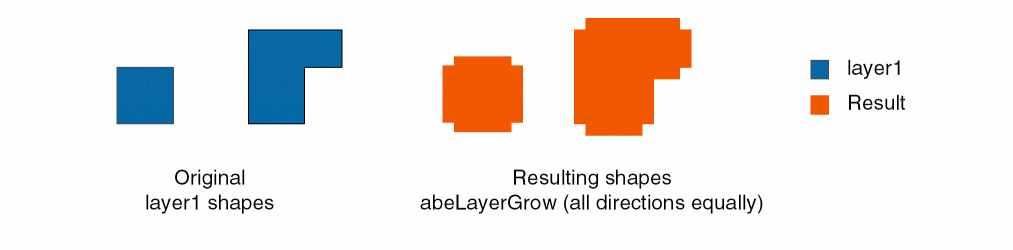
Adds shapes to the ABE output layer that are ABE input layer shapes that have been increased in size along one or more directions in the north, south, east, and/or west.
Arguments
Values Returned
|
The expanded shapes are added on the output layer or the function is queued. |
|
|
The function was not successful because ABE is not initialized or there was an argument error. |
Examples
Adds shapes from the selected set that have been increased in size by 0.02 to the north and 0.05 to the east to the result ABE layer.
a1 = abeLayerFromShapes( geGetSelSet() )
result = abeNewLayer()
abeLayerGrow( a1 result ?north 0.02 ?east 0.05 )
Related Topics
Support for Multithreading in ABE Functions
Return to top