
cleOpenAutoSavedCellView
cleOpenAutoSavedCellView(t_libName t_cellName t_viewName[g_openWindow] ) =>w_windowID/d_cellviewID/ nil
Description
Opens the auto-saved cellview in the read-only mode. You can save the data using the Save a Copy command in the File menu of the layout window to save the cellview back to the disk. The auto-saved file is the cellview file name appended by a plus sign.
Arguments
|
Specifies whether to open a layout window. Default value is |
Value returned
|
Window ID of the Concurrent Layout cellview that opens when g_openWindow is set to |
|
|
Database ID of the Concurrent Layout cellview that opens if g_openWindow is set to |
|
Examples
If the auto-saved file exists in the layout_cle_p1 view of autoSaveBasic in the CustomDigital library, open the canvas window and save it on the disk.
cleHasAutoSavedFile("CustomDigital" "autoSaveBasic" "layout_cle_p1")
=> t
cleOpenAutoSavedCellView("CustomDigital" "autoSaveBasic" "layout_cle_p1")
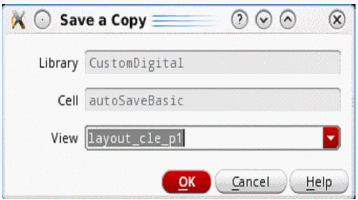
Select the Save a Copy command from the File menu, then click the OK button.
Return to top