
rteGeomSize
rteGeomSize(
[ ?cv d_cvId ]
[ ?lpp1 g_lpp1 ]
[ ?outputLpp l_outputLpp ]
[ ?blockedLayer l_blockedLayer ]
[ ?size f_size ]
[ ?polygons g_polygons ]
[ ?region l_region ]
[ ?trimCorners g_trimCorners ]
[ ?fixEdgesToRegion g_fixEdgesToRegion ]
) ;
=> t / nil
Description
Performs an oversize or undersize shapes on a specific layer purpose.
This function is available only in Layout XL and higher tiers.
Arguments
|
Database ID of the cellview. Defaults to the current cellview. |
|
|
Specifies the first layer purpose pair(s). Required. See Specifying Input Layer Purposes for details. |
|
|
Specifies the output layer and purpose for the generated shapes. Required. You must specify both the layer name and the layer purpose as a list or string. |
|
|
Outputs blockages on the specified layer. Note: the ?blockedLayer and ?outputLpp arguments are mutually exclusive. |
|
|
Specifies the sizing amount in user units for shapes on the first layer purpose. Required. |
|
|
Generates output shapes as polygons, rather than individual rectangles. Values are
If set to
If set to |
|
|
A list specifying the lower-left and upper-right coordinates of the region on which the function should operate. If not specified, the entire design is included in the operation. |
|
|
Specifies that corners be trimmed when shapes are resized.
Values are |
|
|
Keeps edges fixed to region if a negative size is specified.
Values are |
|
Value Returned
Examples
The following illustrates the ?trimCorners argument.
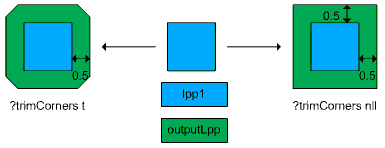
The following illustrates the ?fixEdgesToRegion argument.
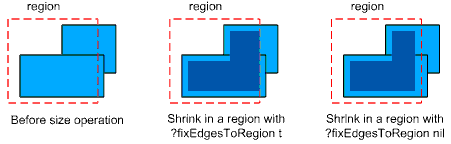
The following example generates new shapes on the metal5/drawing layer purpose by oversizing shapes on the metal2/drawing layer purpose by 1.5 user units.
rteGeomSize(
?lpp1 list("metal2" "drawing")
?outputLpp list("metal5" "drawing")
?size 1.5
?region list(2486.75 2850.75 2635.22 2946.52)
)
In the following example, the layer purpose pair in argument ?lpp1 is specified as a string. This is allowed, as the argument contains only one layer. The example generates new shapes on the metal6/drawing layer purpose by undersizing shapes on the metal1/drawing layer purpose by -2.5 user units.
rteGeomSize(
?lpp1 "metal1 drawing"
?outputLpp list("metal6" "drawing")
?size -2.5
?region list(2486.75 2850.75 2635.22 2946.52)
?polygons t
?trimCorners t
?fixEdgesToRegion t
)
Related Topics
Return to top