
rteGeomXor
rteGeomXor(
[ ?cv d_cvId ]
[ ?lpp1 g_lpp1 ]
[ ?lpp2 g_lpp2 ]
[ ?outputLpp l_outputLpp ]
[ ?blockedLayer l_blockedLayer ]
[ ?polygons g_polygons ]
[ ?region l_region ]
) ;
=> t / nil
Description
Generates new shapes from shapes on either input layer purpose that do not overlap the other layer purpose.
This function is available only in Layout XL and higher tiers.
Arguments
|
Database ID of the cellview. Defaults to the current cellview. |
|
|
Specifies the first layer purpose pair(s). Required. See Specifying Input Layer Purposes for details. |
|
|
Specifies the second layer purpose pair(s). Required. See Specifying Input Layer Purposes for details. |
|
|
Specifies the output layer and purpose for the generated shapes. Required. You must specify both the layer name and the layer purpose as a list or string. |
|
|
Outputs blockages on the specified layer. Note: the ?blockedLayer and ?outputLpp arguments are mutually exclusive. |
|
|
Generates output shapes as polygons, rather than individual rectangles. Values are
If set to
If set to |
|
|
A list specifying the lower-left and upper-right coordinates of the region on which the function should operate. If not specified, the entire design is included in the operation. |
|
Value Returned
Examples
The following is a graphical illustration of the rteGeomXor function.
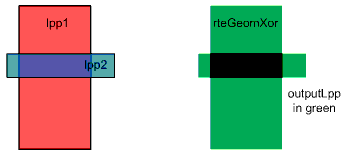
The following example generates shapes on the metal5/drawing layer purpose from shapes on either the metal2/drawing or metal1/pin layer purpose that do not overlap the other.
rteGeomXor(
?lpp1 list("metal2" "drawing")
?lpp2 list("metal1" "pin")
?outputLpp list("metal5" "drawing")
?region list(2486.75 2850.75 2635.22 2946.52)
)
The following example is the same as the one above, but both layer purposes are included in the ?lpp1 argument.
rteGeomXor(
?lpp1 list(
   list("metal2" "drawing")
   list("metal1" "pin"))
?outputLpp list("metal5" "drawing")
?region list(2486.75 2850.75 2635.22 2946.52)
)
In the following example, 48 is the layer number representing metal1. Argument ?lpp1 includes all purposes for layer metal1. In argument ?lpp2, the layer purpose pair is specified as a string. This is allowed, as the argument contains only one layer.
rteGeomXor(
?lpp1 48
?lpp2 "metal2 drawing"
?outputLpp list("metal5" "drawing")
?region list(2486.75 2850.75 2635.22 2946.52)
?polygons t
)
Specifying Input Layer Purposes
In the rteGeom* functions, you specify a layer set for arguments ?lpp1 and ?lpp2. A layer set is comprised of a layer name, layer number, or layer purpose pairs. Express the layer set as a list or string.
You must specify layer purposes by name.
If you specify a layer name or number only, the function considers all layer purposes for that layer as input. To restrict layer purpose pairs, explicitly define the pairs.
If you specify only one layer, you can specify it as a string rather than a list.
Related Topics
Return to top