
4
Semi-Autonomous Simulation and Small Signal Analysis
The semi-autonomous simulation is used to simulate driven oscillators with one or more periodic inputs. Now the algorithms can handle two typical driven oscillator scenarios:
Oscillator-Mixer co-simulation
Now we can simulate the oscillator and mixer together in the harmonic balance (HB) analysis. When a mixer is connected to an oscillator, it may introduce some effects to the oscillator, such as change of oscillating frequency and output amplitude drop due to loading effects, etc. Previous harmonic balance methods cannot accurately capture these effects because they cannot simulate the oscillator and mixer together. Using the semi-autonomous technique, we can simulate the oscillator and mixer together, and take the coupling effects between the oscillator and the mixer into consideration, resulting more accurate simulation. After the semi-autonomous simulation, we can perform corresponding semi-autonomous small signal analysis, like HBNOISE.
Driven oscillator simulation
Using the semi-autonomous simulation, we can simulate unlock driven oscillators (e.g., the oscillator with a power supply interference). When an oscillator is perturbed, but not locked by an injected periodic signal, its frequency and amplitude will change. The semi-autonomous simulation can handle the perturbed oscillator and give us the new oscillating frequency and waveforms. When the semi-autonomous simulation finishes, we can also perform small signal analysis (HBAC/HBXF/HBNOISE) on the semi-autonomous system, just like a normal multi-tone system.
The semi-autonomous simulation is a frequency domain simulation technique, and it is implemented in the Harmonic Balance (HB) analysis.
Initialization
Now we maintain good consistency between the autonomous PSS simulation and the semi-autonomous simulation. We can use all initialization methods for the autonomous PSS simulation in the semi-autonomous simulation.
tstab initialization method
In this method, Spectre runs couple oscillator periods of transient simulation and use the waveforms as the initial guess of the semi-autonomous simulation. The length of the transient simulation is determined by the "tstab" parameter in the HB statement. The user needs to make sure that the "tstab" is long enough to guarantee the oscillation can start properly.
The user can do one of the following to speedup the oscillation:
- Specify an initial condition to one of the oscillator node (on the tank). For example, "ic outp=1.0".
- Apply a pulse or PWL current/voltage source to the oscillator to kick start the oscillation.
It is highly recommended that the first method is used. The second method can prolong the transient simulation, and an over-strong pulse may cause transient convergence problem.
For a better semi-autonomous convergence, the "tstab" needs to be long enough to make the oscillator settle down the final oscillating mode. The integration method of the tstab simulation is specified by the HB option "tstabmethod".
Linear initial condition aided tstab
A linear Eigenvalue analysis can also be performed on the DC solution of the oscillator circuit to stimulus the tstab transient simulation. Using the linear IC method, the user doesn't need to specify the stimulus (you cannot use the PWL/Pulse kicker in linear IC, or linear IC will fail), and the tstab time can be reduced dramatically to save the simulation time. The linear IC works well for high Q oscillators, however, it may fail if the oscillator is not LC type, or the circuit is very large and ill-conditioned.
The linear initial condition method is turned on by the HB option "oscic=lin". By default, the linear method is not activated. In the semi-autonomous analysis, the "tstab" is always required, even though the "oscic=lin" is specified. "tstab=0" doesn't work for semi-autonomous simulation now (but we will improve the initialization code to make it work in the future Spectre version). It
is not recommended to use linear IC for oscillator-mixer simulation in this stage, because the circuit can be very large and the mixer may cause the linear IC method to fail.
Newton Methods
Just like the autonomous PSS simulation, the semi-autonomous simulation supports both the "onetier" and "twotier" Newton methods. The Newton method can be specified using the "oscmethod" option. Please refer to the autonomous simulation application notes for the detailed explanation of the different Newton methods. We suggest customers to try the "onetier" method first, because the "twotier" semi-autonomous simulation can be slow.
Use Model
The semi-autonomous simulation is for oscillators with periodic inputs. Users can use the method to simulate oscillators and mixers together, or simulate oscillators perturbed by periodic external interferences, such as power supply interference.
PSS simulation for semi-autonomous circuits
Now we can use the harmonic balance (HB) do semi-autonomous simulation. To activate the method, we need to add two oscillator output terminals in the HB statement. For example:
Hb1 (outp outn) hb funds=[1.1GHz "frf"] maxharms=[5 5] tstab=1u
Compared to the driven multi-tone HB, the semi-autonomous statement has two differences:
- The two terminals have to be defined as in autonomous PSS.
- The first entry in "funds" is the initial guess of the oscillator frequency.
Small signal analysis for semi-autonomous circuits
A following small signal analysis statement will do the small signal analysis for semi-autonomous circuits. For example:
Hbnoise1 (oscoutp oscoutn) hbpnoise start= 1 stop=1G dec=5 sweeptype=relative relharmvec=[1 0]
Semi-Autonomous Simulation GUI
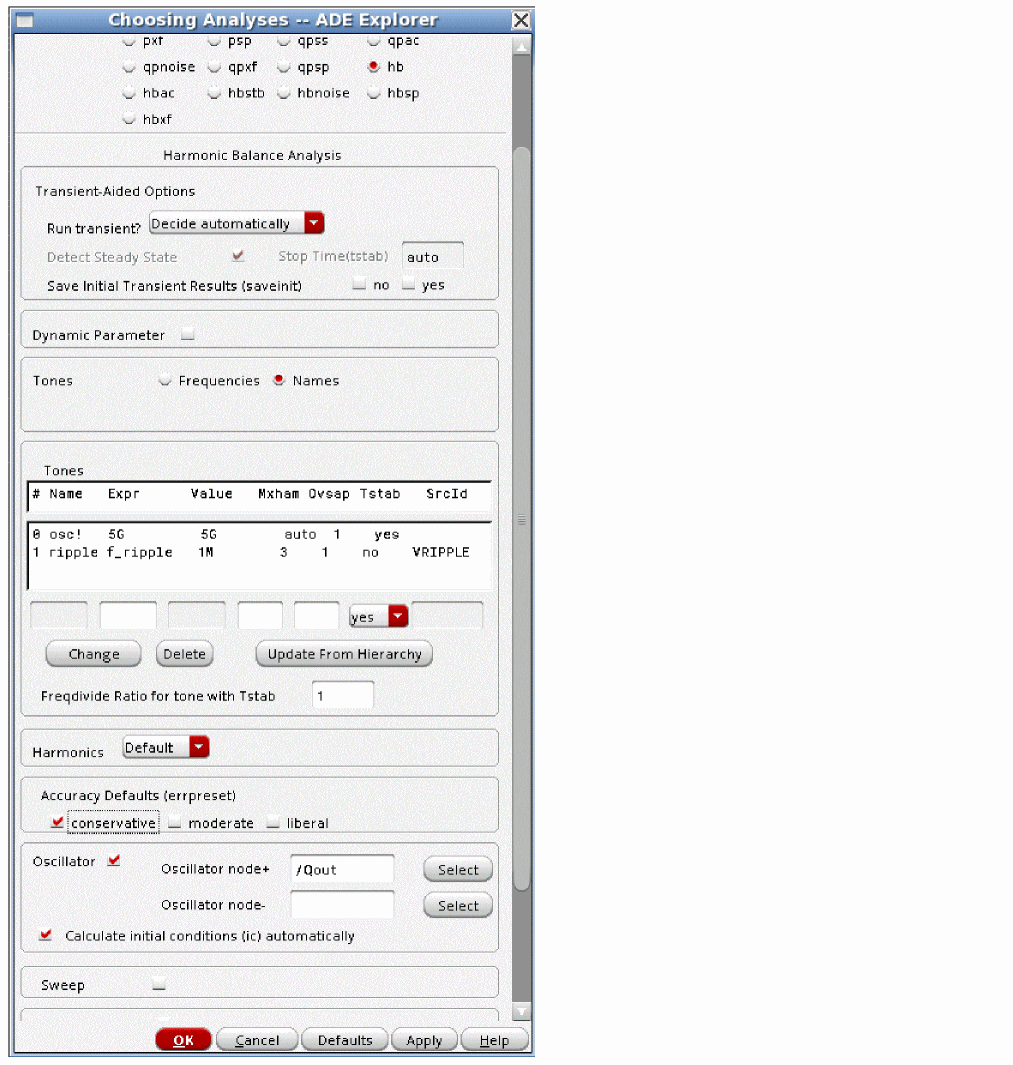
You can setup the semi-autonomous simulation in GUI, as shown in the figure below.
Figure 4-1 Semi-autonomous simulation form
To use the semi-autonomous simulation, you need to:
- Choose 'hb' analysis.
- Select "Names" option in the Tones section.
- Select 'Oscillator'.
- The tone name of the oscillator is 'osc!', fill in the initial frequency guess for this tone in the Expr field. Click Change.
- Select Decide automatically from the Run Transient? drop-down list. This will cause Spectre to run a transient in the tstab interval until steady-state is reached. Then, a Fourier transform is calculated, and the frequency domain iterations begin.
- Set the harmonics and the oversample factor as required. If Run transient? is set to Decide automatically or Yes, then auto is entered for the number of harmonics in the first tone only. This can be set manually, if desired. The number of harmonics for the rest of the tones must be set manually.
- Click Change.
- Specify the oscillator nodes in the circuit. This node can be any node in the circuit where the oscillations are present.
Trouble Shooting
- If the oscillator doesn't oscillate in the semi-autonomous simulation, try to increase the "tstab" time. You can use the parameter "saveinit=yes" to save the tstab waveforms. If the oscillator doesn't oscillate in the tstab transient simulation, give it a kick using the IC method, or using the linear initial condition ("oscic=lin").
- The semi-autonomous simulation may have convergence problem for unlock driven oscillators when the perturbation frequency is very low and perturbation amplitude is large. Decreasing the perturbation amplitude will improve the convergence. Increasing the harmonic number of the RF tone also improves the convergence.
- All trouble shooting tricks for the autonomous PSS simulation are also applicable. Please refer to the autonomous PSS application notes.
Return to top