
Dynamic DC Leakage Current Path Check (dyn_dcpath)
Spectre Syntax
title dyn_dcpath net=[n1 n2 ...] duration=<value> ith=<value> time_window=[start1stop1 start2 stop2 ....] <save=no|violation> <spice=no|yes> <leaki_times=[t1 t2…]> <xinst=[xinst1 xinst2...]> error_limit=<value> <sort=no|current>
SPICE Syntax
.cck title dyn_dcpath net=[n1 n2 ...] duration=<value> ith=<value> time_window=[start1stop1 start2 stop2 ....] <save=no|violation> <spice=no|yes> <leaki_times=[t1 t2…]> <xinst=[xinst1 xinst2...]> error_limit=<value> <sort=no|current>
Description
Reports the conductance paths between user-specified nets. The check is based on transient analysis and reports th qualifying paths carrying an absolute current higher than the parameter ith for a duration longer than the specified duration, within the specified time_window. If you specify leaki_times, Spectre FX treats it like a special time window with only one time point.
If more than two nets are specified, Spectre FX checks the leakage path between each net combination. For example, if net=[vdc1 vdc2 0] is specified, then the conducting path between vdc1 and vdc2, vdc1 and 0, and vdc2 and 0 is checked.
The results are written to a file with the extension dynamic.xml.

Arguments
Example
dcpath1 dyn_dcpath ith=200u net=[vdd 0] duration=1n time_window=[1n 20n]
.cck dcpath1 dyn_dcpath ith=200u net=[vdd 0] duration=1n time_window=[1n 20n]
The above command will report the DC conductance path between vdd and 0. The command will report the paths that carry current higher than 200u for a duration longer than 1n within the time window between 1n and 20n. The following is an example of the report that is displayed in the Web browser:
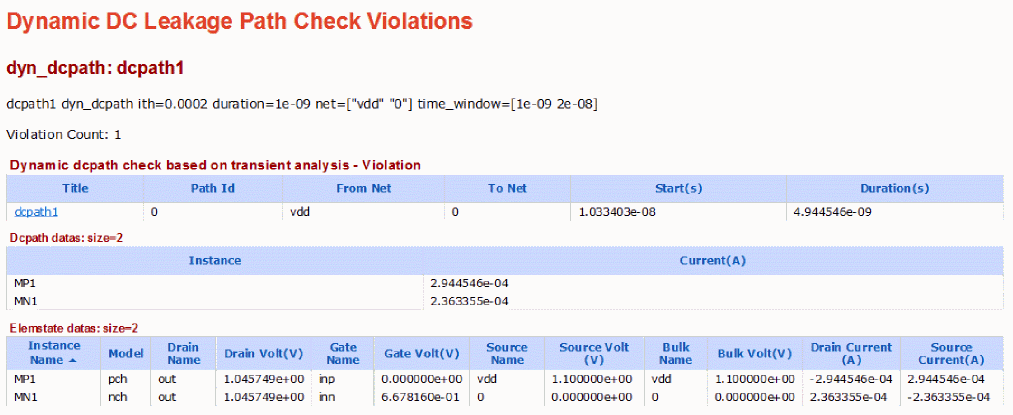
The path report has three sections. Each section is explained below.
-
The first section shows that a path is found starting from net
vddto net0. Since this is a check based on transient-analysis, the name of the table is Dynamic dcpath check based on transient analysis. - The second section shows the actual instances in the path. The first column Instance contains instances in the path. The second column contains the current through the instances. The current is taken at the end of violation, that is, at 1.52e-8 seconds (start + duration = 1.03e-8 + 4.94e-9).
- The third section shows the state of MOSFETs in the path. It does not report anything other than MOSFETs. The first column Instance Name is the MOSFET name. The second column is the model name. The following columns are the terminal names and voltages. The last two columns show the drain and source terminal currents. The values are taken at the end of violation.
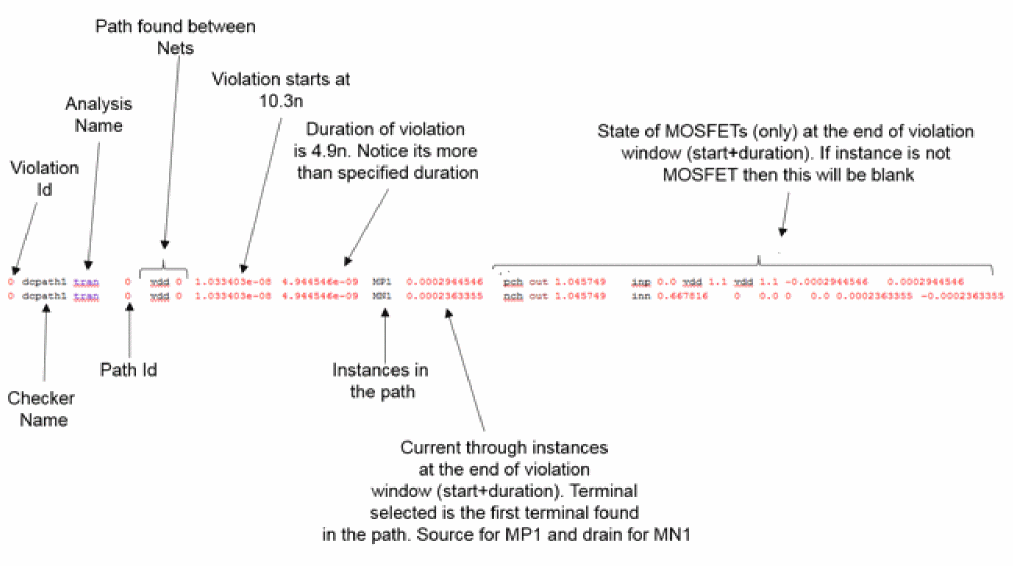
Similar to the XML report, the text report is shown below:
Related Topics
Return to top