
Dynamic Pulse Width Check (dyn_pulsewidth)
Spectre Syntax
title dyn_pulsewidth node=[n1 n2...] pwmin_low=<value> pwmax_low=<value> pwmin_high=<value> pwmax_high=<value> vlth=<value> vhth=<value> time_window=[start1 stop1 start2 stop2 ....] <save=no|violation> <spice=no|yes> <inst=[inst1 inst2...]> <xinst=[xinst1 xinst2...]> <subckt=[subckt1 subckt2....]> <xsubckt=[xsubckt1 xsubckt2....]> <fanout=all|gate|bulk> <depth=n> error_limit=<value>
SPICE Syntax
.cck title dyn_pulsewidth node=[n1 n2...] pwmin_low=<value> pwmax_low=<value> pwmin_high=<value> pwmax_high=<value> vlth=<value> vhth=<value> time_window=[start1 stop1 start2 stop2 ....] <save=no|violation> <spice=no|yes> <inst=[inst1 inst2...]> <xinst=[xinst1 xinst2...]> <subckt=[subckt1 subckt2....]> <xsubckt=[xsubckt1 xsubckt2....]> <fanout=all|gate|bulk> <depth=n> error_limit=<value>
Description
The pulse width of a logic low state signal is the duration between which the signal crosses the low voltage threshold (vlth) while falling and again crosses vlth while rising. If this duration is outside the range specified using the pwmin_low and pwmax_low parameters, the dyn_pulsewidth check reports the pulse width of such signals.
Similarly, the pulse width of a logic high state signal is the duration between which the signal crosses the high voltage threshold (vhth) while rising and again crosses vhth while falling. If this duration is outside the range of pwmin_high and pwmax_high parameters, the dyn_pulsewidth check reports the pulse width of such signals.
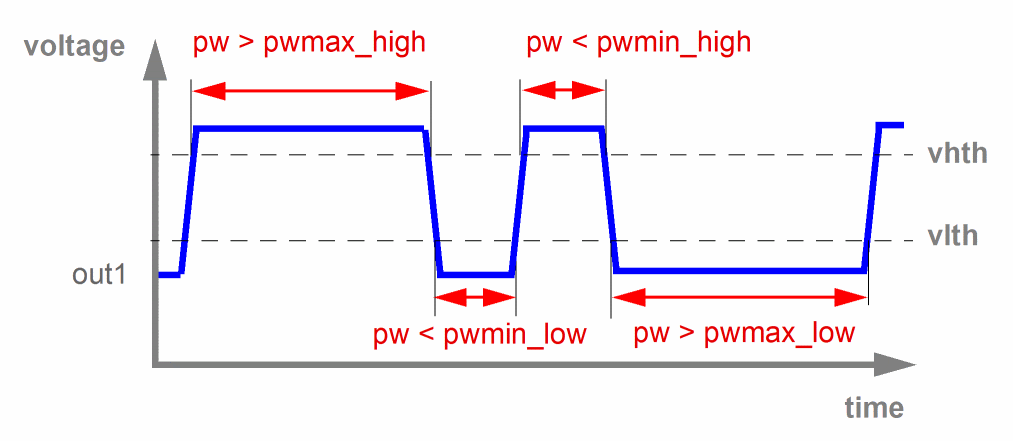
The results are written to a file with the extension dynamic.xml, which can be viewed with a Web browser.
Arguments
Example
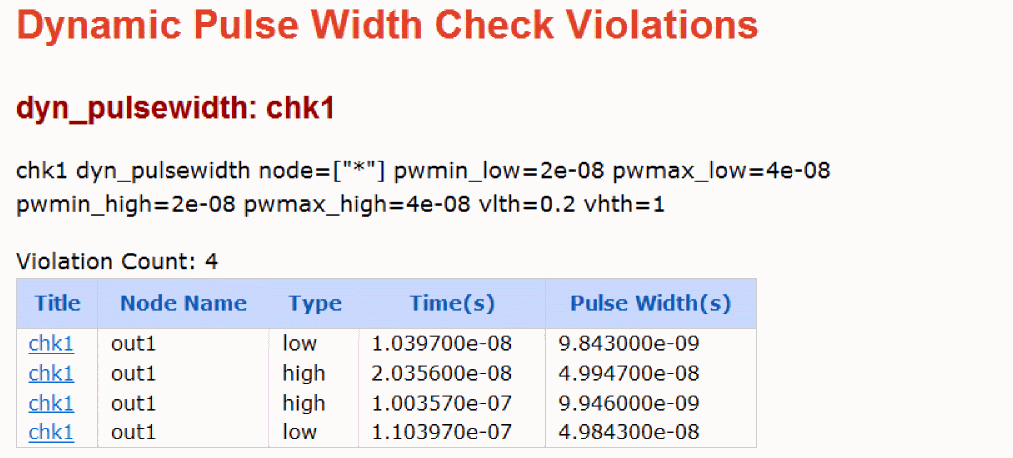
chk1 dyn_pulsewidth node=[*] pwmin_low=20n pwmax_low=40n pwmin_high=20n pwmax_high=40n vlth=0.2 vhth=1.0
.cck chk1 dyn_pulsewidth node=[*] pwmin_low=20n pwmax_low=40n pwmin_high=20n pwmax_high=40n vlth=0.2 vhth=1.0
The above command reports all nodes that specify either of the following conditions:
-
The pulse width in logic low state is outside the range of parameters
pwmin_low(20n) andpwmax_low(40n). -
The pulse width in logic high state is outside the range of parameters
pwmin_high(20n) andpwmax_high(40n).
The following is an example of the report that is displayed in the Web browser.
Related Topics
Return to top