
Dynamic Setup and Hold Check (dyn_setuphold)
Spectre Syntax
title dyn_setuphold node=[node] ref_node=[node] setup_time=<value> hold_time=<value> setup_chk_time=<value> setup_hold_time=<value> delay=<value> edge=[rise|fall|both] ref_edge=[rise|fall|both] vlth=<value> ref_vlth=<value> vhth=<value> ref_vhth=<value> time_window=[start1stop1 start2 stop2 ....] <save=no|violation> <spice=no|yes> margin_stats=[yes|no] <subckt=[subckt1 subckt2....]> <fanout=all|gate|bulk> error_limit=<value> report=[violation|all]
SPICE Syntax
.cck title dyn_setuphold node=[node] ref_node=[node] setup_time=<value> hold_time=<value> setup_chk_time=<value> setup_hold_time=<value> delay=<value> edge=[rise|fall|both] ref_edge=[rise|fall|both] vlth=<value> ref_vlth=<value> vhth=<value> ref_vhth=<value> time_window=[start1stop1 start2 stop2 ....] <save=no|violation> <spice=no|yes> margin_stats=[yes|no] <subckt=[subckt1 subckt2....]> <fanout=all|gate|bulk> error_limit=<value> report=[violation|all]
Description
Measures the timing of a signal net in comparison to a referenced (clock) net. It reports the setup or hold timing errors if the signal net transition happens within the specified violation window.
The violation window of the setup timing check is refTime + delay - setup_time and refTime + delay. The violation window for the hold timing check is refTime + delay and refTime + delay + hold_time. refTime is the transition time of the reference net.
ref_vhth and vhth parameters trigger the rising edge measurements, whereas ref_vlth and vlth parameters trigger the falling edge measurements.
If subcircuit parameter (subckt) is specified then the node (node) and reference node (ref_node) are considered local nodes to that subcircuit. That is, the nodes and reference nodes will belong to the instances of the specified subcircuit. Only one subckt value can be specified per check, with no wildcard.
If the subckt parameter is not specified then node and ref_node are considered as global nodes with hierarchical names starting from the top level.
The results are written to a file with the extension dynamic.xml, which can be viewed with a Web browser.
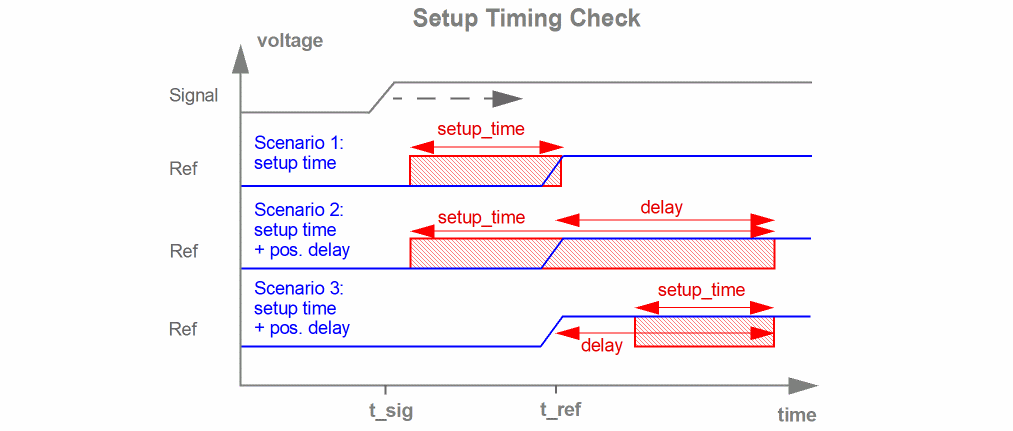
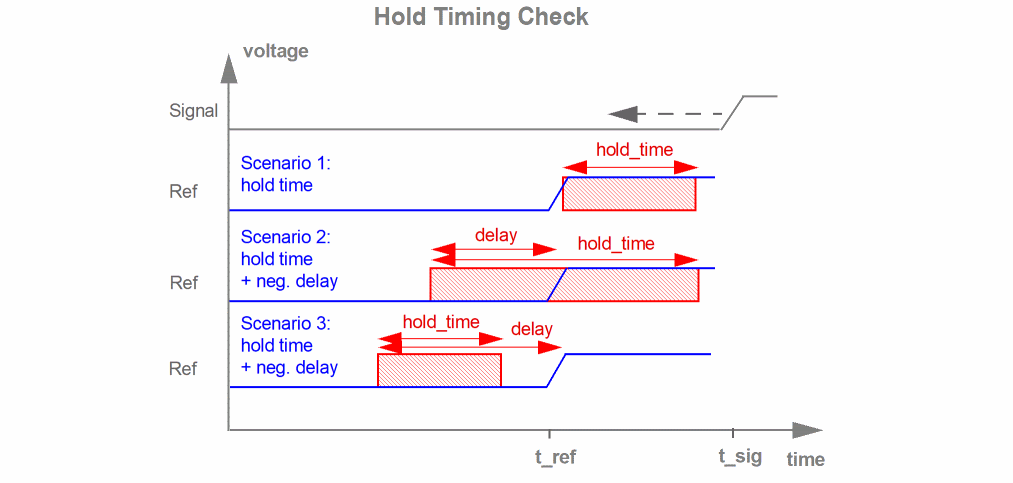
In the figure above, a setup or hold error is reported if the signal net transition occurs in the red marked area.
Arguments
Example 1
s4 dyn_setuphold node=["*"] edge=rise ref_node=“I9.I1.clk" ref_edge=rise setup_time=5e-11 vhth=0.5 ref_vhth=0.5
.cck s4 dyn_setuphold node=["*"] edge=rise ref_node=“I9.I1.clk" ref_edge=rise setup_time=5e-11 vhth=0.5 ref_vhth=0.5
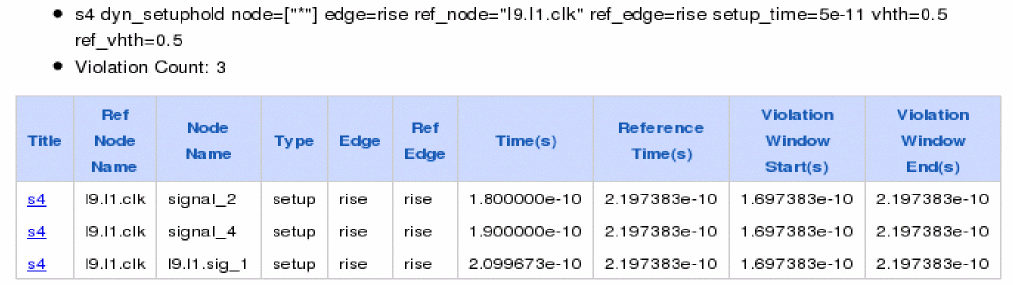
The above command reports any transition of signal node in the time window between 0.5ns before the signal clk rises.
Since subckt parameter is not specified, it will compare all nodes with ref_node I9.I1.sig_2 and report any violations.
The following is an example of the report that is displayed on the Web browser.
Example 2
s1 dyn_setuphold node=["*"] edge=rise ref_node=“clk" ref_edge=rise setup_time=5e-11 vhth=0.5 ref_vhth=0.5 subckt=ckt1
.cck s1 dyn_setuphold node=["*"] edge=rise ref_node=“clk" ref_edge=rise setup_time=5e-11 vhth=0.5 ref_vhth=0.5 subckt=ckt1
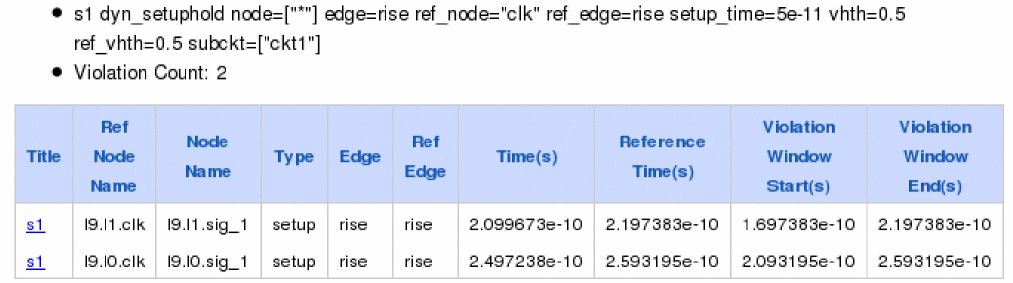
The above command reports any transition of the signal data in the time window between 0.5ns before the signal clk rises.
Since subckt=ckt1 is specified, it will compare all nodes in subckt ckt1 with ref_node sig_2 and report any violations. Note that node and ref_node belongs to same subckt ckt1.
The following is an example of the report that is displayed on the Web browser.
Related Topics
Return to top