
Dynamic Subcircuit Port Power Check (dyn_subcktpwr)
Spectre Syntax
title dyn_subcktpwr <port=[port1 port2...]> <inst=[inst1 inst2...]> <power=[on|off]> error_limit=<value> time_window=[start1stop1 start2 stop2 ....] <save=no|violation> <spice=no|yes> <depth=n> filter=[none|gates] ith=<value>
SPICE Syntax
.cck title dyn_subcktpwr <port=[port1 port2...]> <inst=[inst1 inst2...]> <net=[n1 n2...]> <power=[on|off]> error_limit=<value> time_window=[start1stop1 start2 stop2 ....] <save=no|violation> <spice=no|yes> <depth=n> filter=[none|gates] ith=<value>
Description
Reports port currents, port powers, and subcircuit powers.
The port current is positive when the current is going into a subcircuit. This check will report average, RMS, and maximum values of the current entering a port.
Any port name matching inst and port parameters are reported.
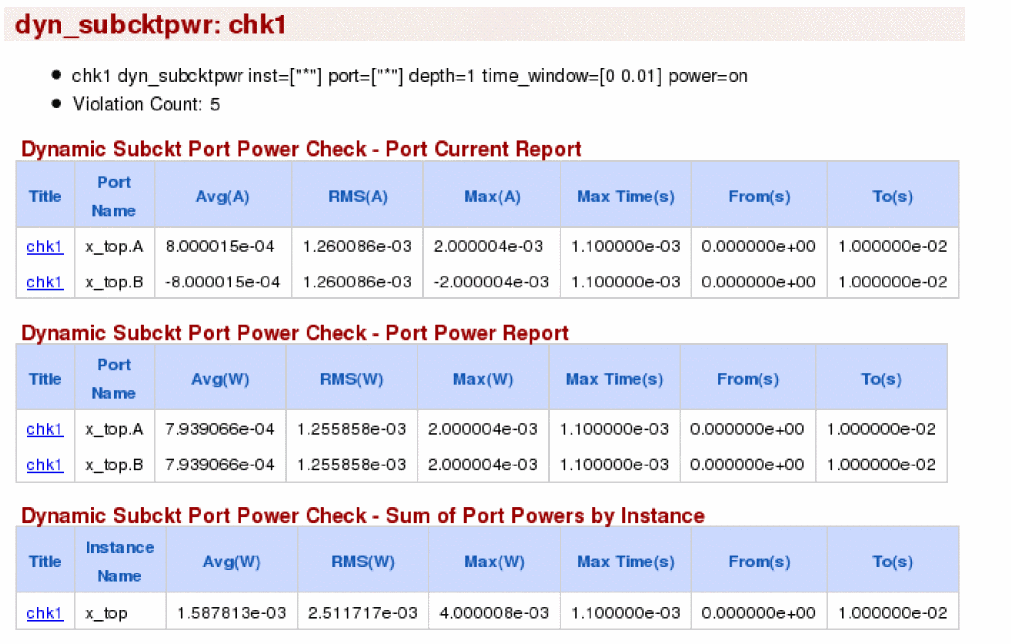
Power analysis can be done by using the parameter power. When the parameter power is set to on, then two additional sections are generated. The first section reports the average, RMS and the maximum power entering the ports, specified using the parameter port. The second section reports the average, RMS, and the maximum power consumed by each instance of a subcircuit, specified using the parameter inst.
port parameter only considers the ports defined in the subcircuit definition. For global nodes, you need to add the ports manually.Arguments
Example
chk1 dyn_subcktpwr inst=[*] port=[*] depth=1 time_window=[0 10m] power=on
.cck chk1 dyn_subcktpwr inst=[*] port=[*] depth=1 time_window=[0 10m] power=on
The above command reports the port current for all ports of all instances in the time window between 0 and 10ms. The report includes the current and power information for all subcircuit instances one level down the hierarchy.
The following is an example of the report that is displayed in the Web browser:
Related Topics
Return to top