
Spectre Circuit Simulator
The Spectre® circuit simulator is a modern circuit simulator that provides high-precision SPICE simulation for pre- and post-layout analog RF and mixed-signal designs. Spectre is fully integrated with the Virtuoso custom design platform and provides a comprehensive set of detailed transistor-level analyses in multiple domains for faster convergence on the design goals. The advance architecture of Spectre enables low memory consumption and high-capacity analysis.
In addition to baseline simulation functionalities, Spectre supports the Accelerated Parallel Simulator ( APS), and the eXtensive Partitioning Simulator (XPS) technologies that utilize the same Spectre simulation infrastructure — netlist format, analysis and options syntax, device models, output formats, feature functions, and so on.
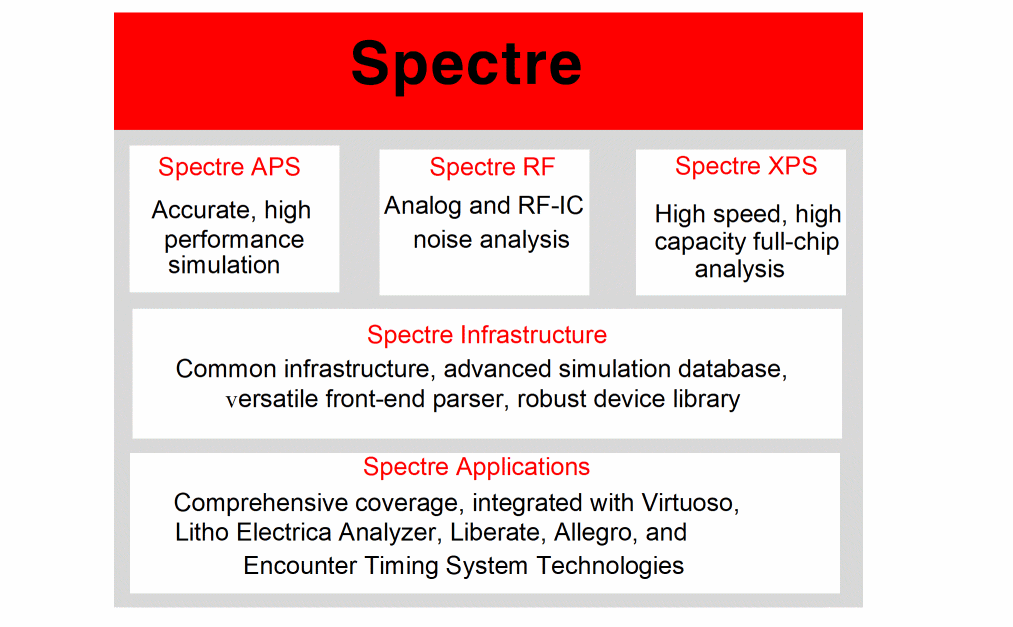
Spectre Circuit Simulator Features
The Spectre circuit simulator provides the following features.
Proven Circuit Simulation Techniques
Spectre uses proprietary techniques — including adaptive time step control, sparse matrix solving, and multi-processing of MOS models — to provide high performance while maintaining sign-off accuracy. It includes native support for both Spectre and SPICE syntax, providing you the flexibility to use the Spectre technology for any design flow without worrying about the design format. In addition, it converges to results that are “silicon-accurate” by modeling extensive physical effects in devices for deep sub-micron processes.
Comprehensive Statistical Analysis
Spectre bridges the gap between manufacturability and time to market nodes by providing a comprehensive set of statistical analysis tools tailored to IC design at advanced process nodes. Advanced Monte Carlo algorithms enable smart selection of process and design parameters to characterize the yield with significantly reduced simulation runs. The DC Match capability efficiently analyzes local process mismatch effects and identifies the yield-limiting devices and parameters. Tight integration between the Spectre Circuit Simulator and the Virtuoso Analog Design Environment offers user-friendly interactive setup and advanced visualization of statistical results.
Transient Noise Analysis
Spectre provides transient noise analysis for accurate calculation of the large signal noise in nonlinear non-periodic circuits. All noise types are supported, including thermal, shot, and flicker.
Built-in Verilog-A and MDL
The Spectre Circuit Simulator offers design abstraction for faster convergence on results, including behavioral modeling capabilities in full compliance with Verilog-A 2.0. The compiled Verilog-A implementation is optimized for compact device models, thus offering comparable performance to built-in device models.
In addition to supporting standard SPICE measurement functions (.measure), it offers a measurement description language (MDL) to automate cell and library characterization. Spectre MDL enables the designer to post-process the results and tune the simulator to provide the best performance/accuracy trade-off for a specific measurement.
Advanced Device Modeling and Support
The Spectre Circuit Simulator supports MOS, BJT, specialty transistor models, resistors, capacitors, inductors, transformers and magnetic cores, lossy and lossless transmission lines, independent and controlled voltage and current sources, and Z and S domain sources.
The Spectre Circuit Simulator provides a user-defined compiled model interface (CMI). It allows for the rapid inclusion of user-defined models for a “model once, use everywhere” capability. It offers curve tracer analysis capability for rapid model development and debugging.
The Spectre circuit simulator supports the following models:
- MOSFET models, including the latest versions of BSIM3, BSIM4, PSP, HISIM, MOS9, MOS11, and EKV
- Silicon-on-insulator (SoI), including the latest versions of BTASOI, SSIMSOI BSIMSOI, BSIMSOI PD, and BSIM-IMG
- High-voltage MOSFET models, including the latest versions of HVMOS, LDMOS, and HiSim_HV
- TMI models from TSMC
- Bipolar junction transistor (BJT) models, including latest versions of VBIC, HICUM L0, HICUM L2, Mextram, HBT, and Gummel-Poon models
- GaAS MESFET models, including the latest versions of GaAs, TOM2, TOM3, and Angelov
- Rensselaer Polytechnic Institute (RPI)’s Poly and Amorphous Silicon Thin-Film models
- Diode, JFET, FinFET, and flash cell models
- Verilog-A compact device models
- Specialized reliability models (AgeMOS) for HCI and NBTI analysis
RF Simulation
Spectre RF, an option to the Spectre Circuit Simulator, provides a set of comprehensive RF analyses built on two production-proven simulation engines: harmonic balance and shooting-Newton. Spectre RF supports all industry-standard models. Spectre RF provides the following capabilities:
- Harmonic balance-based analyses, optimized for high dynamic range, high-capacity circuits with distributed components
- Shooting-Newton-based analysis, optimized for strongly non-linear circuits
- Advanced fast envelope analysis supporting all analog and digital modulation techniques
- Rapid IP2 and IP3 calculation based on perturbation technology
- Periodic noise analysis for accurate calculation of noise in nonlinear time variant circuits with detailed analysis options including modulated noise, sampled noise, and jitter
- Full spectrum periodic noise that provides a fast and silicon-accurate Pnoise analysis for circuits with sharp transitions
- Noise and distortion summary to identify the contribution of each device to the total output noise, harmonic, or inter-modulation distortion
- Small signal analysis that includes AC, transfer function, S-Parameters, and stability based on a periodic or quasiperiodic operating point
- Monte Carlo, corner-case, and parametric sweep analysis
Advanced Transmission Line Library
Signal-integrity issues can be difficult and time consuming to identify, analyze, and resolve for high-speed designs. The Spectre RF rftline (RF transmission line) library enables the designer to perform signal-integrity analysis of the design in context of the package and PCB trace.
Spectre rfTlineLib provides a comprehensive set of multi-layer transmission lines and models. Spectre rftline models are based on rigorous 2-D electromagnetic simulations and include state-of-the-art descriptions of dielectric and conductor losses, delivering accurate models that are tightly integrated into Virtuoso ADE. An intuitive and easy-to-use graphical editor provides the ability to accurately define and graphically capture the substrates.
Wireless Analysis
The modern mobile platform with exponentially evolving wireless standards is increasing the complexity of wireless RFIC designs. To meet specification requirements and productivity goals, you must evaluate the system-level performance metrics in an integrated, automated, and easy-to-use simulation-based flow.
Spectre RF wireless analysis feature provides a fully automated flow integrated in Virtuoso ADE, enabling you to apply the standard-compliant modulation sources and measure the output to calculate system-level performance.
The simulation is based on an advanced, accurate, and fast envelope following algorithm in Spectre RF. The wire analysis is designed with the RFIC designer in mind. It provides an automated setup of simulation parameters and standard-specific post-processing, eliminating the hassle and tedious nature of working with changing wireless standard sources. Spectre RF wireless analysis provides a rich set of visualization that includes EVM, BER, and spectrum. A broad set of wireless standards-compliant library sources is supported.
Co-simulation with Simulink
The MathWorks Simulink interface to Spectre Circuit Simulator offers system and circuit designers a unique integrated environment for design and verification. Designers can insert their analog and RF schematics and post-layout netlist directly in the system-level block diagram and run a co-simulation between Simulink and Spectre technologies. Designers can reuse the same Simulink testbench from system-level design to post-layout verification, minimizing unnecessary format conversion while maintaining accuracy throughout the design flow.
Multi-Mode Simulation Toolbox for MATLAB
Multi-Mode Simulation toolbox for MathWorks MATLAB reads PSF and SST2 files directly in MATLAB. You benefit from the set of MATLAB mathematical functions to post-process simulation results from Spectre Circuit Simulator, Spectre APS, Spectre XPS, and AMS Designer. All sweep types are supported in the toolbox, including Monte Carlo and parametric. Special data structures are used to store RF signals and harmonics resulting from PSS and QPSS analysis. Furthermore, the Spectre Simulation toolbox complements the rich MATLAB libraries with communication product-specific post-processing functions such as Fast Fourier Transform, third-order intercept point, and 1dB gain compression point.
Post-layout Simulation
The Spectre Circuit Simulator enables analog and RF block and subsystem post-layout verification with speed near that of pre-layout simulation. An accurate parasitic reduction technique enhances the simulation performance of parasitic-dominant circuits by a significant amount over traditional SPICE-level simulation.
The technology enables designers to trade off accuracy and performance using a simple user-friendly setup.
Spectre Netlist Format
A netlist is an ASCII file that lists the components in a circuit, the nodes that the components are connected to, and the parameter values. The netlist is created in a text editor such as vi or emacs or from one of the environments that support the Spectre simulator. The Spectre simulator uses a netlist to simulate a circuit.
Sample Netlist
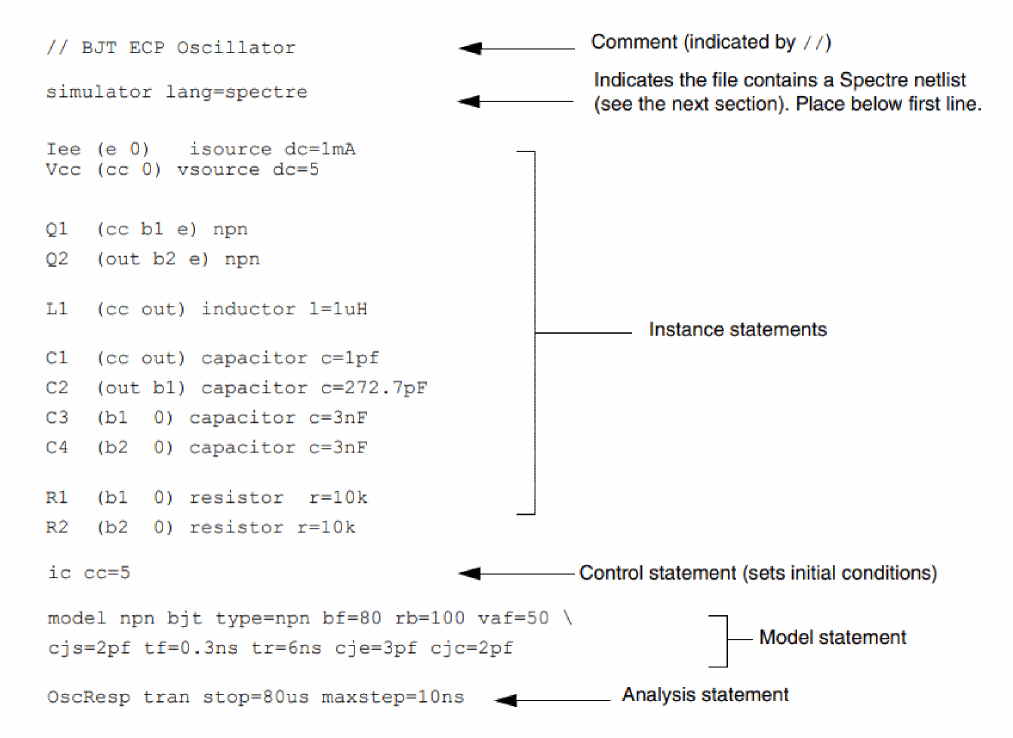
Elements of a Spectre Netlist
The following table briefly explains the components, models, analyses, and control statements in a Spectre netlist.
Refer to the Spectre Classic Simulator, Spectre APS, Spectre X, and Spectre XPS User Guide for detailed information about the elements of the Spectre Netlist.
Benefits of Using the Spectre Circuit Simulator
The Spectre Circuit Simulator provides the following benefits:
- Provides high-performance, high-capacity SPICE-level analog and RF simulation with out-of-the-box tuning for accuracy and faster convergence.
- Facilitates the trade-off between accuracy and performance through user-friendly simulation setup applicable to most complex analog and custom-digital ICs.
- Enables accurate and efficient post-layout simulation.
- Supports out-of-the-box S-Parameter models, enabling simulation of complex n-port devices.
- Delivers signal integrity analysis capability with an advanced transmission line library and graphical editor.
- Provides a platform to measure and analyze system-level performance metric.
- Performs application-specific analysis of RF performance parameters (spectral response, gain compression, intermodulation distortion, impedance matching, stability, and isolation).
- Offers advanced statistical analysis to help design companies improve the manufacturability and yield of ICs at advanced process nodes without sacrificing time to market.
- Delivers fast interactive simulation setup, cross-probing, visualization, and post-processing of simulation results through tight integration with the Virtuoso Analog Design Environment.
- Ensures higher design quality using silicon-accurate, industry-standard, foundry-certified device models shared across the simulation engines.
Return to top