
2
Analyzing Results
This chapter provides information about interpreting the summarized, detailed, and structured reports that TechDB Checker provides after it completes checking a technology database. It includes the following topics:
- Reporting Features
- Viewing the Summary Report
- Viewing the Detailed Report
- Viewing Tools Compliance Results
- Viewing Functions Compliance Results
- Viewing Missing Control Section Items
- Viewing Interconnect Constraints Items
- Viewing Missing Layer Definitions
- Viewing Layer Rules
- Viewing Missing Placement Grids
- Viewing Missing Routing Grids
- Viewing Missing Devices
Reporting Features
After inspecting a technology database, TechDB Checker lets you:
- View summarized and detailed reports and identify information using categories in the reports
- View results using various tabs that are structured according to:
- Navigate from a high-level report, such as the number of missing constraints, to detailed results, such as the name, group, and other details on the missing constraints
- Print and save reports for later use
Viewing the Summary Report
This section provides information on the following topics.
Generating the Summary Report
Using TechDB Checker, you can generate a summary report that includes high-level information on tool enablement in a technology database. TechDB Checker saves the summary report in the run directory.
-
Click View Summary.
TechDB Checker generates the summary report and displays it. The following figure illustrates a summary report.
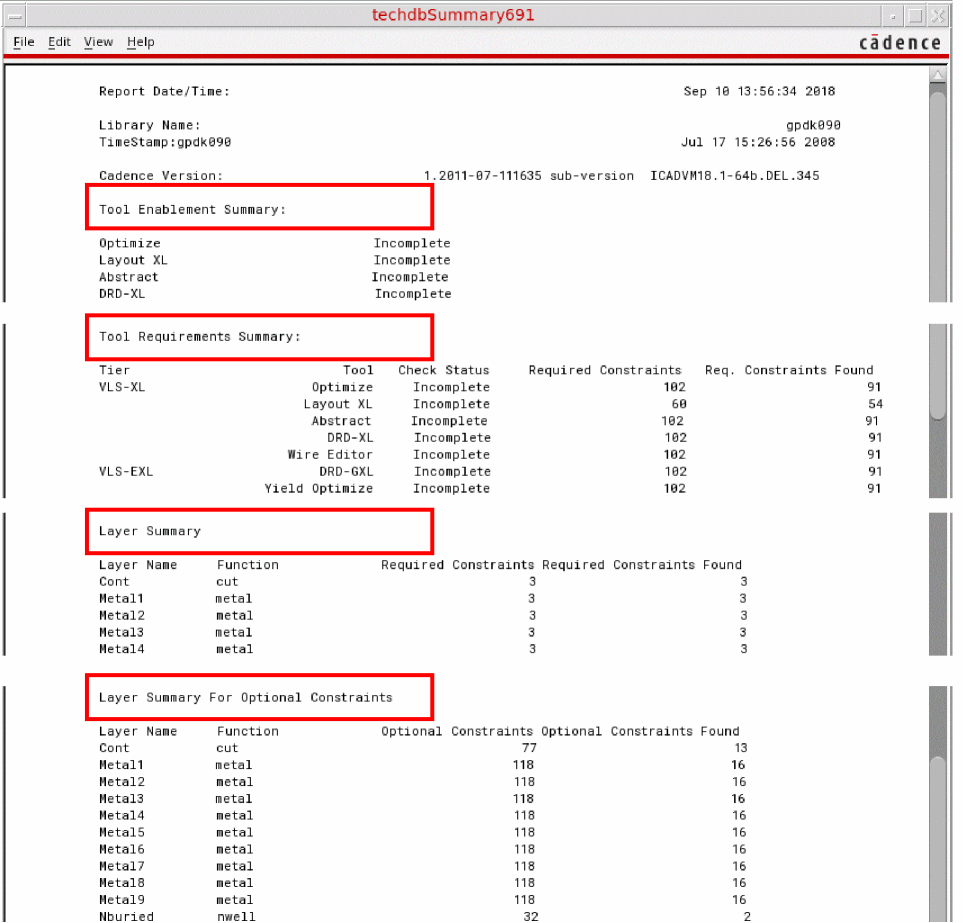
Summary Report Content
A summary report contains the following sections:
-
Report header information
Includes the following details: -
Tool Enablement Summary
Lists the supported Cadence tools and their enablement status.-
Completeindicates that all required constraints for the tool are available in the technology database. -
Incompleteindicates that at least one required constraint for the tool is missing in the technology database. -
<waived>indicates that the tool is not selected for investigation. For details on how to waive a tool, see step 4 in “Running TechDB Checker”.
-
-
Tool Requirements Summary
Provides the tool enablement status, the number of constraints required for tool enablement, and the number of required constraints found in the technology database. -
Layer Summary
Lists layers, along with their functions, the number of required constraints, and how many of those constraints were found in the technology database.
In the following example, thecutfunction of the layerConthas two required constraints, which were also found in the technology database.
Example:Layer Summary
Layer Name Function Required Constraints Required Constraints Found
Bondpad passivationCut 2 2
Cont cut 2 2
-
Layer Summary For Optional Constraints
Lists layers, along with their function, the number of optional constraints, and how many of those constraints were found in the technology database.
Example:Layer Summary For Optional Constraints
Layer Name Function Optional Constraints Optional Constraints Found
Bondpad passivationCut 63 3
Cont cut 63 6
Viewing the Detailed Report
This section provides information on the following topics.
Generating the Detailed Report
Using TechDB Checker, you can generate detailed reports that include comprehensive information on tool enablement in a technology database. TechDB Checker saves the detailed report in the run directory.
To generate a detailed report:
Detailed Report Content
A detailed report includes all the Summary Report Content. Additionally, the detailed report contains the following information:
-
Technology File (Techfile) Section Summary
Includes the number of errors, warnings, and notices on the following sections of the technology database based on result of the analysis that TechDB Checker performs. Example entry:Techfile Section Summary:
Section Errors Warnings Notices
controls 0 0 2
layerDefinitions 0 0 3
-
Techfile Section Details
Includes error messages, warning messages, and notices for sections in the technology database.-
Errors—Indicate issues in the technology database that must be corrected for proper operations. -
Warnings—Indicate conditions that may become an issue, depending on how the technology database or the process technology is used. You should appropriately correct the technology database. -
Notices—Indicate conditions that do not require any action. However, you should know about these conditions.
Example entry:Techfile Section Details:
Techfile Section: controls
Errors: none
Warnings: none
Notices:
Default Grid Snap Resolution set to 0.005.
Default Spacing measurements are in euclidian.
For hierarchical member constraint groups, TechDB Checker displays details using appropriate entries and indentation, as illustrated in the following example:Techfile Section: constraintGroups
Group: virtuosoDefaultExtractorSetup
Errors: none
Warnings: none
Notices:
userDefined virtuosoDefaultExtractorSetup validLayers does not contain 'diffusion in constraint Group.
-
-
Constraints Report
Includes the constraints and layer summary in the following formats:
Both the constraints report formats include the following:- Layer name
- Constraint name
- Value of the constraint
- Constraint group to which the constraint belongs
- Operator note
Examples:-
Constraints by Layers
Techfile Constraints by Layer
Layer Constraint Value Group Op Note
Bondpad minSpacing 8.0 foundry
Bondpad minWidth 55.0 foundry
Cont maxWidth 0.06 foundry
Cont minSpacing 0.06 foundry exclusive
foundry (viaSpacing)
Metal1 minSpacing 0.12 foundry duplicate
virtuosoDefaultSetup (minSpacing)
-
Layers by Constraint
Constraints Report
Techfile Layers by Constraint
Constraint Layer Value Group Op Note
maxDensity Metal1 table foundry
Metal2 table foundry
..
minSpacing Cont 0.14 foundry
ont,Resdum 0.2 foundry
Metal1 0.12 virtuosoDefaultSetup
Metal1 table foundry
Metal1 0.12 foundry duplicate
virtuosoDefaultSetup (minSpacing)
Mutually exclusive constraints have different constraint names, with potentially identical operation with same layers. Such constraints are reported along with the name of the other constraints in the operator note column. -
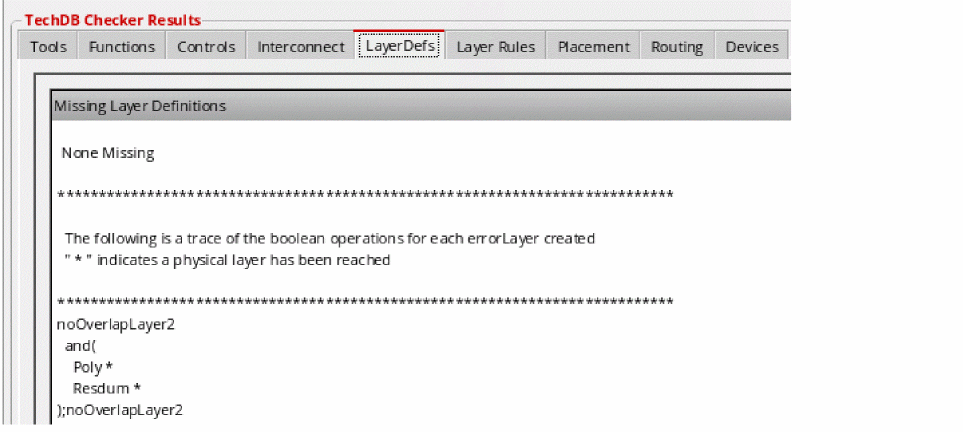
Trace of the boolean operations for each derived layer
Example:noOverlapLayer1
and(
Poly *
Oxide *
;noOverlapLayer1
noOverlapLayer2
and(
Poly *
Resdum *
;noOverlapLayer2
Viewing Tools Compliance Results
The Tools tab of the TechDB Checker form provides information on the missing and found constraints in the technology database for each supported Cadence tool. You can also save the tools compliance results.
Note the following when analyzing the tools compliance results:
- TechDB Checker highlights the following types of constraints:
-
Exclusive constraints are potentially conflicting constraints, when two or more constraints are defined for the same layer or pair of layers. Mutually exclusive constraints have different names with potentially identical operation with same layers. In the following image,
minOppExtensionandminExtensionDistanceare defined forMetal9andVia9. This indicates a potential conflict.
In the example, it is possible that the deprecation of certain constraints may be the reason for the conflict. The technology database may have two forms of a single constraint for backwards compatibility.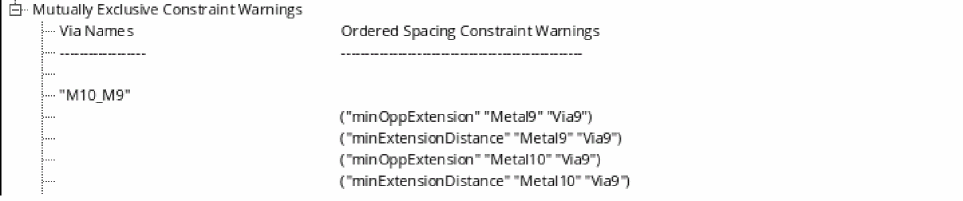
- The required constraints, which TechDB Checker reports, are based on how the tools are typically used.
- The technology database must contain all the required constraints for full tool enablement. However, tools may function correctly even when some required constraints are missing from the technology database.
To view tool compliance results:
-
Click the Tools tab.
View the high-level tool compliance report. This report includes the compliance status, the number of constraints required, and the number of constraints found in the technology database. -
Double-click the tool record whose details you want to view.
If TechDB Checker does not identify any missing, duplicate, or conflicting constraints, it displays an appropriate message.
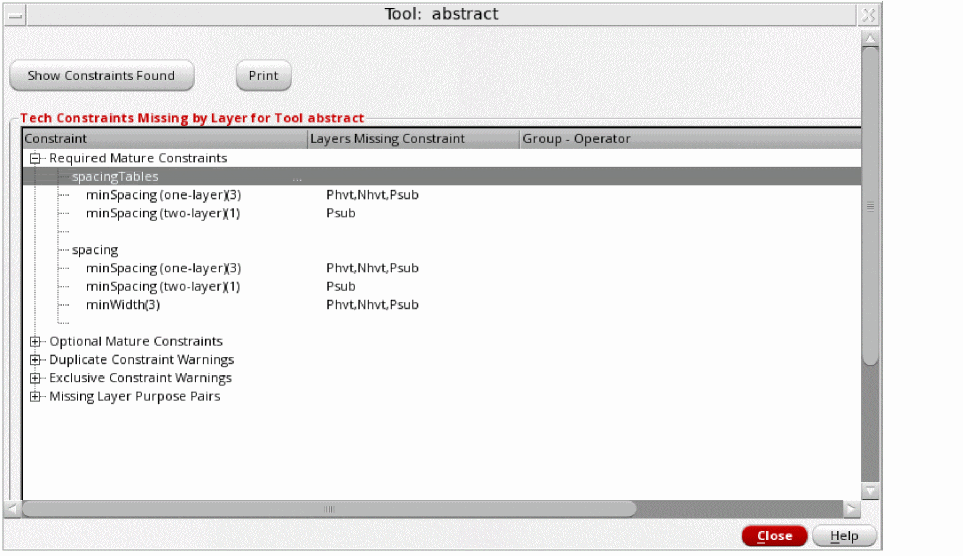
If TechDB Checker identifies errors, it displays the Tool form. This form includes the list of constraints that are missing, duplicate, and conflicting in the technology database for the tool, along with the layers.
The following figure illustrates details of the required constraints that are missing in the technology database for the Abstract Generator tool in Virtuoso Layout Suite XL. You can expand other categories to view details of duplicate and conflicting constraints and missing optional constraints.
-
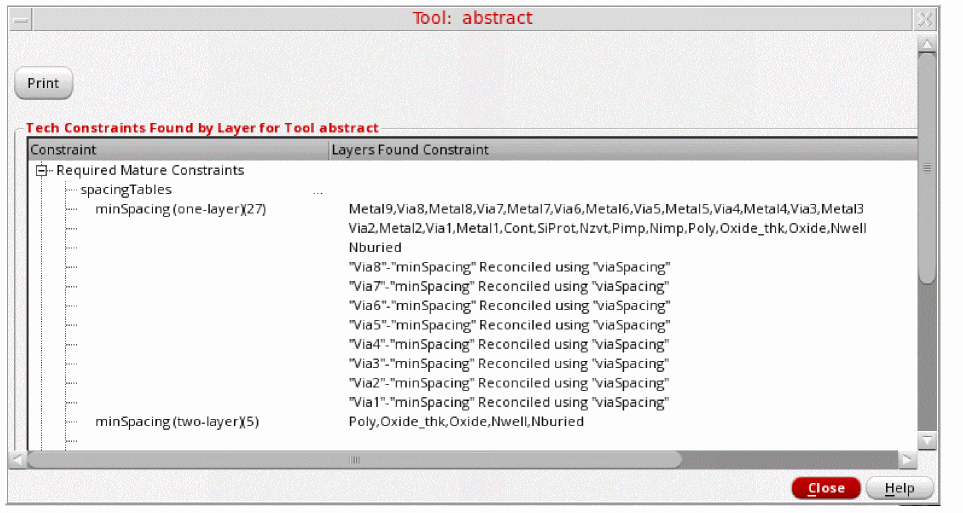
Click Show Constraints Found.
TechDB Checker displays a form with the list of required and optional constraints found in the technology database for the selected tool, along with the layers.
- Click Close to close the Tool forms after viewing the results.
To save tool compliance results:
- Open the relevant Tool form. For details, see the procedure to view tool compliance results.
-
Click Print.
TechDB Checker displays the results as a text file. - Save and print the file as required.
Viewing Functions Compliance Results
The Functions tab of the TechDB Checker form provides information about the required and optional constraints in layers along with their functions for tool enablement. From this tab, you can access information on:
- Missing constraints and the tools that require and support them
- Constraints found in the technology database and the tools that require and support them
You can also save the layer compliance results.
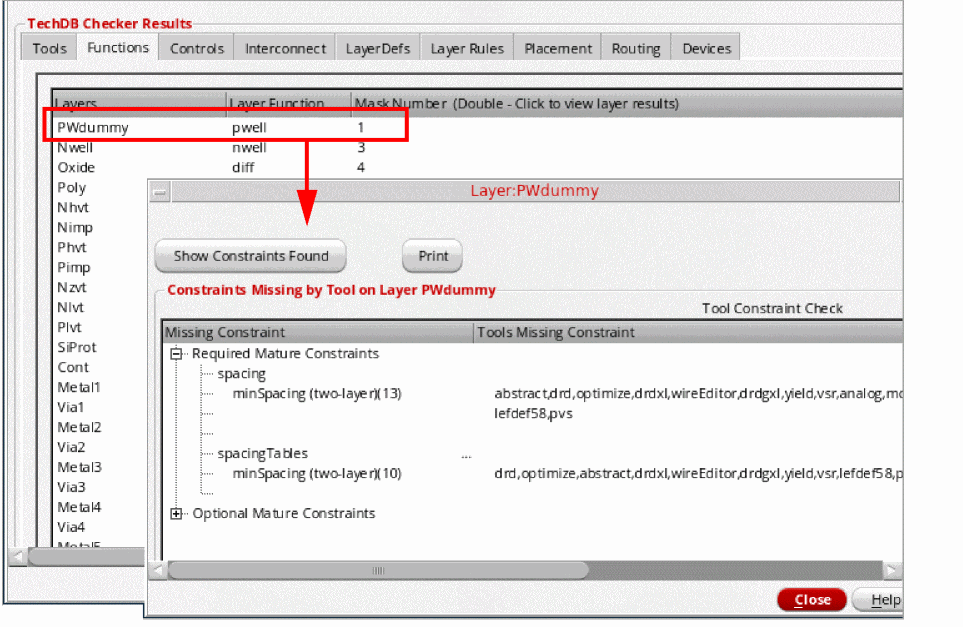
To view layer compliance results after running TechDB Checker:
-
Click the Functions tab.
View the high-level report, which includes the list of layers, their function, and mask number. -
Double-click a layer function record.
If TechDB Checker does not identify any errors, it displays an appropriate message.
If TechDB Checker identifies errors, it displays the Layer form with the list of missing constraints for the selected layer and the tools that require and support them.
-
Click Show Constraints Found on the Layer form.
TechDB Checker displays a form with the list of constraints found in the technology database for the layer, along with the tools that require and support them. - Click Close to close the Layer forms after viewing the results.
To save layer compliance results:
- Open the relevant Layer form. For details, see the procedure to view function compliance results.
-
Click Print.
TechDB Checker displays the results as a text file. - Save and print the file as required.
Viewing Missing Control Section Items
The Controls tab provides information on any missing items in the control section of the technology database, along with the list of tools that require or support them.
To view missing control section items and the tools that require and support them:

Viewing Interconnect Constraints Items
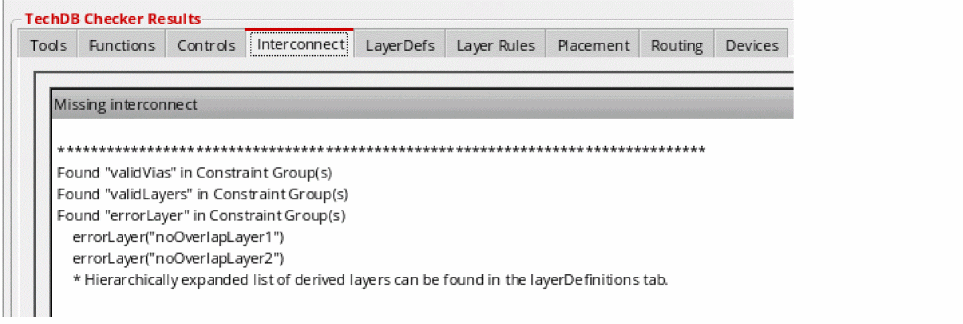
The Interconnect tab provides information on any missing and found interconnect constraint group items in the technology database. It also displays the tools that require and support missing constraints.
To view missing and found interconnect items:
Viewing Missing Layer Definitions
The LayerDefs tab provides information on any missing items from the layer definitions section of the technology database. It also displays a trace of the boolean operations for each derived layer.
To view missing layer definition items and boolean operations for derived layers:
Viewing Layer Rules
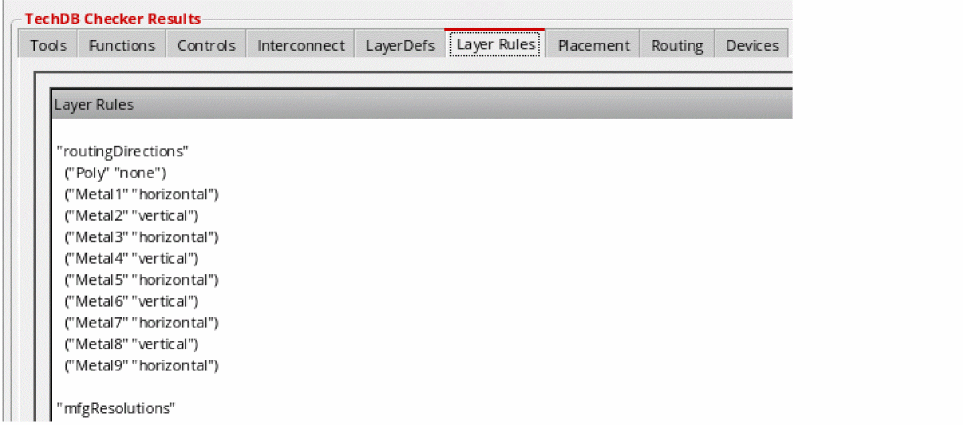
The Layer Rules tab provides information on layer rule items from the layer rules section of the technology database.
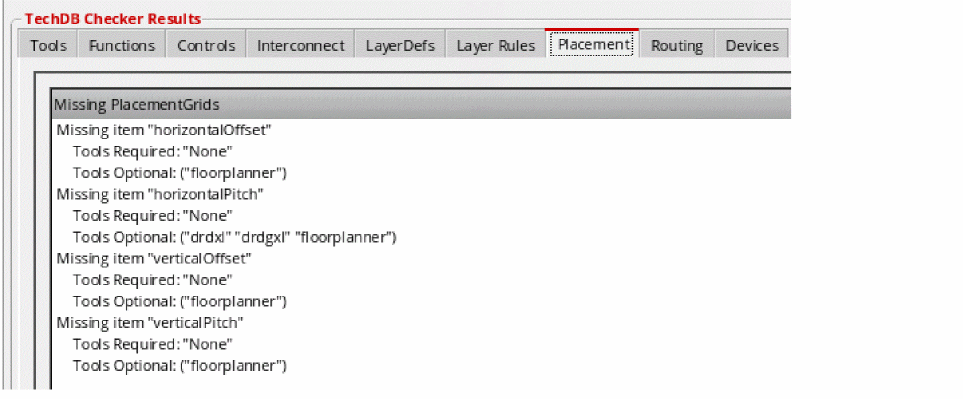
Viewing Missing Placement Grids
The Placement tab provides information on placement grids that are missing from the technology database, along with the list of tools that require and support them.
To view missing placement grids and the tools that require and support them:
Viewing Missing Routing Grids
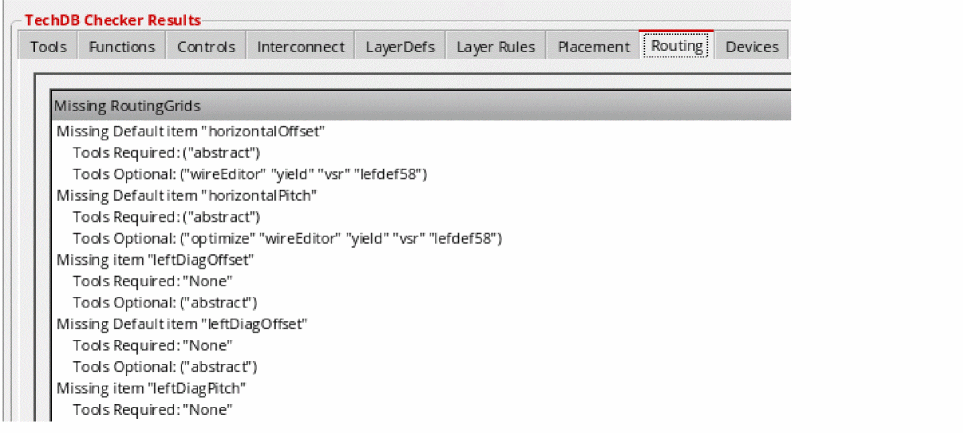
The Routing tab provides information on routing grids that are missing from the technology database, along with the tools that require and support them.
To view missing routing grids and the tools that require and support them:
Viewing Missing Devices
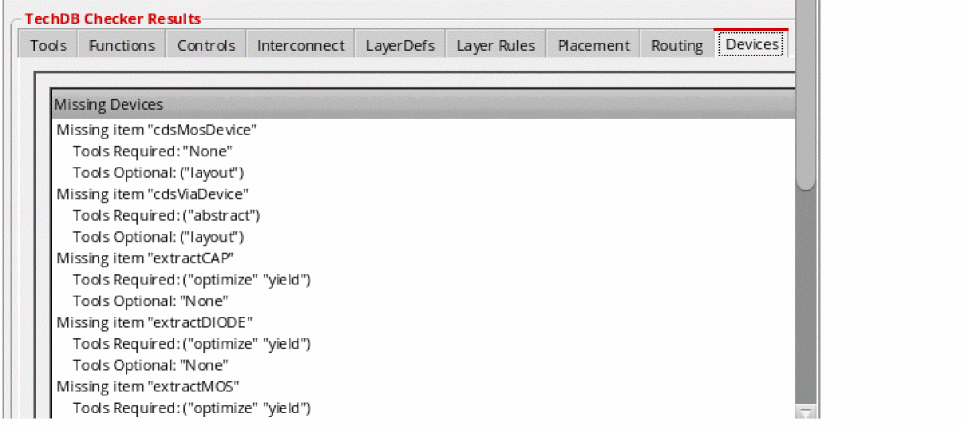
The Devices tab provides information on devices that are missing from the technology database, along with the list of tools that require and support these them.
To view missing devices and the tools that require and support them:
Return to top