
A
Stream Format
This chapter contains the following sections:
- Overview
- Stream File Description
- Differences in Stream Format Versions
- Stream Syntax
- Example of a Stream Format File
- How to read, write and print Stream dates to avoid Y2K problems
Overview
When you want to transfer Virtuoso data to other systems, the best format to translate your data to is Stream format. This appendix describes the Stream format used in the files you can produce and read using the Stream In and Stream Out commands from the Translators menu in the CIW.
You can transfer libraries preserved in Stream format to other systems for processing. In addition, Stream format is upward compatible, which means newer releases of the Stream translators can read libraries produced with an older release.
For complete descriptions of the options and arguments for LEF In, Stream Out, refer to Chapter 2, “Design Translation Using XStream Translator”.
Although you can use the Stream In and Stream Out commands to translate your Stream data, you might want to directly edit your Stream file, or write programs or scripts that manipulate your Stream data.
About GDSII
History
The GDSII format was invented at Calma Co. in the early 1970s, which is now a part of Cadence Design Systems, Inc. Therefore, GDSII is today a registered trademark of Cadence.
GDSII Format
GDSII is the open-standard Stream file format for transferring or archiving two-dimensional graphical design data. It is a binary, platform-independent format. You will read more about the Stream format in the subsequent sections. For a sample of the GDSII file, see Example of a Stream Format File.
Stream File Description
The information stored in a Stream file is coded in variable-length records. The length of a record is measured in eight-bit bytes. The minimum record length is four bytes. There is no limit on record length. Within the record, two bytes (16 bits) is a word. The 16 bits in a word are numbered 0 to 15, left to right.
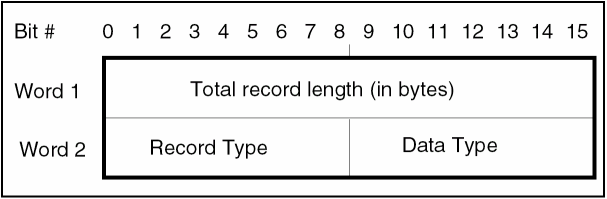
The first four bytes of a record are the header. The first two bytes of the header specify how many eight-bit bytes the record contains. The third byte of the header specifies the record type. The fourth byte of the header specifies the type of data contained within the record. The fifth through last bytes of the record are data. The next record begins immediately after the last byte in the record.
The following figure shows a typical record header:
If the Stream file is on a magnetic tape, the records of the library are usually divided in 2048-byte physical blocks. Records can overlap physical block boundaries; a record is not required to be wholly contained in a single physical block.
Two consecutive zero bytes are a null word. You can use null words to fill the space between the last record of a library and the end of its physical block.
Stream records are always an even number of bytes. If a record contains ASCII string data and the ASCII string is an odd number of bytes, the last character is a null character.
Stream Data Types
The following table lists the Stream data types and their values. The data type is specified by the fourth byte of the record.
| Data Type | Value |
|---|---|
The following paragraphs describe these Stream data types. As a reminder, a word consists of 16 bits, numbered 0 to 15, left to right.
-
Bit array (1)
A bit array is a word that contains bits, or a group of bits, that represent data. A bit array allows one word to contain more than one piece of information. -
Two-byte signed integer (2)
2-byte integer = 1 word 2s-complement representation
The range of two-byte signed integers is -32,768 to 32,767.
The following is a representation of a two-byte integer, whereSis the sign andMis the magnitude.SMMMMMMM MMMMMMMM
The following are examples of two-byte integers:00000000 00000001 = 1 00000000 00000010 = 2 00000000 10001001 = 137 11111111 11111111 = -1 11111111 11111110 = -2 11111111 01110111 = -137
-
Four-byte signed integer (3)
4-byte integer = 2 word 2s-complement representation
The range of four-byte signed integers is -2,147,483,648 to 2,147,483,647.
The following is a representation of a four-byte integer, whereSis the sign andMis the magnitude.SMMMMMMM MMMMMMMM MMMMMMMM MMMMMMMM
The following are examples of four-byte integers:00000000 00000000 00000000 00000001 = 1 00000000 00000000 00000000 00000010 = 2 00000000 00000000 00000000 10001001 = 137 11111111 11111111 11111111 11111111 = -1 11111111 11111111 11111111 11111110 = -2 11111111 11111111 11111111 01110111 = -137
-
Four-byte real (4) and eight-byte real (5)
4-byte real = 2-word floating point representation
8-byte real = 4-word floating point representation
For all nonzero values:
A floating point number has three parts: the sign, the exponent, and the mantissa.- The value of a floating point number is defined as (Mantissa) x (16 raised to the true value of exponent field).
- The exponent field (bits 1-7) is in Excess-64 representation. The field shows a number 64 greater than the exponent.
-
The mantissa is always a positive fraction greater than or equal to
1/16 and less than 1. For a 4-byte real, the mantissa is bits 8 through 31. For an 8-byte real, the mantissa is bits 8 through 63. The binary point is just to the left of bit 8. Bit 8 represents the value 1/2, bit 9 represents 1/4, and so on.
To keep the mantissa in the range of 1/16 to 1, the results of floating point arithmetic are normalized. Normalization is a process that shifts the mantissa left one hex digit at a time until its left FOUR bits represent a non-zero quantity. For every hex digit shifted, the exponent is decreased by one. Since the mantissa is shifted four bits at a time, it is possible for the left three bits of the normalized mantissa to be zero. A zero value, also called true zero, is represented by a number with all bits zero.
The following are representations of 4-byte and 8-byte reals, whereSis the sign,Eis the exponent, andMis the magnitude. Examples of 4-byte reals are included on the following pages, although 4-byte reals are not used currently. The representation of the negative values of real numbers is the same as the positive, except that the highest order bit is 1, not 0.
In the eight-byte real representation, the first four bytes are the same as in the four-byte real representation. The last four bytes contain additional binary places for higher resolution.
4-byte real:SEEEEEEE MMMMMMMM MMMMMMMM MMMMMMMM
8-byte real:SEEEEEEE MMMMMMMM MMMMMMMM MMMMMMMM MMMMMMMM MMMMMMMM MMMMMMMM MMMMMMMM
Examples of 4-byte real:
In the first six lines of the following example, the 7-bit exponent field is 65. The exponent is 65-64=1.01000001 00010000 00000000 00000000 = 1 01000001 00100000 00000000 00000000 = 2 01000001 00110000 00000000 00000000 = 3 11000001 00010000 00000000 00000000 = -1 11000001 00100000 00000000 00000000 = -2 11000001 00110000 00000000 00000000 = -3 01000000 10000000 00000000 00000000 = 0.5 01000000 10011001 10011001 10011001 = 0.6 01000000 10110011 00110011 00110011 = 0.7 01000001 00011000 00000000 00000000 = 1.5 01000001 00011001 10011001 10011001 = 1.6 01000001 00011011 00110011 00110011 = 1.7 00000000 00000000 00000000 00000000 = 0 01000001 00010000 00000000 00000000 = 1 01000001 10100000 00000000 00000000 = 10 01000010 01100100 00000000 00000000 = 100 01000011 00111110 10000000 00000000 = 1000 01000100 00100111 00010000 00000000 = 10000 01000101 00011000 01101010 00000000 = 100000
-
ASCII string (6)
A collection of bytes representing ASCII characters. All odd-length strings are padded with a null character (the number zero), and the byte count for the record containing the ASCII string includes this null character. If you write a program to read Stream data, the program must check for the null character and, if present, decrease the length of the string by one.
Stream Records
This section describes the records that make up a Stream file. The descriptions include the following:
- Record number
- Record name
- Data type
- The four digits that make up the second word in the record, divided as follows:
-
A description of the information contained in the record.
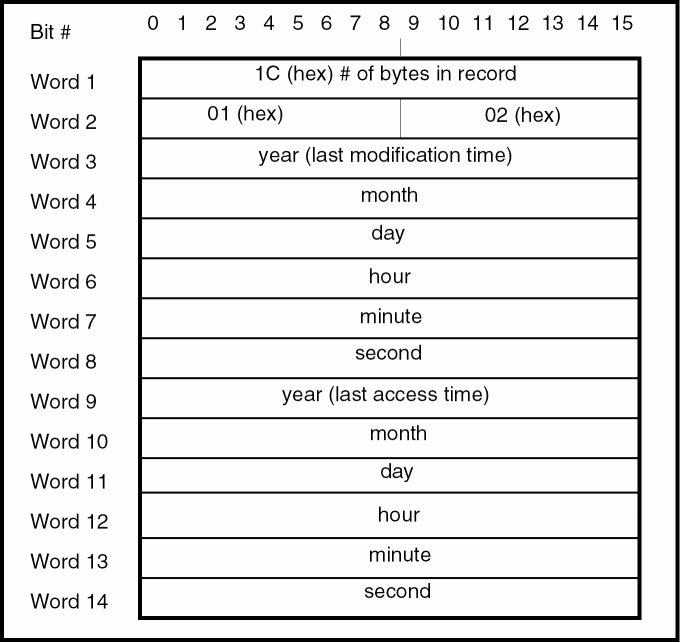
This record type marks the beginning of a library. It contains the last modification time of a library (one word each for years since 1900, month, day, hour, minute, and second), the time of last access (same format). The time fields correspond with the contents of a struct tm, except for the month, which is (tm->tm_mon + 1). See the table for the BGNLIB description in Example of a Stream Format File, and How to read, write and print Stream dates to avoid Y2K problems.
The following figure shows the meaning of each word.
For example, if you create a library using the default unit (user unit = 1 micron and 1000 database units per user unit), the first number is.001 and the second number is 1E-9.
The elements have the following number of coordinates:
- Path elements have a minimum of 2 and a maximum of 8000 coordinates.
- Boundary elements can have a minimum of 4 and a maximum of 8000 coordinates. The first and last coordinates must coincide.
- A text, contact, or SREF element can have only one coordinate.
- A node can have from 1 to 50 coordinates.
- A box must have five coordinates, with the first and last coordinates coinciding.
-
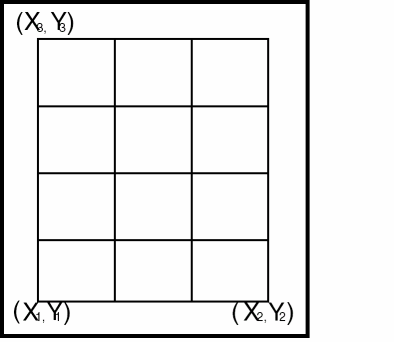
An AREF has three coordinates. In an AREF, the first coordinate is the array reference point (origin point). The second coordinate locates a position that is displaced from the reference point by the inter-column spacing times the number of columns. The third coordinate locates a position that is displaced from the reference point by the inter-row spacing times the number of rows. The following is an example of an array lattice.
The bits in the bit array have the following values:
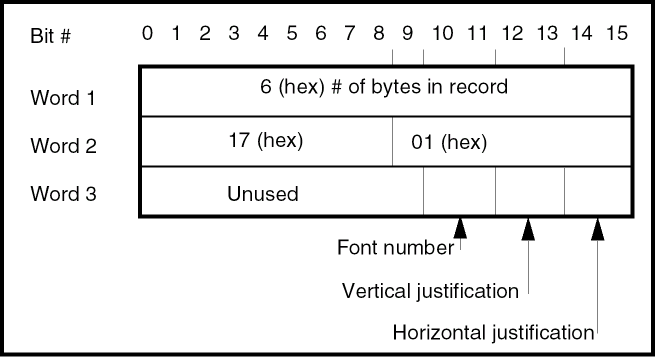
- Bits 10 and 11, used together as a binary number, specify the font (00 is font 0, 01 is font 1, 10 is font 2, and 11 is font 3).
- Bits 12 and 13 specify the vertical justification (00 means top, 01 means middle, and 10 means bottom).
- Bits 14 and 15 specify the horizontal justification (00 means left, 01 means center, and 10 means right).
- Bits 0 through 9 are reserved for future use and must be cleared.
If this record is omitted, top-left justification and font 0 are the default values. The following shows a PRESENTATION record.
|
Contains two bytes of bit flags for SREF, AREF, and text transformation. Bit 0 (the leftmost bit) specifies reflection. |
The bits in the bit array have the following values:
- If bit 0 is set, the element is reflected about the X-axis before angular rotation. For an AREF, the entire array is reflected with the individual array members rigidly attached.
- Bit 13 flags absolute magnification.
- Bit 14 flags absolute angle.
- Bits 1 to 12 and 15 are reserved for future use and must be clear.
If this record is omitted, the defaults for the element are no reflection, non-absolute magnification, and non-absolute angle. The following shows an STRANS record.
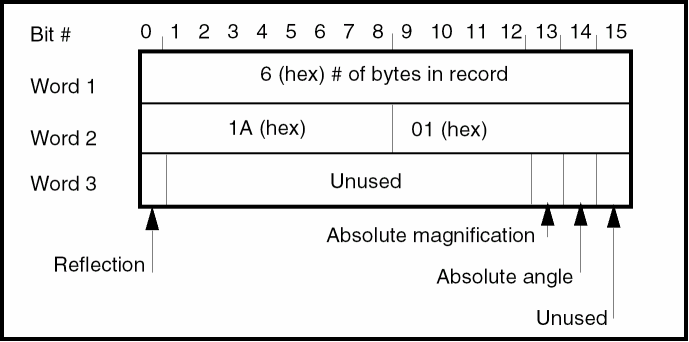
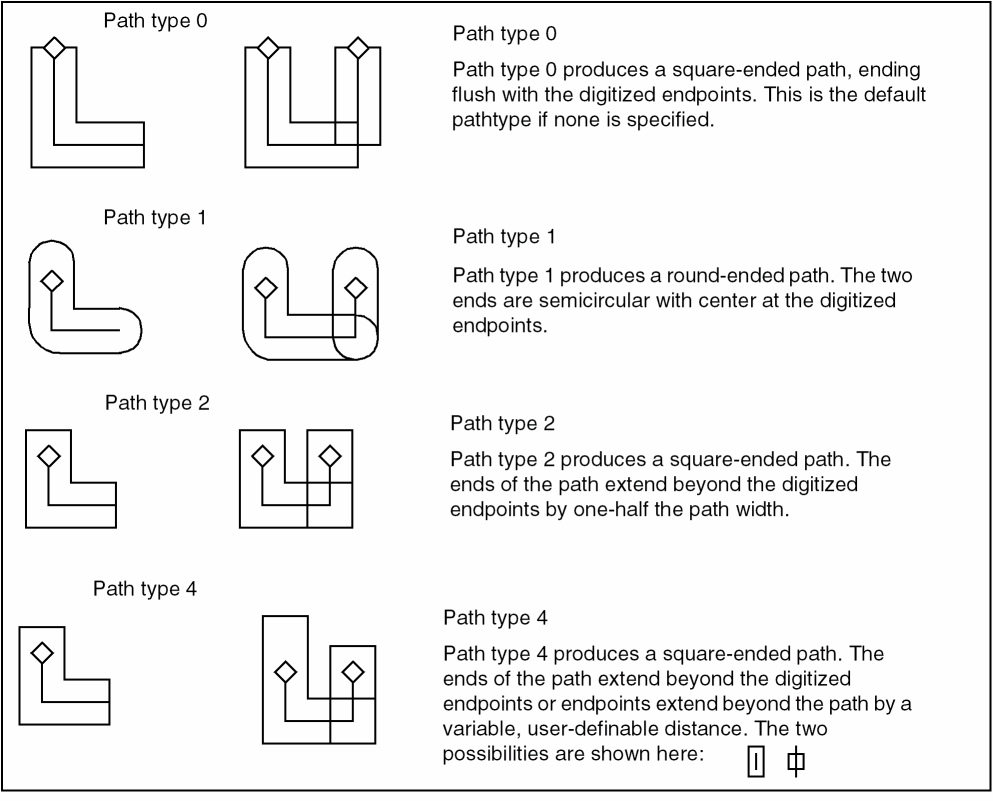
The following illustration shows the path types.
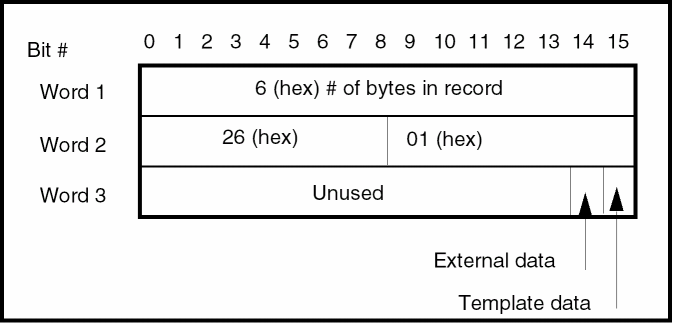
The following illustration shows an ELFLAGS record.
Differences in Stream Format Versions
There are five available versions of Stream format, version 3, 4, 5, 6 and 7. Stream versions 4 and 5 are the same. The records listed in the above section are a combined list of all the records supported by the various Stream formats. The various versions provide support for a subset of records present in this list.
The Stream format is usually broken down into 4 versions:
- Stream format version 3 supports basic geometric information. From the list of supported Stream records, Stream 3.0 only supports up to record 44. See Stream Records.
- Stream format version 4 or 5 provides support for geometric information along with supporting new types in gdsII 4, such as nodes, ports, template, plex data. From the list of supported Stream records, version 5.2 supports up to record 56.
- Stream format 6, has some additional information for a product called “Custom Plus” that includes things like “attach file” and “lib access control lists”. From the list of supported Stream records, version 6.0 supports up to record 59.
- The last format version is generically called 7 which has lots of the limits removed. In this version, polygons can have more than 200 points, more than 64 layers and datatypes are supported, and more than 10 levels of hierarchy are supported. From the list of supported Stream records, version7 supports all the records.
Stream 6 was GDSII-specific so not many non-Calma reader/writer applications handle it. Simple applications deal with Stream 3 (basic geometries), more advanced deal with 4/5 and general purpose remove limitations and can handle upto version 7.
Stream Syntax
This section contains a Bachus Naur representation of the Stream syntax. Bachus Naur uses ALL CAPS to represent the name of a record type and lower case for names that can be further broken down into a set of record types. The following table provides descriptions of the Bachus Naur symbols.
| Name of Symbol | Symbol | Meaning |
|---|---|---|
|
The elements within the braces can be absent or occur one or more times. |
||
|
These elements are further defined in the Stream syntax list. |
||
<stream format>::=
HEADER BGNLIB [LIBDIRSIZE] [SRFNAME] [LIBSECUR] LIBNAME [REFLIBS] [FONTS] [ATTRTABLE] [GENERATIONS] [<FormatType>] UNITS {<structure>}* ENDLIB
<FormatType>::= FORMAT | FORMAT {MASK}+ ENDMASKS
<structure>::= BGNSTR STRNAME [STRCLASS] {<element>}* ENDSTR
<element>::= {<boundary> | <path> | <SREF> | <AREF>
| <text> | <node> | <box>} {<property>}*
ENDEL
<boundary>::= BOUNDARY [ELFLAGS] [PLEX] LAYER DATATYPE XY
<path>::= PATH [ELFLAGS] [PLEX] LAYER DATATYPE [PATHTYPE] [WIDTH] [BGNEXTN] [ENDEXTN] XY
<SREF>::= SREF [ELFLAGS] [PLEX] SNAME [<strans>] XY
<AREF>::= AREF [ELFLAGS] [PLEX] SNAME [<strans>] COLROW XY
<text>::= TEXT [ELFLAGS] [PLEX] LAYER <textbody>
<node>::= NODE [ELFLAGS] [PLEX] LAYER NODETYPE XY
<box>::= BOX [ELFLAGS] [PLEX] LAYER BOXTYPE XY
<textbody>::=
TEXTYPE [PRESENTATION] [PATHTYPE] [WIDTH] [<strans>] XY STRING
<strans>::= STRANS [MAG] [ANGLE]
<property> ::= PROPATTR PROPVALUE
Example of a Stream Format File
The following is an example of a Stream format file. An explanation follows the example.
% od -h example.sf
000 0006 0002 0258 001C 0102 0067 0009 0003............X....
008 0000 0000 0000 0067 0009 0003 000D 0010 .......X........
010 0000 0006 3902 0028 000A 3B02 0003 0005 ....9..(..;.....
018 0007 0010 0206 6578 616D 706C 652E 6368 ......example.ch
020 7000 005C 1F06 7265 6631 2E63 6870 0000 p.....ref1.chp..
028 0000 0000 0000 0000 0000 0000 0000 0000 ................
030 0000 0000 0000 0000 0000 0000 0000 0000 ................
****
048 0000 0000 0000 0000 0000 0000 0000 00B4 ................
050 2006 6361 6C6D 6166 6F6E 742E 666E 7400  .calmafont.fnt.
058 0000 0000 0000 0000 0000 0000 0000 0000 ................
060 0000 0000 0000 0000 0000 0000 0000 7465 ..............te
068 7874 2E66 6E74 0000 0000 0000 0000 0000 xt.fnt..........
O70 0000 0000 0000 0000 0000 0000 0000 0000 ................
078 0000 0000 0000 0000 0000 666F 6E74 2E66 ..........font.f
080 6E74 0000 0000 0000 0000 0000 0000 0000 nt..............
088  0000  0000  0000  0000  0000  0000  0000  0000 ........
090 0000 0000 0000 7067 666F 6E74 2E66 6E74 ......pgfont.fnt
098 0000 0000 0000 0000 0000 0000 0000 0000 ................
0A0 0000 0000 0000 0000 0000 0000 0000 0000 ................
0A8 0000 000C 2300 6174 7472 732E 6174 0006 ....#.attrs.at..
0B0 2202 0003 0014 0305 3E41 8937 4BC6 A7EF ”.......>A.7K...
OB8 3944 B82F A09B 5A5D 001C 0502 0067 0007 9D./..ZQ.....X..
0C0 000C 0011 001D 000A 0067 0007 0011 0011 .........X......
0C8 003A 0014 000C 0606 6578 616D 706C 6532 .|......example2
ODO 0004 0B00 000C 1206 6578 616D 706C 6531 ........example1
0D8 0006 1A01 8000 000C 1C05 425A 0000 0000 ..........BZ....
0E0 0000 0008 1302 0002 0002 001C 1003 0000 ................
0E8 4E20 0000 4E20 0000 4E20 0001 4FF0 0001 N ..N ..N ..0...
0F0 3880 0000 4E20 0004 1100 0004 0700 001C 8...N ..........
0F8 0502 0067 0007 000C 000B 001C 0009 0067 ...X...........X
100 0008 001C 000F 0039 003A 000C 0606 6578 .......9.|....ex
108 616D 706C 6531 0004 0C00 0006 0D02 0000 ample1..........
110 0006 1602 0000 0006 1701 0005 0006 1A01 ................
118 8006 000C 1B05 4120 0000 0000 0000 000C ......A ........
120 1003 0000 4E20 0000 4E20 000E 1906 4920 ....N ..N ....I.
128 414D 2048 4552 450D 0004 1100 0004 0800 AM HERE.........
130 0006 2601 0001 0006 0D02 0002 0006 0E02 ..&.............
138 0003 0024 1003 0000 1388 0000 6D60 0000 ...$........m’..
140 2EE0 0000 6D60 0000 1F40 0000 84D0 0000 ....m’..._......
148 1388 0000 6D60 0004 1100 0004 0900 0006 ....m’..........
150 0D02 0004 0006 0E02 003F 0006 2102 0001 .........?..!...
158 0008 0F03 0000 03E8 0024 1003 0000 3A98 .........$....|.
160 0000 36B0 0000 6590 0000 36B0 0000 84D0 ..6...e...6.....
168 0000 2328 0000 55F0 0000 1770 0006 2B02 ..#(..U....p..+.
170 0002 000A 2C06 4D45 5441 4C00 0006 2B02 ....,.METAL...+.
178 000A 000C 2C06 5052 4F50 4552 5459 0004 ....,.PROPERTY..
180 1100 0004 0700 0004 0400 ................
The database that produced this Stream format output has only two structures. They are called example1 and example2. Example1 contains a boundary that is template data, a path with two properties, and a middle-center justified text element containing the string, I AM HERE. Example2 contains only one element, a 2 by 2 AREF of example1.
The following are explanations of the records contained in the example Stream file. As a reminder, the first two words (four bytes) of a record are the record header. The first word shows the record length in bytes, and the second word identifies the record type and the data type.
0006 0002 0258
The first word reports that this record is 6 bytes long. The second word indicates that this is the HEADER (00 hex) record and that the data type is a two-byte signed integer (02 hex). The information in the third word is the Stream version number, which is version 600 (258 hex).
001C 0102 0067 0009 0003 0000 0000 0000 0067 0009
0003 000D 0010 0000
This record is 28 (1C hex) bytes. It is the BGNLIB (01 hex) record. The data type is a two-byte signed integer (02). The remaining 24 bytes of information contain the date and time the library was last modified and the date and time of last access. For example, the last six words of information contain:
| Time Component | Hexadecimal Representation | Decimal Representation | Real Date Value |
|---|---|---|---|
This record indicates that this library was last accessed on September 3, 2003, at 1:16:00 p.m. This is local time and no time zone or daylight savings time information is stored.
0006 3902 0028
This record is 6 bytes. It is the LIBDIRSIZE (39 hex) record. The data type is a two-byte signed integer (02). In this example, the directory size is 40 (28 hex) pages.
000A 3B02 0003 0005 0007
This record is 10 (A hex) bytes. It is a LIBSECUR (3B hex) record. The data type is a two-byte signed integer (02). This example has only one ACL entry. The entry has a group number of 3, a user number of 5, and access rights of 7. This means that the only one with any access rights to this library is user number 5 in group number 3. The access code (007) means this user has read and write access and is also the owner of the library.
0010 0206 6578 616D 706C 652E 6368 7000
This record is 16 (10 hex) bytes. It is the LIBNAME (02 hex) record. The data type is an ASCII string (06). The six words of information contain the library name, example.chp.
005C 1F06 7265 6631 2E63 6870 0000 0000 0000 0000
0000 0000 0000 0000 0000 0000 0000 0000 0000 0000
0000 0000 0000 0000 0000 0000 0000 0000 0000 0000
0000 0000 0000 0000 0000 0000 0000 0000 0000 0000
0000 0000 0000 0000 0000 0000
This record is 92 (5C hex) bytes. It is the REFLIB (1F hex) record. The data type is an ASCII string (06). In this example, the library ref1.chp is the bound reference library. The library is padded with nulls to equal 44 bytes. At least 92 bytes of this record must be present if any reference libraries are bound to the working library. No other reference library is bound, so the last 44 bytes are filled with nulls. If more than two reference libraries are bound, the record is extended by 44 bytes for each additional library.
00B4 2006 6361 6C6D 6166 6F6E 742E 666E 7400 0000
0000 0000 0000 0000 0000 0000 0000 0000 0000 0000
0000 0000 0000 0000 7465 7874 2E66 6E74 0000 0000
0000 0000 0000 0000 0000 0000 0000 0000 0000 0000
0000 0000 0000 0000 0000 0000 666F 6E74 2E66 6E74
0000 0000 0000 0000 0000 0000 0000 0000 0000 0000
0000 0000 0000 0000 0000 0000 0000 0000 7067 666F
6E74 2E66 6E74 0000 0000 0000 0000 0000 0000 0000
0000 0000 0000 0000 0000 0000 0000 0000 0000 0000
This record is 180 (B4 hex) bytes. It is the FONTS (20 hex) record. The data type is an ASCII string (06). All 180 bytes of this record must be present if any text font files are bound to this library. In this example, four text font files (the maximum possible) are bound to the library. The files are calmafont.fnt, text.fnt, font.fnt, and pgfont.fnt. Each string is padded with nulls out to 44 bytes.
000C 2306 6174 7472 732E 6174
This record is 12 (C Hex) bytes. It is the ATTRTABLE (23 hex) record. The data type is an ASCII string (06). This record is only present if an attribute table is bound to the library. The name of the attribute table is attrs.at.
0006 2202 0003
This record is 6 bytes. It is the GENERATIONS (22 hex) record. The data type is a two-byte signed integer (02). In this example, three generations of a structure are retained in the library.
0014 0305 3E41 8937 4BC6 A7EF 3944 B82F A09B 5A51
This record is 20 (14 hex) bytes. It is the UNITS (03 hex) record. The data type is an eight-byte real (05). In this example, 3E41 8937 4BC6 A7EF is 1E-3. This implies that a database unit is .001 of a user unit. The record 3944 B82F A09B 5A51 is 1E-9. This implies that a database unit is 1E-9 meters (1E-3 microns).
001C 0502 0067 0007 000C 0011 001D 000A 0067 0007
0011 0011 003A 0014
This record is 28 (1C hex) bytes. It is the BGNSTR (05 hex) record. The data type is a two-byte signed integer (02). The information in this record is the creation time and last modification time of the structure. The information is in the same format as the BGNLIB record. This structure was created July 12, 2003, at 5:29:10 p.m. and last modified July 17, 2003, at 5:58:20 p.m.
000C 0606 6578 616D 706C 6532
This record is 12 (C hex) bytes. It is the STRNAME (06 hex) record. The data type is an ASCII string (06). The structure name is example2.
0004 0B00
This record is 4 bytes. It is the AREF (0B hex) record. It contains no data (00). It marks the start of an AREF.
000C 1206 6578 616D 706C 6531
This record is 12 (C hex) bytes. It is the SNAME (12 hex) record. The data type is an ASCII string (06). This record contains the name of referenced structure example1.
0006 1A01 8000
This record is 6 bytes. It is the STRANS (1A hex) record. The data type is a bit array (01). In this example, only bit 0 is set, which implies that this AREF is reflected. Since bit 13 and 14 are not set, this structure’s magnification and angle, respectively, are not absolute.
000C 1C05 425A 0000 0000 0000
This record is 12 (C hex) bytes. It is the ANGLE (1C hex) record. The data type is eight-byte real data (05). The data 425A 0000 0000 0000 represents 90.0, which implies that this AREF is placed at an angle of 90 degrees.
0008 1302 0002 0002
This record is 8 bytes. It is the COLROW (13 hex) record. The data type is a two-byte signed integer (02). This example contains a 2 x 2 AREF.
001C 1003 0000 4E20 0000 4E20 0000 4E20 0001 4FF0
0001 3880 0000 4E20
This record is 28 (1C hex) bytes. It is the XY (10 hex) record. The data type is a four-byte signed integer (03). The data, taken two words at a time, can be translated to decimal as 20000, 20000, 20000, 86000, 80000, 20000. Multiply these by .001 (because a data base unit is .001 of a user unit). The results are the coordinates (20, 20), (20, 86), and (80, 20). The first coordinate is the array reference point. The second coordinate is a point that is displaced from the array reference point in the Y-direction by the number of columns times the inter-column spacing. In this example, the second point was displaced 66 (86 - 20) units from the array reference point. Since the array has two columns, this implies that the inter-column spacing is 33 units. A similar calculation can be carried out to verify that the inter-row spacing is 30 units.
0004 1100
This record is 4 bytes. It is the ENDEL (11 hex) record. It contains no data (00). ENDEL marks the end of an element.
0004 0700
This record is 4 bytes. It is the ENDSTR (07 hex) record. It contains no data (00). ENDSTR marks the end of a structure.
001C 0502 0067 0007 000C 000B 001C 0009 0067 0008 001C 000F 0039 003A
This is another BGNSTR record. This structure was created July 12, 2003, at 11:28:09 a.m., and last modified August 28, 2003, at 3:57:58 p.m.
000C 0606 6578 616D 706C 6531
This is another STRNAME record. It contains the string example1.
0004 0C00
This record is 4 bytes. It is the TEXT (0C hex) record. It contains no data (00). Text marks the start of a text element.
0006 0D02 0000
This record is 6 bytes. It is the LAYER (0D hex) record. The data type is a two-byte signed integer (02). This text element is on layer 0.
0006 1602 0000
This record is 6 bytes. It is the TEXTTYPE (16 hex) record. The data type is a two-byte signed integer (02). This text element is texttype 0.
0006 1701 0005
This record is 6 bytes. It is the PRESENTATION (17 hex) record. The data type is a bit array (01). The hex number 0005 in binary has all bits set to zero except bits 13 and 15. Since bits 10 and 11 are 00, the text element is font 0. Since bits 12 and 13 are 01, the text has a middle vertical position. Since bits 14 and 15 are 01, the text has a center horizontal presentation.
0006 1A01 8006
This is another STRANS record. This text is reflected and has an absolute magnification and absolute angle.
000C 1B05 4120 0000 0000 0000
This record is 12 (C hex) bytes. It is the MAG (1B hex) record. The data type is eight-byte real (05). The data in this record represents 2.0, meaning that this text is magnified two times.
000C 1003 0000 4E20 0000 4E20
This is another XY record. The text is placed at coordinate (20, 20).
000E 1906 4920 414D 2048 4552 450D
This record is 14 (E hex) bytes. It is the STRING (19 hex) record. The data type is an ASCII string (06). The text string is I AM HERE.
0004 1100
0004 0800
This record is 4 bytes. It is the BOUNDARY (08 hex) record. It contains no data (00). BOUNDARY marks the start of a boundary element.
0006 2601 0001
This record is 6 bytes. It is the ELFLAGS (26 hex) record. The data type is a bit array (01). Since bit 15 is set, this element is template data. Since bit 14 is not set, the element is not external data.
0006 0D02 0002
This is another LAYER record. The boundary is on layer 2.
0006 0E02 0003
This record is 6 bytes. It is the DATATYPE (0E hex) record. The data type is a two-byte signed integer (02). This boundary is of datatype 3.
0024 1003 0000 1388 0000 6D60 0000 2EE0 0000 6D60 0000 1F40 0000 84D0 0000 1388 0000 6D60
This is another XY record. The coordinates are (5, 28), (12, 28),
(8, 34), and (5, 28).
0004 1100
0004 0900
This record is 4 bytes. It is the PATH (09 hex) record. It contains no data (00). PATH marks the start of a path element.
0006 0D02 0004
This is another LAYER record. The path is on layer 4.
0006 0E02 003F
This is another DATATYPE record. The path is datatype 63 (3F hex).
0006 2102 0001
This record is 6 bytes. It is the PATHTYPE (21 hex) record. The data type is a two-byte signed integer (02). This path is pathtype 1.
0008 0F03 0000 03E8
This record is 8 bytes. It is the WIDTH (0F hex) record. The data type is a four-byte signed integer (03). The number 03E8 hex is 1000 in decimal. Multiply this by .001 (because a database unit is .001 of a user unit). The result is 1; therefore, the width of this path is 1.
0024 1003 0000 3A98 0000 36B0 0000 6590 0000 36B0 0000 84D0 0000 2328 0000 55F0 0000 1770
This is another XY record. This path’s coordinates are (15, 14), (26, 14), (34, 9), and (22, 6).
0006 2B02 0002
This record is 6 bytes. It is the PROPATTR (2B hex) record. The data type is a two-byte signed integer (02). This path has a property with attribute number 2.
000A 2C06 4D45 5441 4C00
This record is 10 (A hex) bytes. It is the PROPVALUE (2C hex) record. The data type is an ASCII string (06). The property value for property attribute 2 (above) is METAL. The odd length string (five characters) is padded with a null.
0006 2B02 000A
This is another PROPATTR record. This path has another property associated with it. The property has attribute number 10 (A hex).
000C 2C06 5052 4F50 4552 5459
This is another PROPVALUE record. Property attribute 10 (above) has the value PROPERTY.
0004 1100
0004 0700
This is another ENDSTR record.
0004 0400
This record is 4 bytes. This record is the ENDLIB (04 hex) record. It contains no data (00). ENDLIB marks the end of a Stream format file.
How to read, write and print Stream dates to avoid Y2K problems
The year fields in Stream dates represent the number of years since 1900, and this has led to some misunderstandings, because dates before 2000 appeared to be abbreviated rather than offset by 1900. For example, the year 1999 is represented by decimal 00099 in Stream. This can lead to errors after 2000 if the Stream year fields are assumed to be only tens and units, such as in:
printf(“Modification date: %d/%d/19%d\n”, stream[2], stream[1], stream[0]);
The above code will print “Modification date: 1/1/19103” in the year 2003.
The format of the year fields in Stream corresponds with the year field in a struct tm, and this structure is a convenient way of getting the necessary 6 integers to store in a Stream date. The month is the only field which needs to be modified, and it needs to be incremented when writing, and decremented when reading Stream. It is recommended that the methods used in the following example be used when writing and reading Stream, and that the date not be printed directly form the Stream contents.
Code Examples
The following code examples are the recommended methods for writing dates to a Stream file, reading and printing dates from a Stream file, and comparing Stream dates. In each case, the date is encoded and decoded to/from a time_t time stamp.
int strmTime[6]; /* buffer of integers read from or to be written to Stream file */
int lowYears, highYears; /* counters for bad year content */
/*****************************************************************
* Encode a time stamp into a time buffer to write to a Stream file.
*****************************************************************/
void timeStampToStreamBuffer(int *strmTime, time_t timeStamp)
{
   struct    tm *ptm;
   ptm = localtime (&timeStamp);
   strmTime[0]= ptm->tm_year;
   strmTime[1]= ptm->tm_mon + 1; /* Make month 1-based */
   strmTime[2]= ptm->tm_mday;
   strmTime[3]= ptm->tm_hour;
      strmTime[4]= ptm->tm_min;
   strmTime[5]= ptm->tm_sec;
}
/*****************************************************************
* Extract a time_t from a Stream time buffer.
*****************************************************************/
static time_t convStrmDateToTime_t(strmTime)
int *strmTime ;
{
   struct tm ptm ;
   time_t ttime ;
    if (strmTime[0] <= 69) {
      numLowYears++ ;
      ptm.tm_year = strmTime[0] + 100 ;
   }
    else if (strmTime[0] >= 1970) {
      numHighYears++ ;
      ptm.tm_year = strmTime[0] - 1900 ;
   }
    else {
      ptm.tm_year = strmTime[0] ;
   }
    ptm.tm_mon = strmTime[1] - 1 ;
   ptm.tm_mday = strmTime[2] ;
   ptm.tm_hour = strmTime[3] ;
   ptm.tm_min = strmTime[4] ;
   ptm.tm_sec = strmTime[5] ;
   /* initialize these values for mktime. */
   ptm.tm_wday = 0;
   ptm.tm_yday = 0;
   ptm.tm_isdst = -1;
   ttime = mktime(&ptm) ;
   return(ttime) ;
}
/******************************************************************
* Example use of the above functions.
* The following code gets the current system time in a time_t, prints
* the date from that time_t, encodes it in an integer buffer, which
* could be written to a Stream file, prints the contents of that
* buffer, decodesthe buffer back into a time_t, prints the date from
* that time_t, and then compares the before and after time_ts.
*****************************************************************/
void warnBadDates()
{
   if (lowYears > 0 ) {
   printf("Warning: years < 70 encountered in Stream file\n");
   printf("Warning: Stream year fields should be number of years
   since 1900\n");
   }
   if (highYears > 0) {
   printf("Warning: years > 1970 encountered in Stream file\n");
   printf("Warning: Stream year fields should be number of years
   since 1900\n");
   }
}
main(int argc, char **argv)
{
   time_t timeStamp, newTimeStamp;
   short strmTime[6];
   char timeBuf[80];
   lowYears = highYears = 0;
   time(&timeStamp);
   printf("Input time is %s\n", ctime(&timeStamp));
   timeStampToStreamBuffer(strmTime, timeStamp);
   printf("Contents of Stream time buffer: %0.4x %0.4x %0.4x %0.4x
   %0.4x %0.4x\n",
      strmTime[0], strmTime[1],strmTime[2],
      strmTime[3],strmTime[4],strmTime[5]);
   newTimeStamp = convStrmDateToTime_t(strmTime);
   printf("Time returned from time buffer: %s\n\n",
         ctime(&newTimeStamp));
   if (timeStamp != newTimeStamp) {
      printf("Error: timestamps differ: %d %d\n", timeStamp,
            newTimeStamp);
      printf("old: %s\n", ctime(&timeStamp));
      printf("new: %s\n", ctime(&newTimeStamp));
   }
   else
      printf("Timestamps matched\n");
   warnBadDates();
}
Return to top