
Displaying the Congestion Analysis Assistant
Use one of the following methods to display the Congestion Analysis assistant.
- Choose Window – Assistants – Congestion Analysis.
- Right-click anywhere in the layout window menu bar and choose Assistants – Congestion Analysis.
-
Click the Congestion Analysis icon
 on the Design Planning toolbar. For more information, see Design Planner Toolbar.
The main components of the Congestion Analysis assistant user interface are shown in the following figure.
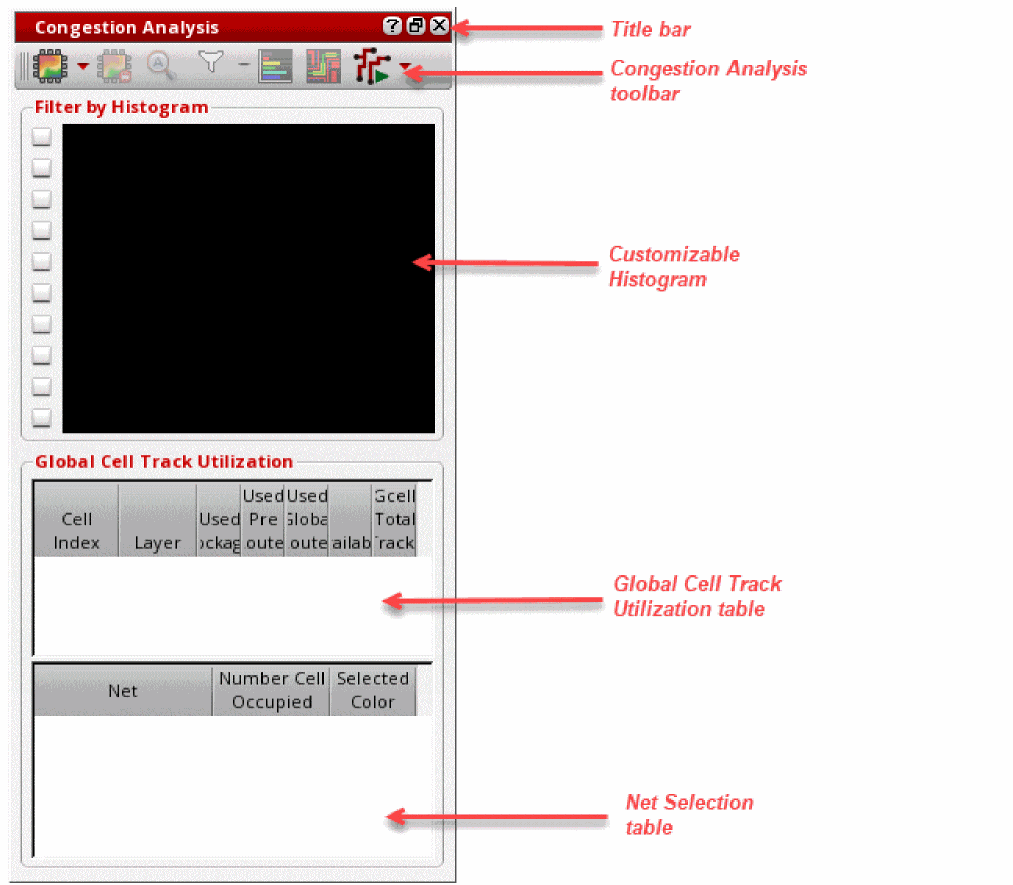
To hide the Congestion Analysis assistant, do one of the following:
- Click the Hide button in the Congestion Analysis title bar.
- Right-click anywhere in the layout window menu bar and choose Assistants – Congestion Analysis.
Related Topics
Environment Setup for Congestion Analysis
Loading the Congestion Analysis Workspace
Uses of the Congestion Analysis Assistant
Return to top