9
Batch Commands
This chapter provides the syntax, descriptions, and examples for the batch utility that can be used in conjunction with the Virtuoso® Integrated Physical Verification System (VIPVS) editing feature.
IpvsGenSnapshot
Allows you to generate snapshot files based on inputs of snapshot name, directory path, layermap and rule deck. In addition, it allows you to define rule selections via a control file. The syntax within the control file is understood by PVS and can be used directly for PVS sign-off technology enablement. By default, this utility generates a preset file that can be loaded into Virtuoso IPVS Snapshot Creator.
Usage:
ipvsGenSnapshot [-h | -help | -v | -version ]
To generate a snapshot via the command line:
ipvsGenSnapshot -name snapshotName -dir dirFilePath [output_arguments]
-layerMap FilePath [-objectMap FilePath] [-control FilePath]
[ -comment string ] rulefile1 [rulefile2 ... rulefileN]
To convert existing GUI preset file to snapshot via the command line:
ipvsGenSnapshot -name snapshotName -dir dirFilePath [output_arguments] -preset FilePath
Arguments
|
-name snapshotName
|
Mandatory keyword specifies snapshot name.
|
|
-dir dirFilePath
|
Mandatory keyword specifies the snapshot directory path (relative or absolute).
|
|
-layerMap FilePath
|
Mandatory keyword to specify absolute layermap file path that VIPVS is referenced to. If Virtuoso_IPVS_defaultSNPLayerMap is set, this option is not required. However, explicit declaration has priority over this shell variable. Ignored if -preset argument is specified.
|
|
-objectMap FilePath
|
Optional keyword to specify absolute object mapping file path that VIPVS is referenced to. Ignored if -preset argument is specified.
|
|
-control FilePath
|
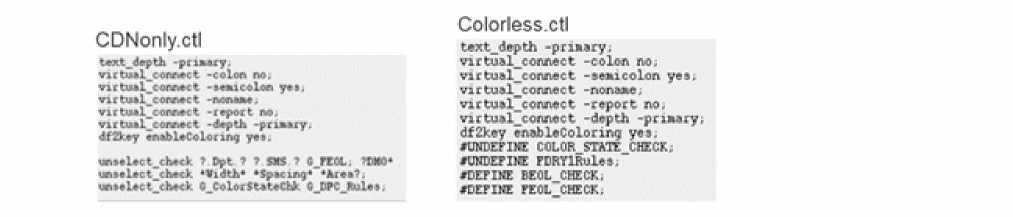
Optional keyword to specify the control file containing PVS readable syntax for rule selection (select_check or unselect_check) or switches (#define or #undefine). Wildcard (* | ?) is supported for select_check / unselect_check commands. Ignored if -preset argument is specified.
|
|
-preset FileName
|
Input preset file.
|
|
-comment string
|
Optional keyword to specify a description comment for the snapshot. You can specify either single word or several words. In second case, double quotes are needed, such as "description comment". For single word double quotes are optional.
|
|
rule_file1 [ … rule_fileN]
|
|
|
Mandatory keyword specifies absolute rule deck path. If Virtuoso_IPVS_defaultSNPRuleDeck is set, this option is not required. However, explicit declaration has priority over this shell variable. Ignored if -preset argument is specified.
|
LayerMapFile ""
If you use preset file as input of ipvsGenSnapshot batch utility, you will notice that ipvsGenSnapshot fails with following error:
[ERROR] PVS UI: Run Data->Layer Map List [LayerMapFile]: Layer map is not defined and not found in technology library.
To avoid this error you have to specify path to layer map file:
LayerMapFile "<path to layer map file>"
Output Arguments
|
-noGenPreset
|
Optional keyword specifies that preset file for Virtuoso IPVS Snapshot Creator should not be generated. Ignored if
-preset argument is specified.
|
|
-log FilePath
|
Optional keyword prints run log to a designated file. If it is not specified, run log is stored in default.snpGen.log at the current working directory.
|
|
-h,--help
|
Prints this message and exits.
|
|
-v, -V, -version, --version
|
|
|
Prints PVS version and exits.
|
Return to top