
B
Schematic Utilities
Inspect Schematic Instance Properties
Enables the review and optional deletion of instance properties often carried over by copies of cellviews. Instance properties are not Pcell CDF Parameters.
To use this utility, open one or more schematic windows. For this example, Figure 1's target schematic is used.
Select Migrate – Schematic – Utilities – Inspect Schematic Instance Properties, and a form will open with the currently opened schematics. Select the cell of interest. If there are no schematic instance properties, the following message will be displayed:
VALE INFO: No instance properties without a corresponding CDF Parameter were found in the current cellview, Aug20_doc1 to inspect and possibly remove.
If there are schematic instance properties, the following form will appear, listing the cell name, instance name, and property name found on the instance.
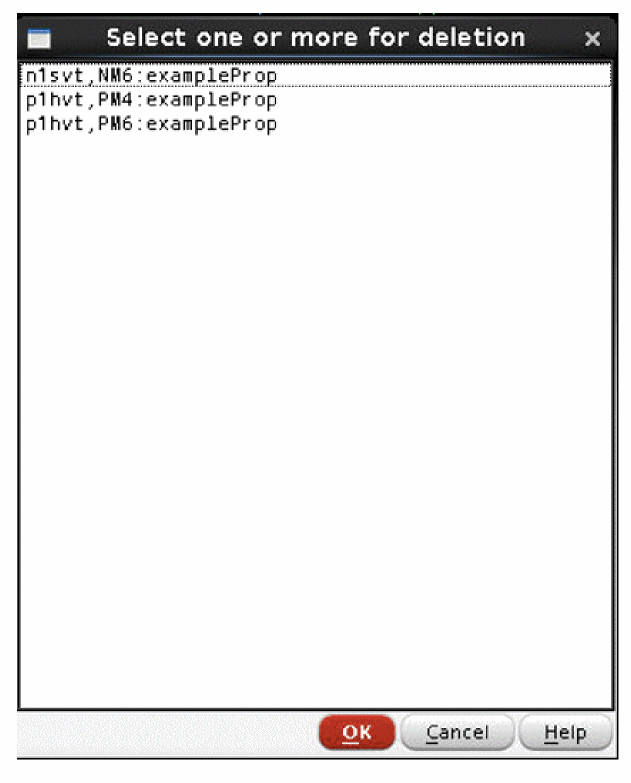
Figure B-1 Figure 19 Select one or more for Deletion
Choose Cancel to only observe and exit. Choose one or more line item (click and shift-click) and select OK to remove the instance property.
Schematic Design Inventory
Displays information about the current design hierarchy.
Select Migrate – Schematic – Utilities – Schematic Design Inventory, and it will display the following four sections in a new text window.
Section 1:
________________________________________________________________________________
1. Design Tree for Framework_Examples_ff_mpt / example_SchDevInv_1 / schematic
________________________________________________________________________________
;cds_ff_mpt p2svt symbol (1)
;cds_ff_mpt n2svt symbol (1)
;Framework_Examples_ff_mpt_REF SchMig_FF_Cell1 symbol (1)
; ;cds_ff_mpt p1lvt symbol (1)
; ;cds_ff_mpt n1lvt symbol (1)
; ;cds_ff_mpt p2svt symbol (1)
...
Section 2:
________________________________________________________________________________
2. Library References and Cell Usage
________________________________________________________________________________
Reference Lib = cds_ff_mpt (Lib Contents: 51 cells):
------------------------------------------------------------
n1hvt = 3
n1lvt = 3
n1svt = 5
n2svt = 3
p1hvt = 3
p1lvt = 3
p1svt = 4
p2svt = 4
------------------------------------------------------------
Sum : 28 instances (from 8 cells)
...
Section 3:
The specific parameters listed are defined in the design inventory file. You can define the path of the file using the designInventoryPath argument.
________________________________________________________________________________
3. Table of PDK Devices grouped by similar CDF Parameters
________________________________________________________________________________
Library Cell Count nfin nf l m polypitch finpitch ns Cell Hierarchy Path
=========== ===== ====== ==== == ===== = ========= ======== == ===============
cds_ff_mpt n1svt 3 5 3 18.0n 1 poly86 48n 1 example_SchDevInv_1/.../n1svt (NM1)
example_SchDevInv_1/n1svt (NM1)
example_SchDevInv_1/.../n1svt (NM1)
cds_ff_mpt p1svt 3 2 1 18n 1 poly86 48n 1 example_SchDevInv_1/.../p1svt (PM0)
example_SchDevInv_1/p1svt (PM0)
example_SchDevInv_1/.../p1svt (PM0)
cds_ff_mpt p1hvt 3 6 6 18.0n 1 poly86 48n 1 example_SchDevInv_1/.../p1hvt (PM1)
example_SchDevInv_1/p1hvt (PM1)
example_SchDevInv_1/.../p1hvt (PM1)
Section 4:
A listing of the PDK Pcells per cell, and specific parameters of each PDK Pcell according to a user specification, in the design inventory file. You can define the path of the file using the designInventoryPath argument.
________________________________________________________________________________
4. CDF Parameter List per Instance
________________________________________________________________________________
Framework_Examples_ff_mpt / example_SchDevInv_1 / schematic
p2svt (M0) in Framework_Examples_ff_mpt / example_SchDevInv_1 / schematic
Parameter nfin = "6"
Parameter nf = "1"
Parameter l = "18.0n"
Parameter m = "1"
Parameter polypitch = "poly86"
Parameter finpitch = "48n"
Parameter ns = "1"
n2svt (M1) in Framework_Examples_ff_mpt / example_SchDevInv_1 / schematic
Parameter nfin = "5"
Parameter nf = "5"
Parameter l = "18.0n"
Parameter m = "1"
Parameter polypitch = "poly86"
Parameter finpitch = "48n"
Parameter ns = "1"
The specification of section 3 and 4 CDF parameters for Pcells is a file. The cell name and parameters can be used explicitly (as in the n1lvt example below), or a regular expression syntax can be used for a number of similar devices (as in the n1svt, p1svt, n1hvt, p1hvt examples below).
rtDpl->parameterList = list(
;; cds_ff_mpt
;; n1lvt
list(nil 'lib "cds_ff_mpt" 'cell "n1lvt" 'type "FET"
'parameters list(
"nfin" "nf" "l" "m" "polypitch" "finpitch"
))
;; n1svt p1svt n1hvt p1hvt
list(nil 'lib "cds_ff_mpt" 'regexp "^[np]1[hs]vt" 'type "FET"
'parameters list(
"nfin" "nf" "l" "m" "polypitch" "finpitch"
))
)
Print Nondefault Pcell CDFs
Select Migrate – Schematic – Utilities – Print Nondefault Pcell CDF to display the Pcell CDF parameters for all the Pcells in the current cellview that are changed from the default. It opens a text view file with the following information.
Device Name: "PM6" Cell Name: "p1hvt" Library: "cds_ff_mpt"
"PM6" has the following differences:
"nfin" has been changed from "2" to "5"
"nf" has been changed from "1" to "2"
"fw" has been changed from "62n" to "206.00n"
"asej" has been changed from "6.528e-15" to "3.264e-14"
"adej" has been changed from "6.528e-15" to "1.632e-14"
"psej" has been changed from "2.32e-07" to "7.52e-07"
"pdej" has been changed from "2.32e-07" to "3.76e-07"
"lrsd" has been changed from "18n" to "68.0n"
Device Name: "PM4" Cell Name: "p1hvt" Library: "cds_ff_mpt"
"PM4" has the following differences:
"nfin" has been changed from "2" to "5"
"nf" has been changed from "1" to "2"
"fw" has been changed from "62n" to "206.00n"
"asej" has been changed from "6.528e-15" to "3.264e-14"
"adej" has been changed from "6.528e-15" to "1.632e-14"
"psej" has been changed from "2.32e-07" to "7.52e-07"
"pdej" has been changed from "2.32e-07" to "3.76e-07"
"lrsd" has been changed from "18n" to "68.0n"
Device Name: "NM6" Cell Name: "n1svt" Library: "cds_ff_mpt"
"NM6" has the following differences:
"nfin" has been changed from "2" to "5"
"nf" has been changed from "1" to "3"
"fw" has been changed from "62n" to "206.00n"
"asej" has been changed from "6.528e-15" to "3.264e-14"
"adej" has been changed from "6.528e-15" to "3.264e-14"
"psej" has been changed from "2.32e-07" to "7.52e-07"
"pdej" has been changed from "2.32e-07" to "7.52e-07"
"lrsd" has been changed from "18n" to "68.0n"
Scan Complete
Hierarchical Check and Save
Run Check and Save hierarchically on the current cellview.
Library Check and Save
Run Check and Save on the library referenced by the current cellview.
Source-side Migration Map Generator
This feature traverses the hierarchy of the currently open cellview and creates a Comma Separated Values file for all the source devices that need to be mapped.
Select Migrate – Schematic – Utilities – Create Source-side Migration Map
A form opens to allow the user to select which libraries contain cells that need to be mapped. In this case, gpdk045 is the source PDK, and VALE_Framework_Examples_45_RebindLib1 is a design library that should not be traversed, but simply have its instances referenced.
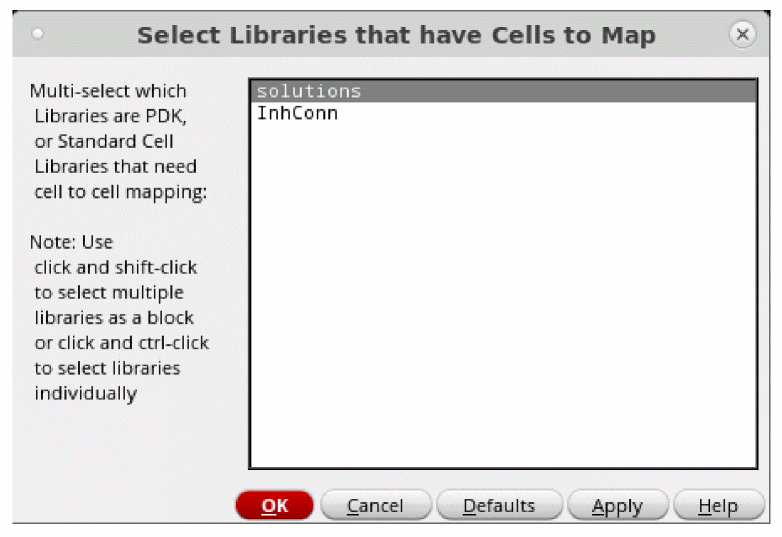
Figure B-2 Select Libraries that Have Cells to Map
Another form opens after the utility has queried the cells to map for CDF Parameters that are changed from the default. Select only the relevant CDF Parameter names for mapping. Some of the CDF Parameters are likely derived parameters and are therefore redundant.
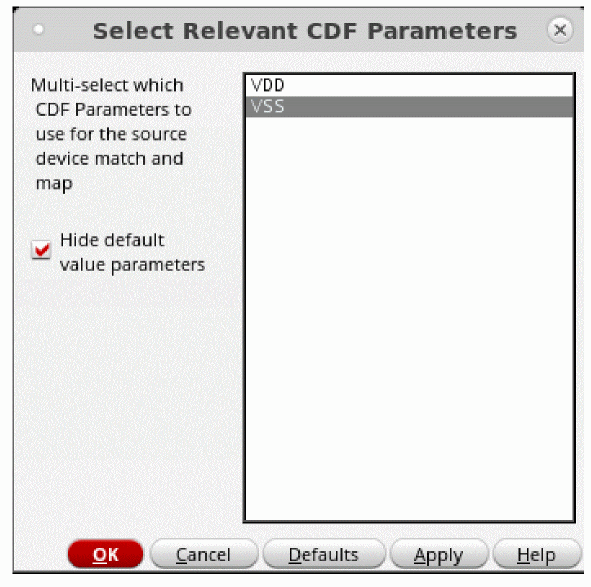
Figure B-3 Select Relevant CDF Parameters
The source-side migration data will be generated according to the selections above, and will generate a file in /RUNDIR/SchMig/srcMigMap.csv
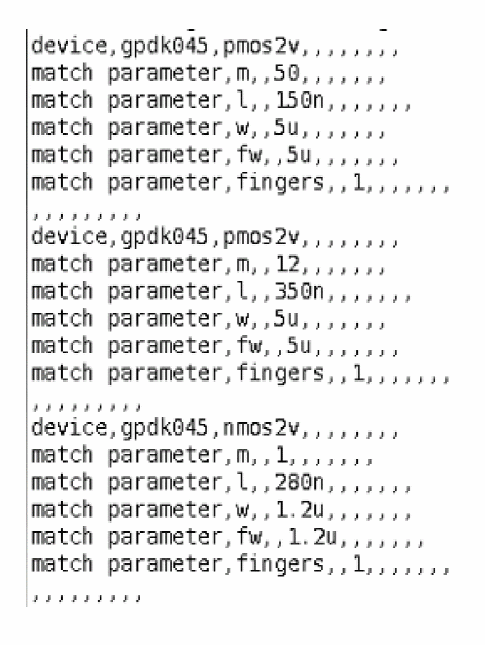
Figure B-4 Source-side Map File
Return to top