
awvAppendWaveform
awvAppendWaveform(w_windowID l_waveformList[?subwindowx_subwindow] [?exprl_exprList] [?indexl_waveIndexList] [?componentt_component] [?colorl_colorList] [?lineTypel_lineTypeList] [?lineStylel_lineStyleList] [?lineThicknessl_lineThicknessList] [?showSymbolsl_showList] [?dataSymboll_symbolList] [?barBaset_barBase] [?barWidtht_barWidth] [?barShiftt_barShift] ) =>t/nil
Description
Plots the waveforms in the list l_waveformList and appends them in a subwindow of the specified Waveform window.
The new waveforms are plotted at the same strip and Y axis as their corresponding curves from l_waveIndexList. Also, the new waveforms are assigned the next lowest unassigned numbers. So, if l_waveIndexList contains curves 1 and 2, the new curves are numbered 3, 4, and so on.
If you do not specify l_waveIndexList, the new waveforms are plotted at the Y axis and strip of existing waveforms with the lowest numbers. These new waveforms are assigned the lowest unused numbers.
Arguments
Value Returned
|
Waveforms specified in the l_waveformList list are plotted in the specified Waveform window. |
|
Examples
The following example creates a Waveform window and returns its ID.
awvCreatePlotWindow()
=> window:3
The following examples create waveform objects w1, w2, w3, and w4.
w1=drCreateWaveform(drCreateVec('double list(1 3 5)) drCreateVec('double list(5 15 25)))
=> srrWave:0x2d4a9020
w2=drCreateWaveform(drCreateVec('double list(1 2 3 4 5)) drCreateVec('double list(10 15 20 25 30)))
=> srrWave:0x2d4a9030
w3=drCreateWaveform(drCreateVec('double list(1 3 5)) drCreateVec('double list(15 25 35)))
=> srrWave:0x2d4a9040
w4=drCreateWaveform(drCreateVec('double list(1 2 3 4 5)) drCreateVec('double list(20 25 30 35 40)))
=> srrWave:0x2d4a9050
The following example plots the waveforms objects w1 and w2 specified in the list.
awvPlotWaveform(
awvGetCurrentWindow()
list(w1 w2)
?expr list("waveform1" "waveform2")
?color list("y1" "y66")
?index list(1 2)
?lineType list("line" "line")
?lineStyle list("dash" "dot")
?lineThickness list("thick" "extraThick")
?showSymbols list(t t)
?dataSymbol list(4 5)
)
=> t
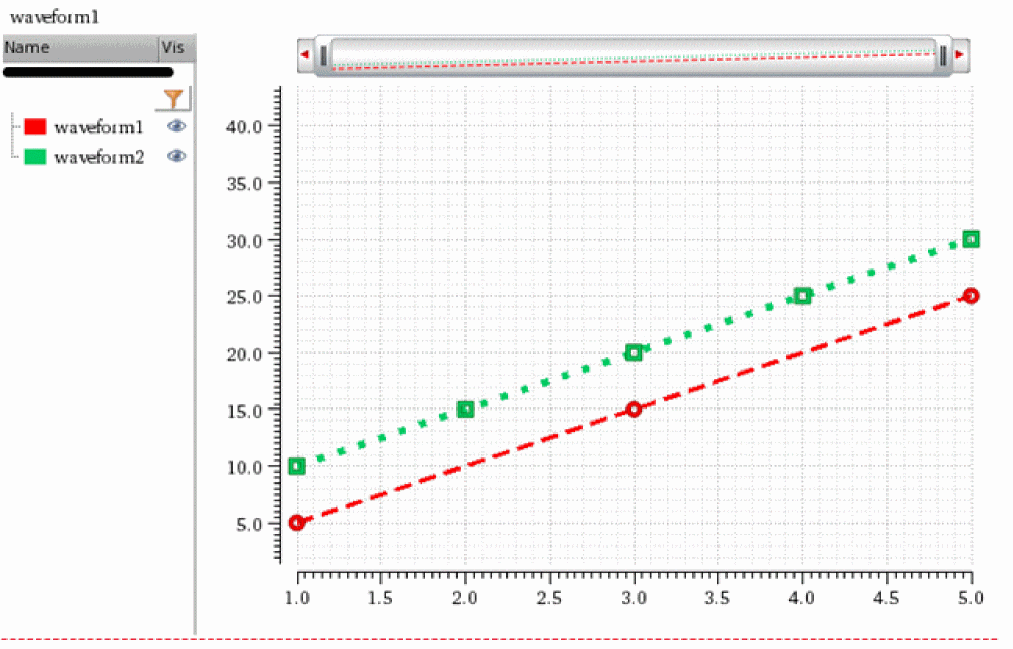
The following example returns the index numbers and names of the waveforms plotted using awvPlotWaveform function.
awvGetWaveNameList(window(3))
=>
((1 2)
("waveform1" "waveform2")
)
The following example plots the waveform objects w3 and w4 specified in the list and appends them to the waveforms plotted using the awvPlotWaveform function.
awvAppendWaveform(
awvGetCurrentWindow()
list(w3 w4)
?expr list("waveform3" "waveform4")
?color list("y12" "y6")
?lineType list("line" "line")
?lineStyle list("dashDot" "dashDotDot")
?lineThickness list("thick" "extraThick")
?showSymbols list(t t)
?dataSymbol list("x" "O")
)
=> t
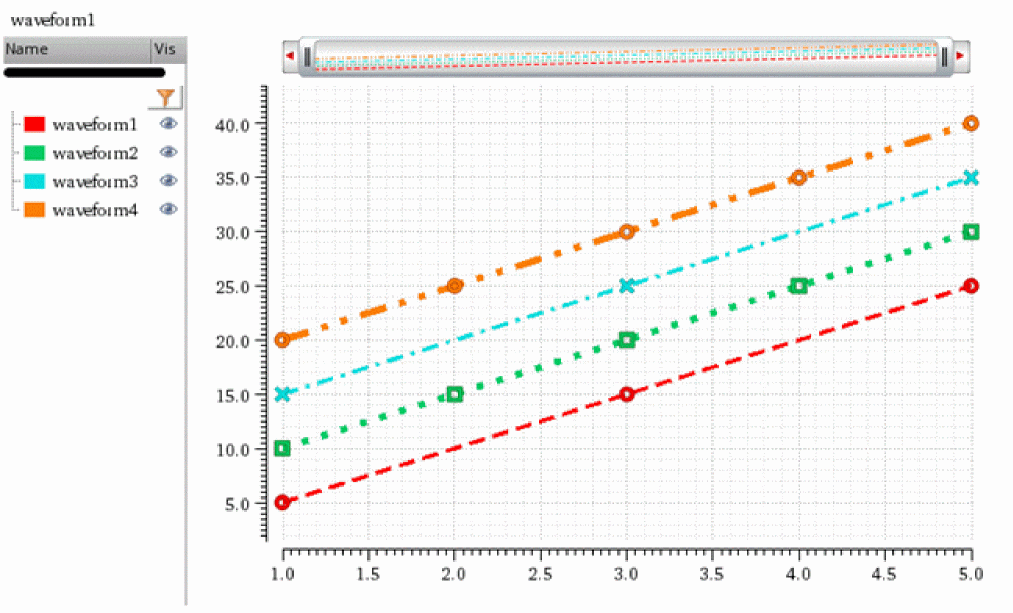
The following example returns the index numbers and names of the waveforms plotted in the specified Waveform window.
awvGetWaveNameList(window(3))
=>
((1 2 3 4)
("waveform1" "waveform2" "waveform3" "waveform4")
)
Return to top