
Object Creation by Entering Points
When you create objects, you need to enter the points to create the shape you want. You can specify points in the following ways:
- By using the mouse pointer to specify the start and end points on the canvas
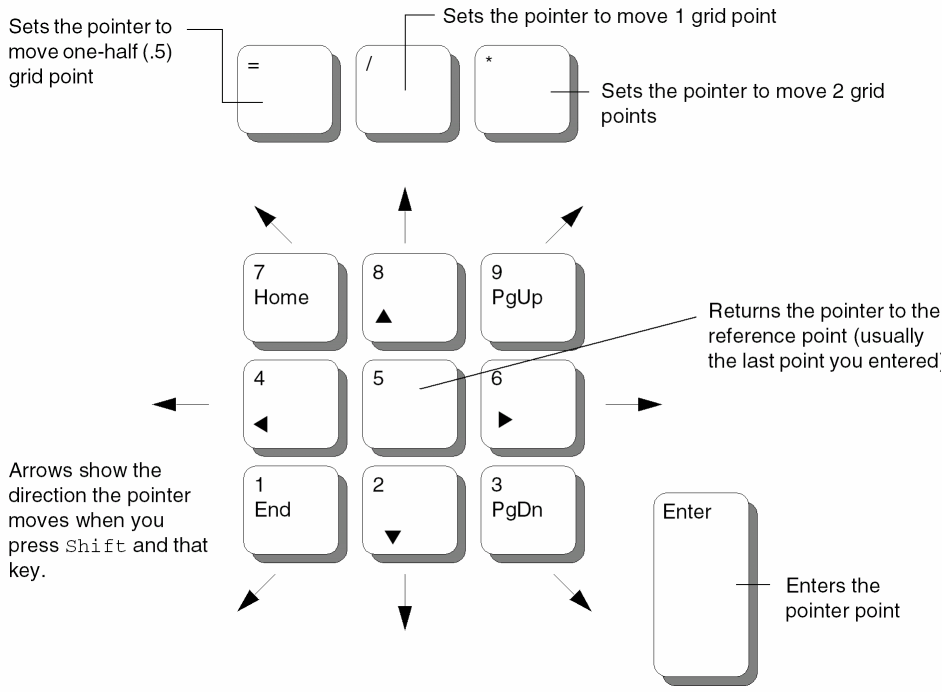
- By using the keypad to move the pointer on the canvas and enter the points
- By entering points in the CIW
- By entering points in the Enter Points form
You can use the following mouse actions for drawing a shape:
- To enter points for a shape or wire, click on the canvas at the starting point for the object.
- To complete a circle, rectangle, ellipse, or a donut, click again on the canvas to complete the last point of the shape.
-
To complete a path, polygon, or wire, double-click on the canvas to enter the last point or click on the canvas and press
Return.
To delete a point, you need to press Backspace.
You can use the keypad to move the mouse pointer and to enter points. This can be helpful if, for example, you want to enter a point just a few units away from the last point. The following figure illustrates a sample keyboard and the keys that you can use to enter the points.
Related Topics
Entering Points in the CIW to Create Objects
Entering Points Using the Enter Points Form
Points Formats Supported in the Enter Points Forms
Return to top