
Making Cells
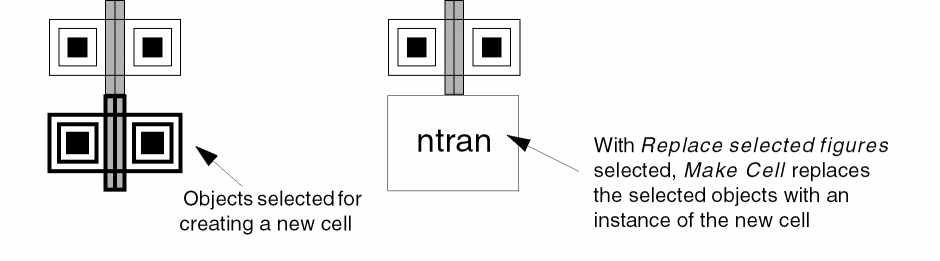
You can copy selected objects in your current cellview into a new cell. You can add levels of hierarchy by using the Make Cell command.
While creating a new cell from objects in your layout, consider the following about blockages and boundaries.
-
Blockages:
- When you select blockages without selecting their owner, a new cell with the selected blockages is created without any owner information. When Replace selected figures option is selected, Make Cell replaces all the selected set including blockage objects with the instance of the new cell in the current cellview. Once it is replaced, the ownership information is not retained.
- When you select both the owner and the blockage, a new cell with the selected owner, all its children, and all associated blockages is created. When Replace selected figures option is selected, all selected objects are replaced in the current cellview with the instance of the new cell and its owner.
-
Boundaries: The Make Cell command does not support snap and cluster boundary objects.
- For area boundary objects, if the constraint group name is part of the same cellview, both the area boundary object and the constraint group are copied over. If the constraint group is not part of the same cellview, only the area boundary object is copied over.
- For the PR boundary object, if its associated blockages are selected as well, the relationship between the PR boundary and blockage objects must be maintained. Even when the Replace selected figures option is selected, the PR boundary remains in the current cellview.
To create a cell from objects in your layout:
- In the layout window, select the objects on the canvas that you want to place into a new cell.
-
Choose Edit – Hierarchy – Make Cell.
The Make Cell form opens. - Specify the library, cell, and view name for the new cell.
-
Select the Replace selected figures check box to replace the selected objects with an instance of the new cell.
You can clear the check box to leave the objects unchanged. -
Click OK.
If you specified the name of an existing cell, a dialog box lets you choose to overwrite the existing cell with a new one.
By default, the lower-left point of the bounding box of the newly created cell is placed at the origin (0,0).
Related Topics
Return to top