Mouse and Key Actions in Ruler Segment Modes
The following table summarizes the effect of mouse actions and key bindings during the Create Measurement command for single, multiple, and auto measurement modes. In the table, LMB refers to the left mouse button click and MMB refers to the middle mouse button click.
|
Mouse Action/Key
|
Single
|
Multi
|
Auto
|
|
LMB
|
Adds a point or positions the measurement segment, where the second point completes the measurement.
|
Adds a point.
|
Adds a point or positions the measurement segment, where the second point completes the measurement.
|
|
MMB
|
Completes the ruler without drawing.
|
Completes the ruler without drawing.
|
Completes the ruler without drawing.
|
|
Ctrl+LMB
|
Enters second point but waits to complete the measurement by allowing you to place the segment by clicking the left mouse button.
This works only when the end points are snapped.
|
NA
|
Enters second point but waits to complete the measurement by allowing you to place the segment by clicking the left mouse button.
This works only when one of the end points is snappable.
|
|
Shift+LMB
|
Inserts a point so that the current measurement becomes multi-segment. Does not complete the measurement. You must enter one more point by using LMB or Enter.
|
NA
|
Inserts another point in the measurement. Does not complete the measurement. You must enter one more point by using LMB or Enter.
|
|
Ctrl+MMB
|
Moves the measurement segment to the clicked location, after the first point.
|
Moves the measurement segment to the clicked location, after the first point
|
NA
|
|
Enter
|
Completes the current measurement.
|
Completes the current measurement.
|
Completes the current measurement.
|
|
Esc
|
Cancels the Create Measurement command.
|
Cancels the Create Measurement command.
|
Cancels the Create Measurement command.
|
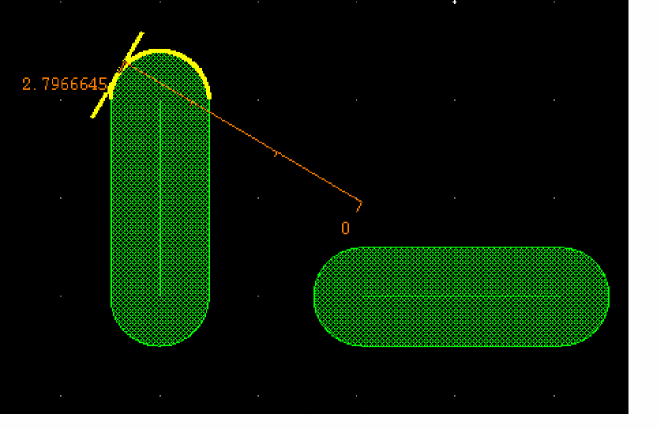
(Virtuoso RF Option) For curved shapes. the measurement is drawn at a tangent to the point where you have snapped, as shown in the following figure. Edge measurement is disabled for measurements on curved shapes.
Related Topics
Rulers
Ruler Segment Modes
Ruler Snapping Support
Creating Rulers with Snapping On
Creating Rulers with Smart Snapping Off
Return to top