
Generating a Standard Report for Pad Shapes
To generate a standard report containing information about the pad shapes found in all or part of a hierarchical cellview:
- In the layout window, open a hierarchical cellview that contains bond pad shapes.
-
Choose Tools – Pad Opening Info.
The Pad Opening Info form appears. - Select the mode as Generate Report.
-
Specify Search Criteria for the pad shapes and labels you are interested in.
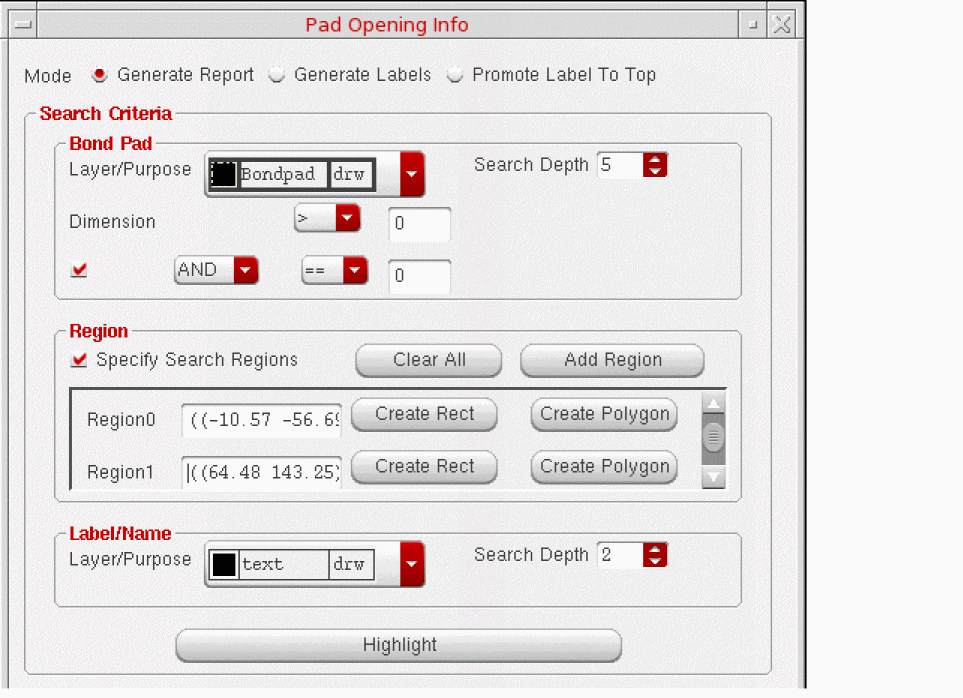
- In the Bond Pad section, select the appropriate Layer/Purpose to search for pad shapes.
- Set Search Depth to limit the number of hierarchy levels to be searched. For example, specifying 5 means that levels 0 through 5 are searched.
- Set the X and Y Dimension for the pad shapes you are interested in, if required.
- In the Region section, optionally, use Create Rect or Create Polygon to limit the region in the cellview that is searched. Either draw the region that you require on the canvas or edit the coordinates manually in the field.
-
In the Label/Name section, specify the Layer/Purpose and Search Depth to search for existing labels. For example, you can choose to search the layer purpose
text drwat level 2 only.
-
Specify the coordinates for the first pad to be generated by clicking the 1st PAD coords button and then clicking on the desired location on the canvas.
The coordinates are populated in the field automatically. You can edit them manually if required. -
Choose whether subsequent pad shapes should be labeled in the Clockwise or Counter Clockwise direction.

- In the Reporting section, select the Make Standard Report check box and use the Browse button to specify the directory and file name for the report file.
- Specify the file format for the report as Plain text or CSV.
-
Click OK or Apply.
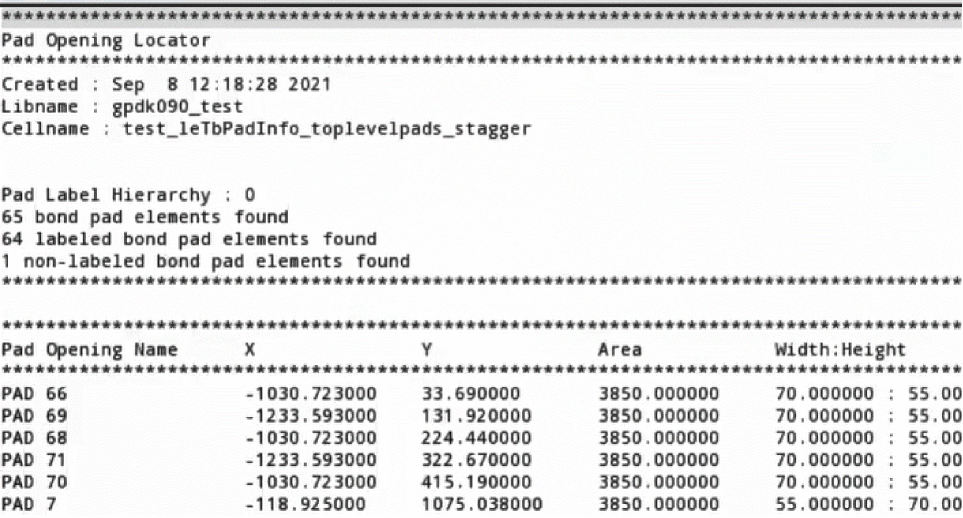
The report is displayed, listing the name, width, height, and area of bond pads. If the design contains duplicate bond pads, the duplicate bond pads are listed in the report only once.
If there are multiple labels, the pad opening name is the label that has minimum distance between the pad origin and the label origin.
Related Topics
Generating a Customized Report for Pad Shapes
Generating Labels for Bond Pads
Promoting Labels to the Top Level
Return to top