
Detail Mode Snapping to Specific Tracks of a Global Grid
By default, devices can be snapped to any track of a global snap pattern definition grid. When snap period-based snapping is enabled, you can snap devices to specific tracks of a global grid by using detail mode snapping. For hierarchical blocks, auto abstract mode snapping is performed, in which a block is moved by the value of the snap period.
Detail Mode Snapping to Specific Tracks of a Global Grid
To enable detail mode snapping of devices to specific tracks:
-
Ensure the snap period-based snapping is enabled, by setting the
snapPatternIndexSnappingLayersenvironment variable tot. -
Define a snap period for the global grid by adding the
snapGridPeriodconstraint in the technology file. -
Define the snappable tracks of the global grid by adding the
leSnapPatternSnappingVerticalGridDetailorleSnapPatternSnappingHorizontalGridDetailproperty to an instance or a master cellview.
For example, you want that devices can be snapped only to the third track of a period of a global vertical grid named GFG, where each period contains four tracks.
You can define the period value as 4 in the following way:
spacings(
snapGridPeriod('snapPatternDef "GFG" 4)
) ;spacings
To specify the third track in each period of GFG as the valid track for snapping, define the leSnapPatternSnappingVerticalGridDetail property on an instance as follows:
leSnapPatternSnappingVerticalGridDetail "GFG 3"
The following image shows a global vertical grid with four tracks in a period, with yellow as the first track. The image shows a device snapped to the third track of the snap period.
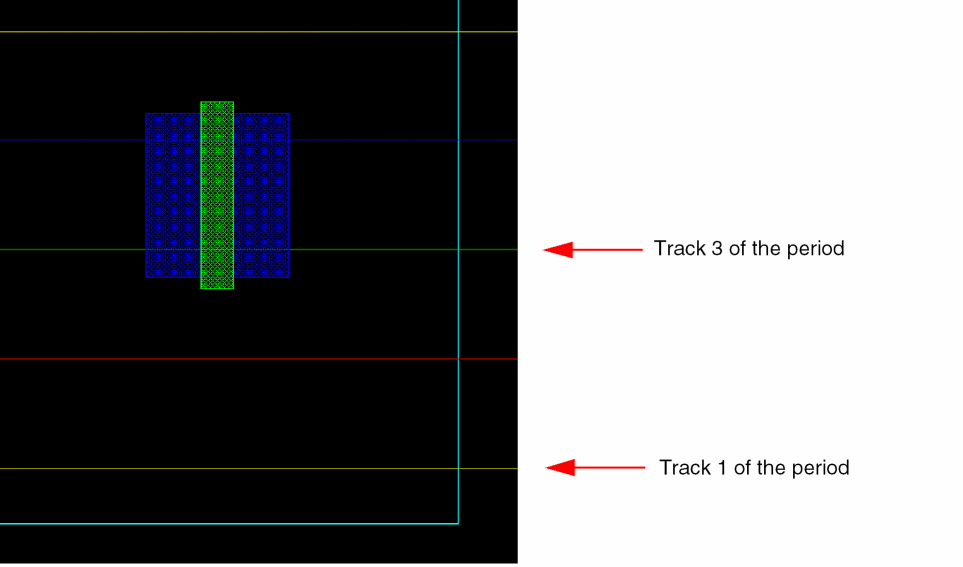
When detail mode snapping of devices to specific tracks is on, the snap period constraint is considered during PR boundary creation and editing to prevent instances from being placed off the grid.
Auto Abstract Mode Snapping
For hierarchical blocks, auto abstract mode snapping is performed, in which a block is moved by the value of the snap period. For example, when the snap period for a grid is set to four and you move a block, the block is always moved by four tracks. This ensures that all instances within the block are snapped correctly to their respective valid grids.
A block is snapped in auto abstract mode when the following conditions are met:
-
The
snapPatternIndexSnappingLayersenvironment variable is set tot, which is the default value. -
The
snapGridPeriodconstraint is defined for the global snap pattern definition grid in the technology file. - The block has a P&R or snap boundary.
- The block has at least one or more levels of hierarchy, implying that it contains instances within.
- The block has at least one shape or layer that can snap to the global snap pattern definition grid for which a period constraint is defined.
Auto abstract mode snapping takes higher precedence than the default width spacing pattern (WSP) abstract snapping.
Related Topics
Object Snapping to Global Snap Pattern Grid
Return to top