
Layout Editor Strokes
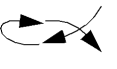
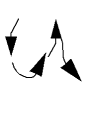
A stroke is a unique shape you draw in a cellview by pressing and holding the right mouse button. Cadence ships a set of predefined strokes for the layout editor that you can load.
To start a command with a stroke, using the right mouse button you can draw one of the strokes listed in the following table. The arrows indicate the direction in which you draw the strokes. Note that there are two ways to start Zoom In with strokes.
| Stroke | Drawing Direction | Command |
|---|---|---|
 |
 |
|
 |
 |
|
 |
 |
|
 |
 |
|
 |
 |
|
 |
 |
|
 |
 |
|
 |
 |
|
 |
 |
|
 |
 |
|
 |
 |
|
 |
 |
|
 |
 |
|
 |
 |
Related Topics
Return to top