
Layer Display Colors
Layout XL uses certain layers for command functionalities such as to show flight lines and highlight components. You can change the colors and characteristics of the display layers that Layout XL uses for such functionality.
-
The Annotation Browser assistant uses the
y0throughy9layers to show flight lines. -
The XL Probe command uses the
hilite drawingthroughhilite drawing9layers to probe pins, nets, and devices. -
The Generate Selected From Source command uses the
hilitedrawing1layer to highlight schematic symbols. -
The Check Against Source command uses the
hilitedrawing9entry layer to identify missing devices. -
The Highlight command for placement constraints uses the
annotate drawing3entry layer to highlight in the layout the components bound by a particular placement constraint.
Incomplete Net Highlighting
To highlight incomplete connections with flight lines, Layout XL cycles through the y0 through y9 layers.
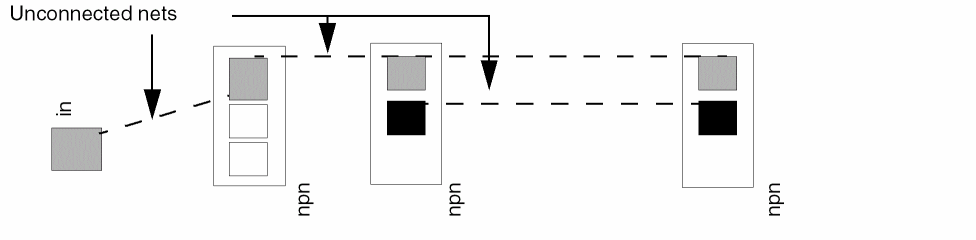
Layout XL displays the flight lines of each net in a different color. If there are more than 10 flight lines, the cycle is repeated unless you have specified certain layers for specific nets.
When assigning new colors to the flight lines:
- Use colors that do not closely resemble each other or the colors you use for paths and components.
- Avoid solid fill so you can see what is underneath.
Probe Highlighting
Layout XL uses the hilite drawing through hilite drawing9 entry layers for probes, which identify equivalent design elements on the schematic and the layout.
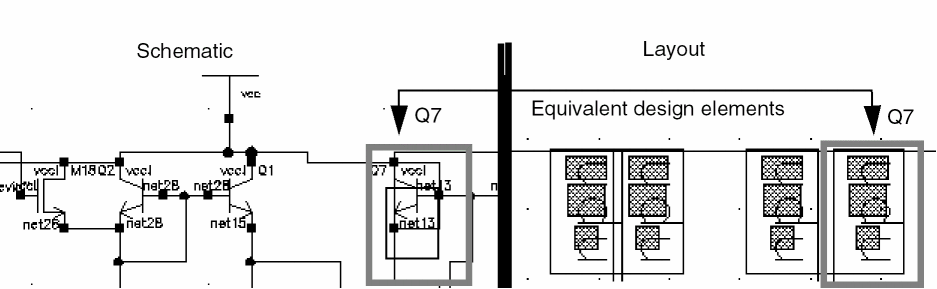
The Check Against Source command uses the hilite drawing9 layer to identify components in the schematic that are not in the layout, and vice versa.
If you change the colors of the hilite drawing layers, consider the following:
- Use thick lines so that you can see device pins.
- Use bright colors to make probes and highlights easy to find.
Do not make the hilite drawing layer and the hilite drawing2 layer solid fill because these layers are used to indicate selected components and to manipulate shapes.
Related Topics
Return to top