
Displaying Details or Outlines of Arrays
You can adjust the display details of cell arrays.
To set the array display details:
-
Choose Options – Display.
The Display Options form appears. -
In the Display Controls section, set the Array Icons, Array Display, and Display Levels options as desired.
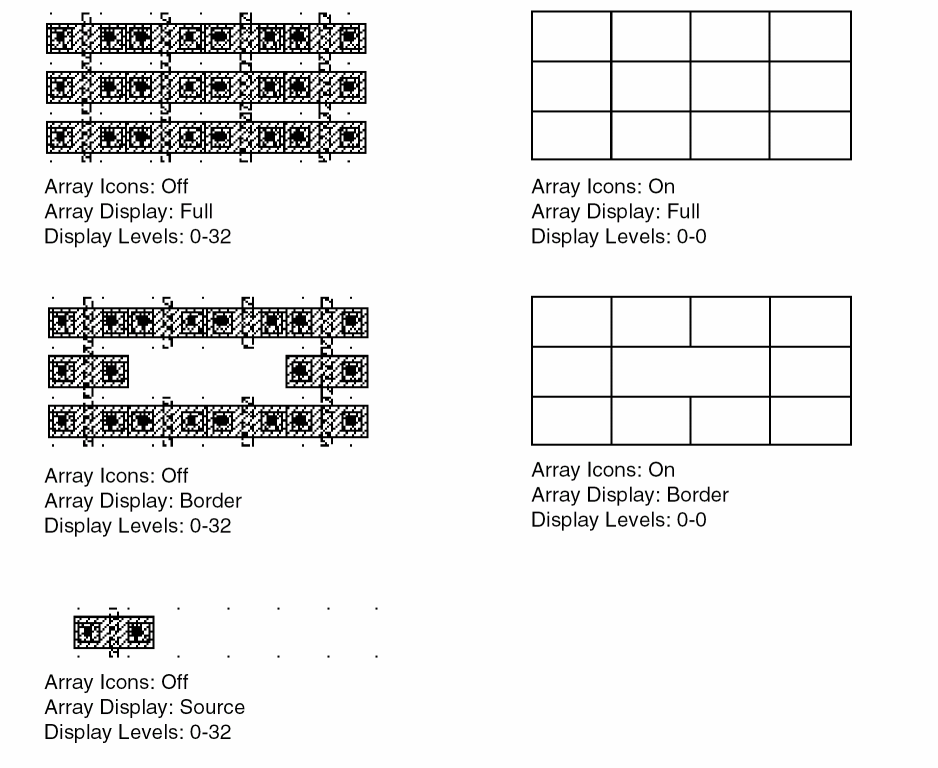
- Array Icons: Shows outlines of array cells when Display Levels suppresses cell details. When Array Icons is enabled and Display Levels is set to Start 0 Stop 0, outlines of array elements appear with no detail.
- Array Display: Controls the number of elements that appear in the array. You can set it to display all instances in the array, only the instances around the outside edge of the array, or only the instance at the origin of the array.
- Display Levels: Controls the level of instance hierarchy details displayed. You can set the first (Start) and last (Stop) levels in the design hierarchy that can be seen in detail. The hierarchy levels are numbered 0 to 32.
- Click OK or Apply.
The following figures show sample settings for displaying arrays.
Related Topics
Return to top