
Customizing Information Balloon Using Custom SKILL Functions
You can define a custom SKILL extension to specify your own information to be displayed in the information balloon. The information you specify appears below a dashed line in the information balloon.
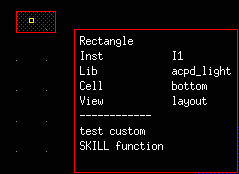
The SKILL extension must be defined at the object level. Global levels, that is Layout, Objects, and Shapes, are not supported. Also, the application must be specified for each SKILL function. Currently, only Layout-XL is supported. For example,
odcRegShapeRect("Layout-XL" "test custom SKILL function")
To turn the display of the SKILL extension on, you need to select the Custom SKILL Function check box on the Setup tab of the Dynamic Display form for the object specified in the SKILL function.
Related Topics
Return to top