
MPT Support
The Palette multi-patterning technology (MPT) feature lets you view all layer-purpose pairs with color. In Layout Editor, it lets you draw shapes, wires, and pins with layer, color, and lock state information. Shapes that you can draw with color include rectangles, polygons, paths, circles, ellipses, and donuts. You cannot draw pins with color in auto mode of pin creation.
To enable MPT in the Palette, choose MPT Support from the Palette context menu. This displays the MPT check box on the Scope toolbar and the C (Color) column in the Layers panel. Also, all layer-purpose pairs with color are listed in the Layers panel, grouped by their master layer-purpose pair. Layer-purpose pairs with no color are listed at the end.
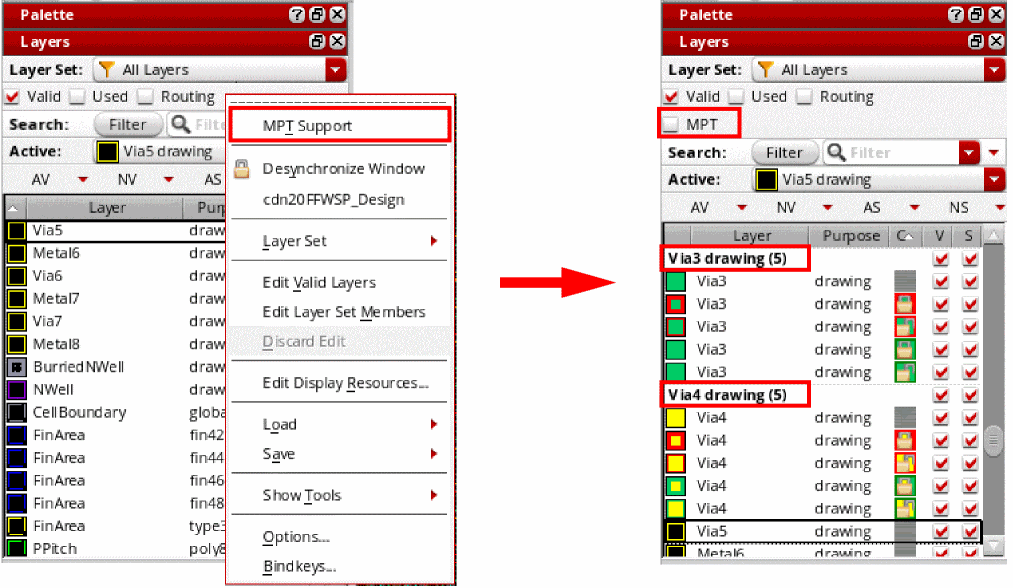
When MPT support is enabled, you can choose to display only the layer-purpose pairs with color by selecting the MPT check box on the Scope toolbar.
Each color and lock state combination for a layer-purpose pair is listed as a separate entry. When you set a layer-purpose pair as active, the color and lock state is automatically set for the shapes that you draw on that layer.
When you open a new layout window, the pteMPTScope environment variable is evaluated only if the pteMPTMode environment variable is set to t. For the pteMPTMode and pteMPTScope environment variables to take effect in a new layout window, you must set them before you open the window.
Related Topics
Return to top