
Example
techDisplays(
;( LayerName Purpose  Packet …)
 ( Metal1    drawing  M1_drawing  …)
 ( Metal1    blockage M1_blockage …)
 ( Via1      drawing  V1_drawing  …)
  …
 ) ;techDisplays
drDefinePacket(
;(DispName PacketName      Stipple     LineStyle  Fill   Outline [FillStyle])
 (display  M1_drawing        hLine     solid      blue   blue    outlineStipple)
 (display  M1_drawing_c1     stipple0  solid      red    red     outlineStipple)
 (display  M1_drawing_c2     stipple0  solid      blue   green   outlineStipple)
 (display  M1_drawing_c2L    stipple0  thickLine  green  green   outlineStipple)
 (display  M1_blockage       hLine     solid      blue   blue    outlineStipple)
 (display  M1_blockage_c1    hLine     solid      blue   red     outlineStipple)
 (display  M1_blockage_c2    hLine     solid      blue   iceblue outlineStipple)
 (display  M1_blockage_black hLine     solid      blue   lilac   outlineStipple)
 (display  M1_blockage_multi hLine     solid      blue   purple  outlineStipple)
 (display  V1_drawing        solid     thickLine  orange orange  X)
 (display  V1_drawing_cl     solid     thickLine  orange red     outlineStipple)
 (display  V1_drawing_c2     solid     thickLine  orange green   outlineStipple)
 …
 )
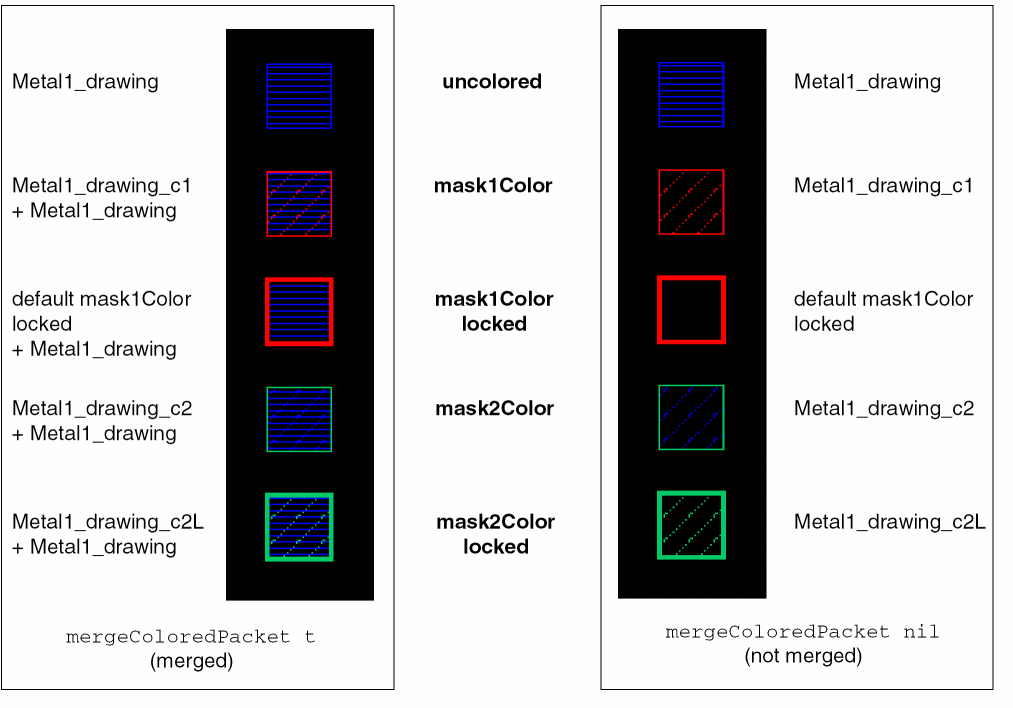
There is no display packet specified for M1_drawing_c1L. Therefore, the default mask1Color locked display packet is used which has a thick red outline with no stipple.
The graphical representations for shapes using this display.drf for the two mergeColoredPacket environment variable settings are shown below.
Related Topics
Enabling the Multiple Patterning Color Engine
Modifying the Default Multi-Patterning Environment Variable Settings
Customizing Displayed Coloring
Return to top