Bump and Ball Editor Form
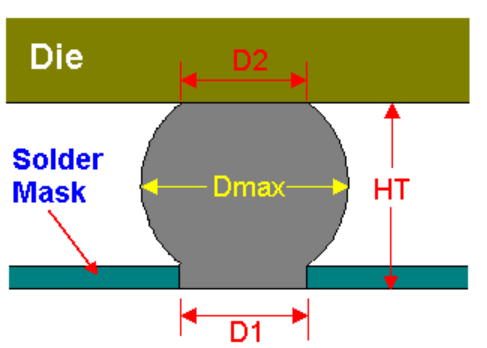
Use the Bump and Ball Editor form to specify the physical parameters for IO pads and balls. The following image represents the physical attributes of a solder ball that are specified in the Bump and Ball Editor form.
|
Field
|
Description
|
|
Diameter Top
|
Specifies the top diameter (D2) measured on the dies side.
|
|
Diameter Max
|
Specifies the widest part (Dmax) of the bump after bulging occurs during die mounting.
|
|
Diameter Bottom
|
Specifies the bottom diameter (D1) measured on the package side.
|
|
Height
|
Specifies the height (HT) of the chip after the solder ball is fused with the substrate metal.
|
|
Material
|
Specifies the material used to make the solder ball.
|
Related Topics
Validating BGA Ball and Flipchip Bump Setup
Return to top