
1
Introduction to Virtuoso Multi-Technology Solution

Virtuoso Multi-Technology Solution enables various Virtuoso schematic–driven layout generation flows. Virtuoso Schematic Editor is the front-end application of choice for back-end tools. The basis of the flows is the use of unified libraries across systems.
The Virtuoso Multi-Technology Solution combines the benefits of Virtuoso schematic-driven Layout MXL methodology along with the features of the SiP Layout. The key features of Layout MXL, such as generate from source, check against source, update connectivity and nets, cross-selection, and hierarchical schematic are available in SiP layout. You can choose to work in the Virtuoso or Allegro environment.
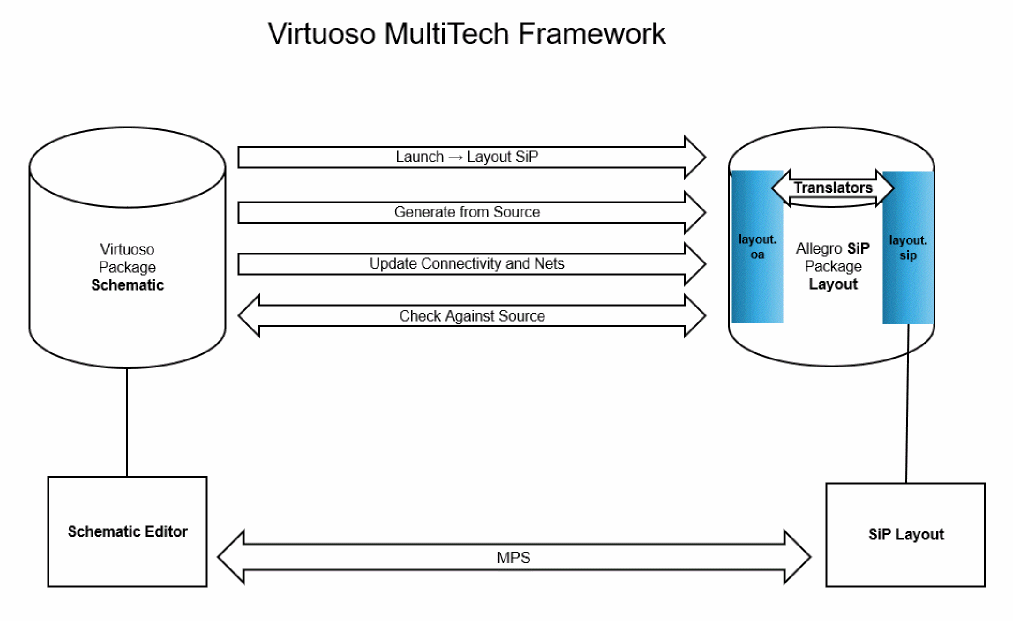
The Framework provides a basic set of services that allows you to design packages, modules, and boards using a variety of heterogeneous integration styles such as die stacking, wire bonding, interposers, and wafer-level packaging (WLP). The schematic for the system might be hierarchical, consisting of ICs, packages, and boards. The flow provides a multi-technology environment for simulation and implementation.
The integrated design system consists of two design concepts, logical design and physical layout. Logical design is the process by which the design intent is specified in a schematic. The schematic can be used for ideal or pre-layout simulation to verify that the intent matches the specification. In logical design, you assign part definition names to instances in the schematic: this association is used to bind the appropriate footprint and other CDF parameters. Creating a physical layout is the process by which the design intent is implemented and expressed in terms of components and routes. The part definition names on the schematic instance imply the name of the footprint that must be used during physical layout.
A layout generation process, Generate All From Source, is used to create the initial layout. Edits in the schematic can be propagated to the layout through an update flow called Update Components and Nets. Changes made in the SiP Layout can be checked against the schematic to provide the in-design layout-versus-schematic (LVS) check that ensures that the layout never departs too far from the schematic. This process is called Check Against Source. At any time in the physical layout process, you can cross-probe to identify corresponding parts, packages, and signals in the layout design and the schematic.
During the layout process or as a step after the layout is done, parts or all of the layout can be extracted using the high-accuracy 3D or planar extractors to create the frequency-dependent models known as sparam. These sparam models can be backannotated or stitched into the original schematic to create a more accurate simulation of the system. Subsequently, pre-and post-layout simulations can be compared to verify that the design specifications are met.
The Virtuoso Multi-Technology Solution environment involves various tools, such as Cadence SiP Layout Option, EMX Solver, Clarity 3D solver, Virtuoso Schematic Editor XL, Virtuoso ADE Explorer, Virtuoso ADE Assembler, and Virtuoso Visualization and Analysis XL.
Related Topics
Virtuoso Schematic Editor User Guide
Virtuoso Layout Viewer User Guide
Virtuoso Layout Suite XL: Basic Editing User Guide
Virtuoso Layout Suite XL: Connectivity Driven Editing Guide
Virtuoso ADE Explorer User Guide
Virtuoso ADE Assembler User Guide
Virtuoso Visualization and Analysis XL User Guide
Return to top