
3
Product Overview
Voltus-Fi-L Product Overview
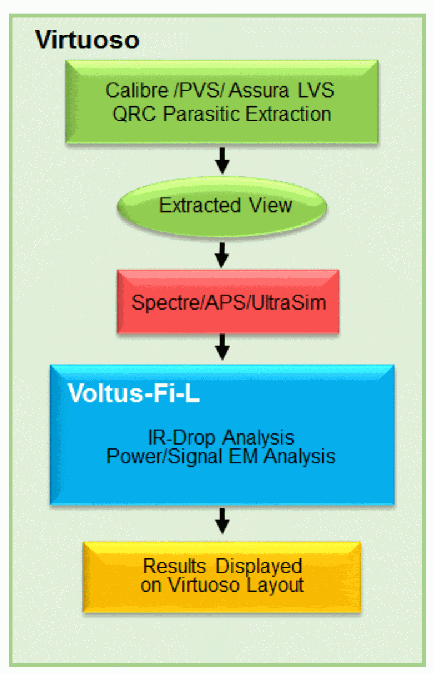
Voltus-Fi-L provides the ability to perform IR drop and Electromigration (EM) analysis using an extracted view of the design. It uses the results of the simulation performed using the vavo-db or the parameter storage format (PSF) data.
The target designs include the analog, analog/mixed-signal (AMS) and custom digital designs of varying sizes that are created using Virtuoso.
This product is tightly integrated within Virtuoso. The results of the analyses are displayed on the Virtuoso layout. Voltus-Fi-L also generates text reports of the analyses and lets you query the analyses results to view specific violations on the layout. This is used to identify and debug regions of high IR drop and EM violations in the design. After analyzing the EMIR results, you can create power-grid views (PGVs) of the design block, which can then be used in Voltus for mixed-signal analysis.
Figure 3-1 Voltus-Fi-L Flow Within the Virtuoso Environment
The product also supports viewing of the IR drop and EM analysis results in the vsaplot utility. This utility opens independently of the Virtuoso environment and provides a high speed of visualization.
The key product features are described below.
Key Product Features and Description
The following table lists the key features of Voltus-Fi-L.
Table 3-1 Product Features – Voltus-Fi-L
| Feature | Description | |
|
Signal net and power-rail IR drop analysis includes support for the following:
For details, see the “IR Drop Analysis Results” chapter. |
||
|
Signal net and power-rail EM analysis includes support for the following:
For details, see “EM Analysis Results” chapter. |
||
|
Static and Dynamic PGV generation feature lets you create power-grid views (PGVs) of an analog design block that can be used in Voltus for mixed-signal analysis. For details, see “Power-Grid View Creation” chapter. |
||
|
Least-Resistive Path (LRP) analysis helps you identify weakly-connected instances in the design during early stages of power planning. It displays the worst IR drop violations and plots the LRP on demand for any node. For details, see “IR Drop Analysis Results” chapter. |
||
|
The vsaplot utility is used to view the results of IR drop and EM analysis that is performed in Voltus-Fi-L. The key benefits of viewing the results of IR drop and EM analysis in vsaplot are as follows: For details, see “Viewing Results in vsaplot or vfiplot” chapter. |
||
Return to top