
14
Statistical ElectroMigration Budgeting
Statistical ElectroMigration Budgeting (SEB) enables you to meet the ElectroMigration (EM) reliability targets by performing a statistical interconnect EM analysis based on the current modeling and thermal analysis of the design. This feature leverages the statistical nature of EM reliability to compute the level of the EM risk for all design rule violations. SEB analysis requires fixing of only those violations that add significant risk. This reduces the design verification time and improves performance while ensuring that the design meets its chip-level reliability goals.
Failures in Time (FIT) is a factor to represent the chip failure rate. Following is the definition of FIT:
1 FIT = One failure per 10^9 product hours
= One failure in 1000 products through 10^6 hours
= One failure in 105 products through 10^4 hours
= or any other combination between products and hours as long as the product of the two is 10^9
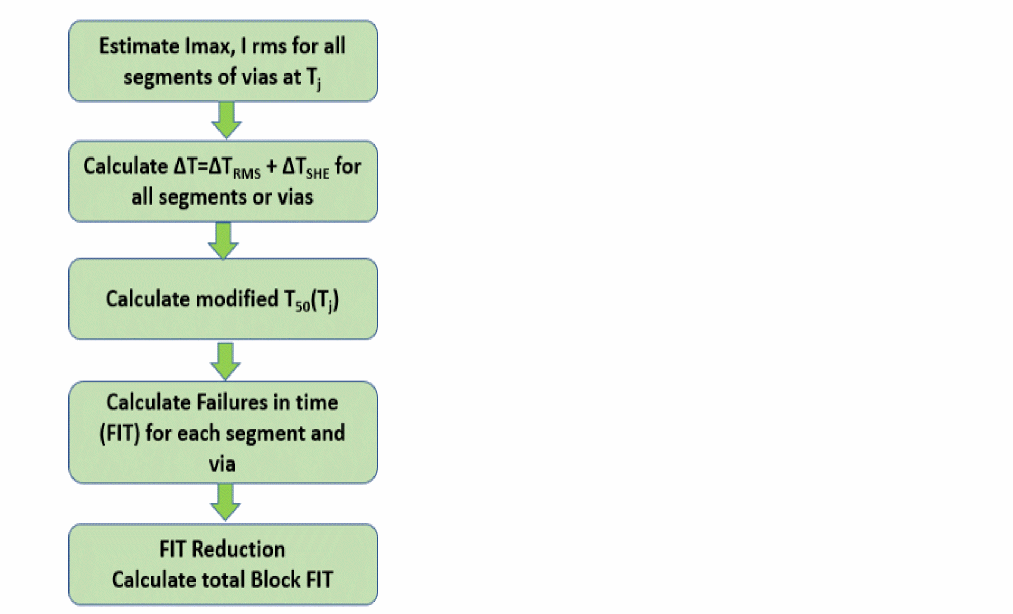
Voltus-Fi will calculate the FIT value for each resistor of metal and via. The tool will follow the foundry EM definition to calculate FIT. This flow is supported in Voltus-Fi and involves the following tasks:
- Calculating the FIT for each resistor of metals and vias.
- Applying FIT reduction using the calculation.
- Adding all the reduced FIT values to get the total block/chip FIT.
- Generating a report with all the FIT information in a text format.
The following flowchart depicts the high-level flow for SEB in Voltus-Fi:
Related Topics
FIT Reduction Method
This section details the FIT reduction methods used for metal and via resistors.
Metal FIT Reduction
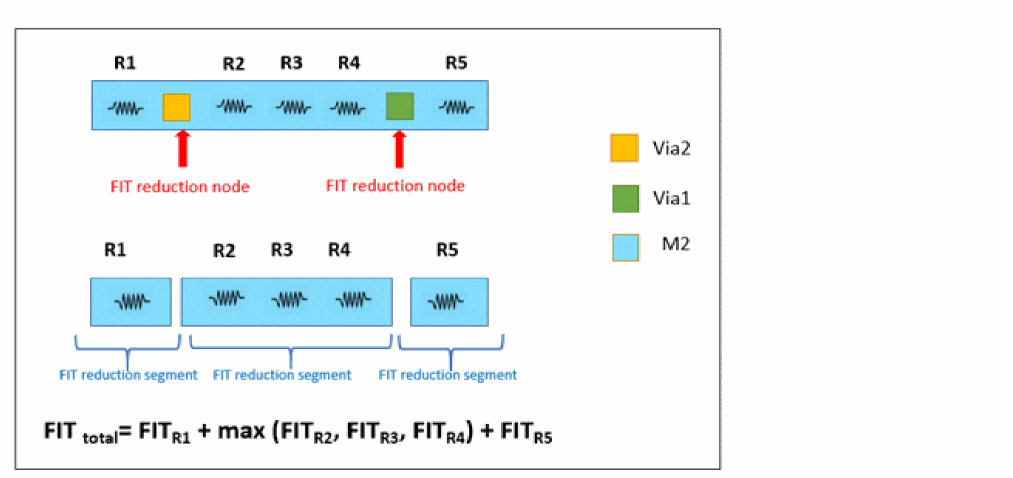
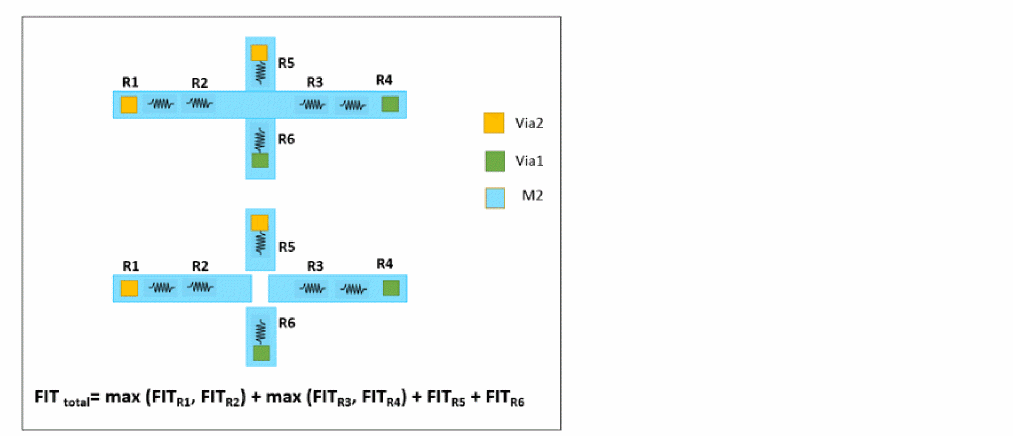
- FIT reduction node is a node on the metal layer satisfying either of the following conditions:
- Metal FIT reduction segment is a group of connected resistors between two FIT reduction nodes
- Voltus-Fi selects the largest FIT among the resistors within a FIT reduction segment as the FIT of the metal segment
VIA FIT Reduction
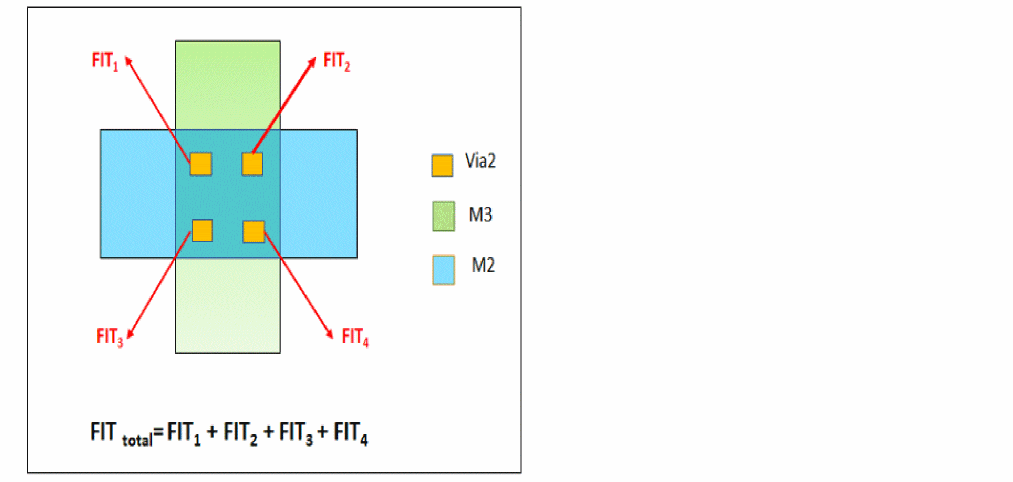
- FIT reduction is not applied to vias
- Via array is divided into single vias
- FIT is calculated for all vias
- Total FIT of the block/chip is calculated by adding all FITs of single vias and metal FITs
Related Topics
Inputs for the SEB Flow
For running the SEB relaxation flow, you need to provide the SEB parameter file with FIT calculations.
Following is a sample of the SEB parameter file:
FIT_TABLE 72 5 (LAYER:V, MTF_HOUR:V, SIGMA:V, Ea:V, EXP_N:V r:V)
FIELD MTF_HOUR SIGMA Ea EXP_N r
LAYER
M12 1.73e5 0.22 0.8 1 1
VIA11 1.73e5 0.22 0.8 1 1
M11 1.73e5 0.22 0.8 1 1
VIA10 1.73e5 0.22 0.8 1 1
M10 1.73e5 0.22 0.8 1 1
VIA9 1.73e5 0.22 0.8 1 1
M9 1.73e5 0.22 0.9 1 1
VIA8 1.73e5 0.22 0.9 1 1
M8 1.73e5 0.22 0.9 1 1
-
FIELD LAYERis the name of a metal layer/via -
MTF_HOURis the median time to failure in hour -
SIGMAis spread in lifetime distribution (from foundry) -
ris the relax factor
Related Topics
SEB Flow emirutil Command Option
The following option is specified in the EMIR control file using the emirutil command for the SEB flow:
Related Topics
Sample EMIR Configuration File
Following is a sample EMIR configuration file with specifications for the SEB flow:
net name=[XTOP.*] analysis=[iavg imax irms iacpeak vavg vmax]
emirutil auto_detect_geounit=[false]
solver method=[direct | iterated]
emirutil techfile=[../../../../Techfile/RCE_qrc/qrcTechFile] >> provide qrcTechfile path
emirutil EMOnlyICTFile=[../../../../Techfile/ICTEM/drawn_color.ictem] >> provide ICTEM file (if any)
emirutil Tj=<value>
emirutil Tambient=<value>
emirutil ProductLife=<value> >> default value=5 years
emirutil autorun=[true]
emirutil report=[text |HTML]
emirutil idirn=[true |false]
emirutil splitACDCRules=[true|false]
emirutil extendedreport=[true|false]
emirutil optimisticEMRuleSelection=[true|false]
emirutil simpleSingleViaDefinition=[true |false]
emirutil redundantNonCDRules=[true |false]
emirutil dbu=<value>
emirutil powerRailRules=[on|off]
emirutil sebParamFile="./test_SEB_n7_1p12m.ircx" >> provide the SEB param file path
emirutil print_em_report=[net=all_nets type=fit filename=fit_woshe.rpt] >> the reporting option to print the FIT report
Related Topics
SEB GUI Variable
The option for the SEB flow can also be specified in the GUI in the Variables form that opens on the EM tab of the IR/EM Results form.
| Variable Name | Option Set |
|---|---|
|
Specifies the SHE analysis parameter file, which is required for calculating the SHE analysis results. sebParamFile ./test_SEB_n7_1p12m.ircx |
Related Topics
- SEB Flow emirutil Command Option
- Statistical ElectroMigration Budgeting
- Inputs for the SEB Flow
- SEB Report
SEB Report
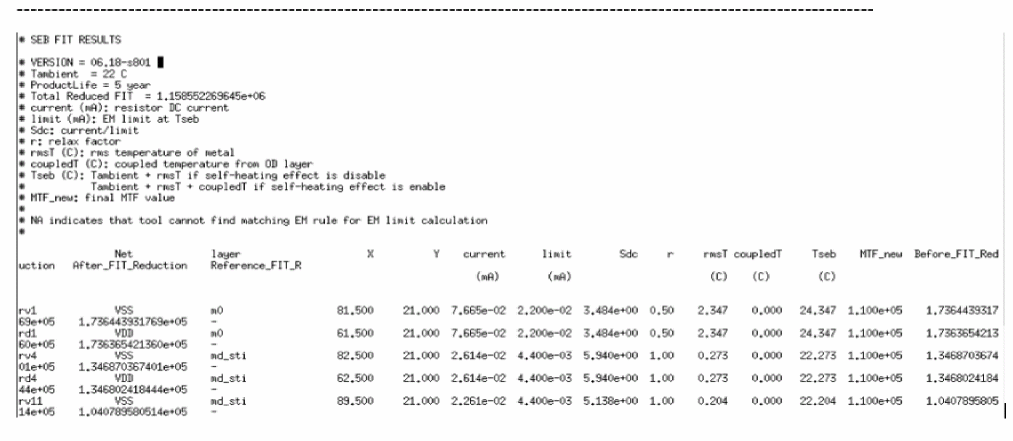
The SEB flow generates a report with the total reduced FIT for all resistors.
Following is a sample SEB FIT Results file:
-
current (mA): resistor DC current -
limit (mA): EM limit at ambient temperature -
Sdc: current/limit -
rmsT (C): rms temperature of metal -
coupledT (C): coupled temperature from OD layer -
Tseb (C): Tambient + rmsT if SHE is disabled - Tambient + rmsT + coupledT if SHE is enabled
-
MTF_new: is the median time to failure that is calculated at Tseb -
Before_FIT_Reduction: FIT values for resistors reported in the SEB parameter file -
After_FIT_Reduction: FIT values after applying reduction method provided by foundry -
Reference_FIT_R: resistor that is used as a reference -
NAindicates that the tool cannot find matching EM rule for EM limit calculation
Related Topics
- SEB Flow emirutil Command Option
- Statistical ElectroMigration Budgeting
- Inputs for the SEB Flow
- SEB Report
Return to top